Disconnecting from The Cloud reporting no connections available when t

Syex

New member
Local time
6:36 AM
Messages
9
Location
Earth
Hello, I used to have an account here that seems to have been disabled so have had to create a new one, I've posted on these forums many times under the old account, anyway, to the point. Something weird keeps happening to my laptop when I go online in public hotspots via The Cloud. Basically I'll be online for a while and without warning the connection will fail and the network icon in the systray displays a red x and reports 'no connections are available'. Please see enclosed pictures. the first one is the list before the error (edited for privacy) and the second is the same screen after the fault happens. Pressing the up/down arrow refresh button has no effect, neither does disabling and re-enabling the wireless adaptor, I have to reboot the computer in order to get the connection list back. What is going on, is my wireless card faulty? Sometimes this happens the moment I click connect! Using Windows 7 Home Premium, Atheros AR5B97 Wireless network Adapter.
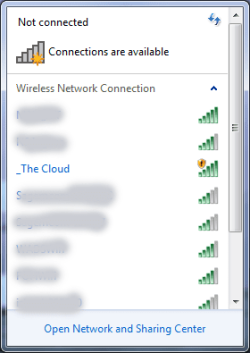
connection_list.png no_connections.png
 

My Computer My Computer

At a glance

Windows 7 Home Premiumi58gbNvidea GT520M
Computer type
Laptop
Computer Manufacturer/Model Number
Acer
OS
Windows 7 Home Premium
CPU
i5
Memory
8gb
Graphics Card(s)
Nvidea GT520M
Welcome to the forum. Next time it happens open a cmd prompt then type


ipconfig /all


netsh wlan show networks

Post both results
 

My Computer My Computer

At a glance

win 8 32 bit
Computer type
PC/Desktop
OS
win 8 32 bit
Thanks, will do.
 

My Computer My Computer

At a glance

Windows 7 Home Premiumi58gbNvidea GT520M
Computer type
Laptop
Computer Manufacturer/Model Number
Acer
OS
Windows 7 Home Premium
CPU
i5
Memory
8gb
Graphics Card(s)
Nvidea GT520M
Hi, I'm having to use a TP-Link USB dongle to get online at the moment. The same thing happened as soon as I booted up the laptop today, I think it might be related to another problem that started at the same time as this one which is the SD card reader not working properly. I'm going to make another post about that soon but in a nutshell, I can't move files from SD card - explorer hangs - have to reboot laptop.
Anyway, I ran cmd, hope you don't mind but I believe the results reveal some private info about my laptop so I've censored certain things.

Windows IP Configuration

Host Name . . . . . . . . . . . . : censored
Primary Dns Suffix . . . . . . . :
Node Type . . . . . . . . . . . . : Hybrid
IP Routing Enabled. . . . . . . . : No
WINS Proxy Enabled. . . . . . . . : No

Wireless LAN adapter Wireless Network Connection:

Media State . . . . . . . . . . . : Media disconnected
Connection-specific DNS Suffix . :
Description . . . . . . . . . . . : Atheros AR5B97 Wireless Network Adapter
Physical Address. . . . . . . . . : censored
DHCP Enabled. . . . . . . . . . . : Yes
Autoconfiguration Enabled . . . . : Yes

There's some other info related to a free VPN I have installed then it says:

Interface name : Wireless Network Connection
There are 0 networks currently visible.


One other thing, this message often appears above the systray (when it works that is), but won't go away unless I open the network and sharing centre over it. Doesn't always happen but annoying when it does:
connections.png
 

My Computer My Computer

At a glance

Windows 7 Home Premiumi58gbNvidea GT520M
Computer type
Laptop
Computer Manufacturer/Model Number
Acer
OS
Windows 7 Home Premium
CPU
i5
Memory
8gb
Graphics Card(s)
Nvidea GT520M
Looks like I'm gonna' have to buy a new laptop then.
 

My Computer My Computer

At a glance

Windows 7 Home Premiumi58gbNvidea GT520M
Computer type
Laptop
Computer Manufacturer/Model Number
Acer
OS
Windows 7 Home Premium
CPU
i5
Memory
8gb
Graphics Card(s)
Nvidea GT520M

My Computer My Computer

At a glance

Windows 7 Ultimate x64
Computer type
PC/Desktop
OS
Windows 7 Ultimate x64
I don't think it's the free VPN as for a long time everything worked ok with it installed. The problem I have with the SD card is still going on, although it decided to work earlier for one time. I managed to cut some files from it and paste them on the laptop, now the computer can't see the card. I think it's time for a new laptop soon.
 

My Computer My Computer

At a glance

Windows 7 Home Premiumi58gbNvidea GT520M
Computer type
Laptop
Computer Manufacturer/Model Number
Acer
OS
Windows 7 Home Premium
CPU
i5
Memory
8gb
Graphics Card(s)
Nvidea GT520M
Hi

Your first post showed 2 different errors

the Bomb means the network is available but you have NOT chosen the correct login details
Your routers name(the cloud) and its password, all you need to do is view this connection and add the SSID password

The second means something wrong with the driver for it

Notes
Your Wi-fi should auto connect on boot, unless YOU have changed something
(VPN in your case - check which you have as default (primary connection - auto logon)

by the way the top entry on the first screenshot is likely your router which will have its own password
(BT/TalkTalk/Virgin/Sky/etc), if you can connect to that - it means your VPN is incorrectly set-up
and why bother with a vpn, if your that paranoid use the TOR browser..

Roy
 

My Computer My Computer

At a glance

W7 home premium 32bit/W7HP 64bit/w10 tp insid...E5300 dual core3gbNvidia Geforce 7100 Nforce 630i
Computer type
PC/Desktop
Computer Manufacturer/Model Number
medionl/Aspire 6930G/acer x55a
OS
W7 home premium 32bit/W7HP 64bit/w10 tp insider ring
CPU
E5300 dual core
Motherboard
medion MS7366
Memory
3gb
Graphics Card(s)
Nvidia Geforce 7100 Nforce 630i
Monitor(s) Displays
avixc
Internet Speed
n (isp resticted to 72)
Antivirus
mse/pands
Browser
palemoon
Other Info
Belkin Fd7050 n USB using Railink RT2870 drivers, more upto date
Back
Top