Disk 1 unknown not initialized - an external HDD

empog

New member
Local time
3:05 AM
Messages
7
Hi i would like to ask why this happen. My external hard disk is detected by computer but doesn't appear in hard disk panel , it only appears on Devices. When i go to computer management. This is the output. Same when i use it to other computers. please help. im just new here and no good at computers.

External HDD : Western Digital My Passport 0740 (500Gb)

1461008_10201139164184779_1604273104_n.jpg
 

My Computer

Computer type
Laptop
Computer Manufacturer/Model Number
HP
OS
Windows 7 Starter x32
Hi i would like to ask why this happen. My external hard disk is detected by computer but doesn't appear in hard disk panel , it only appears on Devices. When i go to computer management. This is the output. Same when i use it to other computers. please help. im just new here and no good at computers.

External HDD : Western Digital My Passport 0740 (500Gb)

1461008_10201139164184779_1604273104_n.jpg

Hi empog,

Welcome to Seven forums.

It could be an either an issue with the harddrive itself or it is formatted in a partition which is not recognized by windows.

Once the harddrive is connected open command prompt and type diskpart and hit enter. Then type list disk and hit enter.

Whatever information is displayed kindly post a screenshot for the same.

http://www.sevenforums.com/tutorials/9733-screenshots-files-upload-post-seven-forums.html

Keep us posted with the results so we can advise you further.
 

My Computer

Computer type
PC/Desktop
OS
Winndows 7 32 bit
thank you Sandeep for the response,, this is the result
 

Attachments

  • diskpart.JPG
    diskpart.JPG
    31.6 KB · Views: 113

My Computer

Computer type
Laptop
Computer Manufacturer/Model Number
HP
OS
Windows 7 Starter x32
thank you Sandeep for the response,, this is the result

Hi empog,

It seems disk has gone corrupt. However, you can do this:

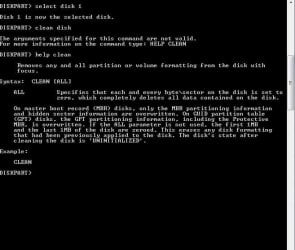
Type select disk 1 and hit enter
Then type clean disk and hit enter
This should clean everything on the disk. You would lose everything is stored on the disk. But you can check if it can be used again.

Keep us posted with the results so we can advise you further.
 

My Computer

Computer type
PC/Desktop
OS
Winndows 7 32 bit
thi is the result
 

Attachments

  • diskpart2.JPG
    diskpart2.JPG
    48 KB · Views: 111

My Computer

Computer type
Laptop
Computer Manufacturer/Model Number
HP
OS
Windows 7 Starter x32
thank you, it says it succeeded. sorry failed to capture a screen shot for it. what's next, please?
 

My Computer

Computer type
Laptop
Computer Manufacturer/Model Number
HP
OS
Windows 7 Starter x32
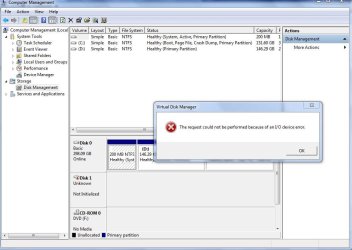
I did and this is the result, an error.. :(
 

Attachments

  • diskman.JPG
    diskman.JPG
    75.9 KB · Views: 3

My Computer

Computer type
Laptop
Computer Manufacturer/Model Number
HP
OS
Windows 7 Starter x32

My Computer

Computer type
PC/Desktop
OS
Winndows 7 32 bit
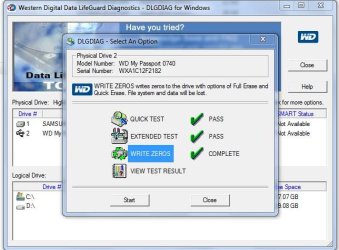
thanks again sandeep, actually i used "Data Lifeguard Diagnostic for Windows" already morethan48hours ago. since i've been searching for a possible solution,,
 

Attachments

  • dldiag.JPG
    dldiag.JPG
    55.3 KB · Views: 56

My Computer

Computer type
Laptop
Computer Manufacturer/Model Number
HP
OS
Windows 7 Starter x32
i haven't tried to change the usb cable yet because WD has a unique cable cord compared to the usual one in the market. :( I would like to thank for the efforts, i will update this post as soon i could find or lend a WD USB cable, thanks :)
 

My Computer

Computer type
Laptop
Computer Manufacturer/Model Number
HP
OS
Windows 7 Starter x32
i haven't tried to change the usb cable yet because WD has a unique cable cord compared to the usual one in the market. :( I would like to thank for the efforts, i will update this post as soon i could find or lend a WD USB cable, thanks :)

Hi empog,

Yes that would be better if you check the harddrive with different USB cable as it seems to be a probable cause. Otherwise we could keep on troubleshooting and find out at last it was the USB cable.

Kindly check the same at your convenience and let us know the results. Feel free to reach out to me.
 

My Computer

Computer type
PC/Desktop
OS
Winndows 7 32 bit
Thanks for your guide!! it help a lot

i m folowing your guide on how to solve disk 1 due to my pc wont recognize my external hd and it solve!! finaly thanks to you. Even for second time it will be much easy using formating tool that external hd orig have like StoreJet ToolBox for StoreJet external hd for example.
 

My Computer

Computer type
PC/Desktop
OS
Malaysia
Same problem

PLEASE HELP ME TO FIX MY PROBLEM IN MY WD 1TB HARD DRIVE, :cry: :cry: :cry: :cry::cry: :cry:
url
 

My Computer

Computer type
PC/Desktop
OS
Windows 10
Welcome to the Forum.

You should start a new thread as this one is 3 years old.
- Don't try to fix it.
- Did the disk had an impact like falling from vertical to horizontal position?
- For now, open disk manager, expand the columns so we can read them. With the sniping tool, take a snapshot of the hole screen and post the image here as an attachment. Use the paper clip - Browse to the file - Upload. Don't use external link.
 

My Computers

System One System Two

  • Computer type
    PC/Desktop
    Computer Manufacturer/Model Number
    custom build
    OS
    Windows 7 HP 64
    CPU
    i5 6600K - 800MHz to 4200MHz
    Motherboard
    GA-Z170-HD3P
    Memory
    4+4G GSkill DDR4 3000
    Graphics Card(s)
    IG - Intel 530
    Monitor(s) Displays
    Samsung 226BW
    Screen Resolution
    1680x1050
    Hard Drives
    (1) -1 SM951 – 128GB M.2 AHCI PCIe SSD drive for Windows 7 and Lubuntu
    (2) -1 WD SATA 3 - 1T for Data
    (3) -1 WD SATA 3 - 1T for backup
    PSU
    Thermaltake 450W TR2 gold
    Keyboard
    Old and good Chicony mechanical keyboard
    Mouse
    Logitech mX performance - 9 buttons (had to disable some)
    Internet Speed
    500Mb/s
    Browser
    Firefox 64
    Other Info
    TinyWall firewall
  • Computer type
    Laptop
    System Manufacturer/Model Number
    Asus Q550LF
    OS
    Windows 7 Pro
    CPU
    i7-4500U 800MHz to 3.0GHz
    Motherboard
    Asus Q550LF
    Memory
    (4+4)G DDR3 1600
    Graphics Card(s)
    IG intel 4400 + NVIDIA GeForce GT 745M
    Sound Card
    Realtek
    Monitor(s) Displays
    LG Display LP156WF4-SPH1
    Screen Resolution
    1920 x 1080
    Hard Drives
    BX500 120G SSD for Windows and programs +
    1T HDD for data
    Internet Speed
    500 Mb/s
    Browser
    Firefox
    Other Info
    TinyWall firewall
Back
Top