Disk check has been canceled on reboot?

Brink,

Additionally,what about this advice from another user (I posted earlier on Page 1):

======================================================

Hit F8 once every second right after starting the PC

This gets you into the DOS looking screen with safe mode and other options, select Repair
Recovery manager starts
Select Advanced Options
Select computer checkup
Select command prompt
CMD prompt starts in X:
Enter C: to change to the C drive
Enter chkdsk /f
When asked to force a dismount select Y
Check disk should now start automatically.
Exit then boot "

======================================================


Thank you for your support.

Sincerely,

KC

KC,

This would be worth a try to see if it will run for you.

http://www.sevenforums.com/tutorials/682-command-prompt-startup.html
 

My Computer My Computer

At a glance

64-bit Windows 11 Pro for WorkstationsIntel i7-8700K OC'd to 5 GHz64 GB (4x16GB) G.SKILL TridentZ RGB DDR4 3600...ASUS ROG-STRIX-GTX1080TI-O11G-GAMING
Computer type
PC/Desktop
Computer Manufacturer/Model Number
Self built custom
OS
64-bit Windows 11 Pro for Workstations
CPU
Intel i7-8700K OC'd to 5 GHz
Motherboard
ASUS ROG Maximus XI Formula Z390
Memory
64 GB (4x16GB) G.SKILL TridentZ RGB DDR4 3600 MHz
Graphics Card(s)
ASUS ROG-STRIX-GTX1080TI-O11G-GAMING
Sound Card
Integrated
Monitor(s) Displays
2 x Samsung Odyssey G7 27"
Screen Resolution
2560x1440
Hard Drives
1TB Samsung 990 PRO M.2,
4TB Samsung 990 PRO PRO M.2,
TerraMaster F8 SSD Plus NAS
PSU
Seasonic Prime Titanium 850W
Case
Thermaltake Core P3
Cooling
Corsair Hydro H115i
Keyboard
Logitech wireless K800
Mouse
Logitech MX Master 4
Internet Speed
2 Gb/s Download and 100 Mb/s Upload
Antivirus
Malwarebyte Anti-Malware Premium
Browser
Google Chrome
Other Info
Logitech Z625 speaker system,
Logitech BRIO 4K Pro webcam,
HP Color LaserJet Pro MFP M477fdn,
APC SMART-UPS RT 1000 XL - SURT1000XLI,
Galaxy S23 Plus phone
I also have this, did a chkdsk c:, and it reported error in bitmap mft. Then tried chkdsk /f /r C:
but on reboot the chkdsk is just cancelled.

Tried the msconfig secure boot option, and in safe mode but nothing seems to work.
 

My Computer My Computer

At a glance

win7, vista
OS
win7, vista
Hi. I have a similar problem. I currently have an HP Pavillion dv5. I understand that most of these issues are with HP notebooks. I had partitioned my hard drive poorly, thus it was misaligned. since my HDD is using Advanced Format, I didn't want there to be any drop in performance, so I aligned it using Paragon Alignment Tool Special Edition 2.0. long story short, my computer was working fine after the alignment for a few days till I noticed that my HP_TOOLS folder only had a single .txt file in it, and I believe its supposed to contain more like a sys_diags file or something like that.

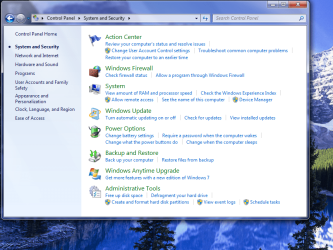
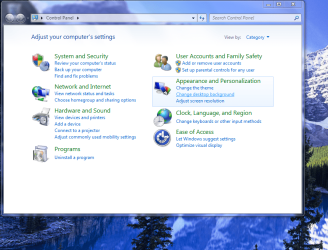
Then, I noticed that my Control Panel when I open it, doesn't have the dialog box on the left hand side with the blue background listing all the options. I put screen shots of the control panel when I first open it, then the control panel when click one of the options. I could have swore that the light blue part on the left was there when I first open control panel. This isn't a big deal since I can still access all my options, but maybe cause for concern? or maybe my mind is just playing tricks on me.

About 3 days after I had aligned my hard drive, I close my laptop lid, and it hibernated or suspended. then, when I opened it again a few minutes later, it had restarted and went into that START WINDOWS NORMALLY black screen option. I did the same overnight and in the morning, it resumed from hibernate/suspend fine so i thought nothing of it. then later that day, I shut my laptop lid and then a few minutes later, opened it up again and it had restarted again! I was pretty sure that it hadn't happened in the days previous since I shut my laptop lid quite frequently. So, very much similar to the OP, I go into Disk Management and check the hard drive for errors, but it says it needs to schedule a scan on boot up. and it scans but cancels right away. I did this also for my HP_TOOLS drive, but it asked me to dismount it first. then when i say cancel, it says that the drive needs to be scheduled for a check on bootup. my RECOVERY partition scanned just fine though.

Any Disk Doctors out there? Anyone experience these problems? are all these symptoms related? Do i need to do a re-install? and if so, is it guaranteed that these things will go away? I would really appreciate someone's help! Thank you!
 

Attachments

  • controlpanel01.PNG
    controlpanel01.PNG
    122.3 KB · Views: 10
  • controlpanel02.PNG
    controlpanel02.PNG
    119.4 KB · Views: 9

My Computer My Computer

At a glance

Windows 7 Hope Premium 64bit
OS
Windows 7 Hope Premium 64bit
After a hard surfing on the web, I found a comment on a topic on another forum.. And it works for me!!!
Here it is:
chkdsk problem was resolved by going into the command prompt as administrator and typing in
chkntfs /t:0
 

My Computer My Computer

At a glance

Windows 8.1 Pro x64Intel Core i76GBnVidia GeForce 3D Vision
Computer type
Laptop
Computer Manufacturer/Model Number
Toshiba
OS
Windows 8.1 Pro x64
CPU
Intel Core i7
Motherboard
Toshiba
Memory
6GB
Graphics Card(s)
nVidia GeForce 3D Vision
Hard Drives
Toshiba 750GB
Antivirus
Avast
Browser
Chrome
After a hard surfing on the web, I found a comment on a topic on another forum.. And it works for me!!!
Here it is:
chkdsk problem was resolved by going into the command prompt as administrator and typing in
chkntfs /t:0

That worked for me too. Thanks for sharing Angelis!

I don't know if it's a bypass solution though or a correct one.
 

My Computer My Computer

At a glance

Windows 7 Home Premium 64 bitIntel Core i5 2410M @ 2.30GHz Sandy Bridge 32...8,00 GB Dual-Channel DDR3 @ 1333 MHz (PC3-10600)NVIDIA GeForce GT 555M, Intel HD Graphics 3000
Computer type
Laptop
Computer Manufacturer/Model Number
Asus N55SF
OS
Windows 7 Home Premium 64 bit
CPU
Intel Core i5 2410M @ 2.30GHz Sandy Bridge 32nm Technology
Motherboard
ASUSTeK Computer Inc. N55SF
Memory
8,00 GB Dual-Channel DDR3 @ 1333 MHz (PC3-10600)
Graphics Card(s)
NVIDIA GeForce GT 555M, Intel HD Graphics 3000
Sound Card
Realtek High Definition Audio
Screen Resolution
1600x900@60Hz
Hard Drives
699GB Seagate ST9750423AS (SATA) 5400rpm
Other Info
Optical drive: Slimtype DVD A DS8A5SH
chkntfs /t:0

Worked for me! Woo Hoo!
I want to kiss 😘 you!
 

My Computer My Computer

At a glance

Windows 7 Ultimate x64
Computer type
Laptop
Computer Manufacturer/Model Number
Dell
OS
Windows 7 Ultimate x64
Browser
Chrome
I faced similar error during disk check. I had an external keyboard connected thru USB which I unplugged and attempted again. It worked for me. Disk check completed and no issues found. I would recommend unplugging any external devices, disks, remove any CD's then give a try. Cheers
 

My Computer My Computer

At a glance

Windows 7 Home Premium 64bit
Computer type
Laptop
Computer Manufacturer/Model Number
Sony
OS
Windows 7 Home Premium 64bit
Back
Top