Disk Check

How to Run Disk Check in Windows 7

   Information
This will show you how to run Check Disk or chkdsk in Windows 7 to check a selected hard disk for file system errors and bad sectors on it.

   Note
Running a check disk may take a bit depending on the size of the selected hard disk. For faster and better results, do not use your computer while check disk is checking for errors.


You will have a choice to scan only, scan for and attempt to fix errors, scan for and attempt recovery of bad sectors, or scan for and attempt to fix errors and recovery of bad sectors.


OPTION ONE

To Run Chkdsk from Drive's Properties Page

1. Open the Start Menu and click on the Computer button on the right dark side.

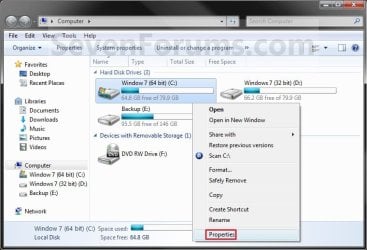
2. Right click the hard disk drive that you want to check, and click on Properties. (see screenshot below) Computer.jpg
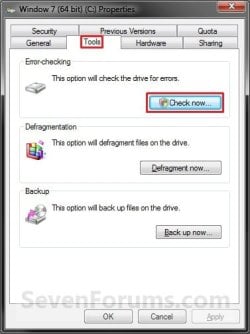
3. Click on the Tools tab, and click on the Check now button under Error-checking. (see screenshot below) Properties.jpg
4. You will now see this window. Do the steps below for what you would like to do. (see screenshot below) Options.jpg
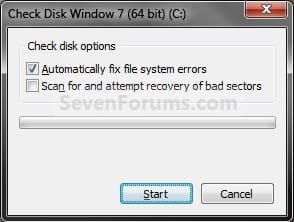
5. To Only Scan the Drive for Errors
NOTE: This will just give you a report if there are any drive errors or not, and will not attempt to fix them. A) Leave both boxes unchecked and click on the Start button. (see screenshot below step 4)
6. To Only Scan and Attempt Recovery of Bad Sectors
NOTE: This scan attempts to find and repair physical errors on the hard disk itself, and it can take much longer to complete. A) uncheck the Automatically fix file system errors box. (see screenshot below step 4)

B) Check the Scan for and attempt recovery of bad sectors box.
7. To Only Scan and Automatically Attempt to Fix Errors
NOTE: This will automatically attempt to repair problems with files and folders that the scan detects. A) Check the Automatically fix file system errors box. (see screenshot below step 4)

B) Uncheck the Scan for and attempt recovery of bad sectors box.
8. To Scan and Automatically Attempt to Fix Errors and Recover Bad Sectors
NOTE: This will scan for both file errors and physical errors (steps 6 and 7). It will then attempt to repair problems with files and folders, and recover physical errors. A) Check the Automatically fix file system errors box. (see screenshot below step 4)

B) Check the Scan for and attempt recovery of bad sectors box.
9. Click on the Start button, and do either step 10 or 11 below depending on if the drive is currently in use or not. (see screenshot below step 4)

10. If the selected hard disk is not in use, then you will see check disk start checking the disk now. (see screenshot below) Step4A.jpg
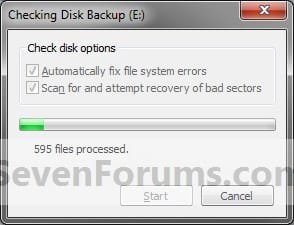
A) When the scan is complete, you will then see
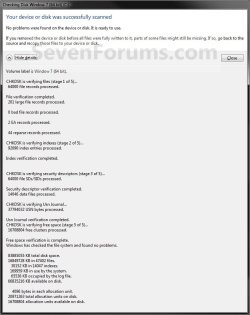
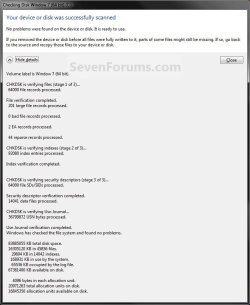
results similar to this. Click on Close. (see screenshots below) Details.jpg
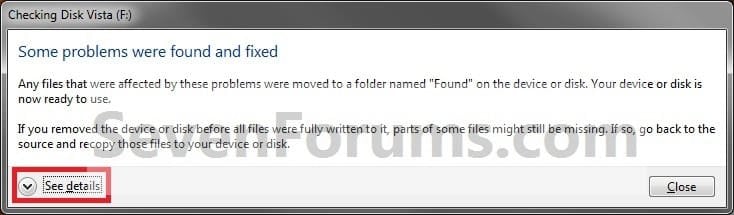
Scan_results2.jpg

B) Click on OK. (see screenshot below step 3)

C) Stop, you're done.
11. If the selected hard disk is in use, then click on the Schedule disk check button. (see screenshot below)
NOTE: If the hard disk that you selected in step 2 is in use (for example, the C: drive or partition that contains Windows 7), you'll be prompted to reschedule the disk check for the next time you restart your computer. Otherwise you will not see this window below. Schedule.jpg
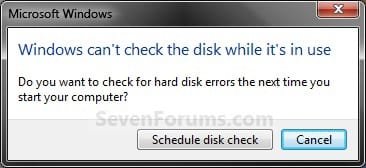
A) Restart the computer.
B) During startup, you will only have 10 seconds to press a key to cancel the Disk Check from steps 7 or 8. (see screenshot below)
   Warning
Once the Disk Check scan starts, DO NOT STOP the scan to prevent possible damage to the data on your hard drive.
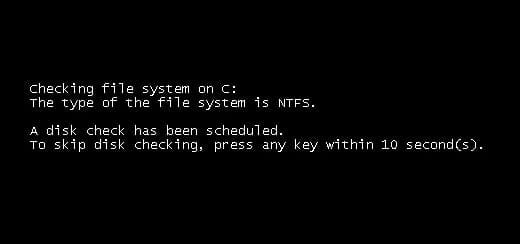
10-Seconds.jpg
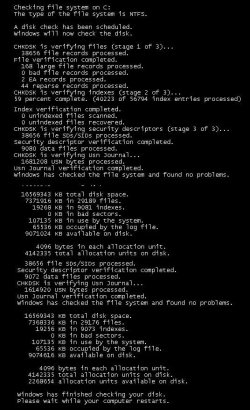
C) When the scan is complete you will see a report similar to this below briefly before the computer automatically restarts. Start-up.jpg


OPTION TWO

To Run Chkdsk from Command Prompt


NOTE: The chkdsk command can be used on a FAT32 or NTFS formatted disk. 1. Open a elevated command prompt or a command prompt at startup.

2. In the command prompt, type in the following command below followed by one or more switches that you would like to use below with a space between each switch and press Enter.
NOTE: For example, the most common command to run chkdsk on your C: drive is: chkdsk C: /F
chkdsk [drive letter]: [switches with space inbetween]


Switches that you can use in the command:
  • /F - Fixes errors on the disk. The disk must be locked. If chkdsk cannot lock the drive, a message appears that asks you if you want to check the drive the next time you restart the computer. For example, on the C: drive.
  • /V - Displays the name of each file in every directory as the disk is checked.
  • /R - Locates bad sectors and recovers readable information. The disk must be locked. /r includes the functionality of /f, with the additional analysis of physical disk errors.
  • /L:[size in KB] - Can only be used with a NTFS disk. Changes the chkdsk log file size to the number size in KB you type. If you omit the size parameter, typing /L by itself will display the current chkdsk log file size. For example, to have the default 65536 KB log file for the C: drive, you would type: chkdsk C: /F /L:65536
  • /X - Forces the volume to dismount first, if necessary. All open handles to the drive are invalidated. /x also includes the functionality of /f.
  • /I - Can only be used with a NTFS disk. Performs a less vigorous check of index entries, which reduces the amount of time required to run chkdsk.
  • /C - Can only be used with a NTFS disk. Does not check cycles within the folder structure, which reduces the amount of time required to run chkdsk.
  • /B - Can only be used with a NTFS disk. Clears the list of bad clusters on the volume and rescans all allocated and free clusters for errors. /b includes the functionality of /r. Use this parameter after imaging a volume to a new hard disk drive.
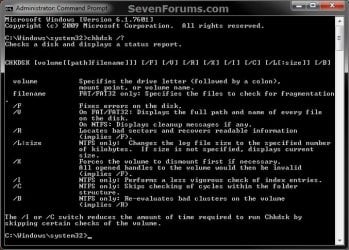
Command.jpg
That's it,
Shawn


Attachments

  • Scan_Results.jpg
    Scan_Results.jpg
    59.7 KB · Views: 786
Last edited:
Thank you sir. I'll give it a try.
 

My Computer

Computer Manufacturer/Model Number
Asus
OS
Windows 7 Home Premium x64 bit
Thank you. I managed to run chkdsk through the command line as the links showed. It even managed to improve my startup time and a few other things. It did not, however, manage to complete.

It stopped at 21% completion with the following text:
An unspecified error occurred (6e74667363686b2e b34)
Failed to transfer logged messages to the event log with status 50.

Is there something wrong with my drive?
 

My Computer

Computer Manufacturer/Model Number
Asus
OS
Windows 7 Home Premium x64 bit
Are you sure you ran chkdsk on the correct drive?


The drive letter is not always the same at boot as in Windows 7. In the command prompt at boot, you can check by:
  • Type diskpart and press Enter
  • Type list volume and press Enter
  • See if the drive letter matches the drive size and label.
  • When finished, type Exit and press Enter
  • Continue with chkdsk command
 

My Computer

Computer type
PC/Desktop
Computer Manufacturer/Model Number
Self built custom
OS
64-bit Windows 11 Pro for Workstations
CPU
Intel i7-8700K OC'd to 5 GHz
Motherboard
ASUS ROG Maximus XI Formula Z390
Memory
64 GB (4x16GB) G.SKILL TridentZ RGB DDR4 3600 MHz
Graphics Card(s)
ASUS ROG-STRIX-GTX1080TI-O11G-GAMING
Sound Card
Integrated
Monitor(s) Displays
2 x Samsung Odyssey G7 27"
Screen Resolution
2560x1440
Hard Drives
1TB Samsung 990 PRO M.2,
4TB Samsung 990 PRO PRO M.2,
TerraMaster F8 SSD Plus NAS
PSU
Seasonic Prime Titanium 850W
Case
Thermaltake Core P3
Cooling
Corsair Hydro H115i
Keyboard
Logitech wireless K800
Mouse
Logitech MX Master 4
Internet Speed
2 Gb/s Download and 100 Mb/s Upload
Antivirus
Malwarebyte Anti-Malware Premium
Browser
Google Chrome
Other Info
Logitech Z625 speaker system,
Logitech BRIO 4K Pro webcam,
HP Color LaserJet Pro MFP M477fdn,
APC SMART-UPS RT 1000 XL - SURT1000XLI,
Galaxy S23 Plus phone
I used the C drive, and it repaired several files I recognize from the drive. This is also the only large partition on the drive. The other is the media player boot thing that plays DVDs without turning on the full hard drive.
 

My Computer

Computer Manufacturer/Model Number
Asus
OS
Windows 7 Home Premium x64 bit

My Computer

Computer type
PC/Desktop
Computer Manufacturer/Model Number
Self built custom
OS
64-bit Windows 11 Pro for Workstations
CPU
Intel i7-8700K OC'd to 5 GHz
Motherboard
ASUS ROG Maximus XI Formula Z390
Memory
64 GB (4x16GB) G.SKILL TridentZ RGB DDR4 3600 MHz
Graphics Card(s)
ASUS ROG-STRIX-GTX1080TI-O11G-GAMING
Sound Card
Integrated
Monitor(s) Displays
2 x Samsung Odyssey G7 27"
Screen Resolution
2560x1440
Hard Drives
1TB Samsung 990 PRO M.2,
4TB Samsung 990 PRO PRO M.2,
TerraMaster F8 SSD Plus NAS
PSU
Seasonic Prime Titanium 850W
Case
Thermaltake Core P3
Cooling
Corsair Hydro H115i
Keyboard
Logitech wireless K800
Mouse
Logitech MX Master 4
Internet Speed
2 Gb/s Download and 100 Mb/s Upload
Antivirus
Malwarebyte Anti-Malware Premium
Browser
Google Chrome
Other Info
Logitech Z625 speaker system,
Logitech BRIO 4K Pro webcam,
HP Color LaserJet Pro MFP M477fdn,
APC SMART-UPS RT 1000 XL - SURT1000XLI,
Galaxy S23 Plus phone
I think I used /r. I'll try F next.

The Event viewer has this in the general tab for the last chkdsk run.

Wait, never mind that big quote, that was for something else that just happened to mention chkdsk.

Okay, I'm not getting anything in the log. I ran the chkdsk from the disk drive, would that prevent the log from being recorded?
 
Last edited:

My Computer

Computer Manufacturer/Model Number
Asus
OS
Windows 7 Home Premium x64 bit
How did it do with using /F ?
 

My Computer

Computer type
PC/Desktop
Computer Manufacturer/Model Number
Self built custom
OS
64-bit Windows 11 Pro for Workstations
CPU
Intel i7-8700K OC'd to 5 GHz
Motherboard
ASUS ROG Maximus XI Formula Z390
Memory
64 GB (4x16GB) G.SKILL TridentZ RGB DDR4 3600 MHz
Graphics Card(s)
ASUS ROG-STRIX-GTX1080TI-O11G-GAMING
Sound Card
Integrated
Monitor(s) Displays
2 x Samsung Odyssey G7 27"
Screen Resolution
2560x1440
Hard Drives
1TB Samsung 990 PRO M.2,
4TB Samsung 990 PRO PRO M.2,
TerraMaster F8 SSD Plus NAS
PSU
Seasonic Prime Titanium 850W
Case
Thermaltake Core P3
Cooling
Corsair Hydro H115i
Keyboard
Logitech wireless K800
Mouse
Logitech MX Master 4
Internet Speed
2 Gb/s Download and 100 Mb/s Upload
Antivirus
Malwarebyte Anti-Malware Premium
Browser
Google Chrome
Other Info
Logitech Z625 speaker system,
Logitech BRIO 4K Pro webcam,
HP Color LaserJet Pro MFP M477fdn,
APC SMART-UPS RT 1000 XL - SURT1000XLI,
Galaxy S23 Plus phone
It actually managed to finish. However, I still have programs telling me that I need to run chkdsk again, even though chkdsk said it finished. I'll run it again tonight after finishing my current projects.
 

My Computer

Computer Manufacturer/Model Number
Asus
OS
Windows 7 Home Premium x64 bit
That's good so far. Please let us know how it went. :)
 

My Computer

Computer type
PC/Desktop
Computer Manufacturer/Model Number
Self built custom
OS
64-bit Windows 11 Pro for Workstations
CPU
Intel i7-8700K OC'd to 5 GHz
Motherboard
ASUS ROG Maximus XI Formula Z390
Memory
64 GB (4x16GB) G.SKILL TridentZ RGB DDR4 3600 MHz
Graphics Card(s)
ASUS ROG-STRIX-GTX1080TI-O11G-GAMING
Sound Card
Integrated
Monitor(s) Displays
2 x Samsung Odyssey G7 27"
Screen Resolution
2560x1440
Hard Drives
1TB Samsung 990 PRO M.2,
4TB Samsung 990 PRO PRO M.2,
TerraMaster F8 SSD Plus NAS
PSU
Seasonic Prime Titanium 850W
Case
Thermaltake Core P3
Cooling
Corsair Hydro H115i
Keyboard
Logitech wireless K800
Mouse
Logitech MX Master 4
Internet Speed
2 Gb/s Download and 100 Mb/s Upload
Antivirus
Malwarebyte Anti-Malware Premium
Browser
Google Chrome
Other Info
Logitech Z625 speaker system,
Logitech BRIO 4K Pro webcam,
HP Color LaserJet Pro MFP M477fdn,
APC SMART-UPS RT 1000 XL - SURT1000XLI,
Galaxy S23 Plus phone
Okay, I ran /f three more times, I kept running it until it stopped correcting things. I then ran /r. It hung up part way through, which seems to be what happens when it doesn't get a specific error. I think my drive is just plain borked and I'll need to get a new one. I just wish there was some way I could copy everything over and have it work properly since I don't have my install disk.
 

My Computer

Computer Manufacturer/Model Number
Asus
OS
Windows 7 Home Premium x64 bit
What brand of HDD is it? The manufacturer's website will usually have a diagnostics utility program that you could use to download and see if the HDD may be dying or not.
 

My Computer

Computer type
PC/Desktop
Computer Manufacturer/Model Number
Self built custom
OS
64-bit Windows 11 Pro for Workstations
CPU
Intel i7-8700K OC'd to 5 GHz
Motherboard
ASUS ROG Maximus XI Formula Z390
Memory
64 GB (4x16GB) G.SKILL TridentZ RGB DDR4 3600 MHz
Graphics Card(s)
ASUS ROG-STRIX-GTX1080TI-O11G-GAMING
Sound Card
Integrated
Monitor(s) Displays
2 x Samsung Odyssey G7 27"
Screen Resolution
2560x1440
Hard Drives
1TB Samsung 990 PRO M.2,
4TB Samsung 990 PRO PRO M.2,
TerraMaster F8 SSD Plus NAS
PSU
Seasonic Prime Titanium 850W
Case
Thermaltake Core P3
Cooling
Corsair Hydro H115i
Keyboard
Logitech wireless K800
Mouse
Logitech MX Master 4
Internet Speed
2 Gb/s Download and 100 Mb/s Upload
Antivirus
Malwarebyte Anti-Malware Premium
Browser
Google Chrome
Other Info
Logitech Z625 speaker system,
Logitech BRIO 4K Pro webcam,
HP Color LaserJet Pro MFP M477fdn,
APC SMART-UPS RT 1000 XL - SURT1000XLI,
Galaxy S23 Plus phone
Not sure, got it from Dell. I don't want to pop the drive out right now, I'd check under the hardware menu, but explorer just decided it doesn't want to run anymore. It continuously crashes right after it starts. I had to use Process Explorer to kill the process so I stopped getting the "this program crashed and is restarting" popup that kept deselecting Firefox.
 

My Computer

Computer Manufacturer/Model Number
Asus
OS
Windows 7 Home Premium x64 bit
You should have access to the Dell Diagnostics by rebooting you system and pressing F12 while the Dell start screen is showing. From there, you can select the Diagnostics and run the Custom test on the HDD.
 

My Computer

Computer type
PC/Desktop
Computer Manufacturer/Model Number
Self built custom
OS
64-bit Windows 11 Pro for Workstations
CPU
Intel i7-8700K OC'd to 5 GHz
Motherboard
ASUS ROG Maximus XI Formula Z390
Memory
64 GB (4x16GB) G.SKILL TridentZ RGB DDR4 3600 MHz
Graphics Card(s)
ASUS ROG-STRIX-GTX1080TI-O11G-GAMING
Sound Card
Integrated
Monitor(s) Displays
2 x Samsung Odyssey G7 27"
Screen Resolution
2560x1440
Hard Drives
1TB Samsung 990 PRO M.2,
4TB Samsung 990 PRO PRO M.2,
TerraMaster F8 SSD Plus NAS
PSU
Seasonic Prime Titanium 850W
Case
Thermaltake Core P3
Cooling
Corsair Hydro H115i
Keyboard
Logitech wireless K800
Mouse
Logitech MX Master 4
Internet Speed
2 Gb/s Download and 100 Mb/s Upload
Antivirus
Malwarebyte Anti-Malware Premium
Browser
Google Chrome
Other Info
Logitech Z625 speaker system,
Logitech BRIO 4K Pro webcam,
HP Color LaserJet Pro MFP M477fdn,
APC SMART-UPS RT 1000 XL - SURT1000XLI,
Galaxy S23 Plus phone
Ah, that'll work. I'll get back to you tomorrow most likely, got to get some sleep. The family gets mad when I throw things at them when I'm cranky.

So, F-12 on startup -> Diagnostic utility-> Harddrive test.

I'll take a picture of the results.
 

My Computer

Computer Manufacturer/Model Number
Asus
OS
Windows 7 Home Premium x64 bit
Okay, ran it. Unfortunately, the drive decided to break down on me. It's no longer starting and it won't respond to startup repair. I did get some error codes. Error Code: 0142 Msg Error Code 2000-0142 Msg Unit 0: Drive Self Test failed. Status byte=49 I think I'm going to have to replace the drive itself. I don't have an install disk, is there a way to do anything to make it work?
 

My Computer

Computer Manufacturer/Model Number
Asus
OS
Windows 7 Home Premium x64 bit
Not if the HDD has died completely. Do you have any system image backups that you could use to restore to a new HDD?

If your Dell is still under warranty, you could ask for a pre-imaged replacement HDD. If not, then you could contact Dell to try and get a replacement installation disc for free or a reduced price for your computer model.
 

My Computer

Computer type
PC/Desktop
Computer Manufacturer/Model Number
Self built custom
OS
64-bit Windows 11 Pro for Workstations
CPU
Intel i7-8700K OC'd to 5 GHz
Motherboard
ASUS ROG Maximus XI Formula Z390
Memory
64 GB (4x16GB) G.SKILL TridentZ RGB DDR4 3600 MHz
Graphics Card(s)
ASUS ROG-STRIX-GTX1080TI-O11G-GAMING
Sound Card
Integrated
Monitor(s) Displays
2 x Samsung Odyssey G7 27"
Screen Resolution
2560x1440
Hard Drives
1TB Samsung 990 PRO M.2,
4TB Samsung 990 PRO PRO M.2,
TerraMaster F8 SSD Plus NAS
PSU
Seasonic Prime Titanium 850W
Case
Thermaltake Core P3
Cooling
Corsair Hydro H115i
Keyboard
Logitech wireless K800
Mouse
Logitech MX Master 4
Internet Speed
2 Gb/s Download and 100 Mb/s Upload
Antivirus
Malwarebyte Anti-Malware Premium
Browser
Google Chrome
Other Info
Logitech Z625 speaker system,
Logitech BRIO 4K Pro webcam,
HP Color LaserJet Pro MFP M477fdn,
APC SMART-UPS RT 1000 XL - SURT1000XLI,
Galaxy S23 Plus phone
I didn't back up on this disk apparently. I had one on my old External HD, but I forgot to make one when I got a new one. The old external bricked a while ago. I have bad luck with Hard Drives. My machine is no longer under warranty (and it actually came with Vista and I got a student upgrade). I'll see if Dell sells the drive with a pre-installed copy of W7.
 

My Computer

Computer Manufacturer/Model Number
Asus
OS
Windows 7 Home Premium x64 bit
What did you use to install the student upgrade with? If you still have those files, then you could use it to install on a new HDD.

Do you have your product key number written down? If so, then you could borrow a friends Windows 7 Home Edition installation disc to install it on your computer and activate with your product key number.

If not, then it might be cheaper to buy a OEM or retail upgrade copy of Windows 7 Home Edition and install it on a new HDD. You might consider comparing prices to see what may work best for you.
 

My Computer

Computer type
PC/Desktop
Computer Manufacturer/Model Number
Self built custom
OS
64-bit Windows 11 Pro for Workstations
CPU
Intel i7-8700K OC'd to 5 GHz
Motherboard
ASUS ROG Maximus XI Formula Z390
Memory
64 GB (4x16GB) G.SKILL TridentZ RGB DDR4 3600 MHz
Graphics Card(s)
ASUS ROG-STRIX-GTX1080TI-O11G-GAMING
Sound Card
Integrated
Monitor(s) Displays
2 x Samsung Odyssey G7 27"
Screen Resolution
2560x1440
Hard Drives
1TB Samsung 990 PRO M.2,
4TB Samsung 990 PRO PRO M.2,
TerraMaster F8 SSD Plus NAS
PSU
Seasonic Prime Titanium 850W
Case
Thermaltake Core P3
Cooling
Corsair Hydro H115i
Keyboard
Logitech wireless K800
Mouse
Logitech MX Master 4
Internet Speed
2 Gb/s Download and 100 Mb/s Upload
Antivirus
Malwarebyte Anti-Malware Premium
Browser
Google Chrome
Other Info
Logitech Z625 speaker system,
Logitech BRIO 4K Pro webcam,
HP Color LaserJet Pro MFP M477fdn,
APC SMART-UPS RT 1000 XL - SURT1000XLI,
Galaxy S23 Plus phone
The original thing I upgraded Vista with was a download, rather than a disk. I can dig around in my files and see if I can find the upgrade disk. I don't have a clue if I still have my activation code kicking around. I'll look through my back up files on my external. Wait, I found this in my old receipt files: The charge(s) will appear on your credit card as "DRI*Windows7US". Microsoft Windows 7 Home Premium Upgrade - 32 bit * Product Key:[deleted for security reasons] * Electronic Download * Download EXE Save file DLMWin7HP32US.exe to your Desktop. After saving, run the file to install your new software. DLMWin7HP32US.exe * Download ISO Alternate download for clean installation (required for XP and Vista 32-bit users) ISO burning software is required. DLMWin7HP32US-ISO.exe It's an html file, which I save any time I get an electronic receipt. It's got some kind of downloader in the file, which I think is used to download the ISO. I called Dell, and the overall replacement would have been in the vicinity of two hundred dollars, which is kind of much. I think I do still have my Vista install disks on my back up spindle.

Wait, just found the install disk. Also, the drive seems not to have bricked, but it won't still boot. I've got it in an enclosure, and can read at least some data off of it. The disk I found says it's an upgrade. I'll have to try and run an install with it. Hm, I'm having trouble getting into my files on the old disk. I had my account password protected, will this cause issues?
 
Last edited by a moderator:

My Computer

Computer Manufacturer/Model Number
Asus
OS
Windows 7 Home Premium x64 bit
You may need to take ownership of the files and set their permissions to "Allow" your user account "Full Control" before being able to access them.
 

My Computer

Computer type
PC/Desktop
Computer Manufacturer/Model Number
Self built custom
OS
64-bit Windows 11 Pro for Workstations
CPU
Intel i7-8700K OC'd to 5 GHz
Motherboard
ASUS ROG Maximus XI Formula Z390
Memory
64 GB (4x16GB) G.SKILL TridentZ RGB DDR4 3600 MHz
Graphics Card(s)
ASUS ROG-STRIX-GTX1080TI-O11G-GAMING
Sound Card
Integrated
Monitor(s) Displays
2 x Samsung Odyssey G7 27"
Screen Resolution
2560x1440
Hard Drives
1TB Samsung 990 PRO M.2,
4TB Samsung 990 PRO PRO M.2,
TerraMaster F8 SSD Plus NAS
PSU
Seasonic Prime Titanium 850W
Case
Thermaltake Core P3
Cooling
Corsair Hydro H115i
Keyboard
Logitech wireless K800
Mouse
Logitech MX Master 4
Internet Speed
2 Gb/s Download and 100 Mb/s Upload
Antivirus
Malwarebyte Anti-Malware Premium
Browser
Google Chrome
Other Info
Logitech Z625 speaker system,
Logitech BRIO 4K Pro webcam,
HP Color LaserJet Pro MFP M477fdn,
APC SMART-UPS RT 1000 XL - SURT1000XLI,
Galaxy S23 Plus phone
Back
Top