Disk Cleanup - Open and Use

How to Open and Use Disk Cleanup in Windows 7 and Windows 8


   Information
You can use Disk Cleanup to reduce the number of unnecessary files on your drives, which can help your PC run faster. It can delete temporary files and system files, empty the Recycle Bin, and remove a variety of other items that you might no longer need.

This tutorial will show you how to open and use Disk Cleanup in Windows 7 and Windows 8.

   Note
The Disk Cleanup exe file is located at C:\Windows\System32\cleanmgr.exe.

   Warning
Checking the Hibernation File Cleaner option to be deleted will also disable hibernate.


Here's How:
1. Press the Windows+R keys to open the Run dialog, type cleanmgr, and press Enter.

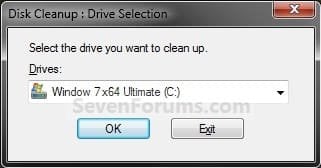
2. Select the drive that you want to use Disk Cleanup on, and click/tap on OK. (see screenshot below)
NOTE: You will not see this window unless you have more than one drive or partition on your computer.
Step1.jpg
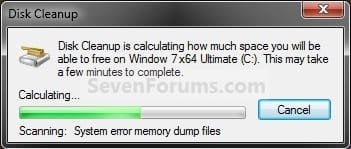
3. You will now see this screenshot below for a moment. Afterwards, do step 4, 5, 6, or 7 below for what you would like to delete using Disk Cleanup.
Step2.jpg
4. To Delete Unnecessary Non-System Files
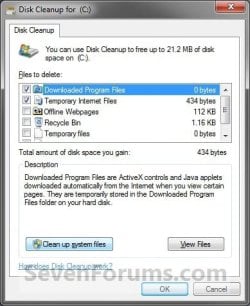
A) Check the type of files box that you want to delete, and click/tap on OK. (see screenshot below)
SystemA.jpg
B) Click/tap on the Delete Files button. (see screenshot below)
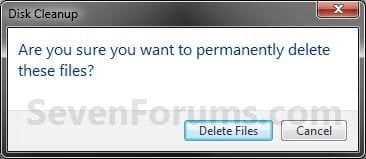
Step5.jpg
C) The files will be deleted and Disk Cleanup will close.
5. To Delete Unnecessary System Files
A) Click/tap on the Clean up system files button. (see screenshot below)
NOTE: If you just did a upgrade install or repair install recently, then you will also see the Files discarded by Windows upgrade option. This would be for the C:\$INPLACE.~TR and C:\$WINDOWS.~Q folders. If you just did a custom install recently, then you will also see the Previous Windows installations option. This would be for the C:\Windows.old folder.
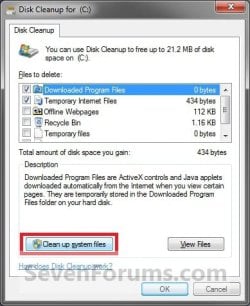
System.jpg
B) If prompted by UAC, then click/tap on Yes.

C) Repeat steps 2 to 4.
6. To Open Programs and Features
NOTE: This will open the Programs and Features window where you can uninstall programs. Normally you could also do this by opening Programs and Features in the Control Panel.
A) Click/tap on the Clean up system files button, and repeat steps 2 and 3. (see screenshot below step 5A)

B) If prompted by UAC, then click/tap on Yes.

C) Click/tap on the More Options tab. (see screenshot below)
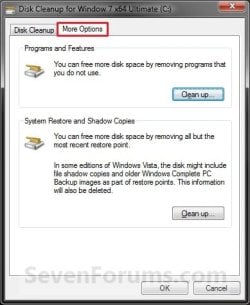
Step4.jpg
D) Click/tap on the Clean up button under the top Programs and Features section. (see screenshot above)

E) Click/tap on OK. (see screenshot below step 6C)

F) In Programs and Features, select any program that you want uninstall.

7. To Delete All but the Most Recent System Restore Point
NOTE: In Windows 7, this will also include deleting shadow copies (Previous Versions) that were created with the deleted restore point.
A) Click/tap on the Clean up system files button, and repeat steps 2 and 3. (see screenshot below step 5A)

B) If prompted by UAC, then click/tap on Yes.

C) Click/tap on the More Options tab. (see screenshot below step 6C)

D) Click/tap on the Clean up button under the bottom System Restore and Shadow Copies section. (see screenshot below step 6C)

E) Click/tap on the Delete button to confirm the deletion. (see screenshot below)
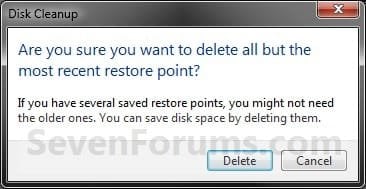
Restore_Points.jpg
F) Click/tap on OK. (See screenshot below step 6C)

G) Click/tap on the Delete Files button. (see screenshot below)
Step5.jpg
H) The files will be deleted and Disk Cleanup will close.
That's it,
Shawn


Attachments

  • Step3.jpg
    Step3.jpg
    122.3 KB · Views: 58
Last edited:
Hello Karthik,

It's safe to delete anything listed in Disk Cleanup as long as you do not want it. You will only be able to safely delete what is listed in Disk Cleanup though. :)
 

My Computer

Computer type
PC/Desktop
Computer Manufacturer/Model Number
Self built custom
OS
64-bit Windows 11 Pro for Workstations
CPU
Intel i7-8700K OC'd to 5 GHz
Motherboard
ASUS ROG Maximus XI Formula Z390
Memory
64 GB (4x16GB) G.SKILL TridentZ RGB DDR4 3600 MHz
Graphics Card(s)
ASUS ROG-STRIX-GTX1080TI-O11G-GAMING
Sound Card
Integrated
Monitor(s) Displays
2 x Samsung Odyssey G7 27"
Screen Resolution
2560x1440
Hard Drives
1TB Samsung 990 PRO M.2,
4TB Samsung 990 PRO PRO M.2,
TerraMaster F8 SSD Plus NAS
PSU
Seasonic Prime Titanium 850W
Case
Thermaltake Core P3
Cooling
Corsair Hydro H115i
Keyboard
Logitech wireless K800
Mouse
Logitech MX Master 4
Internet Speed
2 Gb/s Download and 100 Mb/s Upload
Antivirus
Malwarebyte Anti-Malware Premium
Browser
Google Chrome
Other Info
Logitech Z625 speaker system,
Logitech BRIO 4K Pro webcam,
HP Color LaserJet Pro MFP M477fdn,
APC SMART-UPS RT 1000 XL - SURT1000XLI,
Galaxy S23 Plus phone
Is it ok to use programs like ccleaner or advanced systemcare without any registry or optimization features since they work faster?
 

My Computer

Computer Manufacturer/Model Number
custom
OS
Microsoft Windows 7 Home Premium 32-bit 7601 Multiprocessor Free Service Pack 1
CPU
Intel(R) Core(TM)2 Quad CPU @ 2.40GHz
Motherboard
ASUSTeK Computer INC. P5N32-E SLI PLUS
Memory
2.00 GB
Graphics Card(s)
NVIDIA GeForce 9500 GT
Sound Card
(1) Osprey-240e Capture Device (2) SoundMAX Integrated Dig
Screen Resolution
1680 x 1050 x 32 bits (4294967296 colors) @ 59 Hz
Hard Drives
(1) WDC WD16 00YS-01SHB1 SCSI Disk Device (2) WDC WD16 00YS-01SHB1 SCSI Disk Device (3) WDC WD16 00YS-01SHB1 SCSI Disk Device (4) WDC WD16 00YS-01SHB1 SCSI Disk Device (5) WD 6400AAK External USB Device
Hello Vietdragon,

Sure, CCleaner is a great program to use. :)
 

My Computer

Computer type
PC/Desktop
Computer Manufacturer/Model Number
Self built custom
OS
64-bit Windows 11 Pro for Workstations
CPU
Intel i7-8700K OC'd to 5 GHz
Motherboard
ASUS ROG Maximus XI Formula Z390
Memory
64 GB (4x16GB) G.SKILL TridentZ RGB DDR4 3600 MHz
Graphics Card(s)
ASUS ROG-STRIX-GTX1080TI-O11G-GAMING
Sound Card
Integrated
Monitor(s) Displays
2 x Samsung Odyssey G7 27"
Screen Resolution
2560x1440
Hard Drives
1TB Samsung 990 PRO M.2,
4TB Samsung 990 PRO PRO M.2,
TerraMaster F8 SSD Plus NAS
PSU
Seasonic Prime Titanium 850W
Case
Thermaltake Core P3
Cooling
Corsair Hydro H115i
Keyboard
Logitech wireless K800
Mouse
Logitech MX Master 4
Internet Speed
2 Gb/s Download and 100 Mb/s Upload
Antivirus
Malwarebyte Anti-Malware Premium
Browser
Google Chrome
Other Info
Logitech Z625 speaker system,
Logitech BRIO 4K Pro webcam,
HP Color LaserJet Pro MFP M477fdn,
APC SMART-UPS RT 1000 XL - SURT1000XLI,
Galaxy S23 Plus phone
ty :)
 

My Computer

Computer Manufacturer/Model Number
custom
OS
Microsoft Windows 7 Home Premium 32-bit 7601 Multiprocessor Free Service Pack 1
CPU
Intel(R) Core(TM)2 Quad CPU @ 2.40GHz
Motherboard
ASUSTeK Computer INC. P5N32-E SLI PLUS
Memory
2.00 GB
Graphics Card(s)
NVIDIA GeForce 9500 GT
Sound Card
(1) Osprey-240e Capture Device (2) SoundMAX Integrated Dig
Screen Resolution
1680 x 1050 x 32 bits (4294967296 colors) @ 59 Hz
Hard Drives
(1) WDC WD16 00YS-01SHB1 SCSI Disk Device (2) WDC WD16 00YS-01SHB1 SCSI Disk Device (3) WDC WD16 00YS-01SHB1 SCSI Disk Device (4) WDC WD16 00YS-01SHB1 SCSI Disk Device (5) WD 6400AAK External USB Device
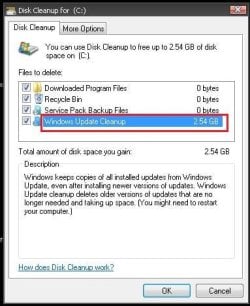
With last Windows Update from October there is new option in Disk Cleanup Utility, new option is called - Windows Update Cleanup (see picture for more description what this option do)


real deleting of old (unused anymore) Windows updates is done when you restart your system .......
 

Attachments

  • diskclenup.JPG
    diskclenup.JPG
    72.7 KB · Views: 1,390

My Computer

OS
Win 7
I'm a tech and workstation administrator at a company with many Windows 7 PCs. I've always liked to use Disk Cleanup before running a Defrag but was never sure if the Temp Internet files were only those found in my profile or in ALL profiles.

Thanks.
 

My Computer

Computer Manufacturer/Model Number
Dell Optiplex 760
OS
Windows 7 Enterprise 32-bit
CPU
Intel Core 2 Duo CPU E8400 @ 3.00GHz
Motherboard
Dell
Memory
4 GB
Graphics Card(s)
ATI Radeon HD 3400 Series
Sound Card
Dell
Monitor(s) Displays
One Dell 19" 1907 FP and one Dell 19" 1907 FPV
Hard Drives
Hitachi 150 GB
Hello 7n7, and welcome to Seven Forums.

I agree. I like cleaning up before defragging as well. Disk Cleanup will only delete the temp Internet file from your user account. Even if you click on "Clean up system files" to elevate Disk Cleanup. :)
 

My Computer

Computer type
PC/Desktop
Computer Manufacturer/Model Number
Self built custom
OS
64-bit Windows 11 Pro for Workstations
CPU
Intel i7-8700K OC'd to 5 GHz
Motherboard
ASUS ROG Maximus XI Formula Z390
Memory
64 GB (4x16GB) G.SKILL TridentZ RGB DDR4 3600 MHz
Graphics Card(s)
ASUS ROG-STRIX-GTX1080TI-O11G-GAMING
Sound Card
Integrated
Monitor(s) Displays
2 x Samsung Odyssey G7 27"
Screen Resolution
2560x1440
Hard Drives
1TB Samsung 990 PRO M.2,
4TB Samsung 990 PRO PRO M.2,
TerraMaster F8 SSD Plus NAS
PSU
Seasonic Prime Titanium 850W
Case
Thermaltake Core P3
Cooling
Corsair Hydro H115i
Keyboard
Logitech wireless K800
Mouse
Logitech MX Master 4
Internet Speed
2 Gb/s Download and 100 Mb/s Upload
Antivirus
Malwarebyte Anti-Malware Premium
Browser
Google Chrome
Other Info
Logitech Z625 speaker system,
Logitech BRIO 4K Pro webcam,
HP Color LaserJet Pro MFP M477fdn,
APC SMART-UPS RT 1000 XL - SURT1000XLI,
Galaxy S23 Plus phone
Desk Cleanup

Thanks, Brink. Thought so.
 

My Computer

Computer Manufacturer/Model Number
Dell Optiplex 760
OS
Windows 7 Enterprise 32-bit
CPU
Intel Core 2 Duo CPU E8400 @ 3.00GHz
Motherboard
Dell
Memory
4 GB
Graphics Card(s)
ATI Radeon HD 3400 Series
Sound Card
Dell
Monitor(s) Displays
One Dell 19" 1907 FP and one Dell 19" 1907 FPV
Hard Drives
Hitachi 150 GB
You're welcome. :)
 

My Computer

Computer type
PC/Desktop
Computer Manufacturer/Model Number
Self built custom
OS
64-bit Windows 11 Pro for Workstations
CPU
Intel i7-8700K OC'd to 5 GHz
Motherboard
ASUS ROG Maximus XI Formula Z390
Memory
64 GB (4x16GB) G.SKILL TridentZ RGB DDR4 3600 MHz
Graphics Card(s)
ASUS ROG-STRIX-GTX1080TI-O11G-GAMING
Sound Card
Integrated
Monitor(s) Displays
2 x Samsung Odyssey G7 27"
Screen Resolution
2560x1440
Hard Drives
1TB Samsung 990 PRO M.2,
4TB Samsung 990 PRO PRO M.2,
TerraMaster F8 SSD Plus NAS
PSU
Seasonic Prime Titanium 850W
Case
Thermaltake Core P3
Cooling
Corsair Hydro H115i
Keyboard
Logitech wireless K800
Mouse
Logitech MX Master 4
Internet Speed
2 Gb/s Download and 100 Mb/s Upload
Antivirus
Malwarebyte Anti-Malware Premium
Browser
Google Chrome
Other Info
Logitech Z625 speaker system,
Logitech BRIO 4K Pro webcam,
HP Color LaserJet Pro MFP M477fdn,
APC SMART-UPS RT 1000 XL - SURT1000XLI,
Galaxy S23 Plus phone
Thanks for this amazing tut man was in college and my teacher was going on about this (never went into depth) but this is what I was looking for saved 69GB thanks to you mate :D!
 

My Computer

Computer type
PC/Desktop
Computer Manufacturer/Model Number
Cyber Power
OS
Windows 8.1 PRO
CPU
AMD FX-4100 3.60 GHz Quad-Core AM3+ CPU 4MB
Motherboard
ASUS M5A78L-M/USB3 AMD 760G (780L)
Memory
8GB (2x4GB) Kingston
Graphics Card(s)
XfX HD R7850 AMD 2GB
Monitor(s) Displays
LG gaming flatron monitor
Screen Resolution
1920×1080
Hard Drives
1TB hitachi 7200RPM 64mb cache
1TB Western digital 7200RPM 64mb cache
PSU
500watt coolermaster gaming power supply
Case
Coolermaster elite gaming case 430
Cooling
CoolerMaster Hyper TX3 Evo + 5 case fans and GPU fan
Keyboard
Razor blackwidow ultimate
Mouse
Razor death adder 3500dpi
Internet Speed
slow :(
Antivirus
F-secure premium
Browser
Google chrome
Advanced Disk Cleanup

The option to clean system files i not in my Disk Cleanup, why? what can i do?

edit:

i added the /c Cleanmgr /sageset:65535 & Cleanmgr /sagerun:65535 and now can see more options to clean, but cannot see the size of each one.

Your question doesn't relate to this tutorial. It relates to the Extended Disk Cleanup tutorial.
 

My Computer

Computer type
Laptop
Computer Manufacturer/Model Number
ASUS
OS
Microsoft Windows 7 Home Premium 64-bit 7601 Multiprocessor Free Service Pack 1
CPU
AMD C-60 APU with Radeon(tm) HD Graphics
Motherboard
ASUSTeK COMPUTER INC. X501U
Memory
4.00 GB
Graphics Card(s)
AMD Radeon HD 6290 Graphics
Sound Card
(1) AMD High Definition Audio Device (2) Realtek High Defi
Screen Resolution
1366 x 768 x 32 bits (4294967296 colors) @ 60 Hz
Hard Drives
Hitachi HTS545050A7E380 SATA Disk Device
Antivirus
Comodo CIS & FW, SecureAplus App Whitelisting, Threatfire
Browser
Cyberfox 64bit, Opera 64bit, Airfox
Other Info
Spy-The-Spy, HitmanPro.Alert, Norton Connect Safe, MJRegWatcher, BitDefender TrafficLight, Voodoo Shield, Zemana AntiMalware
Hello Brick,

I ran the built-in Disk Cleanup utility twice, and I still have 96 Files, 7 Folders left in AppData\Local\Temp

Isn't that Temp folder supposed to get cleaned out during Disk Cleanup? (Or does it only clean out the Temp folder that is under Program Files (x86)?

In the AppData\Local\Temp I still have an mp3 file from last year, a bunch of old PDFs, DOCs, CSVs etc. from years ago; and a bunch of files with no extension. Shouldn't those have been deleted when I ran Disk Cleanup?

Is there any problem with just highlighting and right-click-deleting everything in the folder myself?

I'm a little concerned about possibly creating a problem by manually deleting the files that lack extensions, more than anything.
 

My Computer

Computer type
Laptop
Computer Manufacturer/Model Number
Toshiba Satellite U845W-S410
OS
Windows 7 Home Premium 64 bit
CPU
Intel ® Core™ i5-3317U Processor
Memory
6GB DDR3 1600MHz
Graphics Card(s)
Mobile Intel ® HD Graphics with 64MB-1696MB dynamically allo
Monitor(s) Displays
All-in-one -- Generic PnP Monitor
Screen Resolution
14.4” diagonal widescreen TruBrite ® TFT display at 1792 x 7
Hard Drives
500GB (5400 RPM, Serial ATA) with dedicated 32GB mSATA SSD disk
cache
Keyboard
Logitech
Mouse
Logitech
Hello blue skies, :)

Yes, it'll be safe to delete anything in your %temp% folder. If you get a notice about anything "in use" or "open" when deleting, then you can just select to skip that item.
 

My Computer

Computer type
PC/Desktop
Computer Manufacturer/Model Number
Self built custom
OS
64-bit Windows 11 Pro for Workstations
CPU
Intel i7-8700K OC'd to 5 GHz
Motherboard
ASUS ROG Maximus XI Formula Z390
Memory
64 GB (4x16GB) G.SKILL TridentZ RGB DDR4 3600 MHz
Graphics Card(s)
ASUS ROG-STRIX-GTX1080TI-O11G-GAMING
Sound Card
Integrated
Monitor(s) Displays
2 x Samsung Odyssey G7 27"
Screen Resolution
2560x1440
Hard Drives
1TB Samsung 990 PRO M.2,
4TB Samsung 990 PRO PRO M.2,
TerraMaster F8 SSD Plus NAS
PSU
Seasonic Prime Titanium 850W
Case
Thermaltake Core P3
Cooling
Corsair Hydro H115i
Keyboard
Logitech wireless K800
Mouse
Logitech MX Master 4
Internet Speed
2 Gb/s Download and 100 Mb/s Upload
Antivirus
Malwarebyte Anti-Malware Premium
Browser
Google Chrome
Other Info
Logitech Z625 speaker system,
Logitech BRIO 4K Pro webcam,
HP Color LaserJet Pro MFP M477fdn,
APC SMART-UPS RT 1000 XL - SURT1000XLI,
Galaxy S23 Plus phone
Hello blue skies, :)

Yes, it'll be safe to delete anything in your %temp% folder. If you get a notice about anything "in use" or "open" when deleting, then you can just select to skip that item.

That's great. Thanks so much for letting me know! :)
 

My Computer

Computer type
Laptop
Computer Manufacturer/Model Number
Toshiba Satellite U845W-S410
OS
Windows 7 Home Premium 64 bit
CPU
Intel ® Core™ i5-3317U Processor
Memory
6GB DDR3 1600MHz
Graphics Card(s)
Mobile Intel ® HD Graphics with 64MB-1696MB dynamically allo
Monitor(s) Displays
All-in-one -- Generic PnP Monitor
Screen Resolution
14.4” diagonal widescreen TruBrite ® TFT display at 1792 x 7
Hard Drives
500GB (5400 RPM, Serial ATA) with dedicated 32GB mSATA SSD disk
cache
Keyboard
Logitech
Mouse
Logitech
You're most welcome. :)
 

My Computer

Computer type
PC/Desktop
Computer Manufacturer/Model Number
Self built custom
OS
64-bit Windows 11 Pro for Workstations
CPU
Intel i7-8700K OC'd to 5 GHz
Motherboard
ASUS ROG Maximus XI Formula Z390
Memory
64 GB (4x16GB) G.SKILL TridentZ RGB DDR4 3600 MHz
Graphics Card(s)
ASUS ROG-STRIX-GTX1080TI-O11G-GAMING
Sound Card
Integrated
Monitor(s) Displays
2 x Samsung Odyssey G7 27"
Screen Resolution
2560x1440
Hard Drives
1TB Samsung 990 PRO M.2,
4TB Samsung 990 PRO PRO M.2,
TerraMaster F8 SSD Plus NAS
PSU
Seasonic Prime Titanium 850W
Case
Thermaltake Core P3
Cooling
Corsair Hydro H115i
Keyboard
Logitech wireless K800
Mouse
Logitech MX Master 4
Internet Speed
2 Gb/s Download and 100 Mb/s Upload
Antivirus
Malwarebyte Anti-Malware Premium
Browser
Google Chrome
Other Info
Logitech Z625 speaker system,
Logitech BRIO 4K Pro webcam,
HP Color LaserJet Pro MFP M477fdn,
APC SMART-UPS RT 1000 XL - SURT1000XLI,
Galaxy S23 Plus phone
Thanks for your help Brink! Your BAT fixed the endless windows explorer restarting loop!
 

My Computer

Computer type
PC/Desktop
Computer Manufacturer/Model Number
UNKNOWN
OS
WINDOWS 10 PRO 64BIT
CPU
Intel(R) Core(TM) i5 CPU 750
Memory
6gb
Graphics Card(s)
ATI Radeon HD 4350
I'm glad it could help teosmat, and welcome to Seven Forums. :)
 

My Computer

Computer type
PC/Desktop
Computer Manufacturer/Model Number
Self built custom
OS
64-bit Windows 11 Pro for Workstations
CPU
Intel i7-8700K OC'd to 5 GHz
Motherboard
ASUS ROG Maximus XI Formula Z390
Memory
64 GB (4x16GB) G.SKILL TridentZ RGB DDR4 3600 MHz
Graphics Card(s)
ASUS ROG-STRIX-GTX1080TI-O11G-GAMING
Sound Card
Integrated
Monitor(s) Displays
2 x Samsung Odyssey G7 27"
Screen Resolution
2560x1440
Hard Drives
1TB Samsung 990 PRO M.2,
4TB Samsung 990 PRO PRO M.2,
TerraMaster F8 SSD Plus NAS
PSU
Seasonic Prime Titanium 850W
Case
Thermaltake Core P3
Cooling
Corsair Hydro H115i
Keyboard
Logitech wireless K800
Mouse
Logitech MX Master 4
Internet Speed
2 Gb/s Download and 100 Mb/s Upload
Antivirus
Malwarebyte Anti-Malware Premium
Browser
Google Chrome
Other Info
Logitech Z625 speaker system,
Logitech BRIO 4K Pro webcam,
HP Color LaserJet Pro MFP M477fdn,
APC SMART-UPS RT 1000 XL - SURT1000XLI,
Galaxy S23 Plus phone
Back
Top