Disk Defragment Problem.

Nimway90

New member
Local time
11:54 PM
Messages
4
Lately, my C Drive has not been showing up in the disk defragmenter. It shows my default backup disk (D:) on my dell studio 17. I havent really made any changes that might have possibly removed it. I downloaded a disk defragmenter and it shows up on there. Just wondering how i can get it back
 

My Computer

OS
Windows 7 64 bit
hello at disk management the C drive isn't showing. how about in the Computer.that's show up your C drive?
 

My Computer

Computer Manufacturer/Model Number
built up
OS
windows 7
CPU
Phenom II AMD Dragon 3.5Ghz
Memory
DDR3 4GB
Graphics Card(s)
ATI Radeon 512Mb
Monitor(s) Displays
HP L1506
Screen Resolution
1152 x 864
Hard Drives
WDC 1 TB SATA-II Green Power
Keyboard
HP wireless keyboard
Mouse
HP Optic
Internet Speed
1GB
See if the drive is detected in Disk Management.

Click on Start> Type Disk Management in the search bar> Hit Enter
See if C drive is detected there. If it is detected there then run a Check disk and see if it finds some errors.
See the link below for steps to run Check disk.

Check a drive for errors
 

My Computer

Computer Manufacturer/Model Number
Too many to describe...
OS
Windows 7 x64 pro/ Windows 7 x86 Pro/ XP SP3 x86
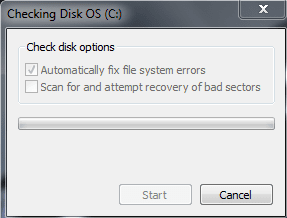
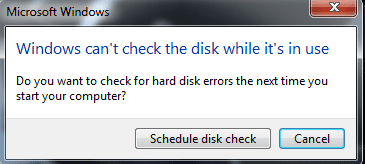
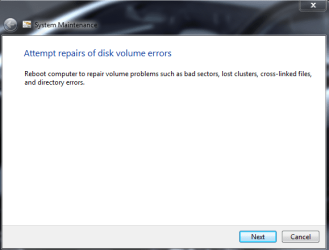
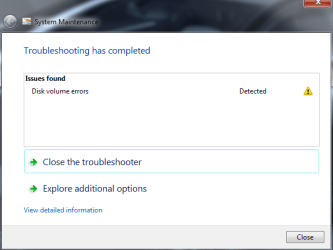
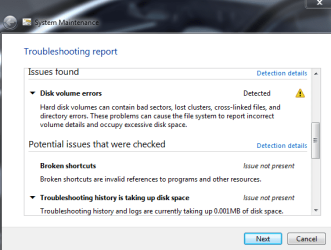
The Hard drive showed up in the disk management. When i run the error-check tool, and select automatically fix file system errors a message comes up and says "windows can't check this disk while it is in use, Do you want to check for hard disk errors the next time you log in?" and when i select okay, i restart m computer and it says "checking for file system errors blah blah blah, to cancel disk check press any key within 10 seconds." Except it doesnt do any disk check, it gets frozen. I've waited for half an hour for it to do anything.. It repeats teh message again when the 10 seconds has run out. I have to manually turn off my laptop and back on in order to start up my computer. I've done the "Scan for and attempt recovery of bad sectors" option in the error check and it found nothing. When i do the system maintenance it shows up that theres an error and it tells me to restart my computer so i do and nothing happens, the same message pops up. Is there anything i can do at this point?
 

My Computer

OS
Windows 7 64 bit
So when i run error check under the Properties of my C: drive this message comes up. Error Check (automatically repair).PNG
(When automatically check for errors is selected)
Capture.PNG
(when the error check starts)

So i restart my computer so it can do the error check and when i restart it, this message comes up and it get frozen.
"Checking file system on C:
The type of the file system is NTFS
Volume Label is OS.

One of your disc needs to be checked for consistency. You may cancel the disk check but it is strongly recommended that you continue.
To Skip disc checking, press any key within 10 second(s)." It gets frozen at this point when the time decreases to 1. I have to manually restart my computer at this point to actually get to the login menu.
 

My Computer

OS
Windows 7 64 bit
When i run system maintenance, these messages come up.
System Maintenance 1.PNG

system Maintenance 2.PNG

system Maintenance 3.PNG

I reboot my computer and the preveious message pops up during the reboot.
 

My Computer

OS
Windows 7 64 bit
You can run chkdsk from the win7 install dvd. Boot off the dvd, then navigate through to Repair Your Computer-System Recovery options-Command prompt. At the prompt, type:

CHKDSK x: /F /R

(X: is the drive to be scanned, replace the letter with the appropriate one).

Hit Enter.

Have you tried the manufacturer's diagnostics (see the link provided by Greg)?
 

My Computer

Computer Manufacturer/Model Number
Too many to describe...
OS
Windows 7 x64 pro/ Windows 7 x86 Pro/ XP SP3 x86
In addition to the HD Diagnostics I linked earlier, I would burn to CD and run the File System checker on free Partition Wizard bootable CD.

Sometimes it will repair the file system from CD when chkdsk won't run at boot.

PW CD also has a HD Surface Scan but its repair function is not as advanced as most maker's HD diagnostics/repair scans, which can fix your failing HD or at least extend it's life.

These are two separate functions here: HD Diagnostics scans the physical disk surface and can repair bad sectors after moving the data off temporarily. ChkDsk/File system checker repairs the file system on the HD.
 
Back
Top