Hi,
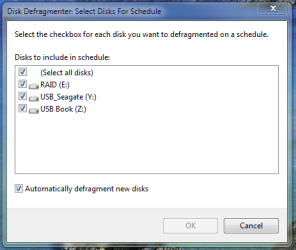
One of the first things I did when I installed my SSD, was to disable the Disk Defragmentation service.
However, I was browsing a link posted earlier by Bill2 in another thread, and found this interesting statement from May 2009:
Support and Q&A for Solid-State Drives - Engineering Windows 7 - Site Home - MSDN Blogs
So, my question is, if the above statement is true and disk fragmentation is automatically disabled, is there any reason to manually disable it in services? Indeed, I have seen many recommendations made here, and I have recommended it myself, to disable defragmentation for SSD's. Perhaps we don't need to?
What do you think? Was automatic disabling of deframentation of SSD's possibly not implemented, and the article is now outdated?
Regards,
Golden
One of the first things I did when I installed my SSD, was to disable the Disk Defragmentation service.
However, I was browsing a link posted earlier by Bill2 in another thread, and found this interesting statement from May 2009:
Will disk defragmentation be disabled by default on SSDs?
Yes. The automatic scheduling of defragmentation will exclude partitions on devices that declare themselves as SSDs. Additionally, if the system disk has random read performance characteristics above the threshold of 8 MB/sec, then it too will be excluded. The threshold was determined by internal analysis.
Support and Q&A for Solid-State Drives - Engineering Windows 7 - Site Home - MSDN Blogs
So, my question is, if the above statement is true and disk fragmentation is automatically disabled, is there any reason to manually disable it in services? Indeed, I have seen many recommendations made here, and I have recommended it myself, to disable defragmentation for SSD's. Perhaps we don't need to?
What do you think? Was automatic disabling of deframentation of SSD's possibly not implemented, and the article is now outdated?
Regards,
Golden
My Computer
- Computer type
- PC/Desktop
- Computer Manufacturer/Model Number
- Golden Mk. I.4
- OS
- Windows 10 Pro x64 ; Xubuntu x64
- CPU
- Intel i7 860 @ 2.80 GHz O/C'ed to 4.0GHz
- Motherboard
- Gigabyte P55A-UD3R Rev.1. Award BIOS F13
- Memory
- 16GB Corsair Vengance DDR3 @ 661 MHz Dual Channel (9-9-9-24)
- Graphics Card(s)
- EVGA NVidia GTX 560 1024MB
- Sound Card
- Realtek Integrated
- Monitor(s) Displays
- Dual Samsung SyncMaster 2494HS
- Screen Resolution
- 1920*1080 and 1920*1080
- Hard Drives
- 1*Samsung 840 EVO 120GB SSD;
1*OCZ Vertex 2 60GB SSD;
2*Samsung F3 SpinPoint 1TB in RAID0;
1*Samsung F1 SpinPoint 1TB;
2*Western Digital 1TB External USB 3.0
1*Western Digital 500GB External USB 3.0
1*Seagate 500GB External USB 2.0
- PSU
- Thermaltake ToughPower QFan 750W
- Case
- Thermaltake Element S VK60001W2Z
- Cooling
- Corsair H60 Water Cooling, 2*230mm and 2*80mm case fans
- Keyboard
- Logitech G110
- Mouse
- Logitech MX518