My system has three internal HDDs, I tried to install Linux Ubuntu 11.10 on the 500GB disk 1 and messed up.
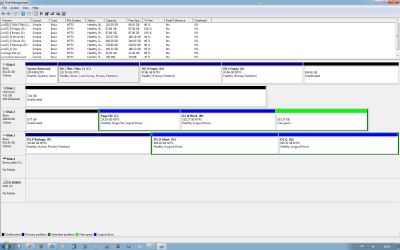
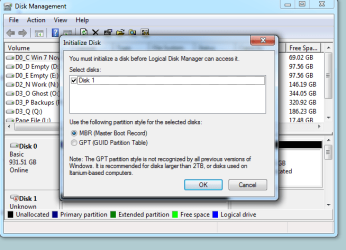
When I open Disc Management it tells me that disk 1 is now 7GB and needs initialization, if I press OK the system crashes.
I tried the following from this post: http://www.sevenforums.com/hardware...l-not-initialize-disk-management-crashes.html
Diskpart and hit enter
List Disk and hit enter
Select Disk n where n is the number shown for your problem drive and hit enter
Create Partition Primary and hit enter
Format fs=ntfs quick and hit enter
Assign and hit enter
Exit and hit enter
At step 4 the system crashes to BSOD.
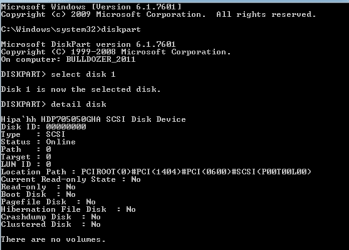
The details of Disk 1 are shown below in the screenshot.
I would be grateful for any suggestions to return Disk 1 to a normal NTFS 500GB disk, if that is still possible.
Windows 7 Ultimate, AMD FX 4_core, 8GB RAM, HDD Hitachi 500GB PATA on PCI Promise SCSI expansion board.
Attachments
Disk 1 details.png
4.8 KB
· Views: 30
My Computer
At a glance
Windows 7 Ultimate 64 bit SP1AMD FX-8350 Eight CoreCorsair Vengeance 16GB DDR3XFX HD6870 1GB DDR5
Computer type
PC/Desktop
Computer Manufacturer/Model Number
Self build
OS
Windows 7 Ultimate 64 bit SP1
CPU
AMD FX-8350 Eight Core
Motherboard
Gigabyte GA-990FXA-UD3
Memory
Corsair Vengeance 16GB DDR3
Graphics Card(s)
XFX HD6870 1GB DDR5
Sound Card
None Onboard sound
Monitor(s) Displays
LG Flatron Wide 20"
Screen Resolution
1680x1050
Hard Drives
WD1002FAEX Caviar Black SATA3 1TB
Hitachi 500GB PATA
Hitachi 320GB PATA
M4-CT256M4SSD2 ATA Device SSD Sata 3 250GB
2 off Seagate 2TB ST2000DM 001-1ER164 SATA Disks
Mmm. Other then your stated problem I don't see anything unusual there.
My first suggestion is to download a copy of PartitionWizard (the bootable CD) and use that to clean, initialize, and format the drive. The program runs on Linux so it does not need your OS. So you could disconnect every drive except the problem one to avoid any issue regarding drive name/number differences.
Try checking in the BIOS settings to see if the drive is recognized there.
And if possible, try the drive in another PC. See if it can be recognized on anther system.
EDIT: the drive may not show up as a hard drive in BIOS because it is on the PCI adapter. I've never used one so I don't know what you'll find. Best to try the drive on another computer.
My Computer
At a glance
Windows 7 64 Bit Home Premium SP1i7-3820GSkill F3-14900CL9Q - 16GBEVGA GeForce GTX660 - Driver 352.86
Computer type
PC/Desktop
Computer Manufacturer/Model Number
Home Built - Jan 2013
OS
Windows 7 64 Bit Home Premium SP1
CPU
i7-3820
Motherboard
Asus P9X79-PRO - Bios 4608
Memory
GSkill F3-14900CL9Q - 16GB
Graphics Card(s)
EVGA GeForce GTX660 - Driver 352.86
Sound Card
On board Realtek ALC898
Monitor(s) Displays
Acer S271HL
Screen Resolution
1920 x 1080
Hard Drives
#1- Samsung 840 Pro Series
#2- Western Digital WD1002FAEX Sata3 Black
#3- Western Digital WD1002FAEX Sata3 Black
PSU
Corsair CMPSU-850TX-V2 - 850 watt (by Seasonic)
Case
Corsair Obsidian 550D
Cooling
Standard 3 120mm case fans, Cooler Master Hyper 212 EVO
toolman59: try the steps in your first post again - but between steps 3 and 4, add the following DiskPart commands:
(step 3) select the disk
type clean
type rescan
(step 4) create a primary partition
Does this work? If not, then maybe it's time to look into the drive's firmware settings, especially its reported LBA size and DCO (drive configuration overlay) settings.
For that, you'll probably need a DOS-only tool provided by the drive's manufacturer.
My Computer
At a glance
Windows 7 Professional SP1 32-bitIntel Core 2 Duo E6600 2.4GHz4GB DDR2-667 (4x1GB in dual-channel config)nVidia GeForce 9800 GT
Computer type
PC/Desktop
Computer Manufacturer/Model Number
Custom-built
OS
Windows 7 Professional SP1 32-bit
CPU
Intel Core 2 Duo E6600 2.4GHz
Motherboard
Asus PL5D2
Memory
4GB DDR2-667 (4x1GB in dual-channel config)
Graphics Card(s)
nVidia GeForce 9800 GT
Sound Card
Creative X-Fi XtremeMusic
Monitor(s) Displays
Acer P236H
Screen Resolution
1920x1200 (DVI)
Hard Drives
OCZ SSD Vertex Plus 60GB SATA (Firmware 3.55), 64MB cache
Hitachi HD321KJ SATA, 320GB, 7200rpm, 16MB cache
I think it's well possible that's exactly what happened, especially with an SCSI connection which uses many parallel data wires. If most of them made contact and some didn't - wham, corruption and false readouts.
My Computer
At a glance
Windows 7 Professional SP1 32-bitIntel Core 2 Duo E6600 2.4GHz4GB DDR2-667 (4x1GB in dual-channel config)nVidia GeForce 9800 GT
Computer type
PC/Desktop
Computer Manufacturer/Model Number
Custom-built
OS
Windows 7 Professional SP1 32-bit
CPU
Intel Core 2 Duo E6600 2.4GHz
Motherboard
Asus PL5D2
Memory
4GB DDR2-667 (4x1GB in dual-channel config)
Graphics Card(s)
nVidia GeForce 9800 GT
Sound Card
Creative X-Fi XtremeMusic
Monitor(s) Displays
Acer P236H
Screen Resolution
1920x1200 (DVI)
Hard Drives
OCZ SSD Vertex Plus 60GB SATA (Firmware 3.55), 64MB cache
Hitachi HD321KJ SATA, 320GB, 7200rpm, 16MB cache