disk management

fay

New member
Local time
12:14 PM
Messages
31
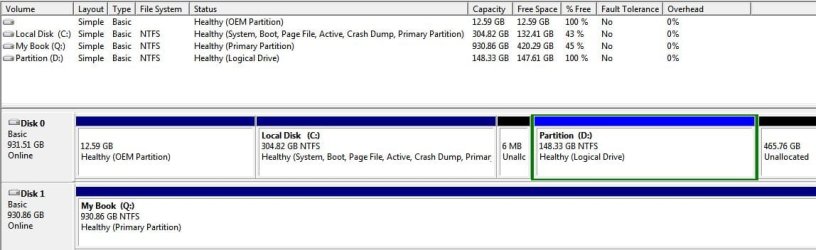
I installed Windows 7 Ultimate on a new hard drive (Seagate 1 TB) from system image. My old hard drive was a 500 GB but was partitioned into C: 304.82 and D: 148.33. When I look in disk management, I see 465.76 GB and 6 MB of unallocated space. How do I make it all one drive again or should I keep partitions. The drive was partitioned when I bought the PC from an individual, but that drive has failed now. It is now installed on the new hard drive. Please help.:confused:
I hope I didn't confuse you with my post.

Thank you
Fay
 

My Computer

Computer type
PC/Desktop
Computer Manufacturer/Model Number
Velocity Micro E2055
OS
windows 7 ultimate
CPU
Intel Core 2 Duo E 8500 @ 3.16 Ghz
Motherboard
Intel Corporation DG33BU
Memory
3 GB
Graphics Card(s)
Intel G33/G31 Express Chipset Family
Hard Drives
c: (NTFS on drive 0) * 327.30 GB 51.88 GB free
d: (NTFS on drive 0) 159.27 GB 152.19 GB free
q: (NTFS on drive 1) 999.50 GB 316.12 GB free

OS is on C
Antivirus
Microsoft Security Essentials
Browser
Firefox 34

My Computer

Computer type
PC/Desktop
Computer Manufacturer/Model Number
Custom Build
OS
Windows 7 Ultimate x64 SP1
CPU
AMD Phenom 2 1090T
Motherboard
Gigabyte GA-890FXA-UD5
Memory
2x8GB Kingston HyperX Fury Black 1600Mhz Unganged
Graphics Card(s)
MSI GTX 970 Gaming 4G
Sound Card
Realtek On-Board HD 7.1 Audio / Logitech G35
Monitor(s) Displays
3xAcer GD245HQ
Screen Resolution
1920x1080
Hard Drives
Samsung 850 Pro 512GB SSD - OS /
WD Caviar Black SATA 3 - 1 TBx2 - Dynamic RAID 0 /
WD Caviar Green SATA 2 - 640GBx2 - Dynamic RAID 0 /
WD Caviar Green SATA 2 - 640GB - Internal Backup /
Seagate Barracude SATA 3 - 3TB - External Backup/ Sync
PSU
HighPower 1000W
Case
Cooler Master HAF 932
Cooling
Noctua NH-D14
Keyboard
Logitech G19
Mouse
Logitech G500
Internet Speed
100/4 Mbit Cable (100GB quota)
Antivirus
ZoneAlarm Extreme Security / MBAM Pro / MBAE Free / SAS Free
Browser
IE 11 - Firefox - Chrome
Other Info
Logitech F710/ G27/ G940/ Z5500 // TrackIR 5 // Nvidia 3D Surround Vision
I hope I did this right.
 

Attachments

  • disk mgmt.JPG
    disk mgmt.JPG
    57.8 KB · Views: 4

My Computer

Computer type
PC/Desktop
Computer Manufacturer/Model Number
Velocity Micro E2055
OS
windows 7 ultimate
CPU
Intel Core 2 Duo E 8500 @ 3.16 Ghz
Motherboard
Intel Corporation DG33BU
Memory
3 GB
Graphics Card(s)
Intel G33/G31 Express Chipset Family
Hard Drives
c: (NTFS on drive 0) * 327.30 GB 51.88 GB free
d: (NTFS on drive 0) 159.27 GB 152.19 GB free
q: (NTFS on drive 1) 999.50 GB 316.12 GB free

OS is on C
Antivirus
Microsoft Security Essentials
Browser
Firefox 34
Select D: in Disk Management and right click on it.
Select Extend from the list and next all the way.
 

My Computer

Computer type
PC/Desktop
Computer Manufacturer/Model Number
Custom Build
OS
Windows 7 Ultimate x64 SP1
CPU
AMD Phenom 2 1090T
Motherboard
Gigabyte GA-890FXA-UD5
Memory
2x8GB Kingston HyperX Fury Black 1600Mhz Unganged
Graphics Card(s)
MSI GTX 970 Gaming 4G
Sound Card
Realtek On-Board HD 7.1 Audio / Logitech G35
Monitor(s) Displays
3xAcer GD245HQ
Screen Resolution
1920x1080
Hard Drives
Samsung 850 Pro 512GB SSD - OS /
WD Caviar Black SATA 3 - 1 TBx2 - Dynamic RAID 0 /
WD Caviar Green SATA 2 - 640GBx2 - Dynamic RAID 0 /
WD Caviar Green SATA 2 - 640GB - Internal Backup /
Seagate Barracude SATA 3 - 3TB - External Backup/ Sync
PSU
HighPower 1000W
Case
Cooler Master HAF 932
Cooling
Noctua NH-D14
Keyboard
Logitech G19
Mouse
Logitech G500
Internet Speed
100/4 Mbit Cable (100GB quota)
Antivirus
ZoneAlarm Extreme Security / MBAM Pro / MBAE Free / SAS Free
Browser
IE 11 - Firefox - Chrome
Other Info
Logitech F710/ G27/ G940/ Z5500 // TrackIR 5 // Nvidia 3D Surround Vision
Extend is greyed out
 

My Computer

Computer type
PC/Desktop
Computer Manufacturer/Model Number
Velocity Micro E2055
OS
windows 7 ultimate
CPU
Intel Core 2 Duo E 8500 @ 3.16 Ghz
Motherboard
Intel Corporation DG33BU
Memory
3 GB
Graphics Card(s)
Intel G33/G31 Express Chipset Family
Hard Drives
c: (NTFS on drive 0) * 327.30 GB 51.88 GB free
d: (NTFS on drive 0) 159.27 GB 152.19 GB free
q: (NTFS on drive 1) 999.50 GB 316.12 GB free

OS is on C
Antivirus
Microsoft Security Essentials
Browser
Firefox 34
Try with Partition Wizard free.
 

My Computer

Computer type
PC/Desktop
Computer Manufacturer/Model Number
Custom Build
OS
Windows 7 Ultimate x64 SP1
CPU
AMD Phenom 2 1090T
Motherboard
Gigabyte GA-890FXA-UD5
Memory
2x8GB Kingston HyperX Fury Black 1600Mhz Unganged
Graphics Card(s)
MSI GTX 970 Gaming 4G
Sound Card
Realtek On-Board HD 7.1 Audio / Logitech G35
Monitor(s) Displays
3xAcer GD245HQ
Screen Resolution
1920x1080
Hard Drives
Samsung 850 Pro 512GB SSD - OS /
WD Caviar Black SATA 3 - 1 TBx2 - Dynamic RAID 0 /
WD Caviar Green SATA 2 - 640GBx2 - Dynamic RAID 0 /
WD Caviar Green SATA 2 - 640GB - Internal Backup /
Seagate Barracude SATA 3 - 3TB - External Backup/ Sync
PSU
HighPower 1000W
Case
Cooler Master HAF 932
Cooling
Noctua NH-D14
Keyboard
Logitech G19
Mouse
Logitech G500
Internet Speed
100/4 Mbit Cable (100GB quota)
Antivirus
ZoneAlarm Extreme Security / MBAM Pro / MBAE Free / SAS Free
Browser
IE 11 - Firefox - Chrome
Other Info
Logitech F710/ G27/ G940/ Z5500 // TrackIR 5 // Nvidia 3D Surround Vision
I downloaded Mini Tool Partition Wizard, but I'm not sure how to use it. What should I do? I want to make C drive all one drive. I just don't want to make a mistake.
 

My Computer

Computer type
PC/Desktop
Computer Manufacturer/Model Number
Velocity Micro E2055
OS
windows 7 ultimate
CPU
Intel Core 2 Duo E 8500 @ 3.16 Ghz
Motherboard
Intel Corporation DG33BU
Memory
3 GB
Graphics Card(s)
Intel G33/G31 Express Chipset Family
Hard Drives
c: (NTFS on drive 0) * 327.30 GB 51.88 GB free
d: (NTFS on drive 0) 159.27 GB 152.19 GB free
q: (NTFS on drive 1) 999.50 GB 316.12 GB free

OS is on C
Antivirus
Microsoft Security Essentials
Browser
Firefox 34
Oh sorry, I mis-read your first post. To make C one big single partition: It is easy since your D is empty. You can simply delete D with Disk Management so everything on the right of C become one big unallocated space. Then right click C and extend it.

However, if you ask me, in short, reduce C to less than 120GB (Windows + programs), make the rest one big D (games + personal data) and then use imaging software (macrium free) to make occasional images of C, and a file sync program (like FreeFileSync) to keep a copy of your games and personal data. Hope this makes sense to you. This one requires a bit of work from you, if you want this ask again so we can provide a detailed action.
 

My Computer

Computer type
PC/Desktop
Computer Manufacturer/Model Number
Custom Build
OS
Windows 7 Ultimate x64 SP1
CPU
AMD Phenom 2 1090T
Motherboard
Gigabyte GA-890FXA-UD5
Memory
2x8GB Kingston HyperX Fury Black 1600Mhz Unganged
Graphics Card(s)
MSI GTX 970 Gaming 4G
Sound Card
Realtek On-Board HD 7.1 Audio / Logitech G35
Monitor(s) Displays
3xAcer GD245HQ
Screen Resolution
1920x1080
Hard Drives
Samsung 850 Pro 512GB SSD - OS /
WD Caviar Black SATA 3 - 1 TBx2 - Dynamic RAID 0 /
WD Caviar Green SATA 2 - 640GBx2 - Dynamic RAID 0 /
WD Caviar Green SATA 2 - 640GB - Internal Backup /
Seagate Barracude SATA 3 - 3TB - External Backup/ Sync
PSU
HighPower 1000W
Case
Cooler Master HAF 932
Cooling
Noctua NH-D14
Keyboard
Logitech G19
Mouse
Logitech G500
Internet Speed
100/4 Mbit Cable (100GB quota)
Antivirus
ZoneAlarm Extreme Security / MBAM Pro / MBAE Free / SAS Free
Browser
IE 11 - Firefox - Chrome
Other Info
Logitech F710/ G27/ G940/ Z5500 // TrackIR 5 // Nvidia 3D Surround Vision
I would prefer a step by step tutorial please. :) I don't want to mess anything up.
If I reduce C and make D bigger, do I point everything to D when installing? I still have a lot of files on C too.
 

My Computer

Computer type
PC/Desktop
Computer Manufacturer/Model Number
Velocity Micro E2055
OS
windows 7 ultimate
CPU
Intel Core 2 Duo E 8500 @ 3.16 Ghz
Motherboard
Intel Corporation DG33BU
Memory
3 GB
Graphics Card(s)
Intel G33/G31 Express Chipset Family
Hard Drives
c: (NTFS on drive 0) * 327.30 GB 51.88 GB free
d: (NTFS on drive 0) 159.27 GB 152.19 GB free
q: (NTFS on drive 1) 999.50 GB 316.12 GB free

OS is on C
Antivirus
Microsoft Security Essentials
Browser
Firefox 34
Your programs and Windows files shouldn't take too much. You will only point your Games to D, regular programs will stay on C.

Before we start please make an image of C to your external with Macrium free - http://www.sevenforums.com/tutorials/73828-imaging-free-macrium.html, even though it shouldn't cause any problems, there is always the possibility. Don't forget to create the bootable media of Macrium as well.
 

My Computer

Computer type
PC/Desktop
Computer Manufacturer/Model Number
Custom Build
OS
Windows 7 Ultimate x64 SP1
CPU
AMD Phenom 2 1090T
Motherboard
Gigabyte GA-890FXA-UD5
Memory
2x8GB Kingston HyperX Fury Black 1600Mhz Unganged
Graphics Card(s)
MSI GTX 970 Gaming 4G
Sound Card
Realtek On-Board HD 7.1 Audio / Logitech G35
Monitor(s) Displays
3xAcer GD245HQ
Screen Resolution
1920x1080
Hard Drives
Samsung 850 Pro 512GB SSD - OS /
WD Caviar Black SATA 3 - 1 TBx2 - Dynamic RAID 0 /
WD Caviar Green SATA 2 - 640GBx2 - Dynamic RAID 0 /
WD Caviar Green SATA 2 - 640GB - Internal Backup /
Seagate Barracude SATA 3 - 3TB - External Backup/ Sync
PSU
HighPower 1000W
Case
Cooler Master HAF 932
Cooling
Noctua NH-D14
Keyboard
Logitech G19
Mouse
Logitech G500
Internet Speed
100/4 Mbit Cable (100GB quota)
Antivirus
ZoneAlarm Extreme Security / MBAM Pro / MBAE Free / SAS Free
Browser
IE 11 - Firefox - Chrome
Other Info
Logitech F710/ G27/ G940/ Z5500 // TrackIR 5 // Nvidia 3D Surround Vision
I've been looking this Macrium program over and watching videos. I still don't feel confident doing this. I watched several videos of different versions of the program. I think what confuses me is their disk mgmt doesn't look like mine. Also, they say make a rescue disk and download WinPE. Which one do I do first. How do I start Macrium.
I also have another issue now. I went to defrag my C drive but it's not showing up in defrag, however it does show in disk mgmt and My Computer. I see D and Q (external) but no C.
 
Last edited:

My Computer

Computer type
PC/Desktop
Computer Manufacturer/Model Number
Velocity Micro E2055
OS
windows 7 ultimate
CPU
Intel Core 2 Duo E 8500 @ 3.16 Ghz
Motherboard
Intel Corporation DG33BU
Memory
3 GB
Graphics Card(s)
Intel G33/G31 Express Chipset Family
Hard Drives
c: (NTFS on drive 0) * 327.30 GB 51.88 GB free
d: (NTFS on drive 0) 159.27 GB 152.19 GB free
q: (NTFS on drive 1) 999.50 GB 316.12 GB free

OS is on C
Antivirus
Microsoft Security Essentials
Browser
Firefox 34
Can you help me please?
 

My Computer

Computer type
PC/Desktop
Computer Manufacturer/Model Number
Velocity Micro E2055
OS
windows 7 ultimate
CPU
Intel Core 2 Duo E 8500 @ 3.16 Ghz
Motherboard
Intel Corporation DG33BU
Memory
3 GB
Graphics Card(s)
Intel G33/G31 Express Chipset Family
Hard Drives
c: (NTFS on drive 0) * 327.30 GB 51.88 GB free
d: (NTFS on drive 0) 159.27 GB 152.19 GB free
q: (NTFS on drive 1) 999.50 GB 316.12 GB free

OS is on C
Antivirus
Microsoft Security Essentials
Browser
Firefox 34
If you want to get rid of D then just delete it, the extend C to take up all the unallocated space, just use Disk Management.
 

My Computer

Computer type
PC/Desktop
Computer Manufacturer/Model Number
Skylake Special #666
OS
Windows 10 Pro x64
CPU
Intel Core i7 6700K
Motherboard
Asus Sabertooth Z170 Mark 1
Memory
GSkill TridentZ RGB 16GB 3600 16-16-16-36
Graphics Card(s)
EVGA GTX 980 Ti SC x2
Sound Card
Realtek High Definition
Monitor(s) Displays
AOC G2460PG
Screen Resolution
1920 x 1080 144Hz
Hard Drives
Samsung 860 Pro 256GB, Seagate Barracuda 4TB x2
PSU
EVGA 1000 P2, EVGA White Custom Braided Cables
Case
Corsair Vengeance C70 Gunmetal Black
Cooling
Corsair H100i v2, Corsair ML120 x2, Thermal Grizzly Kryonaut
Keyboard
Logitech G910 Orion Spectrum
Mouse
Logitech G700s
Internet Speed
Verizon Fios Quantum Gateway 75/75
Antivirus
Windows Defender, Malwarebytes Free 3.8.3
Browser
Chrome
Other Info
Corsair SP120 x4, LG Blu-ray Drive, Durabrand HT-395 100 Watt Dolby Digital Amp, Corsair H2100 Wireless 7.1 Headset
I deleted D but Extend is greyed out on C.
 

My Computer

Computer type
PC/Desktop
Computer Manufacturer/Model Number
Velocity Micro E2055
OS
windows 7 ultimate
CPU
Intel Core 2 Duo E 8500 @ 3.16 Ghz
Motherboard
Intel Corporation DG33BU
Memory
3 GB
Graphics Card(s)
Intel G33/G31 Express Chipset Family
Hard Drives
c: (NTFS on drive 0) * 327.30 GB 51.88 GB free
d: (NTFS on drive 0) 159.27 GB 152.19 GB free
q: (NTFS on drive 1) 999.50 GB 316.12 GB free

OS is on C
Antivirus
Microsoft Security Essentials
Browser
Firefox 34
Post another screenshot of Disk Management please.
 

My Computer

Computer type
PC/Desktop
Computer Manufacturer/Model Number
Custom Build
OS
Windows 7 Ultimate x64 SP1
CPU
AMD Phenom 2 1090T
Motherboard
Gigabyte GA-890FXA-UD5
Memory
2x8GB Kingston HyperX Fury Black 1600Mhz Unganged
Graphics Card(s)
MSI GTX 970 Gaming 4G
Sound Card
Realtek On-Board HD 7.1 Audio / Logitech G35
Monitor(s) Displays
3xAcer GD245HQ
Screen Resolution
1920x1080
Hard Drives
Samsung 850 Pro 512GB SSD - OS /
WD Caviar Black SATA 3 - 1 TBx2 - Dynamic RAID 0 /
WD Caviar Green SATA 2 - 640GBx2 - Dynamic RAID 0 /
WD Caviar Green SATA 2 - 640GB - Internal Backup /
Seagate Barracude SATA 3 - 3TB - External Backup/ Sync
PSU
HighPower 1000W
Case
Cooler Master HAF 932
Cooling
Noctua NH-D14
Keyboard
Logitech G19
Mouse
Logitech G500
Internet Speed
100/4 Mbit Cable (100GB quota)
Antivirus
ZoneAlarm Extreme Security / MBAM Pro / MBAE Free / SAS Free
Browser
IE 11 - Firefox - Chrome
Other Info
Logitech F710/ G27/ G940/ Z5500 // TrackIR 5 // Nvidia 3D Surround Vision
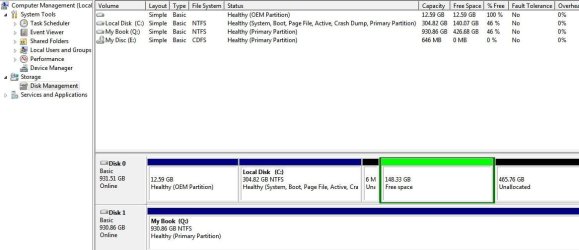
here is the screenshot of disk mgmt after deleting D.
 

Attachments

  • disk mgmt 2.JPG
    disk mgmt 2.JPG
    64 KB · Views: 2

My Computer

Computer type
PC/Desktop
Computer Manufacturer/Model Number
Velocity Micro E2055
OS
windows 7 ultimate
CPU
Intel Core 2 Duo E 8500 @ 3.16 Ghz
Motherboard
Intel Corporation DG33BU
Memory
3 GB
Graphics Card(s)
Intel G33/G31 Express Chipset Family
Hard Drives
c: (NTFS on drive 0) * 327.30 GB 51.88 GB free
d: (NTFS on drive 0) 159.27 GB 152.19 GB free
q: (NTFS on drive 1) 999.50 GB 316.12 GB free

OS is on C
Antivirus
Microsoft Security Essentials
Browser
Firefox 34
You didn`t delete it yet, it all has to be unallocated space. Like my post said.
 

My Computer

Computer type
PC/Desktop
Computer Manufacturer/Model Number
Skylake Special #666
OS
Windows 10 Pro x64
CPU
Intel Core i7 6700K
Motherboard
Asus Sabertooth Z170 Mark 1
Memory
GSkill TridentZ RGB 16GB 3600 16-16-16-36
Graphics Card(s)
EVGA GTX 980 Ti SC x2
Sound Card
Realtek High Definition
Monitor(s) Displays
AOC G2460PG
Screen Resolution
1920 x 1080 144Hz
Hard Drives
Samsung 860 Pro 256GB, Seagate Barracuda 4TB x2
PSU
EVGA 1000 P2, EVGA White Custom Braided Cables
Case
Corsair Vengeance C70 Gunmetal Black
Cooling
Corsair H100i v2, Corsair ML120 x2, Thermal Grizzly Kryonaut
Keyboard
Logitech G910 Orion Spectrum
Mouse
Logitech G700s
Internet Speed
Verizon Fios Quantum Gateway 75/75
Antivirus
Windows Defender, Malwarebytes Free 3.8.3
Browser
Chrome
Other Info
Corsair SP120 x4, LG Blu-ray Drive, Durabrand HT-395 100 Watt Dolby Digital Amp, Corsair H2100 Wireless 7.1 Headset
So I just right click and delete partition? I was worried about the dialog box that comes up saying if i delete it, it will become inaccessible?
 

My Computer

Computer type
PC/Desktop
Computer Manufacturer/Model Number
Velocity Micro E2055
OS
windows 7 ultimate
CPU
Intel Core 2 Duo E 8500 @ 3.16 Ghz
Motherboard
Intel Corporation DG33BU
Memory
3 GB
Graphics Card(s)
Intel G33/G31 Express Chipset Family
Hard Drives
c: (NTFS on drive 0) * 327.30 GB 51.88 GB free
d: (NTFS on drive 0) 159.27 GB 152.19 GB free
q: (NTFS on drive 1) 999.50 GB 316.12 GB free

OS is on C
Antivirus
Microsoft Security Essentials
Browser
Firefox 34

My Computer

Computer type
PC/Desktop
Computer Manufacturer/Model Number
Custom Build
OS
Windows 7 Ultimate x64 SP1
CPU
AMD Phenom 2 1090T
Motherboard
Gigabyte GA-890FXA-UD5
Memory
2x8GB Kingston HyperX Fury Black 1600Mhz Unganged
Graphics Card(s)
MSI GTX 970 Gaming 4G
Sound Card
Realtek On-Board HD 7.1 Audio / Logitech G35
Monitor(s) Displays
3xAcer GD245HQ
Screen Resolution
1920x1080
Hard Drives
Samsung 850 Pro 512GB SSD - OS /
WD Caviar Black SATA 3 - 1 TBx2 - Dynamic RAID 0 /
WD Caviar Green SATA 2 - 640GBx2 - Dynamic RAID 0 /
WD Caviar Green SATA 2 - 640GB - Internal Backup /
Seagate Barracude SATA 3 - 3TB - External Backup/ Sync
PSU
HighPower 1000W
Case
Cooler Master HAF 932
Cooling
Noctua NH-D14
Keyboard
Logitech G19
Mouse
Logitech G500
Internet Speed
100/4 Mbit Cable (100GB quota)
Antivirus
ZoneAlarm Extreme Security / MBAM Pro / MBAE Free / SAS Free
Browser
IE 11 - Firefox - Chrome
Other Info
Logitech F710/ G27/ G940/ Z5500 // TrackIR 5 // Nvidia 3D Surround Vision
Looks like it worked. C is now one big drive, although I don't know if that's a good thing or a bad thing. But why is C not in Disk Defrag
 

My Computer

Computer type
PC/Desktop
Computer Manufacturer/Model Number
Velocity Micro E2055
OS
windows 7 ultimate
CPU
Intel Core 2 Duo E 8500 @ 3.16 Ghz
Motherboard
Intel Corporation DG33BU
Memory
3 GB
Graphics Card(s)
Intel G33/G31 Express Chipset Family
Hard Drives
c: (NTFS on drive 0) * 327.30 GB 51.88 GB free
d: (NTFS on drive 0) 159.27 GB 152.19 GB free
q: (NTFS on drive 1) 999.50 GB 316.12 GB free

OS is on C
Antivirus
Microsoft Security Essentials
Browser
Firefox 34
Back
Top