Disk Mgmt ask to initialize a drive that isn't there.

crobertson

New member
Local time
5:32 PM
Messages
6
Every time I open Disk Management is asks me to initialize a drive that isn't even there. I connect a bad drive as a slave, and it wouldn't initialize. now every time I open Disk Mgmt, it asks me to initialize the drive. I figure it is something in the registry I need to delete, but not sure of what.
 

My Computer My Computer

OS
windows 7
From Microsoft:
A basic disk's status is Not Initialized.

Cause:The disk does not contain a valid signature. After you install a new disk, the operating system must write a disk signature, the end of sector marker (also called signature word), and a master boot record or GUID partition table before you can create partitions on the disk. When you first start Disk Management after installing a new disk, a wizard appears that provides a list of the new disks detected by the operating system. If you cancel the wizard before the disk signature is written, the disk status remains Not Initialized.
So I believe you are correct in that Windows has created a registry entry for that drive without the Disk Signature in one of the keys.

You could try and find that key in a registry search if you search for the name of the hard drive manufacturer or serial number (a long shot, and it would be best to be the only drive in your system of that brand). You would need to be very careful to be sure you are not deleting a key for one of the other drives.

Or you could just click to initialize the (missing) disk and Windows might ignore it afterward. The danger here is that you would want to be sure that only the phantom disk is initialized, not a real disk. So you should disconnect any addition drives and only have your C: partition drive connected if you decide to try this. I've never tried it, but I don't believe Windows will allow you to initialize the system drive while it is running (not promising anything).
 

My Computer My Computer

Computer type
PC/Desktop
Computer Manufacturer/Model Number
Home Built - Jan 2013
OS
Windows 7 64 Bit Home Premium SP1
CPU
i7-3820
Motherboard
Asus P9X79-PRO - Bios 4608
Memory
GSkill F3-14900CL9Q - 16GB
Graphics Card(s)
EVGA GeForce GTX660 - Driver 352.86
Sound Card
On board Realtek ALC898
Monitor(s) Displays
Acer S271HL
Screen Resolution
1920 x 1080
Hard Drives
#1- Samsung 840 Pro Series
#2- Western Digital WD1002FAEX Sata3 Black
#3- Western Digital WD1002FAEX Sata3 Black
PSU
Corsair CMPSU-850TX-V2 - 850 watt (by Seasonic)
Case
Corsair Obsidian 550D
Cooling
Standard 3 120mm case fans, Cooler Master Hyper 212 EVO
Keyboard
MS KC-0405
Mouse
Intellimouse 5-button
Internet Speed
56 Mbits/Sec (on a good day)
Antivirus
Avast & Malwarebytes
Browser
Firefox
Other Info
Asus DVD - DRW-24B1ST 24X
TVeblen is correct. Initializing the drive involves creating a partition and formatting it. Disk Management will not format the System drive so you should have no worries there.
 

My Computers My Computers

System One System Two

  • Computer type
    PC/Desktop
    Computer Manufacturer/Model Number
    ALWAYS UNDER CONSTRUCTION
    OS
    Windows 11 Pro
    CPU
    Ryzen 9 5900X
    Motherboard
    Asus X570 Crosshair Viii Hero
    Memory
    32GB G Skill DDR4-3600
    Graphics Card(s)
    EVGA RTX 3080 FTW 3 Ultra
    Sound Card
    On Board/Sennheiser PC37X Headset
    Monitor(s) Displays
    3 X Asus 27"
    Screen Resolution
    2560x1440
    Hard Drives
    2 X 1 TB NVME drives
    PSU
    EVGA 850
    Case
    Phanteks Eclipse P400A
    Cooling
    EVGA 280 AIO
    Keyboard
    Logitech G510s/ Logitech G13
    Mouse
    Logitech G502
    Internet Speed
    24/1
    Antivirus
    ESET/MBAM Pro/SAS Pro
    Browser
    Chrome/ Firefox/ Edge
  • Computer type
    Laptop
    System Manufacturer/Model Number
    Dell 16 Plus
    OS
    Windows 11 Pro
    CPU
    Intel Ultra 9 288V
    Memory
    32 GB LPDDR5X 8533
    Monitor(s) Displays
    16" Mini-LED HDR600 Touch 90 Hz
    Screen Resolution
    2560X1600
    Hard Drives
    1 TB NVME
TVeblen is correct. Initializing the drive involves creating a partition and formatting it. Disk Management will not format the System drive so you should have no worries there.
Initializing a drive, in terms of windows, is just creating a partition table (MBR or GPT). Not creating a partition or formatting it.

Theoretically, nothing should happen if an already initialized disk is somehow initialized again. It already has a partition table and windows wouldn't be able to overwrite that to "create".
 

My Computer My Computer

Computer type
PC/Desktop
OS
7&8
That may be true for the Primary Disk (with the Active and Boot flags), but it is not true for data disks. We have a parade of folks who come here trying to recover data from data disks they mistakenly initialized (or re-initialized).
In these cases the existing partition table was written over with a blank one.
 

My Computer My Computer

Computer type
PC/Desktop
Computer Manufacturer/Model Number
Home Built - Jan 2013
OS
Windows 7 64 Bit Home Premium SP1
CPU
i7-3820
Motherboard
Asus P9X79-PRO - Bios 4608
Memory
GSkill F3-14900CL9Q - 16GB
Graphics Card(s)
EVGA GeForce GTX660 - Driver 352.86
Sound Card
On board Realtek ALC898
Monitor(s) Displays
Acer S271HL
Screen Resolution
1920 x 1080
Hard Drives
#1- Samsung 840 Pro Series
#2- Western Digital WD1002FAEX Sata3 Black
#3- Western Digital WD1002FAEX Sata3 Black
PSU
Corsair CMPSU-850TX-V2 - 850 watt (by Seasonic)
Case
Corsair Obsidian 550D
Cooling
Standard 3 120mm case fans, Cooler Master Hyper 212 EVO
Keyboard
MS KC-0405
Mouse
Intellimouse 5-button
Internet Speed
56 Mbits/Sec (on a good day)
Antivirus
Avast & Malwarebytes
Browser
Firefox
Other Info
Asus DVD - DRW-24B1ST 24X
And on top of that, what we are talking about is a disk that does not exist. Plus, as you said, theoretically that may be true, but in actual practice it is much different in the overwhelming majority of cases.
 

My Computers My Computers

System One System Two

  • Computer type
    PC/Desktop
    Computer Manufacturer/Model Number
    ALWAYS UNDER CONSTRUCTION
    OS
    Windows 11 Pro
    CPU
    Ryzen 9 5900X
    Motherboard
    Asus X570 Crosshair Viii Hero
    Memory
    32GB G Skill DDR4-3600
    Graphics Card(s)
    EVGA RTX 3080 FTW 3 Ultra
    Sound Card
    On Board/Sennheiser PC37X Headset
    Monitor(s) Displays
    3 X Asus 27"
    Screen Resolution
    2560x1440
    Hard Drives
    2 X 1 TB NVME drives
    PSU
    EVGA 850
    Case
    Phanteks Eclipse P400A
    Cooling
    EVGA 280 AIO
    Keyboard
    Logitech G510s/ Logitech G13
    Mouse
    Logitech G502
    Internet Speed
    24/1
    Antivirus
    ESET/MBAM Pro/SAS Pro
    Browser
    Chrome/ Firefox/ Edge
  • Computer type
    Laptop
    System Manufacturer/Model Number
    Dell 16 Plus
    OS
    Windows 11 Pro
    CPU
    Intel Ultra 9 288V
    Memory
    32 GB LPDDR5X 8533
    Monitor(s) Displays
    16" Mini-LED HDR600 Touch 90 Hz
    Screen Resolution
    2560X1600
    Hard Drives
    1 TB NVME
MBR initialisation - What it does. Data is not lost by merely initiali

There seems to be a lot of misconception about what initialisation of a disk does.

When one initialises a disk and chooses MBR it merely writes the MBR code to the first sector.

The following screenshots were taken with the HDD completely wiped clean - all sectors written with 00.
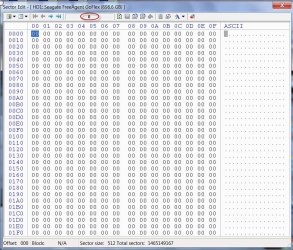
28-06-2014 15-26-33.jpg

When such a disk is connected and Windows Disk Management is invoked, one will be asked to initialise the disk.
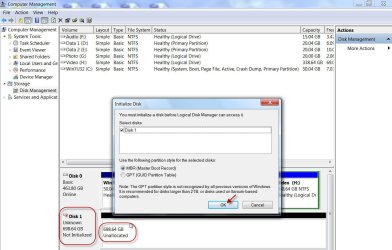
28-06-2014 15-32-50.jpg

Choose MBR and OK, it writes the MBR code to Sector 0, which includes the Windows Disk Signature and Boot Record Signature.
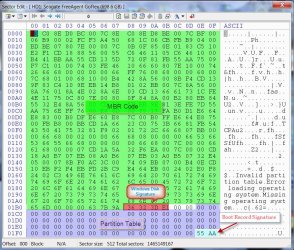
28-06-2014 15-58-57.jpg

The only change that has taken place in Windows Disk Management is the disk is now Basic and Online. ( It is no longer Unknown and Not Initialised.)
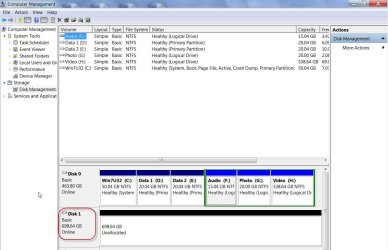
28-06-2014 16-01-11.jpg

Please note that nothing has been written into the space assigned to the partition table. All 64 fields still remain 00. So the disk still remains unallocated.


(When I started with this Primer on Partitioning on 26 Jun 14, I stopped at this and my attention got diverted. The following will be covered as and when I find time and free my HDD for further exploration.)

When one creates New Volumes - maximum four with MBR - for each new volume created a 16 field partition table for each new volume is written into the space allocated in Sector 0.

When subsequently one formats the drive to NTFS, a Volume Boot Record(VBR)/Partition Boot Record(PBR) - more commonly called the File System - is written into the first sector of each such partition.

So initialisation only makes Windows recognise the disk and brings it online.
OK, all this has nothing to do with OP's problem. I shall take a break now and will try to deal with it in my next post.

 
Last edited:

My Computer My Computer

OS
Windows 7 Home Premium 32 bit
Every time I open Disk Management is asks me to initialize a drive that isn't even there. I connect a bad drive as a slave, and it wouldn't initialize. now every time I open Disk Mgmt, it asks me to initialize the drive. I figure it is something in the registry I need to delete, but not sure of what.

I have what could be a probable solution but before that I would like to seek some additional information.

1. Please post a screenshot of the current Windows Disk Management along with the message you get. Please remove all other external HDDs/pendrives/docks/USB hubs (except your USB Keyboard/mouse, if you are using). Only your internal drives.
http://www.sevenforums.com/tutorials/274797-disk-management-post-screen-capture-image.html

Please make sure that you click on Show/Hide Console Tree and Show/Hide Action Pane icons in the tool bar to hide those to give a full screen view and upload it to SevenForums servers and not a third party server.

2. You said you connected that bad drive as a slave. Is it a PATA drive? If so is your System drive also a PATA drive as master?

3. Do you still have that bad drive with you to connect it again if required?

4. Can you give more details about your system, if you can't fill in your system specs?

5. Do you have any System Restore point prior to your connecting that drive in your system? If you have then it will be easier to restore your system to that point and that should automatically resolve the problem.

If not we have to scratch our head as best as we can and we shall do that :).
 

My Computer My Computer

OS
Windows 7 Home Premium 32 bit
LOL.
 

My Computers My Computers

System One System Two

  • Computer type
    PC/Desktop
    OS
    7 X64
    CPU
    i5 8400
    Motherboard
    gigabyte b365m ds3h
    Memory
    2x8gb 3200mhz
    Hard Drives
    various
    PSU
    pure power 11 400w cm
    Case
    Coolermaster
    Cooling
    cryorig m9i
  • Computer type
    PC/Desktop
    OS
    7x64
    CPU
    g5400
    Motherboard
    ga b365m ds3h
    Memory
    8gb ddr4 2400
    PSU
    xfx pro 450w
Back
Top