
Solved Disk partition shrink & expand

That link is dead but there should be nothing there to boot Windows, everything needed is contained in the big Windows 7 partition.
 

My Computer My Computer

Computer Manufacturer/Model Number
* BFK Customs *
OS
W 7 64-bit Ultimate
CPU
Intel Q9550 Yorkfield
Motherboard
ASUS P5Q Pro
Memory
8GB Dominator 8500C5D
Graphics Card(s)
ATI : XFX 5870
Sound Card
Realtek HD Audio 7-1
Monitor(s) Displays
1x 47" LCD HDMI & 3x 26" LCD HDMI
Screen Resolution
1920x1080P & 1920x1200
Hard Drives
1x 80GB Intel X25-M G2 SSD : 1x 500GB & 1x 640GB WD Caviar Black(s)
PSU
Corsair 620HX
Case
Cooler Master RC-690
Cooling
Tuniq Tower 120, 2x 140mm and 3x 120mm case fans
Keyboard
Microsoft 500
Mouse
Razer Diamondback 3G
Internet Speed
14 Mb/s
Other Info
1x Koutech 3Gb/s SATA HDD Hot Swap Rack
Before you wipe the OEM partition or mess with the Recovery partition, answer these questions:

1) Do you use any of the factory utilities which the manufacturer put on the computer? Look in All Programs under then manufacturer's name to see what is likely on the OEM partition. For example, do you use an HP Wireless Connection manager instead of Win7 wireless?

If you don't use any of the manufacturer's named utilities then you can wipe the OEM partition.

2) Have you made your Recovery Disks? Does the Recovery Partition run when you attempt to run it from All Programs? Will it cue up and offer Recovery Options? Can you boot it using the key given to Run Recovery from boot?

If your Recovery Partition won't run and/or you've already made your Recovery disks, then you can risk shrinking or wipe the Recovery partition.

You can also wipe it if you want to instead save externally a Win7 backup image of your current installation and use that for Recovery: http://www.sevenforums.com/tutorials/663-backup-complete-computer-create-image-backup.html

If you have any further questions to help answer these then ask back.
 
Hi Ted, I'm missing where it's discussed that he overwrote Recov with Win7. Was that in another thread?

It's also good to confirm he doesn't use factory utiltiies as he may lose something he's using if he deletes OEM partition.

To make a useable screenshot of your OEM partition contents, use the Snipping Tool in Start Menu, then attach the file it creates using Paper Clip in Reply box.
 
Hi Ted, I'm missing where it's discussed that he overwrote Recov with Win7. Was that in another thread?

It's also good to confirm he doesn't use factory utiltiies as he may lose something he's using if he deletes OEM partition.

To make a useable screenshot of your OEM partition contents, use the Snipping Tool in Start Menu, then attach the file it creates using Paper Clip in Reply box.


Hello Greg, my apologies mate, I think I'm confusing this thread and another, I have deleted my previous post.
 

My Computer My Computer

Computer Manufacturer/Model Number
* BFK Customs *
OS
W 7 64-bit Ultimate
CPU
Intel Q9550 Yorkfield
Motherboard
ASUS P5Q Pro
Memory
8GB Dominator 8500C5D
Graphics Card(s)
ATI : XFX 5870
Sound Card
Realtek HD Audio 7-1
Monitor(s) Displays
1x 47" LCD HDMI & 3x 26" LCD HDMI
Screen Resolution
1920x1080P & 1920x1200
Hard Drives
1x 80GB Intel X25-M G2 SSD : 1x 500GB & 1x 640GB WD Caviar Black(s)
PSU
Corsair 620HX
Case
Cooler Master RC-690
Cooling
Tuniq Tower 120, 2x 140mm and 3x 120mm case fans
Keyboard
Microsoft 500
Mouse
Razer Diamondback 3G
Internet Speed
14 Mb/s
Other Info
1x Koutech 3Gb/s SATA HDD Hot Swap Rack
No prob. I know which thread you're talking about because I confused them myself yesterday.
 
Hi, Sent another screen shot of OEM at my last post, which was posted. I do not use any Dell factory utilities. I have a complete disk back-up on external drive, done this morning. If after looking at screen shot you feel I don't need the small OEM to left of C, will proceed to follow instruction to wipe OEM and D recovery. Will then post back per instructions when this part completed. When I am totally finished, OEM partition will be gone as well the D partition, leaving just the whole disk as C, correct? Thanks for all your time and help. Hope things go as planned.
 

My Computer My Computer

OS
Windows 7 64bit
Please click on your links so you can see that there is no screenshot of OEM partition contents.

Unhide hidden files in Control Panel>Folders Options>View.

Now in Disk Management rightclick OEM partition, see if you can Explore it. If not, assign it a letter then open it in Computer.

If you have Partition Wizard you should be able to rightclick Explore it without drive letter.

Use Snipping TOol in Start Menu to capture maximized window with all files shown. Attach using paper clip in Reply box.
 
Last edited:
HI, I was able to show hidden files from control panel, but don't don't know how to open OEM partition folder. Thanks for trying to help me. Per your instructions, since not able to do this I will quit trying, as seems over my head. Thanks again, sorry to have wasted your time.
 

My Computer My Computer

OS
Windows 7 64bit
It's not a waste of time, we are glad to help you. This is how you learn.

If you have Partiiton Wizard you can rightclick on OEM partition to Explore it.

In Disk Management you'll need to rightclick on OEM partition, see if you can Explore it on rightclick context menu. If not, assign it a letter long enough to open it from Computer.

Have you made your Recovery Disks yet?
 
Hi gregrocker!!!! I will download Partition Wizard now, as will need to do tis task if you feel I can do it. It just came to me that we may going through hoops on this part for nothing. This is a 1 1/2 yr. old Dell laptop that came with Vista x64 installed. I did a clean install and put Win7 x64 on it. Since the OEM and D recovery came when Vista was installed at Dell is it possible these are not needed anyway, given that I now have Win7.
 

My Computer My Computer

OS
Windows 7 64bit
You need to ask yourself how likely it is you might want to sell or give away the computer with its native Vista restored, so that you can keep your retail Win7 to use on another machine (unless you bought retail OEM which becomes locked to the motherboard first installed upon).

You cannot make your Vista Recovery disks off the partition now anyway since Win7 has replaced Vista, and its possible the Recovery Partition will not run. You can cue it up now from boot to see if it will respond, but don't actually run Recovery: http://support.dell.com/support/top...=us&l=en&s=gen&docid=DSN_336966&isLegacy=true

If you don't have the Recovery Disks your options later if you want to restore Vista are to order the Recovery Disks from Dell, or find or borrow a Vista installer to reinstall with the Product Key on COA sticker.

So weigh this all out and decide whether you want to keep the Recovery Partition on the chance that it might run if later needed. The OEM partition is no longer used with the Win7 install. If you decide you want to recover the space from those two partitions into Win7, then follow the steps given by BareFootKid and we wll be here to help you along the way.
 
Hi, Thanks for concise reply. Don't care about reinstall of Vista. If I give it to my daughters I would totally erase the drive anyway. Since OEM and D are useless to me, will proceed to wipe OEM and D. Will post back per BareFootKid"s informative post. Thanks will get back when ready to delete partitions.
 

My Computer My Computer

OS
Windows 7 64bit
Remember to post back here to keep us informed.
 

My Computer My Computer

Computer Manufacturer/Model Number
* BFK Customs *
OS
W 7 64-bit Ultimate
CPU
Intel Q9550 Yorkfield
Motherboard
ASUS P5Q Pro
Memory
8GB Dominator 8500C5D
Graphics Card(s)
ATI : XFX 5870
Sound Card
Realtek HD Audio 7-1
Monitor(s) Displays
1x 47" LCD HDMI & 3x 26" LCD HDMI
Screen Resolution
1920x1080P & 1920x1200
Hard Drives
1x 80GB Intel X25-M G2 SSD : 1x 500GB & 1x 640GB WD Caviar Black(s)
PSU
Corsair 620HX
Case
Cooler Master RC-690
Cooling
Tuniq Tower 120, 2x 140mm and 3x 120mm case fans
Keyboard
Microsoft 500
Mouse
Razer Diamondback 3G
Internet Speed
14 Mb/s
Other Info
1x Koutech 3Gb/s SATA HDD Hot Swap Rack
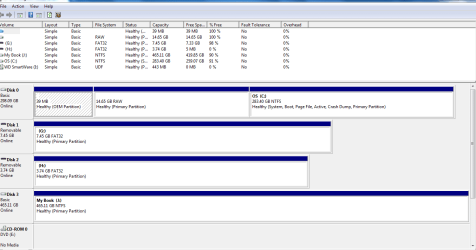
Hi, Hi so far so good!!!! Here is screen capture after wiping OEM & D Recovery. Guess next step to get rid of these 2 partitions.Capture.PNG
 

My Computer My Computer

OS
Windows 7 64bit
In Windows disk management, right click each in turn and click delete to create unallocated space;
 

My Computer My Computer

Computer Manufacturer/Model Number
* BFK Customs *
OS
W 7 64-bit Ultimate
CPU
Intel Q9550 Yorkfield
Motherboard
ASUS P5Q Pro
Memory
8GB Dominator 8500C5D
Graphics Card(s)
ATI : XFX 5870
Sound Card
Realtek HD Audio 7-1
Monitor(s) Displays
1x 47" LCD HDMI & 3x 26" LCD HDMI
Screen Resolution
1920x1080P & 1920x1200
Hard Drives
1x 80GB Intel X25-M G2 SSD : 1x 500GB & 1x 640GB WD Caviar Black(s)
PSU
Corsair 620HX
Case
Cooler Master RC-690
Cooling
Tuniq Tower 120, 2x 140mm and 3x 120mm case fans
Keyboard
Microsoft 500
Mouse
Razer Diamondback 3G
Internet Speed
14 Mb/s
Other Info
1x Koutech 3Gb/s SATA HDD Hot Swap Rack
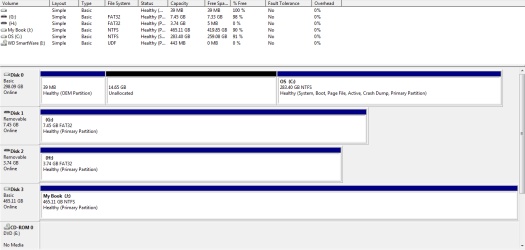
Hi, I did as directed. D recovery shows as unallocated, when I try to do it to OEM partition won't let me do it, only litle help box comes up. so far C has not moved into unallocated space. I restarted the computer but no change. The OEM is only 39MB so not that big a deal, although don't know it didn't work, maybe locked some how. Now need to move C to unallocated space. See screen shot. Thanks for helping me.Capture.PNG
 

My Computer My Computer

OS
Windows 7 64bit
Use Partition Wizard to wipe the OEM first, then use PW to delete it
 

My Computer My Computer

Computer Manufacturer/Model Number
* BFK Customs *
OS
W 7 64-bit Ultimate
CPU
Intel Q9550 Yorkfield
Motherboard
ASUS P5Q Pro
Memory
8GB Dominator 8500C5D
Graphics Card(s)
ATI : XFX 5870
Sound Card
Realtek HD Audio 7-1
Monitor(s) Displays
1x 47" LCD HDMI & 3x 26" LCD HDMI
Screen Resolution
1920x1080P & 1920x1200
Hard Drives
1x 80GB Intel X25-M G2 SSD : 1x 500GB & 1x 640GB WD Caviar Black(s)
PSU
Corsair 620HX
Case
Cooler Master RC-690
Cooling
Tuniq Tower 120, 2x 140mm and 3x 120mm case fans
Keyboard
Microsoft 500
Mouse
Razer Diamondback 3G
Internet Speed
14 Mb/s
Other Info
1x Koutech 3Gb/s SATA HDD Hot Swap Rack
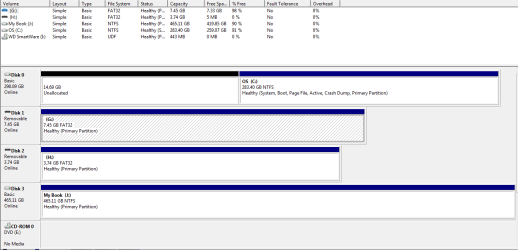
Hi, That worked perfect, OEM gone. Can't delete D recovery as this feature is not highlighted Partition Wizard. Cpuld not find if this can be done in Disk Management. I just have to delete this D partition and should be done. See screen capture.Capture.PNG
 

My Computer My Computer

OS
Windows 7 64bit
Before this next step restart Windows 7 to make sure all programs are closed before you continue.

Now in PW right click the Windows 7 partition and click Resize in the dialog box that opens click to drag the slider all the way to the left, then Apply and Yes, if you are using the installed version of PW it may need to restart, just let it do as it needs.

It may take a while to complete, just relax and let it work.

click to enlarge
ResizeToLeft.jpg
 

My Computer My Computer

Computer Manufacturer/Model Number
* BFK Customs *
OS
W 7 64-bit Ultimate
CPU
Intel Q9550 Yorkfield
Motherboard
ASUS P5Q Pro
Memory
8GB Dominator 8500C5D
Graphics Card(s)
ATI : XFX 5870
Sound Card
Realtek HD Audio 7-1
Monitor(s) Displays
1x 47" LCD HDMI & 3x 26" LCD HDMI
Screen Resolution
1920x1080P & 1920x1200
Hard Drives
1x 80GB Intel X25-M G2 SSD : 1x 500GB & 1x 640GB WD Caviar Black(s)
PSU
Corsair 620HX
Case
Cooler Master RC-690
Cooling
Tuniq Tower 120, 2x 140mm and 3x 120mm case fans
Keyboard
Microsoft 500
Mouse
Razer Diamondback 3G
Internet Speed
14 Mb/s
Other Info
1x Koutech 3Gb/s SATA HDD Hot Swap Rack
Back
Top