Disk Partitioning Issue

Subbiah

New member
Local time
5:12 AM
Messages
2
Hello,

I was trying to partition my disk in Windows 7 Laptop. I shrink-ed the C: to a new Unallocated space. When I tried to name the volume using " New Simple Volume " it went on an option like the basic disk will be converted to a dynamic disk.
When I clicked yes I got another warning as " This is not supported by your OS or server.
Any solution like how i can create a new volume w/o changing my disk to a dynamic disk
 

My Computer

Computer type
Laptop
Computer Manufacturer/Model Number
Lenevo
OS
Windows 7 home basic 64 bit
Basically -- you can't. Your disk is partitioned using MBR partitioning -- which means there is a hard limit of 4 primary partitions (or three primary and one extended). Trying to create MORE partitions will FORCE conversion to Dynamic Disk -- something you don't want to do.
 

My Computer

Computer type
PC/Desktop
Computer Manufacturer/Model Number
Custom
OS
Win7 Pro 32-bit, Win8 Pro 32-bit
CPU
AMD Phenom II X6 1090T
Motherboard
Gigabyte
Memory
4GB ddr3 1300
Graphics Card(s)
AMD HD 4290 onboard
Sound Card
Builtin Realtek HD Audio
Monitor(s) Displays
Samsung 24" widescreen, LG 23" widescreen
Screen Resolution
1920x1200/1920x1080
Hard Drives
Kingston 256GB SSD
Keyboard
Logitech Illuminated Keyboard
Mouse
Logitech M705 wireless mouse
Antivirus
Norton Av 2013
Browser
IE v10
We need to see your disc management window so that we can suggest you the required Steps to make more partitions.

http://www.sevenforums.com/tutorials/274797-disk-management-post-screen-capture-image.html

  1. Right click on the My Computer icon> Select manage. It will open the computer management window.
  2. Click on the "Disc Management" in the left pane.
  3. Make the window Full Screen.
  4. Take a screenshot using snipping tool
  5. Upload the image here following this instructions.
If the disk already has 4 partitions, partitioning it any more will convert it to a dynamic one, and a dynamic disc cannot be booted from. So some precautions is needed; and we can suggest it after seeing the required screenshot.
 
Last edited by a moderator:

My Computer

Computer type
PC/Desktop
Computer Manufacturer/Model Number
Self Assembled
OS
Microsoft Windows 10 Pro Insider Preview 64-bit
CPU
Intel(R) Core(TM) i3-4130 CPU @ 3.40GHz
Motherboard
Gigabyte Technology Co., Ltd. B85M-D3H
Memory
Corsair Vengence 4GB x2 (8.00GB Dual-Channel DDR3 @ 798MHz)
Graphics Card(s)
2047MB GeForce GTS 450 (ZOTAC International)
Sound Card
Onboard (Realtek High Definition Audio)
Monitor(s) Displays
LG Flatron E2040T
Screen Resolution
1600x900
Hard Drives
Western Digital 1 TB
Seagate 500 GB
PSU
Corsair VS550
Case
Cooler Master K380
Cooling
Cooler Master Seidon 120V Plus
Keyboard
Logitech MK260r
Mouse
Logitech MK260r
Internet Speed
PMPL Broadband
Antivirus
Windows Defender + MBAM
Browser
Firefox
Other Info
Dell Studio 15" Laptop
Screenshot

Disk Mgmt Screenshot.jpg

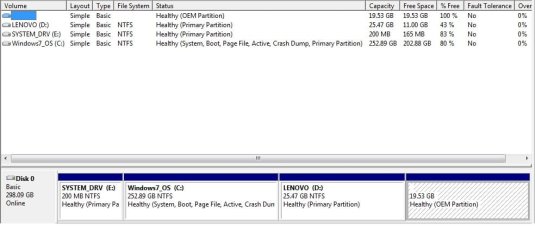
Please find the screenshot attached. As you said there are 4 partitions right now. I'm seeing this E: just from today. I'm not sure how it happened:(
Please let me know the next step
 

My Computer

Computer type
Laptop
Computer Manufacturer/Model Number
Lenevo
OS
Windows 7 home basic 64 bit
Use this program (Home edition). Right click on the E: partition, go to Modify and click on "Set partition as Logical'. Then click on Apply (top left)
 

My Computer

Computer Manufacturer/Model Number
HP, Dell, Gateway, Toshiba - 4 laptops and 2 desktops
OS
Vista, Windows7, Mint Mate, Zorin, Windows 8
CPU
from 1.6GHz Duo to i7
Monitor(s) Displays
2x HP w2207
Hard Drives
5x HDD, 7x SSD, 12x Externals
Keyboard
with trackball - no mices
Mouse
Trackball mice
Internet Speed
DSL 6000
There are something that is not traditional in your partitions. The System partition should me active and contain the bootloader. So mark the 200 MB partition as active. Follow the tutorial http://www.sevenforums.com/tutorials/71432-partition-mark-active.html to mark it as active, and then run Startup Repair for three separate times, with restarts after every single run.
Startup Repair: Run three separate times.

Next correction, The system partition should be hidden, without any drive letter. Remove the Drive Letter "E" from the 200 MB System partition, following http://www.sevenforums.com/tutorials/82994-drive-letter-add-change-remove-windows-7-a.html

Next, Convert C as logical.

It is done. Hopefully.
 

My Computer

Computer type
PC/Desktop
Computer Manufacturer/Model Number
Self Assembled
OS
Microsoft Windows 10 Pro Insider Preview 64-bit
CPU
Intel(R) Core(TM) i3-4130 CPU @ 3.40GHz
Motherboard
Gigabyte Technology Co., Ltd. B85M-D3H
Memory
Corsair Vengence 4GB x2 (8.00GB Dual-Channel DDR3 @ 798MHz)
Graphics Card(s)
2047MB GeForce GTS 450 (ZOTAC International)
Sound Card
Onboard (Realtek High Definition Audio)
Monitor(s) Displays
LG Flatron E2040T
Screen Resolution
1600x900
Hard Drives
Western Digital 1 TB
Seagate 500 GB
PSU
Corsair VS550
Case
Cooler Master K380
Cooling
Cooler Master Seidon 120V Plus
Keyboard
Logitech MK260r
Mouse
Logitech MK260r
Internet Speed
PMPL Broadband
Antivirus
Windows Defender + MBAM
Browser
Firefox
Other Info
Dell Studio 15" Laptop
If you follow Arc's suggestion, you cannot do what I posted in Post #5. But I would not go thru this hassle. The bootmgr in the C partition is a completely viable configuration. I always move the bootmgr to C because that is a much easier handling e.g. if you make images.

But if you like the bootmgr in E, you can just move it like this: http://www.sevenforums.com/tutorials/209885-bootmgr-move-c-easybcd.html Just select E as boot partition rather than C (on the second little window).

What has happened here is that you probably installed Win7 into the previous C partition of Win8. The Win7 installer chose to install the bootmgr there too - and that is OK. The E partition is the old leftover system partition of Win8 which really has no function any more.

PS: I hope we did not completely confuse you now. If yes, post back.
 

My Computer

Computer Manufacturer/Model Number
HP, Dell, Gateway, Toshiba - 4 laptops and 2 desktops
OS
Vista, Windows7, Mint Mate, Zorin, Windows 8
CPU
from 1.6GHz Duo to i7
Monitor(s) Displays
2x HP w2207
Hard Drives
5x HDD, 7x SSD, 12x Externals
Keyboard
with trackball - no mices
Mouse
Trackball mice
Internet Speed
DSL 6000
Back
Top