Disk space usage discrepancy

wildpig1234

New member
Member
Local time
12:48 PM
Messages
45
I just installed Win 7 Ultimate on my UMPC, Viliv X70. I am surprised at how well it runs (using optimized for best performance setting without aero) on my fairly slow umpc (1.3ghz atom, 1 gb ram, 16gb ssd). Even the diskspace requirement surprised me.

But the disk space usage is also what i have question about. When i right click and select property for drive C, the used space is 7.27 GB and free space is 2.95 GB on a 10.2 GB partition.

But when i go to the root dir of drive C and select all the files and folders and right click on property, the total space used by 65 thousands files is 9.81 GB.

I don't have disk compression enabled.

Anyone has an answer to this? all of my other drives shows the expected disk space usage whether by right clicking on the drive letter and select property or by highlighting all the files and folders and select property?

Btw, i really miss the "ask me what to do" option in XP when you do shutdown in Win 7. I guess there is no way to bring that back unless anyone here knows how?
 

My Computer

Computer Manufacturer/Model Number
Viliv X70|Asus P8Z68 Deluxe|MSI FXA890-GD70
OS
Windows 7 Ultimate SP1
CPU
Intel Atom z520 1.33ghz|Intel Core i7 2600K|AMD Phenom II955
Memory
1 GB DDR2|32 GB DDR3|32 GB DDR3
Graphics Card(s)
Intel GM500|Nvidia GTX480|Nvidia 9800GT
Sound Card
Built in
Monitor(s) Displays
Built in Touch sensitive resistive lcd|Samsung 305T|HP 3065
Screen Resolution
1024x600|2560x1600|2506x1600
Hard Drives
16 GB SSD Siliconmotion SM2233AB|Mechanical HDD
PSU
Built in|Ultra LSP 650|Ultra LSP 650
Cooling
Passive|active|active
Internet Speed
12 mbit cable
Normal behavior.

Mine shows 11 occupied one way and 21 the other. If I show hidden files, it says 17.
 

My Computer

Computer type
PC/Desktop
Computer Manufacturer/Model Number
Ignatz Special; 4 speed manual gearbox; factory air conditioning; one of one
OS
Windows 7 Home Premium SP1, 64-bit
CPU
Intel Skylake i5-6600K, not overclocked
Motherboard
AsRock Z170M Extreme 4, micro ATX
Memory
8 GB HyperX DDR4-2666 (2 x 4 GB)
Graphics Card(s)
none; graphics are integrated on CPU
Sound Card
onboard: Realtek ALC1150; external: USB Behringer UF0-202
Monitor(s) Displays
Dell S2340M 23 inch IPS
Screen Resolution
1600 x 900
Hard Drives
System: Crucial MX100 series SSD, 128 GB;
Data: Samsung Spinpoint 103SJ, 1 TB;
Backup: WD Caviar Green WD30EZRX-00D8PB0, 3 TB
PSU
Rosewill SilentNight 500 watt fanless, semi-modular
Case
Antec Solo II
Cooling
Noctua NH-U12S; Noctua F12 intake, Noctua S12A exhaust
Keyboard
Microsoft 200 6JH-00001 USB
Mouse
Dell or Microsoft optical wired; USB
Antivirus
Microsoft Security Essentials and Malwarebytes Premium
Browser
Pale Moon
Other Info
All fans PWM; speeds at idle: CPU circa 500 rpm; intake circa 600 rpm; exhaust circa 600 rpm; CPU temps 27 idle and 47 C load in a warm room (27 C/81 F) when running Intel Extreme Tuning Utility stress test.
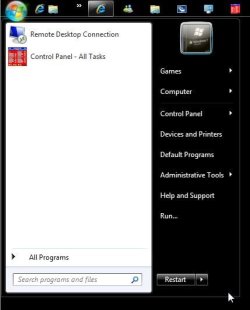
Click the arrow next to shutdown and choose what you want to do, for your second question.
 

My Computer

Computer Manufacturer/Model Number
Sony Vaio Z46GDU
OS
Windows 7 Ultimate x86-64
CPU
[email protected] 1066MHz FSB
Motherboard
Sony branded
Memory
6GB DDR3 1066MHz
Graphics Card(s)
9300M GS 256MB Dedicated (Speed) + Intel4500MHD (Stamina)
Sound Card
Realtek HD Audio
Monitor(s) Displays
13.1' WXGA
Screen Resolution
1600x900
Hard Drives
320GB 7200RPM w/ 16MB cache
Internet Speed
1MB/s
Hello Wildpig1234 Welcome to the Se7en Forums!

When seeing two different amounts of drive space used one thing to add into the mix there is the paging file seen with any Windows installation by default. Windows reserves a certain amount of drive space for that as well as the creation of new system restore points.

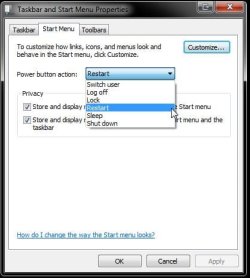
As for options at shutdown, logooff, restart you bring over the dropdown menu to the right for seleting one or the other. For changing the default option seen for the button itsself you Birng up the Start menu and right click on a blank spot to select "properties" and go to the "power button options" to select one from the dropdown list of choices in the properties screen there.

The images here will show how those look.
 

Attachments

  • Shutdown Options.jpg
    Shutdown Options.jpg
    54.3 KB · Views: 16
  • Power Button Options.jpg
    Power Button Options.jpg
    39.7 KB · Views: 15

My Computers

System One System Two

  • Computer type
    PC/Desktop
    Computer Manufacturer/Model Number
    Custom builds = 2
    OS
    W7 Ultimate x64/W10 Pro x64/W11 Pro Triple Boot - Main PC W7 Remote PC Micro ATX W7 Pro x64/W11 Pro
    CPU
    AMD Phenom II X4 975 Deneb 3.6ghz - 965 2nd remote pc
    Motherboard
    Gigabyte GA-790XTA-UD4-Gigabyte GA-880GM-D2H remote pc
    Memory
    Kingston Hyper X DDR3 1600 1.5v 16gb - Hyper X Fury 8gb 2nd
    Graphics Card(s)
    MSI HD Radeon 5750 1gb - MSI HD Radeon 6450 on mini tower
    Sound Card
    Creative Labs X-Fi Xtreme Audio P - Realtek onooard 2nd case
    Monitor(s) Displays
    ASUS VW199T-P 19" HP 2082a Main-HP 2082a 20" remote pc
    Screen Resolution
    Asus 1440x900 - HP 1600x900
    Hard Drives
    WD Black 1TB HD per OS W7, W10, and pending W11 presently on 500gb OS Drive - Pending Triple 1TB HDs for Spanned Storage/backup volume
    Single 2TB external USB enclosure, single 1TB System 7 Host/Boot drive, Pending 8TB external HD for system image b
    PSU
    Corsair 750TX - primary / Corsair CX600 - second
    Case
    Antec 900-2 - SSD compatible / NZXT Vulcan mini tower
    Cooling
    Zalman CNPS9900A
    Keyboard
    AZIO L70 Backlit Letters Gaming - ONN Cordless/USB
    Mouse
    MSI DS200 Programmable, Logitech Cordless
    Internet Speed
    30mbps upgrade - primary hard wired - mini tower usb WiFi
    Antivirus
    GFI VIPRE Internet Security 2014 on W7 2016 beta on W10,
    Browser
    Cyberfox, WaterFox 64bit FF variants, FireFox x64, Pale Moon
    Other Info
    Accomdata fan cooled usb 2.0 PIDE/Sata II, III external enclosure.
    Sambient usb/eSata PATA/Sata II, III external enclosure.
  • Computer type
    PC/Desktop
    System Manufacturer/Model Number
    CUSTOM ASSEMBLY
    OS
    W7 Pro x64/W11 Pro
    CPU
    AMD Deneb 3.6ghz - 965
    Motherboard
    Gigabyte GA-880GM-D2H remote pc
    Memory
    Kingston Hyper X Fury 8gb
    Graphics Card(s)
    MSI HD Radeon 6450 DVI Output
    Sound Card
    Realtek onooard Creative or Other separate PENDING
    Monitor(s) Displays
    VIZIO 32" LCD TV Separate LCD Pending
    Screen Resolution
    1600x1080
    Hard Drives
    WD 500GB OS Host/Boot WD Green 1TB Storage/Backup
    PSU
    Corsair 600W - THERMALTAKE 600W spare case
    Case
    NZXT Vulcan mini tower
    Cooling
    Twin 120mm Top Fans - 240mm Side Cover
    Keyboard
    ONN Cordless/USB Logitech Cordless
    Mouse
    ONN USB/Cordless - Logitech Cordless
    Internet Speed
    DSL 5G
    Browser
    MS Edge, FireFox, WaterFox x64, FireFox Nightly
    Other Info
    OS Testing-Remote Access to Main TeamViewer
Night Hawk - you haven't disabled the option to highlight newly installed programs? I always found that annoying.
 

My Computer

Computer Manufacturer/Model Number
Sony Vaio Z46GDU
OS
Windows 7 Ultimate x86-64
CPU
[email protected] 1066MHz FSB
Motherboard
Sony branded
Memory
6GB DDR3 1066MHz
Graphics Card(s)
9300M GS 256MB Dedicated (Speed) + Intel4500MHD (Stamina)
Sound Card
Realtek HD Audio
Monitor(s) Displays
13.1' WXGA
Screen Resolution
1600x900
Hard Drives
320GB 7200RPM w/ 16MB cache
Internet Speed
1MB/s

My Computers

System One System Two

  • Computer type
    PC/Desktop
    Computer Manufacturer/Model Number
    Custom builds = 2
    OS
    W7 Ultimate x64/W10 Pro x64/W11 Pro Triple Boot - Main PC W7 Remote PC Micro ATX W7 Pro x64/W11 Pro
    CPU
    AMD Phenom II X4 975 Deneb 3.6ghz - 965 2nd remote pc
    Motherboard
    Gigabyte GA-790XTA-UD4-Gigabyte GA-880GM-D2H remote pc
    Memory
    Kingston Hyper X DDR3 1600 1.5v 16gb - Hyper X Fury 8gb 2nd
    Graphics Card(s)
    MSI HD Radeon 5750 1gb - MSI HD Radeon 6450 on mini tower
    Sound Card
    Creative Labs X-Fi Xtreme Audio P - Realtek onooard 2nd case
    Monitor(s) Displays
    ASUS VW199T-P 19" HP 2082a Main-HP 2082a 20" remote pc
    Screen Resolution
    Asus 1440x900 - HP 1600x900
    Hard Drives
    WD Black 1TB HD per OS W7, W10, and pending W11 presently on 500gb OS Drive - Pending Triple 1TB HDs for Spanned Storage/backup volume
    Single 2TB external USB enclosure, single 1TB System 7 Host/Boot drive, Pending 8TB external HD for system image b
    PSU
    Corsair 750TX - primary / Corsair CX600 - second
    Case
    Antec 900-2 - SSD compatible / NZXT Vulcan mini tower
    Cooling
    Zalman CNPS9900A
    Keyboard
    AZIO L70 Backlit Letters Gaming - ONN Cordless/USB
    Mouse
    MSI DS200 Programmable, Logitech Cordless
    Internet Speed
    30mbps upgrade - primary hard wired - mini tower usb WiFi
    Antivirus
    GFI VIPRE Internet Security 2014 on W7 2016 beta on W10,
    Browser
    Cyberfox, WaterFox 64bit FF variants, FireFox x64, Pale Moon
    Other Info
    Accomdata fan cooled usb 2.0 PIDE/Sata II, III external enclosure.
    Sambient usb/eSata PATA/Sata II, III external enclosure.
  • Computer type
    PC/Desktop
    System Manufacturer/Model Number
    CUSTOM ASSEMBLY
    OS
    W7 Pro x64/W11 Pro
    CPU
    AMD Deneb 3.6ghz - 965
    Motherboard
    Gigabyte GA-880GM-D2H remote pc
    Memory
    Kingston Hyper X Fury 8gb
    Graphics Card(s)
    MSI HD Radeon 6450 DVI Output
    Sound Card
    Realtek onooard Creative or Other separate PENDING
    Monitor(s) Displays
    VIZIO 32" LCD TV Separate LCD Pending
    Screen Resolution
    1600x1080
    Hard Drives
    WD 500GB OS Host/Boot WD Green 1TB Storage/Backup
    PSU
    Corsair 600W - THERMALTAKE 600W spare case
    Case
    NZXT Vulcan mini tower
    Cooling
    Twin 120mm Top Fans - 240mm Side Cover
    Keyboard
    ONN Cordless/USB Logitech Cordless
    Mouse
    ONN USB/Cordless - Logitech Cordless
    Internet Speed
    DSL 5G
    Browser
    MS Edge, FireFox, WaterFox x64, FireFox Nightly
    Other Info
    OS Testing-Remote Access to Main TeamViewer
Just have - I know what I installed, 7.
 

My Computer

Computer Manufacturer/Model Number
Sony Vaio Z46GDU
OS
Windows 7 Ultimate x86-64
CPU
[email protected] 1066MHz FSB
Motherboard
Sony branded
Memory
6GB DDR3 1066MHz
Graphics Card(s)
9300M GS 256MB Dedicated (Speed) + Intel4500MHD (Stamina)
Sound Card
Realtek HD Audio
Monitor(s) Displays
13.1' WXGA
Screen Resolution
1600x900
Hard Drives
320GB 7200RPM w/ 16MB cache
Internet Speed
1MB/s
I'm still waiting for Wildpig1234 to have a chance to reply here before we go way too far off the subject but can still take care of a few things easy enough.
 

Attachments

  • Where did they all go.jpg
    Where did they all go.jpg
    34.1 KB · Views: 13

My Computers

System One System Two

  • Computer type
    PC/Desktop
    Computer Manufacturer/Model Number
    Custom builds = 2
    OS
    W7 Ultimate x64/W10 Pro x64/W11 Pro Triple Boot - Main PC W7 Remote PC Micro ATX W7 Pro x64/W11 Pro
    CPU
    AMD Phenom II X4 975 Deneb 3.6ghz - 965 2nd remote pc
    Motherboard
    Gigabyte GA-790XTA-UD4-Gigabyte GA-880GM-D2H remote pc
    Memory
    Kingston Hyper X DDR3 1600 1.5v 16gb - Hyper X Fury 8gb 2nd
    Graphics Card(s)
    MSI HD Radeon 5750 1gb - MSI HD Radeon 6450 on mini tower
    Sound Card
    Creative Labs X-Fi Xtreme Audio P - Realtek onooard 2nd case
    Monitor(s) Displays
    ASUS VW199T-P 19" HP 2082a Main-HP 2082a 20" remote pc
    Screen Resolution
    Asus 1440x900 - HP 1600x900
    Hard Drives
    WD Black 1TB HD per OS W7, W10, and pending W11 presently on 500gb OS Drive - Pending Triple 1TB HDs for Spanned Storage/backup volume
    Single 2TB external USB enclosure, single 1TB System 7 Host/Boot drive, Pending 8TB external HD for system image b
    PSU
    Corsair 750TX - primary / Corsair CX600 - second
    Case
    Antec 900-2 - SSD compatible / NZXT Vulcan mini tower
    Cooling
    Zalman CNPS9900A
    Keyboard
    AZIO L70 Backlit Letters Gaming - ONN Cordless/USB
    Mouse
    MSI DS200 Programmable, Logitech Cordless
    Internet Speed
    30mbps upgrade - primary hard wired - mini tower usb WiFi
    Antivirus
    GFI VIPRE Internet Security 2014 on W7 2016 beta on W10,
    Browser
    Cyberfox, WaterFox 64bit FF variants, FireFox x64, Pale Moon
    Other Info
    Accomdata fan cooled usb 2.0 PIDE/Sata II, III external enclosure.
    Sambient usb/eSata PATA/Sata II, III external enclosure.
  • Computer type
    PC/Desktop
    System Manufacturer/Model Number
    CUSTOM ASSEMBLY
    OS
    W7 Pro x64/W11 Pro
    CPU
    AMD Deneb 3.6ghz - 965
    Motherboard
    Gigabyte GA-880GM-D2H remote pc
    Memory
    Kingston Hyper X Fury 8gb
    Graphics Card(s)
    MSI HD Radeon 6450 DVI Output
    Sound Card
    Realtek onooard Creative or Other separate PENDING
    Monitor(s) Displays
    VIZIO 32" LCD TV Separate LCD Pending
    Screen Resolution
    1600x1080
    Hard Drives
    WD 500GB OS Host/Boot WD Green 1TB Storage/Backup
    PSU
    Corsair 600W - THERMALTAKE 600W spare case
    Case
    NZXT Vulcan mini tower
    Cooling
    Twin 120mm Top Fans - 240mm Side Cover
    Keyboard
    ONN Cordless/USB Logitech Cordless
    Mouse
    ONN USB/Cordless - Logitech Cordless
    Internet Speed
    DSL 5G
    Browser
    MS Edge, FireFox, WaterFox x64, FireFox Nightly
    Other Info
    OS Testing-Remote Access to Main TeamViewer
Hello Wildpig1234 Welcome to the Se7en Forums!

When seeing two different amounts of drive space used one thing to add into the mix there is the paging file seen with any Windows installation by default. Windows reserves a certain amount of drive space for that as well as the creation of new system restore points.

As for options at shutdown, logoff, restart you bring over the dropdown menu to the right for seleting one or the other. For changing the default option seen for the button itsself you Birng up the Start menu and right click on a blank spot to select "properties" and go to the "power button options" to select one from the dropdown list of choices in the properties screen there.

The images here will show how those look.

My pagefile is on another partition, drive D. System restore is disabled on all drives. I don't understand why right clicking on drive C, and select property it says i have 2.95 GB freespace in a 10.2 GB partition, but selecting all the files and folder on drive C and right click and select property, it says i am using 9.81 GB for all the files on drive C. Does that means i really don't have 2.95 GB free? Does windows 7 somehow use compression even though i tell it not to? I do have show all files enabled btw

There;s no option to set power button to the option "ask me what to do". also when you click shut down button, it does so immediately without giving you another dialog box (with the choice of logoff, restart or shut down) to confirm like in XP. From what i heard, they did away with this starting with Vista because some people don't bother to click on shutdown again on the second dialog box that comes up. This is bad mistake because its very easy to click on shutdown button by mistake. Yes, you can click on the arrow next to the shutdown button, but that is a small arrow.
 

My Computer

Computer Manufacturer/Model Number
Viliv X70|Asus P8Z68 Deluxe|MSI FXA890-GD70
OS
Windows 7 Ultimate SP1
CPU
Intel Atom z520 1.33ghz|Intel Core i7 2600K|AMD Phenom II955
Memory
1 GB DDR2|32 GB DDR3|32 GB DDR3
Graphics Card(s)
Intel GM500|Nvidia GTX480|Nvidia 9800GT
Sound Card
Built in
Monitor(s) Displays
Built in Touch sensitive resistive lcd|Samsung 305T|HP 3065
Screen Resolution
1024x600|2560x1600|2506x1600
Hard Drives
16 GB SSD Siliconmotion SM2233AB|Mechanical HDD
PSU
Built in|Ultra LSP 650|Ultra LSP 650
Cooling
Passive|active|active
Internet Speed
12 mbit cable
My pagefile is on another partition, drive D. System restore is disabled on all drives. I don't understand why right clicking on drive C, and select property it says i have 2.95 GB freespace in a 10.2 GB partition, but selecting all the files and folder on drive C and right click and select property, it says i am using 9.81 GB for all the files on drive C. Does that means i really don't have 2.95 GB free? Does windows 7 somehow use compression even though i tell it not to? I do have show all files enabled btw
The properties of the C drive are correct in what it tells you. When reviewing file size by going though folder properties, a lot of the files are counted multiple times. This is because of folder junctions and hardlinks. The drive properties however, does its calculation of space by examining the bitmap which is by far the most accurate.
 

My Computer

Computer type
PC/Desktop
Computer Manufacturer/Model Number
Alienware Aurora ALX R4
OS
Windows 10 Pro (x64)
CPU
Intel Core i7-3930K (3.2GHz - 4.5GHz)
Motherboard
Alienware Aurora-R4 x79
Memory
4x Samsung 4GB PC3-12800 DDR3 (16GB 1600MHz)
Graphics Card(s)
Nvidia Geforce GTX 690
Sound Card
SteelSeries Siberia Elite
Monitor(s) Displays
Dell UltraSharp U3011
Screen Resolution
2560x1600
Hard Drives
Samsung 850 Pro 256 GB, Seagate 1TB Desktop Hybrid HDD, 2x Western Digital 4TB Green HDD
PSU
875W Some Dell PSU <.<
Case
Alienware Aurora ALX
Cooling
Custom Liquid Cooling (EK CPU & GPU blocks) dual EK 480RAD
Keyboard
Logitech G710+ Mechanical
Mouse
Logitech G700s
Internet Speed
Verizon Fios (50 mbps average)
Other Info
Server: Intel NUC D54250WYK: i5-4250U, 16GB, 256 GB mSATA, Windows Server 2012 R2
My pagefile is on another partition, drive D. System restore is disabled on all drives. I don't understand why right clicking on drive C, and select property it says i have 2.95 GB freespace in a 10.2 GB partition, but selecting all the files and folder on drive C and right click and select property, it says i am using 9.81 GB for all the files on drive C. Does that means i really don't have 2.95 GB free? Does windows 7 somehow use compression even though i tell it not to? I do have show all files enabled btw
The properties of the C drive are correct in what it tells you. When reviewing file size by going though folder properties, a lot of the files are counted multiple times. This is because of folder junctions and hardlinks. The drive properties however, does its calculation of space by examining the bitmap which is by far the most accurate.

Hmm, that explanation is the best one so far. But still strange. It just strange because i haven't seen this behavior of files counted multiple times due to folder junctions and hardlinks in XP. Is this something different in win 7?
 

My Computer

Computer Manufacturer/Model Number
Viliv X70|Asus P8Z68 Deluxe|MSI FXA890-GD70
OS
Windows 7 Ultimate SP1
CPU
Intel Atom z520 1.33ghz|Intel Core i7 2600K|AMD Phenom II955
Memory
1 GB DDR2|32 GB DDR3|32 GB DDR3
Graphics Card(s)
Intel GM500|Nvidia GTX480|Nvidia 9800GT
Sound Card
Built in
Monitor(s) Displays
Built in Touch sensitive resistive lcd|Samsung 305T|HP 3065
Screen Resolution
1024x600|2560x1600|2506x1600
Hard Drives
16 GB SSD Siliconmotion SM2233AB|Mechanical HDD
PSU
Built in|Ultra LSP 650|Ultra LSP 650
Cooling
Passive|active|active
Internet Speed
12 mbit cable
If you don't use Hibernation, you can probably free up another gig by making sure Hibernation is disabled and deleting the hibrfile.sys
 

My Computer

Computer Manufacturer/Model Number
Averatec 6130HS-20
OS
Windows 7 Professional 32-bit (6.1, Build 7600)
CPU
Intel(R) Pentium(R) 4 3.00 GHz HT
Memory
2.0 GB
Graphics Card(s)
ATI Mobility Radeon 9600 64MB
Sound Card
Realtek AC'97 Audio
Screen Resolution
1280 x 800
Hard Drives
Seagate 96023A 60GB 7200RPM -
Seagate FreeAgentDesktop 250GB
Cooling
20 Inch Box Fan
Mouse
Targus PAWM10 Wireless Optical Laptop Mouse
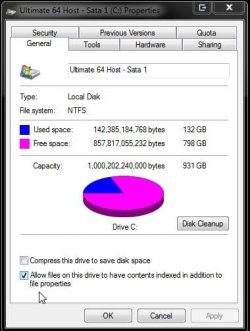
Where does the drive space go? When going to use a 16gb flash drive some 15.04gb will be found available there. The image here shows 142+gb of data including the 7 installation itself deducted from a 1tb drive.

For the 10.2gb C you have there before adding anything on it you should be seeing some 9.49949026107788gb according to one hard drive calculator seen at The Tomorrow Times: The Hard Drive Capacity Calculator

To convert decimal units of measurement as drives are labeled into binary units of measurement to see where the drive space goes you can thank Airbot for the best multiplier of 0.9313226 multiplied by each gigabyte of hard drive space.

Besides having the paging file created on D one other factor not mentioned is what? system restore points
 

Attachments

  • Host Drive Properties.jpg
    Host Drive Properties.jpg
    44.4 KB · Views: 16

My Computers

System One System Two

  • Computer type
    PC/Desktop
    Computer Manufacturer/Model Number
    Custom builds = 2
    OS
    W7 Ultimate x64/W10 Pro x64/W11 Pro Triple Boot - Main PC W7 Remote PC Micro ATX W7 Pro x64/W11 Pro
    CPU
    AMD Phenom II X4 975 Deneb 3.6ghz - 965 2nd remote pc
    Motherboard
    Gigabyte GA-790XTA-UD4-Gigabyte GA-880GM-D2H remote pc
    Memory
    Kingston Hyper X DDR3 1600 1.5v 16gb - Hyper X Fury 8gb 2nd
    Graphics Card(s)
    MSI HD Radeon 5750 1gb - MSI HD Radeon 6450 on mini tower
    Sound Card
    Creative Labs X-Fi Xtreme Audio P - Realtek onooard 2nd case
    Monitor(s) Displays
    ASUS VW199T-P 19" HP 2082a Main-HP 2082a 20" remote pc
    Screen Resolution
    Asus 1440x900 - HP 1600x900
    Hard Drives
    WD Black 1TB HD per OS W7, W10, and pending W11 presently on 500gb OS Drive - Pending Triple 1TB HDs for Spanned Storage/backup volume
    Single 2TB external USB enclosure, single 1TB System 7 Host/Boot drive, Pending 8TB external HD for system image b
    PSU
    Corsair 750TX - primary / Corsair CX600 - second
    Case
    Antec 900-2 - SSD compatible / NZXT Vulcan mini tower
    Cooling
    Zalman CNPS9900A
    Keyboard
    AZIO L70 Backlit Letters Gaming - ONN Cordless/USB
    Mouse
    MSI DS200 Programmable, Logitech Cordless
    Internet Speed
    30mbps upgrade - primary hard wired - mini tower usb WiFi
    Antivirus
    GFI VIPRE Internet Security 2014 on W7 2016 beta on W10,
    Browser
    Cyberfox, WaterFox 64bit FF variants, FireFox x64, Pale Moon
    Other Info
    Accomdata fan cooled usb 2.0 PIDE/Sata II, III external enclosure.
    Sambient usb/eSata PATA/Sata II, III external enclosure.
  • Computer type
    PC/Desktop
    System Manufacturer/Model Number
    CUSTOM ASSEMBLY
    OS
    W7 Pro x64/W11 Pro
    CPU
    AMD Deneb 3.6ghz - 965
    Motherboard
    Gigabyte GA-880GM-D2H remote pc
    Memory
    Kingston Hyper X Fury 8gb
    Graphics Card(s)
    MSI HD Radeon 6450 DVI Output
    Sound Card
    Realtek onooard Creative or Other separate PENDING
    Monitor(s) Displays
    VIZIO 32" LCD TV Separate LCD Pending
    Screen Resolution
    1600x1080
    Hard Drives
    WD 500GB OS Host/Boot WD Green 1TB Storage/Backup
    PSU
    Corsair 600W - THERMALTAKE 600W spare case
    Case
    NZXT Vulcan mini tower
    Cooling
    Twin 120mm Top Fans - 240mm Side Cover
    Keyboard
    ONN Cordless/USB Logitech Cordless
    Mouse
    ONN USB/Cordless - Logitech Cordless
    Internet Speed
    DSL 5G
    Browser
    MS Edge, FireFox, WaterFox x64, FireFox Nightly
    Other Info
    OS Testing-Remote Access to Main TeamViewer

My Computer

Computer Manufacturer/Model Number
Self Built
OS
Win 7 Ultimate 32bit
CPU
C2D E6600 2.4Ghz
Motherboard
Intel D965WH
Memory
4G Kingston KHX5400D2
Graphics Card(s)
EVGA GTX 570 HD SC (012-P3-1573-KR)
Sound Card
On-Board
Monitor(s) Displays
Samsung 226BW
Screen Resolution
1680 x 1050
Hard Drives
2 x 250 Seagate Barracuda
2 x 500 Seagate Barracuda (Raid1)
PSU
Corsair TX750W
Case
In-Win C589
Cooling
Stock Intel Cooling
Where does the drive space go? When going to use a 16gb flash drive some 15.04gb will be found available there. The image here shows 142+gb of data including the 7 installation itself deducted from a 1tb drive.

For the 10.2gb C you have there before adding anything on it you should be seeing some 9.49949026107788gb according to one hard drive calculator seen at The Tomorrow Times: The Hard Drive Capacity Calculator

To convert decimal units of measurement as drives are labeled into binary units of measurement to see where the drive space goes you can thank Airbot for the best multiplier of 0.9313226 multiplied by each gigabyte of hard drive space.

Besides having the paging file created on D one other factor not mentioned is what? system restore points

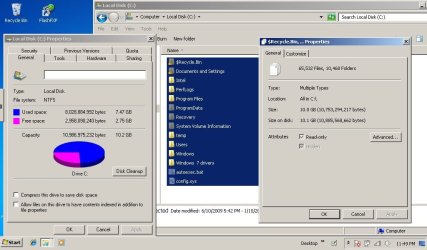
I am not sure if most people understand what i am saying yet. On that box that Night Hawk shows for drive C property, mine would say the used space is 7.27 GB and free space is 2.95 GB and total capacity of 10.2 GB. But if i manually highlight all the files and folders on drive C and right click and select property, it would say that there are like 65k files and a few hundred folders and they use 9.81 GB total.

Does anyone see that this does not jive? the used space stated in the drive c property box should equal to the total space that all my files and folders use unless like Logicearth said before that some files are being counted more than once somehow.

I probably will make a screen capture to clarify....

i did have restore point and hibernation disable. And I am not talking about converting between binary and decimal definition of GB.... The number mentioned in my posts are all binary GB.
 

My Computer

Computer Manufacturer/Model Number
Viliv X70|Asus P8Z68 Deluxe|MSI FXA890-GD70
OS
Windows 7 Ultimate SP1
CPU
Intel Atom z520 1.33ghz|Intel Core i7 2600K|AMD Phenom II955
Memory
1 GB DDR2|32 GB DDR3|32 GB DDR3
Graphics Card(s)
Intel GM500|Nvidia GTX480|Nvidia 9800GT
Sound Card
Built in
Monitor(s) Displays
Built in Touch sensitive resistive lcd|Samsung 305T|HP 3065
Screen Resolution
1024x600|2560x1600|2506x1600
Hard Drives
16 GB SSD Siliconmotion SM2233AB|Mechanical HDD
PSU
Built in|Ultra LSP 650|Ultra LSP 650
Cooling
Passive|active|active
Internet Speed
12 mbit cable
Don't disable system restore - it is essential, configure it so it takes the minimum space required.
 

My Computer

Computer Manufacturer/Model Number
Sony Vaio Z46GDU
OS
Windows 7 Ultimate x86-64
CPU
[email protected] 1066MHz FSB
Motherboard
Sony branded
Memory
6GB DDR3 1066MHz
Graphics Card(s)
9300M GS 256MB Dedicated (Speed) + Intel4500MHD (Stamina)
Sound Card
Realtek HD Audio
Monitor(s) Displays
13.1' WXGA
Screen Resolution
1600x900
Hard Drives
320GB 7200RPM w/ 16MB cache
Internet Speed
1MB/s
I do understand what you are saying,,,, and I am sure there is a logical explanation of it.

When looking at the properties of all files on C: are you looking at Size on Disk or Size?
I think Size on Disk should correlate with Local C: Properties Used Space.
 

My Computer

Computer Manufacturer/Model Number
Self Built
OS
Win 7 Ultimate 32bit
CPU
C2D E6600 2.4Ghz
Motherboard
Intel D965WH
Memory
4G Kingston KHX5400D2
Graphics Card(s)
EVGA GTX 570 HD SC (012-P3-1573-KR)
Sound Card
On-Board
Monitor(s) Displays
Samsung 226BW
Screen Resolution
1680 x 1050
Hard Drives
2 x 250 Seagate Barracuda
2 x 500 Seagate Barracuda (Raid1)
PSU
Corsair TX750W
Case
In-Win C589
Cooling
Stock Intel Cooling
The screen posted earlier is in binary there as well being looked in Windows. That comes out to an even figure with the "Hidden system files" options unchecked in the menu bar>tools>folder options>view tab.

The files unaccounted for there would be those if you left everything at the default view settings and be one explaination right off for not adding those into the total.
 

My Computers

System One System Two

  • Computer type
    PC/Desktop
    Computer Manufacturer/Model Number
    Custom builds = 2
    OS
    W7 Ultimate x64/W10 Pro x64/W11 Pro Triple Boot - Main PC W7 Remote PC Micro ATX W7 Pro x64/W11 Pro
    CPU
    AMD Phenom II X4 975 Deneb 3.6ghz - 965 2nd remote pc
    Motherboard
    Gigabyte GA-790XTA-UD4-Gigabyte GA-880GM-D2H remote pc
    Memory
    Kingston Hyper X DDR3 1600 1.5v 16gb - Hyper X Fury 8gb 2nd
    Graphics Card(s)
    MSI HD Radeon 5750 1gb - MSI HD Radeon 6450 on mini tower
    Sound Card
    Creative Labs X-Fi Xtreme Audio P - Realtek onooard 2nd case
    Monitor(s) Displays
    ASUS VW199T-P 19" HP 2082a Main-HP 2082a 20" remote pc
    Screen Resolution
    Asus 1440x900 - HP 1600x900
    Hard Drives
    WD Black 1TB HD per OS W7, W10, and pending W11 presently on 500gb OS Drive - Pending Triple 1TB HDs for Spanned Storage/backup volume
    Single 2TB external USB enclosure, single 1TB System 7 Host/Boot drive, Pending 8TB external HD for system image b
    PSU
    Corsair 750TX - primary / Corsair CX600 - second
    Case
    Antec 900-2 - SSD compatible / NZXT Vulcan mini tower
    Cooling
    Zalman CNPS9900A
    Keyboard
    AZIO L70 Backlit Letters Gaming - ONN Cordless/USB
    Mouse
    MSI DS200 Programmable, Logitech Cordless
    Internet Speed
    30mbps upgrade - primary hard wired - mini tower usb WiFi
    Antivirus
    GFI VIPRE Internet Security 2014 on W7 2016 beta on W10,
    Browser
    Cyberfox, WaterFox 64bit FF variants, FireFox x64, Pale Moon
    Other Info
    Accomdata fan cooled usb 2.0 PIDE/Sata II, III external enclosure.
    Sambient usb/eSata PATA/Sata II, III external enclosure.
  • Computer type
    PC/Desktop
    System Manufacturer/Model Number
    CUSTOM ASSEMBLY
    OS
    W7 Pro x64/W11 Pro
    CPU
    AMD Deneb 3.6ghz - 965
    Motherboard
    Gigabyte GA-880GM-D2H remote pc
    Memory
    Kingston Hyper X Fury 8gb
    Graphics Card(s)
    MSI HD Radeon 6450 DVI Output
    Sound Card
    Realtek onooard Creative or Other separate PENDING
    Monitor(s) Displays
    VIZIO 32" LCD TV Separate LCD Pending
    Screen Resolution
    1600x1080
    Hard Drives
    WD 500GB OS Host/Boot WD Green 1TB Storage/Backup
    PSU
    Corsair 600W - THERMALTAKE 600W spare case
    Case
    NZXT Vulcan mini tower
    Cooling
    Twin 120mm Top Fans - 240mm Side Cover
    Keyboard
    ONN Cordless/USB Logitech Cordless
    Mouse
    ONN USB/Cordless - Logitech Cordless
    Internet Speed
    DSL 5G
    Browser
    MS Edge, FireFox, WaterFox x64, FireFox Nightly
    Other Info
    OS Testing-Remote Access to Main TeamViewer
Yep, your right Hawk, i see it now.
I'm on XP SP3 and notice the same thing
 

My Computer

Computer Manufacturer/Model Number
Self Built
OS
Win 7 Ultimate 32bit
CPU
C2D E6600 2.4Ghz
Motherboard
Intel D965WH
Memory
4G Kingston KHX5400D2
Graphics Card(s)
EVGA GTX 570 HD SC (012-P3-1573-KR)
Sound Card
On-Board
Monitor(s) Displays
Samsung 226BW
Screen Resolution
1680 x 1050
Hard Drives
2 x 250 Seagate Barracuda
2 x 500 Seagate Barracuda (Raid1)
PSU
Corsair TX750W
Case
In-Win C589
Cooling
Stock Intel Cooling
here's my screenshot. I did this for all my other drives and they all make sense except for C drive.

there should be a simple explanation....
 

Attachments

  • Untitled.jpg
    Untitled.jpg
    153.9 KB · Views: 103

My Computer

Computer Manufacturer/Model Number
Viliv X70|Asus P8Z68 Deluxe|MSI FXA890-GD70
OS
Windows 7 Ultimate SP1
CPU
Intel Atom z520 1.33ghz|Intel Core i7 2600K|AMD Phenom II955
Memory
1 GB DDR2|32 GB DDR3|32 GB DDR3
Graphics Card(s)
Intel GM500|Nvidia GTX480|Nvidia 9800GT
Sound Card
Built in
Monitor(s) Displays
Built in Touch sensitive resistive lcd|Samsung 305T|HP 3065
Screen Resolution
1024x600|2560x1600|2506x1600
Hard Drives
16 GB SSD Siliconmotion SM2233AB|Mechanical HDD
PSU
Built in|Ultra LSP 650|Ultra LSP 650
Cooling
Passive|active|active
Internet Speed
12 mbit cable
Back
Top