
Disk Volume Errors on my USB external hard drive

trigan

New member
Local time
5:48 PM
Messages
3
After about a year of use, this window came up on my screen with a tab in it Perform System Maintenance.I decided to click on the perform tab. It subsequently said that DISK VOLUME ERRORS WERE DETECTED.

I was advised to run CHKDSK and I did so twice over a 2 week period. CHKDSK took ages to finish its 5 stages. It then restarted my computer automatically. When windows fully booted, I ran System Maintenance program again and disk volume errors were still detected.
I subsequently realized that when I disconnected my USB 1 terabyte external hard drive and then booted my computer, no disk volume errors were reported when I ran the Perform System Maintenance program.


Suppose I copy and paste all the files I have on my external hard drive onto my C drive and then reformat my external hard drive. Will this fix these disk volume errors?

Can you please tell me how to best fix these errors in my external hard drive ?
 

My Computer

Computer Manufacturer/Model Number
Medion
OS
Windows 7 Home Premium
CPU
i3 processor
Hard Drives
Seagate external hard drive
Western Digital C drive
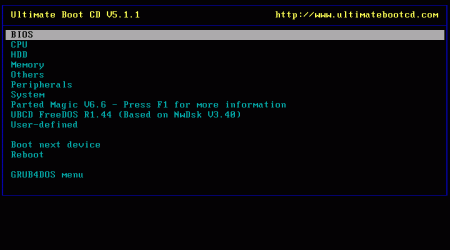
I recommend scanning the hard drive using UBCD with the diagnostic tools for your brand of hard drive. It may have bad sectors. I would copy all the data off, if you could before testing just in case the drive is bad. That way, if were to die during test, you won't lose anything.
 

My Computer

Computer type
PC/Desktop
Computer Manufacturer/Model Number
Custom (desktop), Custom (desktop), Lenovo U530 Touch
OS
Windows 7 Ultimate x64, Windows 7 Pro x64, Windows 10 Home x64
CPU
Intel i7-4790K , Intel i7-3770K, Intel i7-4510ULT
Motherboard
Asus Z87-PRO (main), Asus P8P67 Rev 3.1(secondary)
Memory
12GB Corsair Vengeance
Graphics Card(s)
EVGA GeForce GTX 660 2GB, 2X GIGABYTE 6890, Nvidia GT730M
Sound Card
Realtek Integrated, IDT (both laptops)
Monitor(s) Displays
Samsung S22C300H 21.5"
Screen Resolution
1920x1080 (Both machines)
Hard Drives
Main:
Muskin SSD 240GB
Seagate 320GB
Western Digital 1TB
Seagate 2TB

Seconday:
Toshiba 1TB
WD 1TB

Lenovo Laptop:
SAMSUNG SM843 SSD 480GB
PSU
Corsair GS700, COOLMAX CUL-850B (secondary)
Case
Thermaltake Chaser
Cooling
Corsair H60 Dual Fans, Stock Cooler
Keyboard
Logitech K360
Mouse
Logitech M310
Internet Speed
16Mbps
Antivirus
Comodo Internet Security Premium, MWB
Browser
Chrome, Firefox
Other Info
I have three systems listed in the specs area. My main desktop and my secondary desktop that was my previous build. The last one (in all the sections) is my Lenovo laptop.

Thanks for your interest in my machines! :)
Thank you for your reply. Please explain what UBCD means? By diagnostic tools, do you mean a program that can repair bad sectors like the error check program in Windows can do when you right click a drive in Computer folder, selecting Properties >Tools > Check Now for errors and ticking the 2 boxes for "automatically check the file system errors" and "scan for and attempt recovery of bad sectors" ?
 

My Computer

Computer Manufacturer/Model Number
Medion
OS
Windows 7 Home Premium
CPU
i3 processor
Hard Drives
Seagate external hard drive
Western Digital C drive
UBCD is Ultimate Boot CD. It is a disc of compiled tools for diagnosing computers. It can be found Ultimate Boot CD - Overview Download this and burn it to a CD.When you boot into it, select HDD and then select the brand of hard drive you have (as shown on the picture). Use hard drive tool to scan the drive.

Also, I do not recommend repairing bad sectors(if they are present). I have had bad experiences with that in the past. I would go and buy a new hard drive. It is not worth the risk if you can get a new drive. Of course I am only saying this if the drive is bad.
 

Attachments

  • screenshot.gif
    screenshot.gif
    4.4 KB · Views: 63

My Computer

Computer type
PC/Desktop
Computer Manufacturer/Model Number
Custom (desktop), Custom (desktop), Lenovo U530 Touch
OS
Windows 7 Ultimate x64, Windows 7 Pro x64, Windows 10 Home x64
CPU
Intel i7-4790K , Intel i7-3770K, Intel i7-4510ULT
Motherboard
Asus Z87-PRO (main), Asus P8P67 Rev 3.1(secondary)
Memory
12GB Corsair Vengeance
Graphics Card(s)
EVGA GeForce GTX 660 2GB, 2X GIGABYTE 6890, Nvidia GT730M
Sound Card
Realtek Integrated, IDT (both laptops)
Monitor(s) Displays
Samsung S22C300H 21.5"
Screen Resolution
1920x1080 (Both machines)
Hard Drives
Main:
Muskin SSD 240GB
Seagate 320GB
Western Digital 1TB
Seagate 2TB

Seconday:
Toshiba 1TB
WD 1TB

Lenovo Laptop:
SAMSUNG SM843 SSD 480GB
PSU
Corsair GS700, COOLMAX CUL-850B (secondary)
Case
Thermaltake Chaser
Cooling
Corsair H60 Dual Fans, Stock Cooler
Keyboard
Logitech K360
Mouse
Logitech M310
Internet Speed
16Mbps
Antivirus
Comodo Internet Security Premium, MWB
Browser
Chrome, Firefox
Other Info
I have three systems listed in the specs area. My main desktop and my secondary desktop that was my previous build. The last one (in all the sections) is my Lenovo laptop.

Thanks for your interest in my machines! :)
Does the UBCD have a repair bad sectors capability? So if I understand you correctly, using the Windows Check Now for errors facility or the UBCD one should make no difference to the risk involved in having my data damaged on my external hard drive. I have all my video and muic files on my external drive as well as my Acronis backups.
In that case, I think it is best if I invest my time in learning how to make online backups of all the folders and files in my external hard drive and make online copies of my backups I have on it before I proceed. This will also protect my data in case of theft or fire.
Is there a reliable free online storage website ? Please give me a few links on how to learn to make online backups?
Thank you. Your help is much appreciated for a lot depends on it!
 

My Computer

Computer Manufacturer/Model Number
Medion
OS
Windows 7 Home Premium
CPU
i3 processor
Hard Drives
Seagate external hard drive
Western Digital C drive
Back
Top