Solved Lost my external hard drive again.

stuart253

New member
Member
Local time
9:34 AM
Messages
60
Hello,

Lost my 3 TB external hard drive once again!

One of my external hard drives has disappeared, by that I mean it no longer shows up with my other external hard drives when I double click on the Computer icon on my desktop.

Besides “losing” the drive, I also am having problems formatting it.

Problem 1: My missing drive.

This is the drive that I perform my system backups to.

If I power the drive off and back on, I hear the “ding” sounds that occur when it disconnects and connects.

The drive having an issue is a LaCie 3TB external drive. I use an eSATA connection between external drive and my PC.
Even if I connect the drive via USB2, the drive is missing.

When I right click on Computer icon, select Manage a then Disk Management my missing drive appears but I have to initialize it first:

Please refer to attach files - Capture 1.JPG
Note: This use to be a usable drive, my system backups were written here. I also kept a copy of the pictures on this drive.

I do not know whether my lost drive problem is related to Windows 7, Dell or my LaCie drive.

Maybe unrelated, but I do suffer from time to time machine crashes or system stalls that require me to power off and on my machine, but I have not lost my drive.
I have not figured out a pattern yet. My last “lost” drive was noticed on 04/07/13. Previous problem was discovered on 06/08/12.

Since I have encountered this problem a couple of times, I always check that my backup was successful. I backup my system weekly.

Once I format my drive, it re-appears again, but at the loss of any data on the drive. The problem is my drive has gone missing several times now. Any backup data or any others files on it are lost.

My machine is a DELL Studio XPS Desktop 8100, running Windows 7 Professional Service Pack 1 with current maintenance. The drive that I am having the problem with is a 3TB LaCie d2 Quadra v2.1.

Problem 2: Formatting my lost drive.

The instructions that I use to format the drive I received from LaCie.

1. Start by executing RUN and typing cmd.
2. From DOS prompt, I enter diskpart
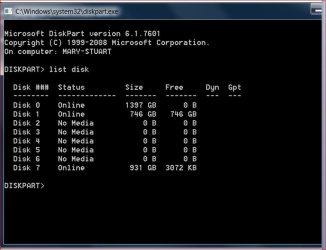
3. From the new window, I enter "list disk":

Please refer to attach files - Capture 2.JPG
In order to verify that I am working with the correct drive, I turn off the drive and issue “list disk” again, “Disk 1” disappears. Turn the drive back on and issue “list disk” again.
This confirms that “Disk 1” is my 3TB drive.

Note: The Size and Free values show the drive as 746 GB. My 3TB should have a larger value.

4. I then enter “select disk 1”

The screen shows “Disk 1 is now the selected disk”

5. I next enter the command “clean”

The screen shows “DiskPart succeeded in cleaning the disk”

6. Close out the “DiskPart” windows.

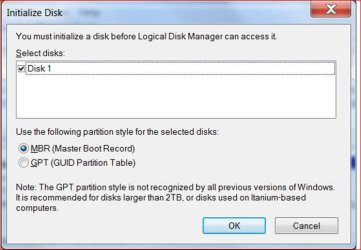
7. From the DOS window enter “diskmgmt.msc”

The following appears:

Please refer to attach files - Capture 3.JPG

I select GPT and press “OK”

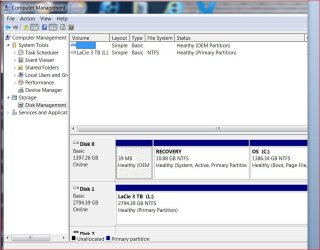
The following appears:

Please refer to attach files - Capture 4.JPG

As you can see from the screen above, my 3TB drive shows up as 746.39 GB. Via diskpart, the Size/Free values are both 746 GB

When I connect my external drive to my laptop via a USB2 connection, only option I have, and perform both the diskpart and diskmgmt.msc commands, the results are different.

On the laptop via diskpart, both the Size/Free values are both 2794 GB. On the laptop via diskmgmt.msc, drive shows as 2794.38 GB Unallocated

The laptop is a DELL 1545 running Windows 7 Professional Service Pack 1 with current maintenance.

After I format the drive on my laptop, I can successfully connect my newly formatted drive to my desktop, the drive show as 2.72TB:

Please refer to attach files - Capture 5.JPG
I am looking to resolve the problems of the “lost” drive as well as the desktop not being able to format the 3TB drive correctly.

Does anyone have any suggestions/ resolutions or questions regarding my problems?

Thanks

Stu


Attachments

  • Capture 1.JPG
    Capture 1.JPG
    47.6 KB · Views: 18
  • Capture 2.JPG
    Capture 2.JPG
    53.5 KB · Views: 4
  • Capture 3.JPG
    Capture 3.JPG
    47.6 KB · Views: 17
  • Capture 4.JPG
    Capture 4.JPG
    78.9 KB · Views: 7
  • Capture 5.JPG
    Capture 5.JPG
    83 KB · Views: 11

My Computer My Computer

Computer Manufacturer/Model Number
Dell
OS
Windows 7 professional 64 bit
Memory
16 gig

Attachments

  • PW.PNG
    PW.PNG
    51.1 KB · Views: 4

My Computer My Computer

Computer type
PC/Desktop
Computer Manufacturer/Model Number
Own build (new) Desk1 / Asus ROG Win 7 / Desk2 1st build
OS
Desk1 7 Home Prem / Desk2 10 Pro / Main lap Asus ROG 10 Pro 2 laptop Toshiba 7 Pro Asus P2520 7 & 10
CPU
Desk1 i5 3750K / Laptop i7 GTX 860M / Desk2 i5 2500
Motherboard
Desk1 Asus P877-V / Desk2 Gigabyte H67 UD3H / Laptop ?
Memory
Desk1 8GB (1866) / Desk2 16GB (1333) / Laptop 8Gb DDR3
Graphics Card(s)
Desk 1& 2NVidia GTX 650 & Laptops on board Intel
Sound Card
Desk 1 & 2 -XONAR DG Realtek High Def audio Laptop
Monitor(s) Displays
Desk 1 Benq HD 2450 / Desk2 Philips 24" / Laptop 17.5"
Screen Resolution
1920x1080 D1 & D2 & Laptop 1
Hard Drives
Desk1 Samsung 120GB 830 SSD
Asus ROG 256GB 850 Pro SSD
Desk2 Samsung 840 256 SSD
Toshiba 120GB EVO
PSU
Desk 1 Corsair HX 1050/ Laptop ? / Desk 2 Corsair HX 650
Case
Desk 1 Cooler HAF XM ? Toshiba laptop / Desk2 Coolermaster
Cooling
Fans on all Desk1 -2 Desk2 - all Coolermasters 5 Laptop ?
Keyboard
Desk 1 MS Sidewinder X6 Desk 2 MS Sidewinder X 4
Mouse
Desk 1&2 - Gigabyte MS 900 gamer - laptop - Logitec wireless
Internet Speed
ADSL2+
Other Info
One other Desktop (tester) and spare Toshba laptop both with SSD's
Running Kaspersky 2016 ISS on all machines config'd identically
Logitec audio stereo systems on each machine (x3)
Canon MG5250MFC
Router/modem TP-Link running WPA2SK
Hello,

Thanks for your reply. I will take a look at the product.
 

My Computer My Computer

Computer Manufacturer/Model Number
Dell
OS
Windows 7 professional 64 bit
Memory
16 gig
Hello,

Thanks for your reply. I will take a look at the product.
Sorry for late reply Stuart let us know how you go and it is a very handy tool to keep on board mate for all sorts of disk and partition stuff.
 

My Computer My Computer

Computer type
PC/Desktop
Computer Manufacturer/Model Number
Own build (new) Desk1 / Asus ROG Win 7 / Desk2 1st build
OS
Desk1 7 Home Prem / Desk2 10 Pro / Main lap Asus ROG 10 Pro 2 laptop Toshiba 7 Pro Asus P2520 7 & 10
CPU
Desk1 i5 3750K / Laptop i7 GTX 860M / Desk2 i5 2500
Motherboard
Desk1 Asus P877-V / Desk2 Gigabyte H67 UD3H / Laptop ?
Memory
Desk1 8GB (1866) / Desk2 16GB (1333) / Laptop 8Gb DDR3
Graphics Card(s)
Desk 1& 2NVidia GTX 650 & Laptops on board Intel
Sound Card
Desk 1 & 2 -XONAR DG Realtek High Def audio Laptop
Monitor(s) Displays
Desk 1 Benq HD 2450 / Desk2 Philips 24" / Laptop 17.5"
Screen Resolution
1920x1080 D1 & D2 & Laptop 1
Hard Drives
Desk1 Samsung 120GB 830 SSD
Asus ROG 256GB 850 Pro SSD
Desk2 Samsung 840 256 SSD
Toshiba 120GB EVO
PSU
Desk 1 Corsair HX 1050/ Laptop ? / Desk 2 Corsair HX 650
Case
Desk 1 Cooler HAF XM ? Toshiba laptop / Desk2 Coolermaster
Cooling
Fans on all Desk1 -2 Desk2 - all Coolermasters 5 Laptop ?
Keyboard
Desk 1 MS Sidewinder X6 Desk 2 MS Sidewinder X 4
Mouse
Desk 1&2 - Gigabyte MS 900 gamer - laptop - Logitec wireless
Internet Speed
ADSL2+
Other Info
One other Desktop (tester) and spare Toshba laptop both with SSD's
Running Kaspersky 2016 ISS on all machines config'd identically
Logitec audio stereo systems on each machine (x3)
Canon MG5250MFC
Router/modem TP-Link running WPA2SK
Still looking for the reason that I "lost" my external drive.

Hello,

I would like to thank ICit2lol once again for taking the time to response to my thread, but I am still looking for the reason for my external drive being "lost".

Since this is the drive that I create my backups on, I would like to depend upon it being there with my backups on it.

Thanks

Stu
 

My Computer My Computer

Computer Manufacturer/Model Number
Dell
OS
Windows 7 professional 64 bit
Memory
16 gig
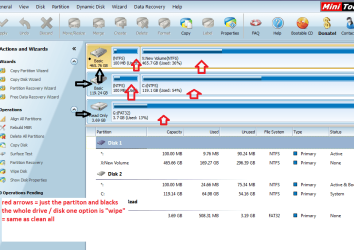
So mate I guess the Partition Wizard did not find it?

To be honest I prefer to keep drives to 1TB I know this means more drives but losing one is so much less a loss than a whole 3TB .

But back to it being lost I am at a loss myself.
 

My Computer My Computer

Computer type
PC/Desktop
Computer Manufacturer/Model Number
Own build (new) Desk1 / Asus ROG Win 7 / Desk2 1st build
OS
Desk1 7 Home Prem / Desk2 10 Pro / Main lap Asus ROG 10 Pro 2 laptop Toshiba 7 Pro Asus P2520 7 & 10
CPU
Desk1 i5 3750K / Laptop i7 GTX 860M / Desk2 i5 2500
Motherboard
Desk1 Asus P877-V / Desk2 Gigabyte H67 UD3H / Laptop ?
Memory
Desk1 8GB (1866) / Desk2 16GB (1333) / Laptop 8Gb DDR3
Graphics Card(s)
Desk 1& 2NVidia GTX 650 & Laptops on board Intel
Sound Card
Desk 1 & 2 -XONAR DG Realtek High Def audio Laptop
Monitor(s) Displays
Desk 1 Benq HD 2450 / Desk2 Philips 24" / Laptop 17.5"
Screen Resolution
1920x1080 D1 & D2 & Laptop 1
Hard Drives
Desk1 Samsung 120GB 830 SSD
Asus ROG 256GB 850 Pro SSD
Desk2 Samsung 840 256 SSD
Toshiba 120GB EVO
PSU
Desk 1 Corsair HX 1050/ Laptop ? / Desk 2 Corsair HX 650
Case
Desk 1 Cooler HAF XM ? Toshiba laptop / Desk2 Coolermaster
Cooling
Fans on all Desk1 -2 Desk2 - all Coolermasters 5 Laptop ?
Keyboard
Desk 1 MS Sidewinder X6 Desk 2 MS Sidewinder X 4
Mouse
Desk 1&2 - Gigabyte MS 900 gamer - laptop - Logitec wireless
Internet Speed
ADSL2+
Other Info
One other Desktop (tester) and spare Toshba laptop both with SSD's
Running Kaspersky 2016 ISS on all machines config'd identically
Logitec audio stereo systems on each machine (x3)
Canon MG5250MFC
Router/modem TP-Link running WPA2SK
Someone reviewing a LaCie 3TB external drive on newegg mentioned only able to get it working properly with a USB 2.0 cable, plus company gave them the run around about it (no telling what that really means).

Sadly the only review there:

http://www.newegg.com/Product/Product.aspx?Item=N82E16822154545

That was only model with eSata listed.

I'd put that on another computer and see if that one has the same flaky problems.

I discovered that 7 couldn't handle two of the exact same external drives connected via USB at the same time, but not issue here.


My Computer My Computer

Computer type
PC/Desktop
Computer Manufacturer/Model Number
Self Built Custom
OS
Windows 7 Ultimate Retail Box (64-bit installed) + Service Pack 1
CPU
AMD FX-8350 CPU v1.15 (or 1.0F) BIOS was required!
Motherboard
MSI 890FXA-GD70
Memory
8G CAS-7 G-Skill DDR3 @1333 (2 fours) [mobo nonOC max rec'd]
Graphics Card(s)
Radeon HD 7950 [3 gigs of GDDR5] MSI Twin Frozr model
Sound Card
Realtek High Definition Audio (onboard mobo, ALC-889 chip)
Monitor(s) Displays
2 WS LED Monitors: One LG One Viewsonic
Screen Resolution
1920 by 1080
Hard Drives
SSD for OS: Samsung 840 Pro
SSD for VM and utilities: Adata SX900
7200 RPM SATA HDs for the rest: Hitachi and Seagate
PSU
Corsair TX850 - 850W max, in service since August 2010.
Case
Thermaltake Armor A90
Cooling
Thermaltake Spin Q CPU Cooler, in service since August 2010
Keyboard
Logitech G11
Mouse
Logitech M310 Wireless
Internet Speed
100 Megabit broadband supposedly upgraded from 50 (Cable)
Antivirus
Bitdefender Internet Security 2014 suite
Browser
Pale Moon 64-bit main, also IceDragon, Opera, and Maxthon.
Other Info
CompTIA A+ certified (220-800 series) in July 2013.
Hum think you are onto something here Faladu I have had a couple of large La Cies that have dropped their bundle and both have been using Hitachi drives the casings actually have a large control circuit board inside the case which is easily got into using a couple of table (eating) knives.
The drive itself seats into a dock on that control board that the outer USB connection plugs into. So an easy job to replace the drive as it is just a power/data SATA push in from inside the case - you don't have to trash the whole gismo.Plus I did see something about 2.0 USB connections somewhere that mentioned cabling too but where I don't recall.
 

My Computer My Computer

Computer type
PC/Desktop
Computer Manufacturer/Model Number
Own build (new) Desk1 / Asus ROG Win 7 / Desk2 1st build
OS
Desk1 7 Home Prem / Desk2 10 Pro / Main lap Asus ROG 10 Pro 2 laptop Toshiba 7 Pro Asus P2520 7 & 10
CPU
Desk1 i5 3750K / Laptop i7 GTX 860M / Desk2 i5 2500
Motherboard
Desk1 Asus P877-V / Desk2 Gigabyte H67 UD3H / Laptop ?
Memory
Desk1 8GB (1866) / Desk2 16GB (1333) / Laptop 8Gb DDR3
Graphics Card(s)
Desk 1& 2NVidia GTX 650 & Laptops on board Intel
Sound Card
Desk 1 & 2 -XONAR DG Realtek High Def audio Laptop
Monitor(s) Displays
Desk 1 Benq HD 2450 / Desk2 Philips 24" / Laptop 17.5"
Screen Resolution
1920x1080 D1 & D2 & Laptop 1
Hard Drives
Desk1 Samsung 120GB 830 SSD
Asus ROG 256GB 850 Pro SSD
Desk2 Samsung 840 256 SSD
Toshiba 120GB EVO
PSU
Desk 1 Corsair HX 1050/ Laptop ? / Desk 2 Corsair HX 650
Case
Desk 1 Cooler HAF XM ? Toshiba laptop / Desk2 Coolermaster
Cooling
Fans on all Desk1 -2 Desk2 - all Coolermasters 5 Laptop ?
Keyboard
Desk 1 MS Sidewinder X6 Desk 2 MS Sidewinder X 4
Mouse
Desk 1&2 - Gigabyte MS 900 gamer - laptop - Logitec wireless
Internet Speed
ADSL2+
Other Info
One other Desktop (tester) and spare Toshba laptop both with SSD's
Running Kaspersky 2016 ISS on all machines config'd identically
Logitec audio stereo systems on each machine (x3)
Canon MG5250MFC
Router/modem TP-Link running WPA2SK
Hello and thanks to all who have comments and replied.

I have switch my backup to a WD external cloud drive and so far my backups are working.

I am going to mark this as resolved.

Thanks

Stu
 

My Computer My Computer

Computer Manufacturer/Model Number
Dell
OS
Windows 7 professional 64 bit
Memory
16 gig
what to do if external hdd not show up in Partition Wizard??? disk management show only "unknown" and "not initialized" :(
 

My Computer My Computer

Computer type
Laptop
Computer Manufacturer/Model Number
thinkpad (lenovo)
OS
window 7 professional 32 bit
Well if you want to get data from it try this

BOOTABLE UBUNTU

Make a bootable Ubuntu disk http://www.ubuntu.com/download

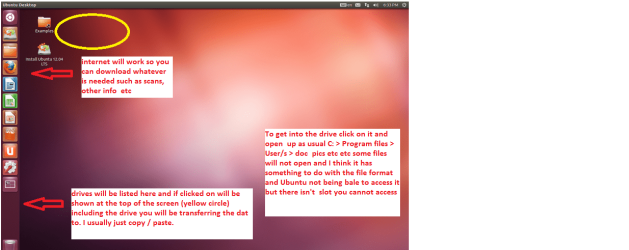
Set the BIOS to boot from theoptical when the machine boots it will show you a screen with TRY or INSTALL> select TRYnot INSTALL

When it is finished - it takes verylittle time you will get a screen like in the pic .

Open the drive you want > Userand dig down until you get to the data / settings you may be able to copy /paste the material you want to an external source or other installed drive doingthis.

I am not sure if it will but I haverecovered tons of data etc using this method both on "dead" or justplain drives that you cannot get data from using Windows.
 

Attachments

  • Ubuntu screen.PNG
    Ubuntu screen.PNG
    103 KB · Views: 1

My Computer My Computer

Computer type
PC/Desktop
Computer Manufacturer/Model Number
Own build (new) Desk1 / Asus ROG Win 7 / Desk2 1st build
OS
Desk1 7 Home Prem / Desk2 10 Pro / Main lap Asus ROG 10 Pro 2 laptop Toshiba 7 Pro Asus P2520 7 & 10
CPU
Desk1 i5 3750K / Laptop i7 GTX 860M / Desk2 i5 2500
Motherboard
Desk1 Asus P877-V / Desk2 Gigabyte H67 UD3H / Laptop ?
Memory
Desk1 8GB (1866) / Desk2 16GB (1333) / Laptop 8Gb DDR3
Graphics Card(s)
Desk 1& 2NVidia GTX 650 & Laptops on board Intel
Sound Card
Desk 1 & 2 -XONAR DG Realtek High Def audio Laptop
Monitor(s) Displays
Desk 1 Benq HD 2450 / Desk2 Philips 24" / Laptop 17.5"
Screen Resolution
1920x1080 D1 & D2 & Laptop 1
Hard Drives
Desk1 Samsung 120GB 830 SSD
Asus ROG 256GB 850 Pro SSD
Desk2 Samsung 840 256 SSD
Toshiba 120GB EVO
PSU
Desk 1 Corsair HX 1050/ Laptop ? / Desk 2 Corsair HX 650
Case
Desk 1 Cooler HAF XM ? Toshiba laptop / Desk2 Coolermaster
Cooling
Fans on all Desk1 -2 Desk2 - all Coolermasters 5 Laptop ?
Keyboard
Desk 1 MS Sidewinder X6 Desk 2 MS Sidewinder X 4
Mouse
Desk 1&2 - Gigabyte MS 900 gamer - laptop - Logitec wireless
Internet Speed
ADSL2+
Other Info
One other Desktop (tester) and spare Toshba laptop both with SSD's
Running Kaspersky 2016 ISS on all machines config'd identically
Logitec audio stereo systems on each machine (x3)
Canon MG5250MFC
Router/modem TP-Link running WPA2SK
Back
Top