Diskpart By Accident

LucyLu

New member
Local time
12:55 PM
Messages
3
Hi everyone.

I am having a very similar issue as OP, but I "accidentally" [STUPID ME.....] did diskpart/clean (only clean) on a remote HD (149Ghz size with no partition on it).

I am still reading through this thread and hopefully I will be able to recover my data on this remote HD. I have been using TestDisk, EaseUS partition recovery to scan (only quick scan so far) w/o any luck yet. At this moment I am running Partition Recovery quick scan now. Since I do not have any partition on this HD, I am not sure if I am doing the right thing.... I only store pictures (tons of them) and some docs on it. I am on Page 9 of this thread, I will keep reading and trying.

Thanks in advance for helping me,
Lucy
 

My Computer

Computer type
Laptop
Computer Manufacturer/Model Number
DELL
OS
winXP

My Computers

System One System Two

  • Computer type
    PC/Desktop
    Computer Manufacturer/Model Number
    ChillBlast - Custom to my design
    OS
    Windows 11 Pro x64 [Latest Release and Release Preview]
    CPU
    Ryzen 9 5950X, 3.8 - 5.2 MHz
    Motherboard
    Asus Prime X570-Pro
    Memory
    64GB [2 x 32GB] DDR4 3200MHz
    Graphics Card(s)
    4GB NVIDIA GEFORCE GTX 1650 Ti
    Sound Card
    On-board SPDIF to 5.1 System + HDMI [5.1 system]
    Monitor(s) Displays
    32" UHD 32 Bit HDR Monitor + 43" UHD 4K 32Bit HDR TV
    Screen Resolution
    2 x 3840 x 2160 @60Hz
    Hard Drives
    1TB M2 SSD OS, 500GB Fast Access SSD, 2 x 8TB Data + Various Externals from 1TB to 4TB, 10TB NAS
    PSU
    NZXT C750 80 PLUS Gold 750W Modular PSU
    Case
    Workstation Case [Matt Black]
    Cooling
    NZXT Kraken X63 280mm CPU Cooler +2x Quiet Case fans
    Keyboard
    Logitech Wireless MX Keys & K400 + others
    Mouse
    Logitech Wireless MX Master 3S
    Internet Speed
    920 MB Down 50 MB Up
    Antivirus
    BitDefender Total Security Pro
    Browser
    Chrome (always run latest Non-Beta)
    Other Info
    Also run ...
    Laptop - Quad 8GB - Windows 10 Pro x64
    Nexus 7 Android tablet x2
    Samsung 10.2" tablet
    Blackview TAB 8 4G Android Tablet c/w Keyboard
    Wacom Intuos Pro Medium Pen Pad
    Wacom Intuos Pro Small Pen Pad
    Wacom Expresskeys Remote
    Loopdeck+ Graphics Controller
    Shuttle Pro v2 Control
  • Computer type
    Laptop
    System Manufacturer/Model Number
    Dell XPS 17 10750H
    OS
    Windows 11 Pro x64 Latest RP
    CPU
    Intel I7 10750H 5.0GHz
    Motherboard
    Dell XPS
    Memory
    32GB [2x16GB] DDR4 2933 MHz
    Graphics Card(s)
    nVidia GTX1650Ti 4 GB GDDR6
    Sound Card
    Stock [Realtek] 4 Speaker
    Monitor(s) Displays
    17" IPS UHD+ Infinity Edge Touchscreen
    Screen Resolution
    3840 x 2400
    Hard Drives
    2TB M2 NVMe, 4TB External + various 500GB & 1TB External NVMe (also have access to spinner HDD from
    PSU
    Stock
    Case
    Stock XPS Aluminium & Carbon Fibre
    Cooling
    Stock - Active Fan Control
    Keyboard
    Backlit + Various Logitech
    Mouse
    Stock Track Pad + Logitech MX Trackball
    Internet Speed
    72 MB Down 18MB Up
    Browser
    Chrome
    Other Info
    Also run ...
    Laptop - Quad 8GB - Windows 10 Pro x64
    Nexus 7 Android tablet x2
    10.2" tablet
    Sony Z3 Android Smartphone
    Wacom Intuos Pro Medium Pen Pad
    Wacom Intuos Pro Small Pen Pad
    Wacom Expresskeys Remote
    Loopdeck+ Graphics Controller
    Shuttle Pro v2 Control Pad
    10TB NAS
Hi all,

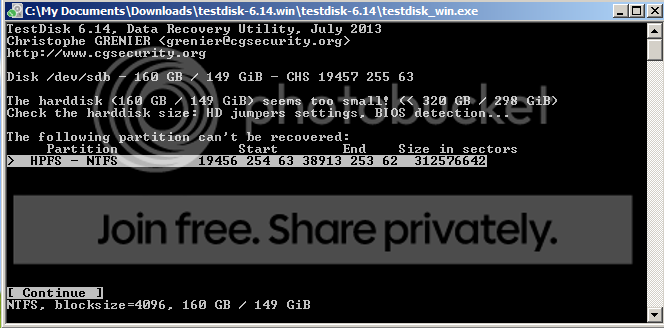
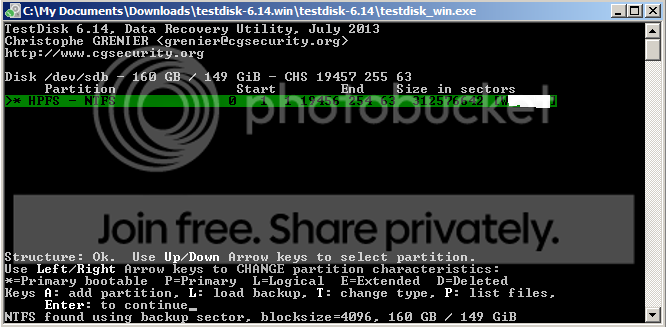
After several attempts of search using testdisk, when pressing "P" I can see all my files now, should I then continue with the table recovery? Many websites (including the TestDisk Wiki page), the examples used are when disks contain multiple partitions, while I never partitioned it at all, it was just a "complete disk". Sorry I am not familiar with the technology.

For image2 below, should I change partition characteristics to Logical? or just Enter to continue?

Many thanks!
Lucy

after_quicksearch_1_zps5c111166.png
after_quicksearch_1_zps5c111166.png.html
after_quicksearch_1_zps5c111166.png


after_quicksearch_2_zps65d23ebf.png


after_quicksearch_2_zps65d23ebf.png
 

My Computer

Computer type
Laptop
Computer Manufacturer/Model Number
DELL
OS
winXP
Hi

What is the actual size of that HDD?

TestDisk says that it seems to be too small.

And you said that by hitting P, you can see all the files. In that case I would rather play safe and copy all those files to another external HDD or internal HDD if that has sufficient space. If you are to copy it to another external drive you must have it plugged in before you run Test Disk.

So if you would take this advise and copy the files, plugin the external drive and run Testdisk again.( Only copy files and do not do any write operation such as changing to Primary or logical and any rewrite Partition Table)

At this point, I still feel you should try Partition Recovery Wizard in MiniTools Partition Wizard. Since you have zeroed the first sector - that is what the clean command does - both MBR code and the partition table are lost. So in the Partition Wizard Main Screen which shows all your drives, you should first write the MBR code on that HDD by selecting that HDD and then "Rebuild MBR" on the left Pane. Once the MBR code is written (a reboot may be necessary), you should run the Partition Recovery Wizard and do a Quick Scan.If by selecting the partition shown, if the Disk Map Preview shows your entire disk as it was before, you can then Finish, and Apply the pending operations.
 

My Computer

OS
Windows 7 Home Premium 32 bit
Thanks! I was able to recover everything. :geek:

Lucy
 

My Computer

Computer type
Laptop
Computer Manufacturer/Model Number
DELL
OS
winXP
That's good news.

Can you please recount what you did?

That can of course help others.
 

My Computer

OS
Windows 7 Home Premium 32 bit
Back
Top