DISKPART clean performed accidently. how to recover data?

shashank0889

New member
Local time
2:09 PM
Messages
11
Hello everyone,
I had major partition problems and tried fixmbr,fixboot,etc and even rebuilding bcd was not working. I was misguided by one of the other Forums and entered:
DISKPART Select Volume 1
DISKPART Clean Volume 1
The Volume has been cleaned
[If it was to delete all data, I thought it would ask Y or N]
where volume 1 was my C drive. I had data on other drives. Immediately after this the computer hung and I was forced to restart. All this while the MBR was not working and I was on Windows 7 installation disc. Now it does not detect my Hard Disk or any of the Volumes and shows Hard Disk as 249 out of 249 Gb free. I have no choice but to go to Windows 7 Disc where there are no installations or data.
Of what I have read, this command only clears the Partition List..
While I was trying fixmbr, I even used gparted Live disc where it turns out that there is some "recursive" bug which was found.
Please help me, there is vital information on the disk as it is my office computer.
I need to recover all the data. Its very urgent. I have committed a huge blunder but is there way ?
 

My Computer My Computer

At a glance

Windows 7 32 Bit Home edition
Computer type
PC/Desktop
OS
Windows 7 32 Bit Home edition
Thank you for your reply! I Tried MiniTool Partition Wizard Home Edition by booting on CD
It shows the HD as 232.89 Gb Unallocated - "Bad Disk".

In Gparted I get error like "Libparted Bug Found" and Partition Table error!
I tried TestDisk/Photorec in Gparted - both did not show the partition table and showed nothing found to recover.

I tried CMD prompt in Windows Installation disc- it found 0 installations and when i switch form X:\Sources to C:\ is gave an error of bad or corruptable disc I guess!
 

My Computer My Computer

At a glance

Windows 7 32 Bit Home edition
Computer type
PC/Desktop
OS
Windows 7 32 Bit Home edition
"Partition Wizard" flagging a HDD as bad doesn't necessarily means it is faulty. If partition table is screwed, PW may flag the disk as bad ( i have seen PW doing this if the disk type is "Dynamic" ).

In Gparted I get error like "Libparted Bug Found" and Partition Table error!

This could be the reason PW flagging the disk as bad.

I tried TestDisk/Photorec in Gparted - both did not show the partition table and showed nothing found to recover.

Have you run a "Deep" scan with "TestDisk" ?. Which exact boot disc you used ? ( is it "Gparted" or "Parted Magic" ).
 

My Computer My Computer

At a glance

Windows 7 Ultimate x64
Computer type
PC/Desktop
OS
Windows 7 Ultimate x64
Some background info will be helpful. What exact problem you had experienced with the system ?. Can we have a link to the other forum's thread in which you are instructed to run DISKPART ?.

Also i highly recommend to stop trying commands like "Fixmbr" etc to not make the problem worse.
 

My Computer My Computer

At a glance

Windows 7 Ultimate x64
Computer type
PC/Desktop
OS
Windows 7 Ultimate x64
Normally a bad disk message would warrant a check of your disk with manufacturer's diagnostic utility.

But here the history you have given - problem with MBR, trying to fix mbr, running diskpart clean to clean the first sector all suggest that there can be other reasons as Anshad Edavana stated.

Now Diskpart clean also went through and upto that point the drive was accessible.

At this point I would suggest that you should write the MBR code using TestDisk.

Since you have already used Test Disk, I shall straight away go to the fourth screen.

There instead of Analyse move down to [MBR Code] Write TestDisk MBR to first sector ENTER and then y and again y on the next two screens.

If MBR code is successfully written,you will get a confirmation screen and you are better off than before. Press ENTER. Shut down your computer after closing the Test Disk etc.,

Boot now with Partition Wizard. Do you still get a Bad Disk message? If you no longer get a bad disk message,do a quick scan with Partition Recovery Wizard and check whether partitions are found.

You can also do a quick search with TestDisk, but if I remember correctly if no bootable partition is found it will not initiate a search.. If MBR Code is written there is a greater chance of it initiating the search.
 

My Computer My Computer

At a glance

Windows 7 Home Premium 32 bit
OS
Windows 7 Home Premium 32 bit
caution: psyched long History

Thanks anshad & jumanji for the prompt reply!

Long story short: (Flashback History)
I initially experienced BSOD error about 2 weeks back, it would either get stuck at start screen or cursor with black screen, I somehow rebuilt bcd and after hours of trying it brought back life into my PC. I should have backed everything here! But thought everything is fine, I expanded the space on my C: Drive (thinking its a problem with RAM and lack of space on my system drive) SO i had one primary drive -C and D,E,F as extended drives. No changes in hardware and i made sure system restore is also there.

What happened now: It would just get stuck at loading windows screen for hours without loading it, I tried Gparted TestDisk even at that time and couldnt recover the table. I had the same bug found error/volume corrupted,etc. After failing, I ran windows installation Disc, it showed my windows installation on C. System recovery detected the problem but couldnt fix it even after several restarts. I had all the files intact untill I ran DISKPART CLEAN - in the help section it showed me that 1mb of beginning and end would be deleted. I ran it and immediately found that I couldnt switch to C: Drive. the computer hung there and I was forced to restart! Now it would show as "Please insert boot media and press any key". I'm guessing it couldnt even detect my harddrive any more after the command.
 

My Computer My Computer

At a glance

Windows 7 32 Bit Home edition
Computer type
PC/Desktop
OS
Windows 7 32 Bit Home edition
I did see the "Write MBR" command, It would not overwrite any files right? I am running out of options now! Do I remove my harddisk and put it back and then retry? The bad volume/ unallocated space scares me at present
 

My Computer My Computer

At a glance

Windows 7 32 Bit Home edition
Computer type
PC/Desktop
OS
Windows 7 32 Bit Home edition
No, the MBR will be written to Sector zero where it should be. I shall post a screen in a shortwhile.
 

My Computer My Computer

At a glance

Windows 7 Home Premium 32 bit
OS
Windows 7 Home Premium 32 bit
The description you provided indicates possibly failing hard drive. I would recommend diagnosing the hard drive and verifying it's health before any other steps. It will be safe to check the SMART data of HDD as a first step. Please follow the below steps.

1. Download "Parted Magic" from Download Parted Magic - MajorGeeks

2. Boot from it and open "Disk Health" (GsmartControl ). Select your HDD and double click on it.

main_ok.png


3. Navigate to the "Attributes" tab and choose "Save As" and save the file with the name SMART.

info_failing.png


Upload this report with next reply. If you have a wired broadband connection, you can connect to the Internet from within "Parted Magic". There is "Firefox" to browse net.
 

My Computer My Computer

At a glance

Windows 7 Ultimate x64
Computer type
PC/Desktop
OS
Windows 7 Ultimate x64
@Jumanji

"TestDisk" don't require MBR or GPT header to be present. It will find partitions as long as boot sectors are not over written and the disk is healthy.

Another possible obstacle is disk encryption.

@shashank

I had all the files intact untill I ran DISKPART CLEAN

If the system was not booting at that time, how do you know that all files are in there intact ?.
 

My Computer My Computer

At a glance

Windows 7 Ultimate x64
Computer type
PC/Desktop
OS
Windows 7 Ultimate x64
I could use command prompt and D:\dir and view the files! the same was for all other drives. Will perform PartedMagic shortly! Downloading
 

My Computer My Computer

At a glance

Windows 7 32 Bit Home edition
Computer type
PC/Desktop
OS
Windows 7 32 Bit Home edition
Test Disk MBR:

Initially I had zeroed Sector 0 . All zeros. ( I do it often with Bootice for all my experiments)

Then I wrote Test Disk MBR.

Now sector O has everything but partition table. The MBR code, Windows Signature and MBR disk signature.It does not have the partition table. That space 64 bytes in all are still 00s. If TestDisk or PW find the sectors with NTFS volume boot record, the sectors will be noted and the partition table will be written in the space assigned to them in the sector 0.

27-06-2014 14-24-25.jpg

I am off for my afternoon nap.
 

My Computer My Computer

At a glance

Windows 7 Home Premium 32 bit
OS
Windows 7 Home Premium 32 bit
Since CLEAN command is already issued, first 1 MB and last 2 MB will be already destroyed. We can try writing a new MBR and then a "Deep" scan with "TestDisk" as it won't hurt writing to sector zero which is already wiped. But let's verify the disk's health condition first.
 

My Computer My Computer

At a glance

Windows 7 Ultimate x64
Computer type
PC/Desktop
OS
Windows 7 Ultimate x64
@shashank

In addition to collecting the SMART report, please perform the below steps also.

1. Open a "Terminal" Window ( Monitor icon in the taskbar ).

2. Enter the below command.

fdisk -l

3. No take a screenshot of the command window. There is a screen capture utility in "Parted Magic" ( named "Screenshot" )which will be located in either "Graphics" or "multimedia". Opening that and you will see options to capture either the full screen or active window. Use "Active window" option and save the picture. Upload it with the SMART report.
 

My Computer My Computer

At a glance

Windows 7 Ultimate x64
Computer type
PC/Desktop
OS
Windows 7 Ultimate x64
It shows "Overall Health Self-Assessment" as FAILED. Attaching the assessment!
 

Attachments

My Computer My Computer

At a glance

Windows 7 32 Bit Home edition
Computer type
PC/Desktop
OS
Windows 7 32 Bit Home edition
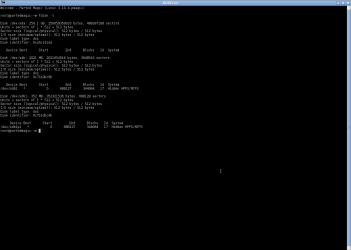
fdisk -l

Screenshot of Fdisk -l attached herewith.
 

Attachments

  • Screenshot - Fdisk.png
    Screenshot - Fdisk.png
    18.5 KB · Views: 5

My Computer My Computer

At a glance

Windows 7 32 Bit Home edition
Computer type
PC/Desktop
OS
Windows 7 32 Bit Home edition
This is definitely bad news. "GsmartControl" is not like other SMART monitoring tools. It only displays what is written in the SMART log of a HDD (it won't predict disk life its own ). All the BSOD and booting issues, PW flagging disk as bad etc further confirms the disk's critical condition.

( use "Notepad++" to correctly view the "SMART.txt file )

If the data stored on the disk is really important and you need to recover them as soon as possible, i would recommend hiring the service of a professional data recovery company. Otherwise we can try to recover data but it will take time as copying the disk to another good one is the first step.


Anyway please perform the below steps to check whether there is a valid file system present on the disk.

1. Open a "Terminal" window.

2. Enter the below command exactly.

dd if=/dev/sda of=/root/Desktop/MBR.img bs=512 count=2050

3. After the above command completed successfully, you will see a file named MBR.img on the desktop. Please attach it with next reply.
 

My Computer My Computer

At a glance

Windows 7 Ultimate x64
Computer type
PC/Desktop
OS
Windows 7 Ultimate x64
Do you remember how many partitions was on the disk ?.
 

My Computer My Computer

At a glance

Windows 7 Ultimate x64
Computer type
PC/Desktop
OS
Windows 7 Ultimate x64
Just an Update

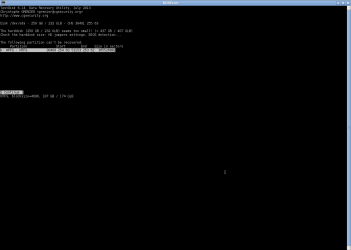
I somehow feel better about PARTEDMAGIC. brings some faith and hope back. I ran a testdisk and deeper search and found the partitions which GPARTED couldnt detect. Attaching 2 screenshots. Can I run photorec? or What is a better solution??

GSmartControl shows health as "Alert:the drive is reporting that it will FAIL very soon. Please back up as soon as possible."
 

Attachments

  • Screenshot - sk.png
    Screenshot - sk.png
    15.9 KB · Views: 2
  • Screenshot - testdisk.png
    Screenshot - testdisk.png
    11.6 KB · Views: 1

My Computer My Computer

At a glance

Windows 7 32 Bit Home edition
Computer type
PC/Desktop
OS
Windows 7 32 Bit Home edition
Back
Top