
diskpart clean zeros LBA 0 to LBA 2047

jumanji

New member
Guru
Gold Member
VIP
Local time
11:42 AM
Messages
5,915
During the course of this thread http://www.sevenforums.com/backup-restore/333571-recover-data-diskpart-clean-command.html it became evident that the first NTFS (also known as Partition Boot Record / Volume Boot Record) in a HDD can be at LBA 63 (Absolute Sector 63) or LBA 2048 (Absolute Sector 2048) depending upon the partitioning utility used. This is actually the starting sector of the first partition.

Partition Wizard run from a bootable pendrive formatted a 750GB Seagate GoFlex external HDD with the first NTFS at LBA 63.
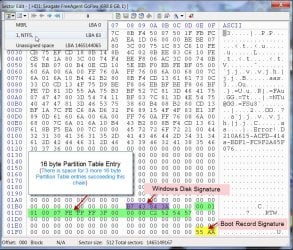
NTFS63PWbootCD.jpg

Windows Disk Management formatted the same drive with the first NTFS at LBA 2048.
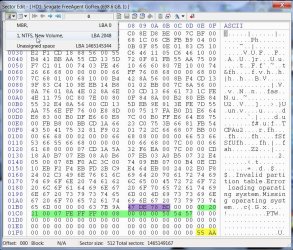
NTFS2048WDM.jpg

In both cases it was found that the diskpart clean command zeroed LBA 0 to LBA 2047.

This should remove the common misconception that the diskpart clean zeros only the MBR at LBA 0.

Even I believed it to be so thus far till a debate/discussion between me and Anshad Edavana in that thread brought this revelation.
 

My Computer My Computer

At a glance

Windows 7 Home Premium 32 bit
OS
Windows 7 Home Premium 32 bit
I did one more DISKPART experiment with a XP partitioned disk ( partition start at LBA 63 ). Regardless of the starting position of first partition at LBA 63, DISKPART zeroed the first 1 MB and last 1 MB. It looks like this behavior is hard coded in "Windows 7" version of DISKPART ( Probably in 8 too ). It make sense because DISKPART doesn't have to bother about whether the disk is partitioned in MBR or GPT scheme by wiping out first and last one MB.

Official Microsoft documentation ( DiskPart Command-Line Options ) start by these words:

DiskPart is a text-mode command interpreter in Windows Vista, Windows® XP, and the Windows Server 2003® family

It means the documentation was probably updated lastly on 2006. Even at the time of Vista, GPT was not popular and large capacity drives are very rare. Anyway since both Vista and XP are obsolete, there won't be any practical benefit in examining how legacy version of DISKPART works.
 

My Computer My Computer

At a glance

Windows 7 Ultimate x64
Computer type
PC/Desktop
OS
Windows 7 Ultimate x64
Keep in mind; both of you are many pay grades above me in such matters.

I don't know what the charts mean and never will.
I'm trying to understand what is trying to be proved and why.
I have followed the other thread for days trying to learn something but I'm still lost. Could you explain it better with less teckie?

What would a dummy like me do with this information?
Where would it come in handy for a dummy like me?
 

My Computer My Computer

At a glance

Windows 10 Pro. 64/ version 1709 Windows 7 Pr...Intel i7-6800K @ 4.3Corsair Platinum 16 gig @2400EVGA GTX 1070 OC
Computer type
PC/Desktop
Computer Manufacturer/Model Number
Home made Desktop
OS
Windows 10 Pro. 64/ version 1709 Windows 7 Pro/64
CPU
Intel i7-6800K @ 4.3
Motherboard
ASUS X-99 Deluxe II
Memory
Corsair Platinum 16 gig @2400
Graphics Card(s)
EVGA GTX 1070 OC
Monitor(s) Displays
Asus 27" LED LCD/VE278Q
Screen Resolution
1920-1080 or 1280-720 HDMI
Hard Drives
INTEL SSD 730-240 Gb Sata 3.0/
PSU
EVGA Platium 1200W
Case
Phanteks Luxe Tempered Glass 8 fans/ one radiator
Cooling
XSPC/ Water Cooled CPU
Keyboard
Das 4 Professional
Mouse
Logitech M705/MX Anywhere 2-S
Internet Speed
100 mbits
Antivirus
Microsoft Security Essentials/ Malwarebytes Premium 3.0/ SAS
Browser
I.E. 11 default/Firefox/ ISP Time Warner Cable/Spectrum
Other Info
LG BluRay Burner/
Sound system-KLipsch-THX/
Icy Dock ssd Hot Swap bays.
For some years here we've used Diskpart Clean command heavily to overcome more than half of installation failures as well as occasionally when a drive is traced as blocking boot. I assumed it was because interfering boot code was neutralized along with possibly the partition table.

Does this prove or disprove that theory, or shed any more light on exactly why Clean command works for these purposes?

Nice work. :geek::geek:
 
I don't know what the charts mean and never will.
I'm trying to understand what is trying to be proved and why.
I have followed the other thread for days trying to learn something but I'm still lost. Could you explain it better with less teckie?

Typically a hard drive's sector is 512 bytes sized. As you know, sector 0 is reserved for MBR and all legacy operating systems like XP, DOS etc creates first partition at sector 63. There will be a 62 sector gap between the MBR and partition one. Windows usually considers this as "hidden sectors" but Linux may use these sectors to store parts of GRUB.

The default behavior of creating first partition at sector 63 is changed with the release of "Vista". By default, Vista and higher operating systems only creates partitions starting from sector 2048. The reason for this is to maintain compatibility with modern "Advanced Format Disks" and Solid state disks. All partitions created under Vista/7/8 using either installer, Dikpart or Disk Management will always start on a number divisible by 8.

If we issue DIKPART CLEAN command from "Windows 7" or it's install disc, first 1 MB ( LBA 0 to 2047 ) and last 1 MB seems to be filled with zeros. Sector 2048 and onward won't be wiped unless we use DISKPART CLEAN ALL command. When we scan for lost partitions with "Partition Wizard" or "TestDisk", both will search for NTFS boot sectors starting from sector zero and probably will find the first partition's boot sector on LBA 2048 and parse partition information by reading it. Then this info is used to create a new partition table entry.

On the other hand if we issue DISKPART CLEAN command against a disk which is partitioned by legacy partitioning tools ( XP setup, Partition Wizard Bootable CD etc ), NTFS boot sector which starts at sector 63 will be zeroed as part of first 1 MB wipe. So the chances of successfully recovering the partition will be marginally low. In my test, "TestDisk" was able to find the partition by locating the backup copy of boot sector but it took a long time to do that.

For whatever reason a deep scan with neither "TestDisk" nor "Partition Wizard" failed to find the lost partition in OP's external HDD. This may happen if both primary and backup "Boot Sectors" are damaged.
 

My Computer My Computer

At a glance

Windows 7 Ultimate x64
Computer type
PC/Desktop
OS
Windows 7 Ultimate x64
...... What would a dummy like me do with this information?
Where would it come in handy for a dummy like me?

The message is loud and clear. Do what a dummy like me does.:)

Know your HDD.

By that I mean check each and every HDD you have. Know whether the start LBA of your partition is LBA 63 or LBA 2048. Make a note of it.

If it is LBA63, don't run diskpart clean on it under any circumstances - even if recommended by a Microsoft Certified Professional.


For some years here we've used Diskpart Clean command heavily to overcome more than half of installation failures as well as occasionally when a drive is traced as blocking boot. I assumed it was because interfering boot code was neutralized along with possibly the partition table.

Does this prove or disprove that theory, or shed any more light on exactly why Clean command works for these purposes?

Nice work. :geek::geek:

If one suspects boot sector related problems or Windows booting related problems :

If it is an already existing HDD with a single volume or multiple volumes, it shall be prudent to examine the start sector of the first volume ( this I would presume can be done in many ways. Even by running a partitioning utility from a boot device. The properties of the volume may show the start sector) and recommend diskpart clean only if the start sector is LBA 2048. If it is LBA 63 it is a no no as it will zero it and make the disk inaccessible. This may perhaps increase the success rate from the present estimate you had indicated by eliminating one cause of failure of recommended action.

In the case of start sector LBA 2048 drives - Many alien OS like Linux may write data in Sector 64 to 2047 and any dirty data left behind may be a potential source of Windows booting related problems. So wiping it with diskpart clean may be advantageous. (E & O.E. - Errors and Omissions Excepted. :D)

We already seem to have another problem of this kind here where another forum had recommended diskpart clean. http://www.sevenforums.com/general-...an-performed-accidently-how-recover-data.html I am just closing my eyes. I need sometime off. I can afford to now that Anshad is here to battle.:)
 

My Computer My Computer

At a glance

Windows 7 Home Premium 32 bit
OS
Windows 7 Home Premium 32 bit
How will running Clean command make a disk inaccessible? I've never seen this. It appears from your discussion it would make the data irretrievable by undelete but that is not what we're attempting to do in installation troubleshooting where we only need the MBR boot code and Partition Table zeroed.

Are you saying that to Clean a disk with LBA 63 would make the disk inaccessible to use at all? I've never heard of that.
 
Are you saying that to Clean a disk with LBA 63 would make the disk inaccessible to use at all? I've never heard of that.

Possibility for a successful recovery depends on more than one factor - especially the presence of a valid backup boot sector and the contents of LBA 64 to 2047. These sectors will be part of NTFS (if partition start at sector 63 ) and may or may not used to store critical file system structure data.

In my test, i was able to successfully recover the partition since backup boot sector was not destroyed. However Windows refused to recognize the NTFS due to the wiped out sectors inside the file system ( LBA 64 to 2047 ). Fortunately running CHKDSK was able to successfully repair the damage and all files were in tact.

But the backup boot sector may also be destroyed if it is stored at the very end of the disk. In that case partition recovery will be very difficult if not impossible.
 

My Computer My Computer

At a glance

Windows 7 Ultimate x64
Computer type
PC/Desktop
OS
Windows 7 Ultimate x64
Greg, it is simple to carryout this experiment.

What all you need is one external HDD and bootable pendrive with Partition Wizard.

Format the drive with Partition Wizard running from the pendrive.

The first partition will start at LBA 63.

Now put some data in the external HDD.

Check that what all you have put is inside the HDD.

Run diskpart clean.

When it completes , see what happens.

Check whether you can access the data. You will not be able to - because LBA 63 where the NTFS VBR is there has been zeroed and Partition Wizard cannot identify that it is the beginning of a partition, to be able to rewrite it into the first sector. So undelete not possible.

I had performed this experiment and speak. If you want to contest you are welcome. Please do it and check for yourself.

This is exactly what happened in this thread http://www.sevenforums.com/backup-restore/333571-recover-data-diskpart-clean-command.html Here it is a data drive.

This is exactly what has happened in this thread http://www.sevenforums.com/general-...an-performed-accidently-how-recover-data.html Here it is OP's system disk.

I see you have recommended Partition Wizard. Let us see the result.

Whether it is possible to retrieve the data: That is what we are trying to in the first thread.

To my mind, data retrieval may be possible by trying PhotoRec since photoRec does not require a file system present.Anshad is trying his best to reconstruct the boot record on LBA63.We have to see whether his attempt succeeds.

Whatever, undelete by PW just not possible.
 
Last edited:

My Computer My Computer

At a glance

Windows 7 Home Premium 32 bit
OS
Windows 7 Home Premium 32 bit
I only asked if these findings reveal any more about why Clean command works for Win7 installation failures. I am not contesting anything about partition recovery, but am trying to understand better how exactly Clean command works to resolve installation failures.

I think Kaktussoft answered it in another thread:

Would you want to theorize why Clean command works to overcome about half or more of all installation failures? I assume it's because it wipes boot sector and the partition table, one or both of which interferes with attempts to install Win7.

Likewise on multiple occasions we've had drives which failed to boot that traced to a hard drive where the solution was to wipe the drive with Clean command.
After the diskpart->clean command the MBR, so master bootcode and partition table, is zeroed. Both are in sector 0. So "logically" the disk is totally empty. It doesn't have boot code and no partitions at all afterwards.

Do you concur?
 
Definitely. Clean command not only zeros sector 0 deleting the MBR code and partition table but
also zeros all the sectors upto 2047.

I do not know what sort of installation failures you are talking about and also I am not an installation specialist by any stretch of imagination. My own conviction is that if the HDD has been wiped clean to start with there should be no installation problem at all.

What all I wish to convey is if one is recommending diskpart clean on a working HDD, it is always prudent to check before the 63 or 2048 factor. Safe if it is 2048 ,destructive if it is 63.
 

My Computer My Computer

At a glance

Windows 7 Home Premium 32 bit
OS
Windows 7 Home Premium 32 bit
I'm sorry jumanji I am not getting you at all. :confused:

Please explain exactly how these findings could affect wiping the hard drive with Diskpart Clean Command which is what we have been recommending for installation failures for years. There have been no complaints about it being unsafe, and it is intended to be destructive of MBR, partition table and by extension data.
 
I need 4 brain cells because my 3 brain cells are not getting the job done on this subject.

My understanding is the Diskpart Clean Command is designed to wipe the MBR and partitions and the Clean All Command was designed to not only wipe the MBR and partitions but also wipe the whole drive.
I'm not understanding why one would care what little spot on a hard drive the MBR is located. It's either wiped or it isn't.

If a recovery program is used to get data it either gets the data or it doesn't. Where the data is located on the drive doesn't matter.

When you do a Clean Command only; you will be able to install Windows 7 which will make a new MBR and partition and install Windows 7. The rest of the garbage on the drive will be gone when it's wrote over buy new data installed. If you do a Clean Command All once again you just install Windows 7 and nothing has to be wrote over to remove it.

What do I not understand? I'm sure trying to understand.
Maybe I will never know.

For sure I don't understand this. What is destroyed. Can't one just format to NTSF and get on with their lives.

Safe if it is 2048 ,destructive if it is 63.
 

My Computer My Computer

At a glance

Windows 10 Pro. 64/ version 1709 Windows 7 Pr...Intel i7-6800K @ 4.3Corsair Platinum 16 gig @2400EVGA GTX 1070 OC
Computer type
PC/Desktop
Computer Manufacturer/Model Number
Home made Desktop
OS
Windows 10 Pro. 64/ version 1709 Windows 7 Pro/64
CPU
Intel i7-6800K @ 4.3
Motherboard
ASUS X-99 Deluxe II
Memory
Corsair Platinum 16 gig @2400
Graphics Card(s)
EVGA GTX 1070 OC
Monitor(s) Displays
Asus 27" LED LCD/VE278Q
Screen Resolution
1920-1080 or 1280-720 HDMI
Hard Drives
INTEL SSD 730-240 Gb Sata 3.0/
PSU
EVGA Platium 1200W
Case
Phanteks Luxe Tempered Glass 8 fans/ one radiator
Cooling
XSPC/ Water Cooled CPU
Keyboard
Das 4 Professional
Mouse
Logitech M705/MX Anywhere 2-S
Internet Speed
100 mbits
Antivirus
Microsoft Security Essentials/ Malwarebytes Premium 3.0/ SAS
Browser
I.E. 11 default/Firefox/ ISP Time Warner Cable/Spectrum
Other Info
LG BluRay Burner/
Sound system-KLipsch-THX/
Icy Dock ssd Hot Swap bays.
I'm sorry jumanji I am not getting you at all. :confused:

Please explain exactly how these findings could affect wiping the hard drive with Diskpart Clean Command which is what we have been recommending for installation failures for years. There have been no complaints about it being unsafe, and it is intended to be destructive of MBR, partition table and by extension data.

Sorry Greg, I got confused by the terminology you used and in the process confused you.:)

A quick explanation:

1. On a guestimate almost 95% of Windows 7 Systems, the start sector - the beginning of the first partition is LBA 2048.

2. Rest 5% can have the start sector at LBA 63

Note: When I formatted my external drive with Windows Disk Management, the start sector is LBA 2048.

When I formatted the same drive with bootable PW, the start sector is LBA 63.

The same applies to system drive. When installed from the Installation Disk maintaining the System
Reserved partition, the System Reserved partition will start at LBA 2048.

If I format the drive with PW before installing Windows to eliminate the System Reserved Partition,
the first partition will start at LBA 63

The point to note is there are systems with partitions starting at LBA 63.

When you advocated diskpart clean for "Windows Installation Failures" it is quite possible that all systems you dealt with had the starting partition, (where the NTFS File system is written during formatting) at 2048 that constituting 95% of the population. Though it wrote zeros to all sectors 0 to 2047, the file system on 2048 is still in tact. Partition Wizard during scan will identify the starting partition by the NTFS file system present and successfully write the partition table on to sector 0. You will also Rebuild MBR to write the MBR code. All operations successful and the drive now is accessible as before. You can claim 100% success.:)

Take my case. On my system preformatted before installing Windows 7 in 2009, the starting sector is on LBA 63.Now that I know that diskpart clean writes zeros to all sectors upto 2047 and will wipe the NTFS file system on it making it impossible for PW or any other utility to find the beginning of the first partition, I will not run it even if you advise me to do it to resolve any boot related problem..That would be inviting further trouble.

In the case of lonewolfs he accidentally ran diskpart clean and the NTFS file system on Sector 63 has been wiped clean with zeros.(Sector 2048 did not show NTFS File system)

In Shashank08989's case, based on his complaint that someone recommended diskpart clean and after that he lost the drive, I presume he also had the NTFS file system on Sector 63 and it is now wiped clean. You have recommended Partition Wizard and if it does not find the NTFS file system on Sector 2048 and rewrite the partition table, it is confirmed. Let us wait and see.

I have explained things to the best of my ability.
 

My Computer My Computer

At a glance

Windows 7 Home Premium 32 bit
OS
Windows 7 Home Premium 32 bit
What might symptoms be if wiping with Clean command to clear the partition table and MBR to enable Win7 install on a LBA 63 drive caused "further trouble?"
 
Sorry, I do not understand your question.
 

My Computer My Computer

At a glance

Windows 7 Home Premium 32 bit
OS
Windows 7 Home Premium 32 bit
You said you wouldn't use Diskpart Clean command to wipe the drive of an LBA 63 drive even if it is a known solution to install failure. What kind of problems do you think it could cause exactly since the MBR and partition table is formatted during install afterwards.

I don't know what we would even look for and no damage has previously been reported. It just works.
 
To my understanding, Greg or any other helper in the forum never advised to clean the partitions on a disk with data on it. If there is no valuable data to be saved on the disk, there is no further complications in using DISKPART CLEAN command.
 

My Computer My Computer

At a glance

Windows 7 Ultimate x64
Computer type
PC/Desktop
OS
Windows 7 Ultimate x64
No it is not a known solution in case where the start sector is 63. Greg, you have to define what is the install failure you are talking about.
 

My Computer My Computer

At a glance

Windows 7 Home Premium 32 bit
OS
Windows 7 Home Premium 32 bit
If I'm reading this correctly, the difference is that if you formatted with PW or any tool that uses LBA 63 rather than 2048, and later run Diskpart Clean, you will not then later be able to recover the partition.

If you use Windows Disk Management to format, you would be able to recover the partition after a Diskpart Clean because WDM uses LBA 2048, not 63.

So--if possible, use WDM or some other tool that will format using LBA 2048--to increase the likelihood that you would later be able to recover a partition.

Do I have that right?

What formatting tools are known to use 2048?
 

My Computer My Computer

At a glance

Windows 7 Home Premium SP1, 64-bitIntel Skylake i5-6600K, not overclocked8 GB HyperX DDR4-2666 (2 x 4 GB)none; graphics are integrated on CPU
Computer type
PC/Desktop
Computer Manufacturer/Model Number
Ignatz Special; 4 speed manual gearbox; factory air conditioning; one of one
OS
Windows 7 Home Premium SP1, 64-bit
CPU
Intel Skylake i5-6600K, not overclocked
Motherboard
AsRock Z170M Extreme 4, micro ATX
Memory
8 GB HyperX DDR4-2666 (2 x 4 GB)
Graphics Card(s)
none; graphics are integrated on CPU
Sound Card
onboard: Realtek ALC1150; external: USB Behringer UF0-202
Monitor(s) Displays
Dell S2340M 23 inch IPS
Screen Resolution
1600 x 900
Hard Drives
System: Crucial MX100 series SSD, 128 GB;
Data: Samsung Spinpoint 103SJ, 1 TB;
Backup: WD Caviar Green WD30EZRX-00D8PB0, 3 TB
PSU
Rosewill SilentNight 500 watt fanless, semi-modular
Case
Antec Solo II
Cooling
Noctua NH-U12S; Noctua F12 intake, Noctua S12A exhaust
Keyboard
Microsoft 200 6JH-00001 USB
Mouse
Dell or Microsoft optical wired; USB
Antivirus
Microsoft Security Essentials and Malwarebytes Premium
Browser
Pale Moon
Other Info
All fans PWM; speeds at idle: CPU circa 500 rpm; intake circa 600 rpm; exhaust circa 600 rpm; CPU temps 27 idle and 47 C load in a warm room (27 C/81 F) when running Intel Extreme Tuning Utility stress test.
Back
Top