diskpart clean zeros LBA 0 to LBA 2047

You are exactly right. If I use diskpart clean for boot related problems I will not be able to recover the partition just like in the other two cases that have come up recently.
 

My Computer My Computer

At a glance

Windows 7 Home Premium 32 bit
OS
Windows 7 Home Premium 32 bit
OK, then I guess we need to be cognizant of the formatting tool used.

Like Jumanji said, 2048 is much more common, presumably due to the prevalence of WDM as a formatting tool.

PW uses LBA 63, on the other hand.

What's the quickest way to determine if LBA 63 has been used? Or anything other than 2048?
 

My Computer My Computer

At a glance

Windows 7 Home Premium SP1, 64-bitIntel Skylake i5-6600K, not overclocked8 GB HyperX DDR4-2666 (2 x 4 GB)none; graphics are integrated on CPU
Computer type
PC/Desktop
Computer Manufacturer/Model Number
Ignatz Special; 4 speed manual gearbox; factory air conditioning; one of one
OS
Windows 7 Home Premium SP1, 64-bit
CPU
Intel Skylake i5-6600K, not overclocked
Motherboard
AsRock Z170M Extreme 4, micro ATX
Memory
8 GB HyperX DDR4-2666 (2 x 4 GB)
Graphics Card(s)
none; graphics are integrated on CPU
Sound Card
onboard: Realtek ALC1150; external: USB Behringer UF0-202
Monitor(s) Displays
Dell S2340M 23 inch IPS
Screen Resolution
1600 x 900
Hard Drives
System: Crucial MX100 series SSD, 128 GB;
Data: Samsung Spinpoint 103SJ, 1 TB;
Backup: WD Caviar Green WD30EZRX-00D8PB0, 3 TB
PSU
Rosewill SilentNight 500 watt fanless, semi-modular
Case
Antec Solo II
Cooling
Noctua NH-U12S; Noctua F12 intake, Noctua S12A exhaust
Keyboard
Microsoft 200 6JH-00001 USB
Mouse
Dell or Microsoft optical wired; USB
Antivirus
Microsoft Security Essentials and Malwarebytes Premium
Browser
Pale Moon
Other Info
All fans PWM; speeds at idle: CPU circa 500 rpm; intake circa 600 rpm; exhaust circa 600 rpm; CPU temps 27 idle and 47 C load in a warm room (27 C/81 F) when running Intel Extreme Tuning Utility stress test.
If you run bootice, it will show the start sector of all partitions.Please see my first post
 

My Computer My Computer

At a glance

Windows 7 Home Premium 32 bit
OS
Windows 7 Home Premium 32 bit
I am asking what damage Clean command can do when run to clear the boot sector and partition table to overcome Win7 installation failure. You said you would not run it with a LBA 63 start sector because of problems it could cause. What problems could a consumer experience who we advise to Clean their drive?
 
Greg, I am asking again. What do you mean by installation failure? And how diskpart clean will resolve the installation failure?
 

My Computer My Computer

At a glance

Windows 7 Home Premium 32 bit
OS
Windows 7 Home Premium 32 bit
Jumanji:

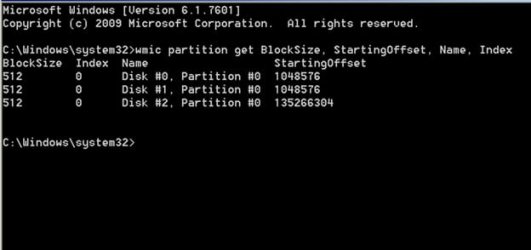
Here is wmic output on my drives.

Note that the starting offsets divided by the block size results in an answer of 2048 for 2 of the disks and 264192 for the other. All 3 at 2048 or later.

Can I assume these results are effectively what Bootice would tell me, at least for this specific issue?
 

Attachments

  • Untitled-1.jpg
    Untitled-1.jpg
    30.7 KB · Views: 23

My Computer My Computer

At a glance

Windows 7 Home Premium SP1, 64-bitIntel Skylake i5-6600K, not overclocked8 GB HyperX DDR4-2666 (2 x 4 GB)none; graphics are integrated on CPU
Computer type
PC/Desktop
Computer Manufacturer/Model Number
Ignatz Special; 4 speed manual gearbox; factory air conditioning; one of one
OS
Windows 7 Home Premium SP1, 64-bit
CPU
Intel Skylake i5-6600K, not overclocked
Motherboard
AsRock Z170M Extreme 4, micro ATX
Memory
8 GB HyperX DDR4-2666 (2 x 4 GB)
Graphics Card(s)
none; graphics are integrated on CPU
Sound Card
onboard: Realtek ALC1150; external: USB Behringer UF0-202
Monitor(s) Displays
Dell S2340M 23 inch IPS
Screen Resolution
1600 x 900
Hard Drives
System: Crucial MX100 series SSD, 128 GB;
Data: Samsung Spinpoint 103SJ, 1 TB;
Backup: WD Caviar Green WD30EZRX-00D8PB0, 3 TB
PSU
Rosewill SilentNight 500 watt fanless, semi-modular
Case
Antec Solo II
Cooling
Noctua NH-U12S; Noctua F12 intake, Noctua S12A exhaust
Keyboard
Microsoft 200 6JH-00001 USB
Mouse
Dell or Microsoft optical wired; USB
Antivirus
Microsoft Security Essentials and Malwarebytes Premium
Browser
Pale Moon
Other Info
All fans PWM; speeds at idle: CPU circa 500 rpm; intake circa 600 rpm; exhaust circa 600 rpm; CPU temps 27 idle and 47 C load in a warm room (27 C/81 F) when running Intel Extreme Tuning Utility stress test.
What problems could a consumer experience who we advise to Clean their drive?

I assume he means at least that Clean on an LBA 63 formatted drive would prevent partition recovery.

Not a problem assuming you never would want to recover that partition.

He may mean more than that?
 

My Computer My Computer

At a glance

Windows 7 Home Premium SP1, 64-bitIntel Skylake i5-6600K, not overclocked8 GB HyperX DDR4-2666 (2 x 4 GB)none; graphics are integrated on CPU
Computer type
PC/Desktop
Computer Manufacturer/Model Number
Ignatz Special; 4 speed manual gearbox; factory air conditioning; one of one
OS
Windows 7 Home Premium SP1, 64-bit
CPU
Intel Skylake i5-6600K, not overclocked
Motherboard
AsRock Z170M Extreme 4, micro ATX
Memory
8 GB HyperX DDR4-2666 (2 x 4 GB)
Graphics Card(s)
none; graphics are integrated on CPU
Sound Card
onboard: Realtek ALC1150; external: USB Behringer UF0-202
Monitor(s) Displays
Dell S2340M 23 inch IPS
Screen Resolution
1600 x 900
Hard Drives
System: Crucial MX100 series SSD, 128 GB;
Data: Samsung Spinpoint 103SJ, 1 TB;
Backup: WD Caviar Green WD30EZRX-00D8PB0, 3 TB
PSU
Rosewill SilentNight 500 watt fanless, semi-modular
Case
Antec Solo II
Cooling
Noctua NH-U12S; Noctua F12 intake, Noctua S12A exhaust
Keyboard
Microsoft 200 6JH-00001 USB
Mouse
Dell or Microsoft optical wired; USB
Antivirus
Microsoft Security Essentials and Malwarebytes Premium
Browser
Pale Moon
Other Info
All fans PWM; speeds at idle: CPU circa 500 rpm; intake circa 600 rpm; exhaust circa 600 rpm; CPU temps 27 idle and 47 C load in a warm room (27 C/81 F) when running Intel Extreme Tuning Utility stress test.
I am out for a while.
 

My Computer My Computer

At a glance

Windows 7 Home Premium 32 bit
OS
Windows 7 Home Premium 32 bit
Jumanji:

Here is wmic output on my drives.

Note that the starting offsets divided by the block size results in an answer of 2048 for 2 of the disks and 264192 for the other. All 3 at 2048 or later.

Can I assume these results are effectively what Bootice would tell me, at least for this specific issue?

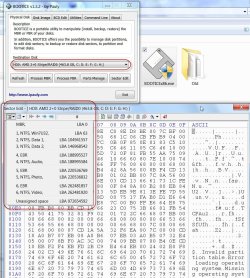
Here is a picture of how Bootice shows my system drive. My system drive has three primary partitions and three logical in the extended partition.

As you can see all the partition details are available.

Start sectors of all NTFS volumes (Partition/Volume Boot Record) as well as the EBR (Extended Boot Record) are all shown.

27-06-2014 20-16-28.jpg

If I have any problems with my Windows Installation, the solution is definitely not diskpart clean which will instantly make my system drive inaccessible. This will be the case with any one having the start partition on Sector 63. ( In my case I formatted the drive before installing Windows in 2009 to avoid the System reserved partition. Many have done that. In fact it was a hot topic then.)

Having said that I am still not clear what a "Windows Installation Failure" can occur, how it will manifest, and how will diskpart clean can only be the solution to resolve it. A technical explanation is required to be convinced.

If my Windows is still working albeit any problems, I shall only look for a solution other than diskpart clean. I have a backup of all these sectors and can restore them.
 
Last edited:

My Computer My Computer

At a glance

Windows 7 Home Premium 32 bit
OS
Windows 7 Home Premium 32 bit
Jumanji:

Thanks for that. I'd never used Bootice before, but fumbled around with it.

Turns out the LBA info is also shown through the "Parts Manage" tab, which turns out to mean "partition manage".

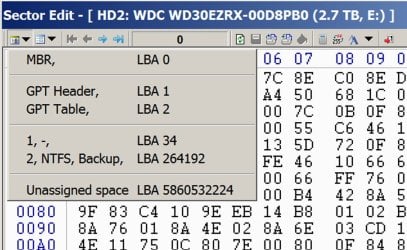
As I suspected, for my 3 physical drives, it showed the same results as shown by the WMIC command I mentioned a few posts back: 2048, 2048, and 264192. So Diskpart Clean would be OK for me.

Just FYI, here's what Bootice shows for my 3 TB drive (GPT), with a single data partition:
 

Attachments

  • sector edit of 3 tb.jpg
    sector edit of 3 tb.jpg
    104.1 KB · Views: 0

My Computer My Computer

At a glance

Windows 7 Home Premium SP1, 64-bitIntel Skylake i5-6600K, not overclocked8 GB HyperX DDR4-2666 (2 x 4 GB)none; graphics are integrated on CPU
Computer type
PC/Desktop
Computer Manufacturer/Model Number
Ignatz Special; 4 speed manual gearbox; factory air conditioning; one of one
OS
Windows 7 Home Premium SP1, 64-bit
CPU
Intel Skylake i5-6600K, not overclocked
Motherboard
AsRock Z170M Extreme 4, micro ATX
Memory
8 GB HyperX DDR4-2666 (2 x 4 GB)
Graphics Card(s)
none; graphics are integrated on CPU
Sound Card
onboard: Realtek ALC1150; external: USB Behringer UF0-202
Monitor(s) Displays
Dell S2340M 23 inch IPS
Screen Resolution
1600 x 900
Hard Drives
System: Crucial MX100 series SSD, 128 GB;
Data: Samsung Spinpoint 103SJ, 1 TB;
Backup: WD Caviar Green WD30EZRX-00D8PB0, 3 TB
PSU
Rosewill SilentNight 500 watt fanless, semi-modular
Case
Antec Solo II
Cooling
Noctua NH-U12S; Noctua F12 intake, Noctua S12A exhaust
Keyboard
Microsoft 200 6JH-00001 USB
Mouse
Dell or Microsoft optical wired; USB
Antivirus
Microsoft Security Essentials and Malwarebytes Premium
Browser
Pale Moon
Other Info
All fans PWM; speeds at idle: CPU circa 500 rpm; intake circa 600 rpm; exhaust circa 600 rpm; CPU temps 27 idle and 47 C load in a warm room (27 C/81 F) when running Intel Extreme Tuning Utility stress test.
So I am going to assume that Diskpart Clean can still continue to be advised for installation failures without adverse effects based on what you have found here.
 
@ignatsatzonic,

I do not have a more than 2 TB drive that would warrant GPT, but I had done some preliminary exploration of GPT structure with the existing drive.

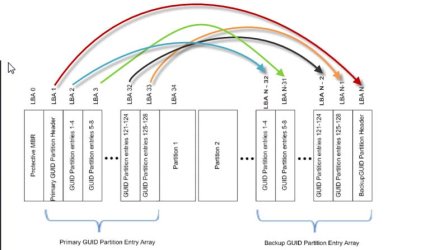
The interesting fact is, if the GPT Header or GPT Partition Table gets corrupted, it will be instantly and automatically restored from the backup kept in the last sectors of the HDD and you will never even know that a corruption had occurred.

It is only if the backups in the last sectors of the HDD get corrupted , by virtue of the fact that those backups will be what will be restored to the initial sectors, that may lead to loss of access to the drive.

My advice to those who have GPT drives is, do backup all the sectors shown by bootice and if ever you lose access to the drive, restore the backups in the last sectors in the HDD with the backups you had taken with bootice. In most cases that will instantly bring access to the drive or else you will be running around in circles for data recovery from a lost drive.

A diagram of what goes where is below.

arrow.jpg

If you have upto 4 Partitions, you will back up LBA 1 and LBA 2 and keep it in safe custody in another drive. If you ever lose access to the drive because of corrupted GPT Header and/or GPT Partition Table, restore the backup of LBA 1 to LBA n (the last sector of your drive) and LBA 2 to LBA n-32. In most cases your drive will be accessible again immediately.
 
Last edited:

My Computer My Computer

At a glance

Windows 7 Home Premium 32 bit
OS
Windows 7 Home Premium 32 bit
So I am going to assume that Diskpart Clean can still continue to be advised for installation failures without adverse effects based on what you have found here.

As long as I do not know or understand what that installation failure is and how it manifests, I can't give a definitive answer.

What definitive answer can be given is:

If the Windows installation is working still, though impaired, and if the Windows start sector is 2048, diskpart clean can be executed safely without any deteriment.

If the Windows installation is working still, though impaired, and if the Windows start sector is 63, diskpart clean will only aggravate the situation by zeroing the NTFS file system on 63 making the HDD vanish almost to a point of no return as for as data recovery is concerned.

( Just in the recent fortnight, we have seen two cases of diskpart clean wiping sector 63 ( one was accidental and one was due to misguidance in some other forum - not SF) and both are under extremely difficult data recovery process by the able Anshad.)

( For successful data recovery, a valid intact NTFS (Volume boot record ) is essential. Where it is not there, some sort of data recovery is possible with PhotoRec and like-software where these reconstruct the data from specific file signatures and attributes. If it is a multiple partitioned drive, data in other partitions where NTFS remains intact , the data in those can be successfully recovered and copied with TestDisk.)

 
Last edited:

My Computer My Computer

At a glance

Windows 7 Home Premium 32 bit
OS
Windows 7 Home Premium 32 bit
OK jumanji I realize now you aren't clear on they type of installation failure I'm talking about. My bad for not explaining it better.

When Win7 won't install normally it can be for a number of reasons. In the early days it needed all but one stick of RAM removed, then something was inserted in SP1 that resolved that. The remaining reasons are several but are almost all covered in Overcoming Windows 7 Installation Failures - Windows 7 Help Forums which resolves about 90% of them. The remaining 10% are almost all UEFI problems.

Of those steps the one which works foremost is the Clean command. You'll notice in the commands we also format an Active partition which also can help.

I hope this helps.
 
OK, greg, thanks for clearing it. I had always been in a dilemma whether you were meaning Windows Installation failure as one arising during the course of its installation, or meaning it in an already existing "Windows installation" failing in someway.

I also mentioned somewhere that "I am no Windows installation specialist" and it is your forte :) and I am none to advise you on it.

In any case, since a successful "Windows Installation" :) has not come into existence yet, this 63 /2048 issue does not arise at all and you are free to do anything that will result in a successful Windows install.
 
Last edited:

My Computer My Computer

At a glance

Windows 7 Home Premium 32 bit
OS
Windows 7 Home Premium 32 bit
Back
Top