
DiskPart Error "Data Error (cyclic redundancy check)"

ed123

New member
Member
Local time
3:06 AM
Messages
72
Im trying to do a clean install of Win7. Im installing it through usb i have already deleted the hard drive using Darik's Boot And Nuke.When i try to create a partition from the command prompt it gives me an error DiskPart Error "Data Error (cyclic redundancy check)" see the system event log for more info.
 

My Computer My Computer

At a glance

Windows & Ultimate 64 bit & Linux Mint * Dual...4GB DDR3 SDRAM (1 DIMM)AMD Radeon HD 6320 Discrete-Class Graphics
Computer Manufacturer/Model Number
QE339UA#ABA
OS
Windows & Ultimate 64 bit & Linux Mint * Dual Boot
Motherboard
1.65GHz VISION E2 Technology from AMD with AMD Dual-Core E-4
Memory
4GB DDR3 SDRAM (1 DIMM)
Graphics Card(s)
AMD Radeon HD 6320 Discrete-Class Graphics
Sound Card
Altec Lansing Speakers
Monitor(s) Displays
1366x768
Hard Drives
500GB 5400RPM
Keyboard
Full-size keyboard
Mouse
Touchpad with multitouch gesture support and on/off button
Why are you doing all of those unnecessary steps instead of just booting the Win7 installation media to delete all partitons and then create New and Format using the drive options pictured in Steps 7/8 of Clean Install Windows 7? Nothing more is needed unless troubleshooting install failure.

If you did a secure erase using DBAN that is overkill intended to overwrite data to make it unrecoverable by forensics software. It is also hard on the drive.

Try now booting the Win7 installer to create the partitions. If the error repeats run the HD maker's HD Diagnostic extended CD test, followd by Disk Check from the installer's Command Line in System Recovery Options
 
Like gregrocker said, it is hard on the drive. I think it may have killed the drive in the process of erase...
 

My Computer My Computer

At a glance

Windows 7 Professional 32-bit/Windows 8 64-bi...Intel Core 2 Quad Q6600/Intel Core i7 4790/In...2GB/16GB/4GBIntel G33/G31 Express(Vostro)/NVIDIA GeForce ...
Computer type
PC/Desktop
Computer Manufacturer/Model Number
Dell Vostro 400/Dell XPS 8700(Slightly Customized for me by Dell)/Toshiba Satellite T135
OS
Windows 7 Professional 32-bit/Windows 8 64-bit/Win7 Pro64-bit
CPU
Intel Core 2 Quad Q6600/Intel Core i7 4790/Intel Pentium
Memory
2GB/16GB/4GB
Graphics Card(s)
Intel G33/G31 Express(Vostro)/NVIDIA GeForce GTX 745(XPS)
Monitor(s) Displays
HP 2009m(Vostro)/ViewSonic VX2250wm-LED(XPS)
Screen Resolution
1600x900(Vostro)/1920x1080(XPS)
Hard Drives
Seagate ST3160815AS(Vostro)/Western Digital Blue(Satellite)
External:
Western Digital My Passport 0748
Samsung HM121HC
Keyboard
Dell L100)(Vostro)/Dell KB2133p(XPS)
Mouse
Dell M-UAV-DEL8(XPS)
Internet Speed
100 Mbit/s(Only when IPTV is plugged out)
Antivirus
Avast, Malwarebytes PRO
Browser
Internet Explorer 11
Other Info
Note: Names with slashes between two different parts mean that the left is my old desktop and the right is my old laptop and the middle is my new desktop.(Unless specified)
Ping is horrible for servers overseas in US and Europe.
New laptop:LG Gram(Not available in US) Processor:Intel Core i3 4th Gen Ultra Low Power RAM:4GB Hard Drive:SK Hynix OEM MSATA or M.2 Graphics:Intel HD
Okay I understand i have tried going through the installation disk but when it asks me to choose a drive for it to install it in it give me an error message when trying format the unacollated space
 

My Computer My Computer

At a glance

Windows & Ultimate 64 bit & Linux Mint * Dual...4GB DDR3 SDRAM (1 DIMM)AMD Radeon HD 6320 Discrete-Class Graphics
Computer Manufacturer/Model Number
QE339UA#ABA
OS
Windows & Ultimate 64 bit & Linux Mint * Dual Boot
Motherboard
1.65GHz VISION E2 Technology from AMD with AMD Dual-Core E-4
Memory
4GB DDR3 SDRAM (1 DIMM)
Graphics Card(s)
AMD Radeon HD 6320 Discrete-Class Graphics
Sound Card
Altec Lansing Speakers
Monitor(s) Displays
1366x768
Hard Drives
500GB 5400RPM
Keyboard
Full-size keyboard
Mouse
Touchpad with multitouch gesture support and on/off button
What is the exact error message as we've probably seen it hundreds of times or more?
 
unnamed_zpsd7a5a777.jpg
 

My Computer My Computer

At a glance

Windows & Ultimate 64 bit & Linux Mint * Dual...4GB DDR3 SDRAM (1 DIMM)AMD Radeon HD 6320 Discrete-Class Graphics
Computer Manufacturer/Model Number
QE339UA#ABA
OS
Windows & Ultimate 64 bit & Linux Mint * Dual Boot
Motherboard
1.65GHz VISION E2 Technology from AMD with AMD Dual-Core E-4
Memory
4GB DDR3 SDRAM (1 DIMM)
Graphics Card(s)
AMD Radeon HD 6320 Discrete-Class Graphics
Sound Card
Altec Lansing Speakers
Monitor(s) Displays
1366x768
Hard Drives
500GB 5400RPM
Keyboard
Full-size keyboard
Mouse
Touchpad with multitouch gesture support and on/off button
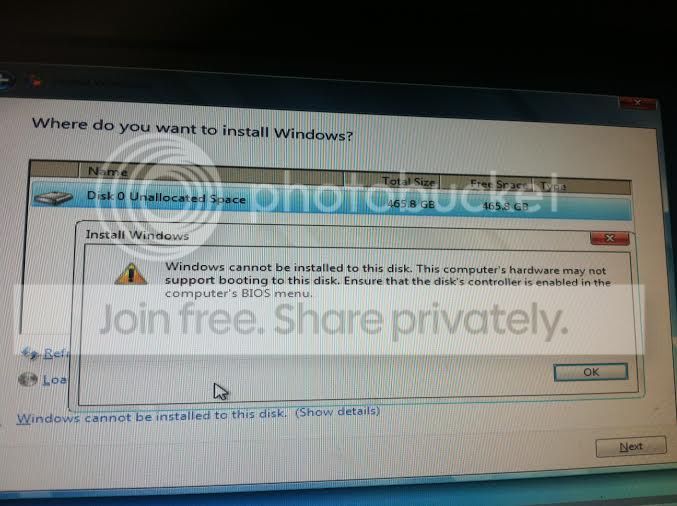
After i try to format i get this error
unnamed1_zpsaa198ada.jpg
 

My Computer My Computer

At a glance

Windows & Ultimate 64 bit & Linux Mint * Dual...4GB DDR3 SDRAM (1 DIMM)AMD Radeon HD 6320 Discrete-Class Graphics
Computer Manufacturer/Model Number
QE339UA#ABA
OS
Windows & Ultimate 64 bit & Linux Mint * Dual Boot
Motherboard
1.65GHz VISION E2 Technology from AMD with AMD Dual-Core E-4
Memory
4GB DDR3 SDRAM (1 DIMM)
Graphics Card(s)
AMD Radeon HD 6320 Discrete-Class Graphics
Sound Card
Altec Lansing Speakers
Monitor(s) Displays
1366x768
Hard Drives
500GB 5400RPM
Keyboard
Full-size keyboard
Mouse
Touchpad with multitouch gesture support and on/off button
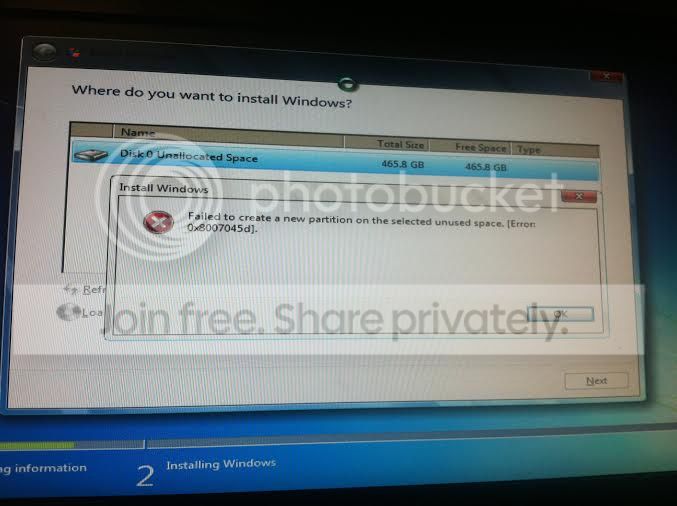
I'd run the HD tests specified earlier. You may have a failing HD. The tests will tell you for sure.

Does the PC have a UEFI BIOS? Boot into BIOS setup to look for any UEFI, Legacy BIOS or Compatibility Service Mode (CSM) settings, report back all of those choices or take a camera snap to attach back using paper clip in reply box.

If a UEFI BIOS to install to UEFI you must boot the Win7 installation media as a UEFI device in the BIOS Boot order menu. If no such choice exists then you may have Legacy Mode or CSM settings that are not exactly correct causing problems.

I would set the BIOS to Legacy or CSM enabled and SATA controller setting to AHCI. If no UEFI BIOS, just AHCI. If you have dual SATA controllers plug into the Intel port and not Marvel.
 
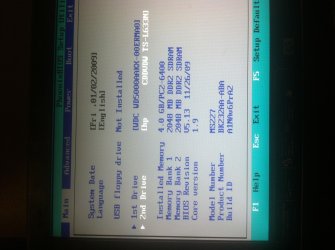
this is all i see in the BIOS
 

Attachments

  • photo 1.jpg
    photo 1.jpg
    420.4 KB · Views: 1
  • photo 2.jpg
    photo 2.jpg
    397.3 KB · Views: 2

My Computer My Computer

At a glance

Windows & Ultimate 64 bit & Linux Mint * Dual...4GB DDR3 SDRAM (1 DIMM)AMD Radeon HD 6320 Discrete-Class Graphics
Computer Manufacturer/Model Number
QE339UA#ABA
OS
Windows & Ultimate 64 bit & Linux Mint * Dual Boot
Motherboard
1.65GHz VISION E2 Technology from AMD with AMD Dual-Core E-4
Memory
4GB DDR3 SDRAM (1 DIMM)
Graphics Card(s)
AMD Radeon HD 6320 Discrete-Class Graphics
Sound Card
Altec Lansing Speakers
Monitor(s) Displays
1366x768
Hard Drives
500GB 5400RPM
Keyboard
Full-size keyboard
Mouse
Touchpad with multitouch gesture support and on/off button
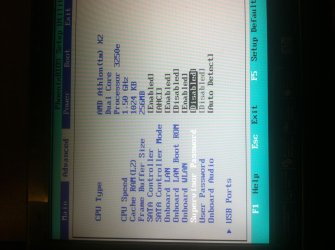
Looks like a normal BIOS although we should see the Boot tab to be sure.

Test your HD as specified to confirm it's condition.

Since you have a Western Digital drive it will need to be pulled out and slaved to another PC to run Data Lifeguard from Windows. HD Diagnostic

You can boot the Win7 DVD, press Shift + F10 at first screen to access Command Prompt to run Disk Check.
 
Is there a way to test the hard drive using program running off my usb i do not have the option to test the hard drive off another computer.
 

My Computer My Computer

At a glance

Windows & Ultimate 64 bit & Linux Mint * Dual...4GB DDR3 SDRAM (1 DIMM)AMD Radeon HD 6320 Discrete-Class Graphics
Computer Manufacturer/Model Number
QE339UA#ABA
OS
Windows & Ultimate 64 bit & Linux Mint * Dual Boot
Motherboard
1.65GHz VISION E2 Technology from AMD with AMD Dual-Core E-4
Memory
4GB DDR3 SDRAM (1 DIMM)
Graphics Card(s)
AMD Radeon HD 6320 Discrete-Class Graphics
Sound Card
Altec Lansing Speakers
Monitor(s) Displays
1366x768
Hard Drives
500GB 5400RPM
Keyboard
Full-size keyboard
Mouse
Touchpad with multitouch gesture support and on/off button
You could try just checking if the drive will work with copying files and opening them.
 

My Computer My Computer

At a glance

Windows 7 Professional 32-bit/Windows 8 64-bi...Intel Core 2 Quad Q6600/Intel Core i7 4790/In...2GB/16GB/4GBIntel G33/G31 Express(Vostro)/NVIDIA GeForce ...
Computer type
PC/Desktop
Computer Manufacturer/Model Number
Dell Vostro 400/Dell XPS 8700(Slightly Customized for me by Dell)/Toshiba Satellite T135
OS
Windows 7 Professional 32-bit/Windows 8 64-bit/Win7 Pro64-bit
CPU
Intel Core 2 Quad Q6600/Intel Core i7 4790/Intel Pentium
Memory
2GB/16GB/4GB
Graphics Card(s)
Intel G33/G31 Express(Vostro)/NVIDIA GeForce GTX 745(XPS)
Monitor(s) Displays
HP 2009m(Vostro)/ViewSonic VX2250wm-LED(XPS)
Screen Resolution
1600x900(Vostro)/1920x1080(XPS)
Hard Drives
Seagate ST3160815AS(Vostro)/Western Digital Blue(Satellite)
External:
Western Digital My Passport 0748
Samsung HM121HC
Keyboard
Dell L100)(Vostro)/Dell KB2133p(XPS)
Mouse
Dell M-UAV-DEL8(XPS)
Internet Speed
100 Mbit/s(Only when IPTV is plugged out)
Antivirus
Avast, Malwarebytes PRO
Browser
Internet Explorer 11
Other Info
Note: Names with slashes between two different parts mean that the left is my old desktop and the right is my old laptop and the middle is my new desktop.(Unless specified)
Ping is horrible for servers overseas in US and Europe.
New laptop:LG Gram(Not available in US) Processor:Intel Core i3 4th Gen Ultra Low Power RAM:4GB Hard Drive:SK Hynix OEM MSATA or M.2 Graphics:Intel HD
How do you suggest I check if it can copy files I can't see the drive I ran windows PE and the hard drive isn't showing up anywhere
 

My Computer My Computer

At a glance

Windows & Ultimate 64 bit & Linux Mint * Dual...4GB DDR3 SDRAM (1 DIMM)AMD Radeon HD 6320 Discrete-Class Graphics
Computer Manufacturer/Model Number
QE339UA#ABA
OS
Windows & Ultimate 64 bit & Linux Mint * Dual Boot
Motherboard
1.65GHz VISION E2 Technology from AMD with AMD Dual-Core E-4
Memory
4GB DDR3 SDRAM (1 DIMM)
Graphics Card(s)
AMD Radeon HD 6320 Discrete-Class Graphics
Sound Card
Altec Lansing Speakers
Monitor(s) Displays
1366x768
Hard Drives
500GB 5400RPM
Keyboard
Full-size keyboard
Mouse
Touchpad with multitouch gesture support and on/off button
I attempted to look for it in partition wizard and in windows disk manager but no luck ..
 

My Computer My Computer

At a glance

Windows & Ultimate 64 bit & Linux Mint * Dual...4GB DDR3 SDRAM (1 DIMM)AMD Radeon HD 6320 Discrete-Class Graphics
Computer Manufacturer/Model Number
QE339UA#ABA
OS
Windows & Ultimate 64 bit & Linux Mint * Dual Boot
Motherboard
1.65GHz VISION E2 Technology from AMD with AMD Dual-Core E-4
Memory
4GB DDR3 SDRAM (1 DIMM)
Graphics Card(s)
AMD Radeon HD 6320 Discrete-Class Graphics
Sound Card
Altec Lansing Speakers
Monitor(s) Displays
1366x768
Hard Drives
500GB 5400RPM
Keyboard
Full-size keyboard
Mouse
Touchpad with multitouch gesture support and on/off button
I think it is dead for good.
 

My Computer My Computer

At a glance

Windows 7 Professional 32-bit/Windows 8 64-bi...Intel Core 2 Quad Q6600/Intel Core i7 4790/In...2GB/16GB/4GBIntel G33/G31 Express(Vostro)/NVIDIA GeForce ...
Computer type
PC/Desktop
Computer Manufacturer/Model Number
Dell Vostro 400/Dell XPS 8700(Slightly Customized for me by Dell)/Toshiba Satellite T135
OS
Windows 7 Professional 32-bit/Windows 8 64-bit/Win7 Pro64-bit
CPU
Intel Core 2 Quad Q6600/Intel Core i7 4790/Intel Pentium
Memory
2GB/16GB/4GB
Graphics Card(s)
Intel G33/G31 Express(Vostro)/NVIDIA GeForce GTX 745(XPS)
Monitor(s) Displays
HP 2009m(Vostro)/ViewSonic VX2250wm-LED(XPS)
Screen Resolution
1600x900(Vostro)/1920x1080(XPS)
Hard Drives
Seagate ST3160815AS(Vostro)/Western Digital Blue(Satellite)
External:
Western Digital My Passport 0748
Samsung HM121HC
Keyboard
Dell L100)(Vostro)/Dell KB2133p(XPS)
Mouse
Dell M-UAV-DEL8(XPS)
Internet Speed
100 Mbit/s(Only when IPTV is plugged out)
Antivirus
Avast, Malwarebytes PRO
Browser
Internet Explorer 11
Other Info
Note: Names with slashes between two different parts mean that the left is my old desktop and the right is my old laptop and the middle is my new desktop.(Unless specified)
Ping is horrible for servers overseas in US and Europe.
New laptop:LG Gram(Not available in US) Processor:Intel Core i3 4th Gen Ultra Low Power RAM:4GB Hard Drive:SK Hynix OEM MSATA or M.2 Graphics:Intel HD
Did you try different cables, port or reinstalling drive?

Try another HD
 
I have an hp all in one there is no cable it just slides in and how do I reinstall drive
 

My Computer My Computer

At a glance

Windows & Ultimate 64 bit & Linux Mint * Dual...4GB DDR3 SDRAM (1 DIMM)AMD Radeon HD 6320 Discrete-Class Graphics
Computer Manufacturer/Model Number
QE339UA#ABA
OS
Windows & Ultimate 64 bit & Linux Mint * Dual Boot
Motherboard
1.65GHz VISION E2 Technology from AMD with AMD Dual-Core E-4
Memory
4GB DDR3 SDRAM (1 DIMM)
Graphics Card(s)
AMD Radeon HD 6320 Discrete-Class Graphics
Sound Card
Altec Lansing Speakers
Monitor(s) Displays
1366x768
Hard Drives
500GB 5400RPM
Keyboard
Full-size keyboard
Mouse
Touchpad with multitouch gesture support and on/off button
Slide it out and back in.

HP has pretty detailed User Guides on the Support Downloads webpage for each model. You can also often find videos by googling the model + replace hard drive video, or + disassemble.

The goal is to get HD to show up in BIOS setup. If not then replace it. That is also done by googling the model + replace hard drive. Try clicking the Shopping tab to order your choices, if any. I also pull out the HD and google it's Product Number or serial for replacement. You can then decide among the choices. If you need help just ask back.
 
Back
Top