

I'm running Win 7 Ultimate x64 on this laptop. There are two user accounts; mine and that of my wife, who is Chinese. I want to keep my user account set up for English and her user account set up for Chinese Simplified. I have already installed the CS language pack and the CS language pack for IE-9. The Windows OS CS language pack is displaying properly but IE-9 in her user account will not display in CS. The laptop is a Dell XPS 17 L702X with the HD screen. I bought it, for the most part, to watch movies while I'm in China but also for my wife to watch Chinese TV and movies while in the U.S, those movies and TV programs I cannot get with Dish Network TV. It would be easier for her if IE-9 would display CS in her user account. I have already tried, in IE-9, going to the file menu and under "View">Encoding (UTF-8)>More I selected Chinese Simplified (GB18030) but that did nothing.
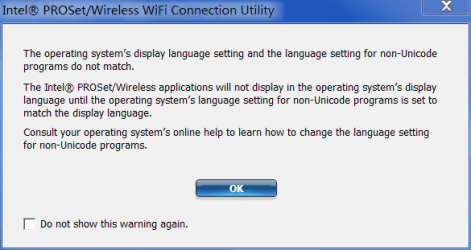
I have included a screenshot of what I think may be part of the problem. It involves my Intel PROSet Wireless and Unicode. If not, I still need to solve the Unicode problem anyway. If I need to start a new thread for the Unicode problem I will do so.
I have spent many hours trying to research my way out of the problem, to no avail. I have determined through the following link, and many other websites that discuss the problem, that there is really no way around the problem without changing the system locale for all users. I'm aware of the Microsoft AppLocale application but I don't think I should have to use it to display IE-9 in Chinese Simplified. Of course, I could be wrong and being wrong is nothing new to me.
language for non unicode programs + multiple users
Thank you in advance for your time and any assistance provided.
C.B.
I have included a screenshot of what I think may be part of the problem. It involves my Intel PROSet Wireless and Unicode. If not, I still need to solve the Unicode problem anyway. If I need to start a new thread for the Unicode problem I will do so.
I have spent many hours trying to research my way out of the problem, to no avail. I have determined through the following link, and many other websites that discuss the problem, that there is really no way around the problem without changing the system locale for all users. I'm aware of the Microsoft AppLocale application but I don't think I should have to use it to display IE-9 in Chinese Simplified. Of course, I could be wrong and being wrong is nothing new to me.
language for non unicode programs + multiple users
Thank you in advance for your time and any assistance provided.
C.B.
Attachments
My Computer
At a glance
1.Windows 7 Ultimate x64; 2.Windows 7 Ultimat...1.AMD Phenom II X6 1075T; 2.Intel Core i7-272...1.8GB DDR3; 2.8GB DDR31.AMD HD 5670 1GB; 2.NVIDIA GeForce GT 555M 3GB
- Computer Manufacturer/Model Number
- 1.Dell Studio XPS 7100 Desktop; 2.Dell XPS 17 Laptop
- OS
- 1.Windows 7 Ultimate x64; 2.Windows 7 Ultimate x64
- CPU
- 1.AMD Phenom II X6 1075T; 2.Intel Core i7-2720QM 2.20 GHz
- Memory
- 1.8GB DDR3; 2.8GB DDR3
- Graphics Card(s)
- 1.AMD HD 5670 1GB; 2.NVIDIA GeForce GT 555M 3GB
- Monitor(s) Displays
- 1.Samsung SyncMaster; 2.17.3in FHD
- Screen Resolution
- 1.1600X900; 2.1920X1080
- Hard Drives
- 1.1TB; 2.1TB 500GB X2
- Keyboard
- 1.Microsoft Wireless; 2.Backlit
- Mouse
- Microsoft Wireless; 2.Microsoft Wireless Mobile 3500
- Internet Speed
- 10.0 Mbps


