Display Properties missing from desktop context menu...

Zaxx

New member
Local time
5:44 PM
Messages
13
Running W7 HP x64....

I noticed a few days ago that when I rt clkd on my desktop that the 'Display Properties' option is missing from the context menu. I can access the various settings thru the CP but I'd like to fix the desktop context menu so I can disable the desktop cleanup wizard as well. Any suggestions? Most every thing I've googled deals with various missing tabs...not the missing menu option itself. I'm sure it's probably a reg key somewhere but I haven't a clue.

Tia...:o
 

My Computer

Computer Manufacturer/Model Number
Custom designed & self built 'Extreme DuoPro 2'
OS
Win 7 Ult. x64
CPU
E8400 'Wolfdale' C2D 6MB Cache 3GHz @ 4GHz 24/7 - 4.3GHz Max
Motherboard
Asus P5K-E WiFi - ICH9R - JMB363 with 2xeSata chans Raid 0/1
Memory
2x2GB+2x1GB Ocz Reaper HPC - DDR2-1066 5-5-5-15 @ 2.1v
Graphics Card(s)
Palit HD4850 SSE - 512MB DDR5 - 750MHz/950MHz Factory Clock
Sound Card
Creative Audigy 2 ZS - 7.1 Channel - 24bit Proc.
Monitor(s) Displays
ViewSonic VX922 - 2ms Black to Black
Screen Resolution
1280x1024
Hard Drives
Dual Boot SSDs: OCZ Vertex 2 50GB (W7) - Apex 60GB (XP)
Primary: 2x500GB Seagate 7200.12s Raid0
Storage: 2x500GB Seagate 7200.12s Raid0
Backup: 2x250GB Seagate 7200.11s Ext. Raid1
PSU
PC Power & Cooling Silencer 610W
Case
CoolerMaster Storm Scout - 2x140mm 2x120mm
Cooling
Thermalright VenomousX - 120mm TR FDB Fan w/ shrowd
Keyboard
Logitech G110
Mouse
Logitech LX8 Laser
Internet Speed
22Mb Down / 7Mb Up
Other Info
Audigy ZS2 - Logitech Z-2300s - 2.1 200W RMS 270W Peak
Modded by swapping the 8" sub for a JL Audio Dual Voice Coil car sub! Mounted 2x120mm 2500rpm together to blow on the amp's external heatsink. On/off by RF remote cont. 12v switch in case.
This is my shot at building a 'most bang for the buck' system. ;)
When I right click my screen I don't see a display properties option. I see graphics properties which pulls up the options I have though the Intel driver software. I also see personalize and screen resolution. When did you start using 7? I was confused at first too and don't like having to shuffle through all the options to change what I could in one menu before either, but it is what it is. I wish I could be of more help :(
 

My Computer

Computer type
Laptop
Computer Manufacturer/Model Number
Toshiba P775-S7100
OS
Windows 7 Professional SP1 64-bit
CPU
Intel Core i5-2450M @2.5 GHz
Memory
6 GB DDR3 1333MHz
Graphics Card(s)
Intel HD 3000
Monitor(s) Displays
Built-in 17.3" LED; 22" Insignia NS-L22Q-10A
Screen Resolution
1600x900; 1360x768
Hard Drives
750 GB Hitachi
1TB Seagate FreeAgent External
Internet Speed
Verizon DSL Speed(Down/Up): 3360 Kbps / 800 Kbps
Antivirus
MSE and MBAM Pro
Browser
IE10
Just installed last month...I can get to all the setting thru the CP but what I'm after is the option to disable the desktop cleanup wizard.
Tried this regedit...no luck. http://www.sevenforums.com/tutorials/68760-display-dpi-settings-enable-disable.html
When I rt clk the desktop there's no 'Properties' in the context menu...personalize, gadgets ect are all there tho.

I hope my Ati Catalyst driver isn't responsible for it's disappearance...:s
 
Last edited by a moderator:

My Computer

Computer Manufacturer/Model Number
Custom designed & self built 'Extreme DuoPro 2'
OS
Win 7 Ult. x64
CPU
E8400 'Wolfdale' C2D 6MB Cache 3GHz @ 4GHz 24/7 - 4.3GHz Max
Motherboard
Asus P5K-E WiFi - ICH9R - JMB363 with 2xeSata chans Raid 0/1
Memory
2x2GB+2x1GB Ocz Reaper HPC - DDR2-1066 5-5-5-15 @ 2.1v
Graphics Card(s)
Palit HD4850 SSE - 512MB DDR5 - 750MHz/950MHz Factory Clock
Sound Card
Creative Audigy 2 ZS - 7.1 Channel - 24bit Proc.
Monitor(s) Displays
ViewSonic VX922 - 2ms Black to Black
Screen Resolution
1280x1024
Hard Drives
Dual Boot SSDs: OCZ Vertex 2 50GB (W7) - Apex 60GB (XP)
Primary: 2x500GB Seagate 7200.12s Raid0
Storage: 2x500GB Seagate 7200.12s Raid0
Backup: 2x250GB Seagate 7200.11s Ext. Raid1
PSU
PC Power & Cooling Silencer 610W
Case
CoolerMaster Storm Scout - 2x140mm 2x120mm
Cooling
Thermalright VenomousX - 120mm TR FDB Fan w/ shrowd
Keyboard
Logitech G110
Mouse
Logitech LX8 Laser
Internet Speed
22Mb Down / 7Mb Up
Other Info
Audigy ZS2 - Logitech Z-2300s - 2.1 200W RMS 270W Peak
Modded by swapping the 8" sub for a JL Audio Dual Voice Coil car sub! Mounted 2x120mm 2500rpm together to blow on the amp's external heatsink. On/off by RF remote cont. 12v switch in case.
This is my shot at building a 'most bang for the buck' system. ;)
I'm confursed, or you are. There is no Display Properties option on the desktop context menu. And, there is no desktop cleanup wizard in Windows 7. Sorry. A Guy
 

My Computer

Computer type
PC/Desktop
OS
Windows 10 Home x64
CPU
INTEL Core i5-750 Quad-Core 3.37GHz
Motherboard
ASUS P7P55D
Memory
HyperX Fury Black Series 8GB (2 x 4GB) 1866Mhz
Graphics Card(s)
EVGA GeForce GTX 750 Superclocked 1GB 128-Bit GDDR5
Monitor(s) Displays
LG 32MA68HY 32" IPS
Screen Resolution
1920 x 1080
Hard Drives
Samsung 840 Evo 120GB, SEAGATE 500GB Barracuda® 7200.12, SATA 3 Gb/s, 7200 RPM, 16MB cache
PSU
ANTEC TruePower New TP-550, 80 PLUS, 550W
Case
ANTEC Three Hundred Illusion
Cooling
COOLER MASTER Hyper 212 Plus, 4 x 120mm 1 x 140mm Noctua's
Internet Speed
85 + Mbps
Antivirus
Avast
Browser
Vivaldi
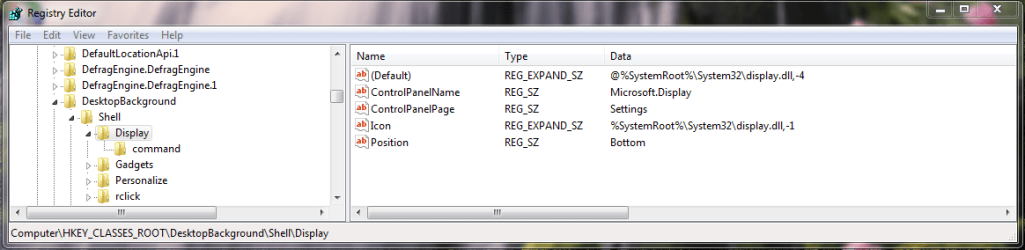
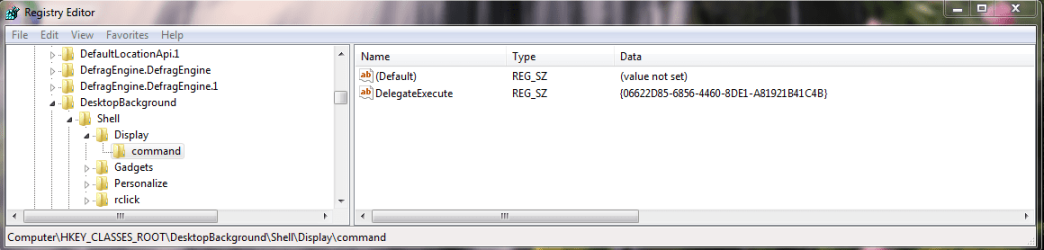
What you need are these reg keys:
97789-1.PNG
97789-2.PNG
 

My Computer

OS
Windows 7 Enterprise
CPU
Intel Pentium Dual E2200 @2.2GHz
Motherboard
Gigabyte II-G31
Memory
4GB
Graphics Card(s)
Palit GForce 9500GT 1GB
Sound Card
onBoard
Hard Drives
WesternDigital: 250GB + 1TB + 1TB + 2TB
PSU
450W
Case
CoolerMaster CM690
Cooling
Corsair H50
Mouse
Logitech MX518
Hello Zaxx,

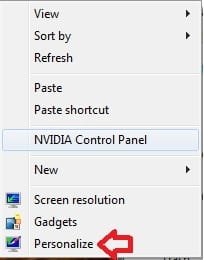
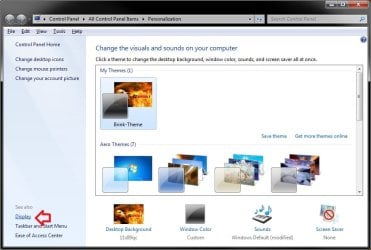
By default, Display is not listed in the desktop context menu like it is in the Control Panel (icons view). Instead you would normally click on Personalize, then click on Display at the bottom of the left pane.

desktop.jpg

Display.jpg

Hope this helps,
Shawn

UPDATE:
In addition, the Desktop Cleanup Wizard is not in Windows 7 like XP.
 
Last edited:

My Computer

Computer type
PC/Desktop
Computer Manufacturer/Model Number
Self built custom
OS
64-bit Windows 11 Pro for Workstations
CPU
Intel i7-8700K OC'd to 5 GHz
Motherboard
ASUS ROG Maximus XI Formula Z390
Memory
64 GB (4x16GB) G.SKILL TridentZ RGB DDR4 3600 MHz
Graphics Card(s)
ASUS ROG-STRIX-GTX1080TI-O11G-GAMING
Sound Card
Integrated
Monitor(s) Displays
2 x Samsung Odyssey G7 27"
Screen Resolution
2560x1440
Hard Drives
1TB Samsung 990 PRO M.2,
4TB Samsung 990 PRO PRO M.2,
TerraMaster F8 SSD Plus NAS
PSU
Seasonic Prime Titanium 850W
Case
Thermaltake Core P3
Cooling
Corsair Hydro H115i
Keyboard
Logitech wireless K800
Mouse
Logitech MX Master 4
Internet Speed
2 Gb/s Download and 100 Mb/s Upload
Antivirus
Malwarebyte Anti-Malware Premium
Browser
Google Chrome
Other Info
Logitech Z625 speaker system,
Logitech BRIO 4K Pro webcam,
HP Color LaserJet Pro MFP M477fdn,
APC SMART-UPS RT 1000 XL - SURT1000XLI,
Galaxy S23 Plus phone

My Computer

Computer type
PC/Desktop
Computer Manufacturer/Model Number
Self built custom
OS
64-bit Windows 11 Pro for Workstations
CPU
Intel i7-8700K OC'd to 5 GHz
Motherboard
ASUS ROG Maximus XI Formula Z390
Memory
64 GB (4x16GB) G.SKILL TridentZ RGB DDR4 3600 MHz
Graphics Card(s)
ASUS ROG-STRIX-GTX1080TI-O11G-GAMING
Sound Card
Integrated
Monitor(s) Displays
2 x Samsung Odyssey G7 27"
Screen Resolution
2560x1440
Hard Drives
1TB Samsung 990 PRO M.2,
4TB Samsung 990 PRO PRO M.2,
TerraMaster F8 SSD Plus NAS
PSU
Seasonic Prime Titanium 850W
Case
Thermaltake Core P3
Cooling
Corsair Hydro H115i
Keyboard
Logitech wireless K800
Mouse
Logitech MX Master 4
Internet Speed
2 Gb/s Download and 100 Mb/s Upload
Antivirus
Malwarebyte Anti-Malware Premium
Browser
Google Chrome
Other Info
Logitech Z625 speaker system,
Logitech BRIO 4K Pro webcam,
HP Color LaserJet Pro MFP M477fdn,
APC SMART-UPS RT 1000 XL - SURT1000XLI,
Galaxy S23 Plus phone
Another good one Shawn, thanks :thumbsup:

A Guy
 

My Computer

Computer type
PC/Desktop
OS
Windows 10 Home x64
CPU
INTEL Core i5-750 Quad-Core 3.37GHz
Motherboard
ASUS P7P55D
Memory
HyperX Fury Black Series 8GB (2 x 4GB) 1866Mhz
Graphics Card(s)
EVGA GeForce GTX 750 Superclocked 1GB 128-Bit GDDR5
Monitor(s) Displays
LG 32MA68HY 32" IPS
Screen Resolution
1920 x 1080
Hard Drives
Samsung 840 Evo 120GB, SEAGATE 500GB Barracuda® 7200.12, SATA 3 Gb/s, 7200 RPM, 16MB cache
PSU
ANTEC TruePower New TP-550, 80 PLUS, 550W
Case
ANTEC Three Hundred Illusion
Cooling
COOLER MASTER Hyper 212 Plus, 4 x 120mm 1 x 140mm Noctua's
Internet Speed
85 + Mbps
Antivirus
Avast
Browser
Vivaldi
You're welcome Bill. Thank you. :)
 

My Computer

Computer type
PC/Desktop
Computer Manufacturer/Model Number
Self built custom
OS
64-bit Windows 11 Pro for Workstations
CPU
Intel i7-8700K OC'd to 5 GHz
Motherboard
ASUS ROG Maximus XI Formula Z390
Memory
64 GB (4x16GB) G.SKILL TridentZ RGB DDR4 3600 MHz
Graphics Card(s)
ASUS ROG-STRIX-GTX1080TI-O11G-GAMING
Sound Card
Integrated
Monitor(s) Displays
2 x Samsung Odyssey G7 27"
Screen Resolution
2560x1440
Hard Drives
1TB Samsung 990 PRO M.2,
4TB Samsung 990 PRO PRO M.2,
TerraMaster F8 SSD Plus NAS
PSU
Seasonic Prime Titanium 850W
Case
Thermaltake Core P3
Cooling
Corsair Hydro H115i
Keyboard
Logitech wireless K800
Mouse
Logitech MX Master 4
Internet Speed
2 Gb/s Download and 100 Mb/s Upload
Antivirus
Malwarebyte Anti-Malware Premium
Browser
Google Chrome
Other Info
Logitech Z625 speaker system,
Logitech BRIO 4K Pro webcam,
HP Color LaserJet Pro MFP M477fdn,
APC SMART-UPS RT 1000 XL - SURT1000XLI,
Galaxy S23 Plus phone
Back
Top