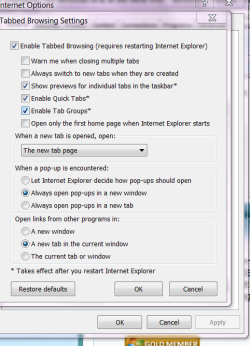
I have two shortcuts on my desktop each linking to a website. Until today i have been able to click on one, which displayed the web page in a window, and then click on the other shortcut and the other web page would be displayed in its own window. I could then arrange one window alongside the other and flip between the two.
Today, I must have inadvertently changed something because now, when I click the second shortcut, the webpage appears and displaces the first webpage. I can switch between the two using the task bar, but there is only the one window and this is not the behaviour I want.
I presume it is a Windows feature I have changed but I cannot see how.
Ken
Today, I must have inadvertently changed something because now, when I click the second shortcut, the webpage appears and displaces the first webpage. I can switch between the two using the task bar, but there is only the one window and this is not the behaviour I want.
I presume it is a Windows feature I have changed but I cannot see how.
Ken
My Computer
At a glance
Windows 7 Home Premium 64-bitIntel Core i7 Processor 8708 gb1GB NVIDIA GeForce GTX 460
- Computer Manufacturer/Model Number
- Dell Studio XPS 8100
- OS
- Windows 7 Home Premium 64-bit
- CPU
- Intel Core i7 Processor 870
- Memory
- 8 gb
- Graphics Card(s)
- 1GB NVIDIA GeForce GTX 460
- Monitor(s) Displays
- Dell ST2320L
- Hard Drives
- 1TB ATA