DNS Not Found

lorac322

New member
Local time
8:00 AM
Messages
4
Hi,
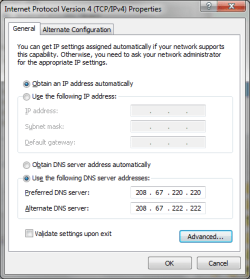
I've had my computer for about a year now and this has always been a problem that has happening more often now. I sporadically get this "DNS Not Found" error. I've tried changing the DNS server addresses, I'm currently using the OpenDNS addresses.. still, it only works sometimes. I don't know what else to try and am quite tired of only being able to reach websites 45% of the time.
 

My Computer

OS
Windows 7 Home Premium 64-bit
Hi lorac322, welcome to SevenForums.

How did you change the DNS addresses? from the router? Or from Windows?

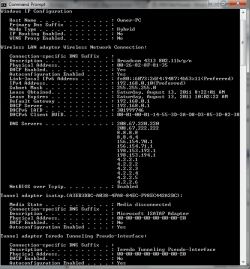
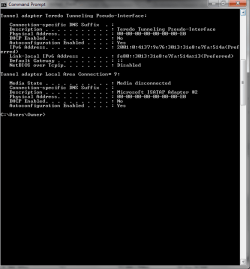
Can you please open a command prompt and type "ipconfig /all" (no quotes) and post the results?
 

My Computer

Computer type
PC/Desktop
Computer Manufacturer/Model Number
Medion Erazer (note to self: insert model number) - with custom additions
OS
Windows 10 Pro x64
CPU
Intel Core i5 7400 @ 3.00GHz
Motherboard
OEM supllied with PC
Memory
8GB 2133Mhz DDR4 (OEM supplied)
Graphics Card(s)
Gygabyte Windforce GTX 1050Ti (Factory Overclocked)
Sound Card
Realtek
Monitor(s) Displays
Acer Al1980 + HKC
Screen Resolution
1360*768(HKC) / 1280*1024(Acer)
Hard Drives
1TB Toshiba
1TB WD Caviar Green
120GB Samsung Evo 840
PSU
OEM supplied (no power rating on case)
Case
OEM Supplied
Cooling
Stock
Keyboard
Logitech Wireless
Mouse
Logitect Wireless
Internet Speed
40Mb/s Down 10Mb/s Up
Antivirus
Defender
Browser
Firefox
I did it in Windows. I don't think it's a router problem, I have other wireless devices that work just fine..

Thanks for any input you might have!
 

Attachments

  • Untitled.png
    Untitled.png
    58.7 KB · Views: 70
  • Untitled2.png
    Untitled2.png
    46 KB · Views: 21

My Computer

OS
Windows 7 Home Premium 64-bit
Ok... first thing I see wrong there, is why on earth do you have 14 different DNS servers?

The first thing I would recommend you try, is change the DNS settings in the router (if you can) and reset the Windows settings to default.

I find that Windows sometimes just ignores DNS settings, and goes through the router anyway, for some odd reason. Or at least on mine it does.
 

My Computer

Computer type
PC/Desktop
Computer Manufacturer/Model Number
Medion Erazer (note to self: insert model number) - with custom additions
OS
Windows 10 Pro x64
CPU
Intel Core i5 7400 @ 3.00GHz
Motherboard
OEM supllied with PC
Memory
8GB 2133Mhz DDR4 (OEM supplied)
Graphics Card(s)
Gygabyte Windforce GTX 1050Ti (Factory Overclocked)
Sound Card
Realtek
Monitor(s) Displays
Acer Al1980 + HKC
Screen Resolution
1360*768(HKC) / 1280*1024(Acer)
Hard Drives
1TB Toshiba
1TB WD Caviar Green
120GB Samsung Evo 840
PSU
OEM supplied (no power rating on case)
Case
OEM Supplied
Cooling
Stock
Keyboard
Logitech Wireless
Mouse
Logitect Wireless
Internet Speed
40Mb/s Down 10Mb/s Up
Antivirus
Defender
Browser
Firefox
ok, thanks! I'll try the router, 14 different DNS servers? I don't know, I only changed two. I did let someone else try to fiddle with it. How do I get rid of the settings that I don't see?
 

My Computer

OS
Windows 7 Home Premium 64-bit
this is all I did
 

Attachments

  • Untitled3.png
    Untitled3.png
    41.8 KB · Views: 21

My Computer

OS
Windows 7 Home Premium 64-bit
The easiest way would be to reset the Windows DNS Settings to "obtain DNS settings automatically"

Possibly the other 12 are something to do with your ISP?
 

My Computer

Computer type
PC/Desktop
Computer Manufacturer/Model Number
Medion Erazer (note to self: insert model number) - with custom additions
OS
Windows 10 Pro x64
CPU
Intel Core i5 7400 @ 3.00GHz
Motherboard
OEM supllied with PC
Memory
8GB 2133Mhz DDR4 (OEM supplied)
Graphics Card(s)
Gygabyte Windforce GTX 1050Ti (Factory Overclocked)
Sound Card
Realtek
Monitor(s) Displays
Acer Al1980 + HKC
Screen Resolution
1360*768(HKC) / 1280*1024(Acer)
Hard Drives
1TB Toshiba
1TB WD Caviar Green
120GB Samsung Evo 840
PSU
OEM supplied (no power rating on case)
Case
OEM Supplied
Cooling
Stock
Keyboard
Logitech Wireless
Mouse
Logitect Wireless
Internet Speed
40Mb/s Down 10Mb/s Up
Antivirus
Defender
Browser
Firefox
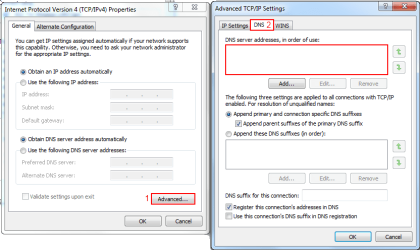
Also check the advanced settings under TCP/IP

Any DNS addresses there? If so remove them.

DNS_Advanced.png

Hope this Helps,
Ryan
 

My Computer

Computer Manufacturer/Model Number
HP Pavilion dv5 Notebook PC
OS
Windows Seven x64
CPU
2.2 GHz Dual Core
Motherboard
Quanta 3600
Memory
4GB
Graphics Card(s)
ATI Mobility RADEON HD 3470
Sound Card
ATI
Monitor(s) Displays
Laptop
Hard Drives
ATA Hitachi HTS543215 (5400RPM)
Case
Laptop
Cooling
Fan
Internet Speed
Basic DSL 1.5 up and Down
Back
Top