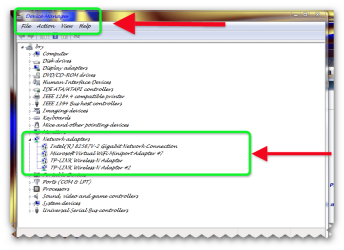
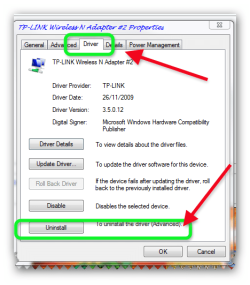
Please go to Device Manager and Uninstall your Network Card Driver then restart the computer
WarningYou may need the security that is used to connect to your Router
Click Start and type "Device Manager" then press enter
good call
 found this on the router maker site Re: No connection to Internet, but connected to ro... - Cisco Home Community
Re: No connection to Internet, but connected to router? Check your firewall(?!) [ Edited ]
Options
02-26-2011 07:57 PM - last edited on 02-26-2011 09:12 PM by kent07
I had the same problem (same symptoms), but with a different solution. Here's what I had & how I fixed it in case it helps anyone else.
The situtation
1. Before getting a Cisco/Linksys E3000, I had a Linksys WRT54GL, & everything worked fine.
2. Replaced it with a new E3000.
3. All computers could reach the Internet via Ethernet (a.k.a. wired) connections with no problems. This was a Playstation 3, two XP desktops, a Win7 desktop, & an Acer Aspire One laptop.
4. iPhone could reach Internet wirelessly.
5. The Acer Aspire One laptop could not reach the Internet wirelessly. (This was the problem.) Like pajuliet said, the OS reported that there was a good wireless connection, but I couldn't do anything with it: browsers couldn't reach anything, couldn't ping anything.
The solution (brief)
The Acer Aspire 1's wireless network chipset is Atheros AR5007EG. The solution was to upgrade that driver. Ultimately, upgrading to version 7.7.0.523 worked. After that upgrade, I use the Easy Quick Key (or whatever it's called, on a USB memory stick) to setup the wireless connection. After that, it's working great.
The solution (details)
I connected the Acer Aspire One to the network with Ethernet (a wire).
Searched the web for the most recent driver for Atheros AR5007EG for Windows XP, 32-bit. The most recent I found as of 2011-02-26 was version 7.7.0.523. Found it at this .cz website. (The site is an eye-sore, & it tries to sell you some kind of "AtherosDrivers.exeAtherosDrivers.exe" utility which I neither needed nor trusted. However, if you scroll to the bottom of the first big section, there's a "click for download" link. I used that to get just the drivers in a ZIP file.)
With the driver in hand (so to speak), run "devmgmt.msc" to get the Device Manager window.
Expand the "network adapters" & double-click the Atheros AR5007EG device to get its Properties window.
Use the "Update driver" button.
To update the driver, I took the default of having Windows search for the driver, but I used the "Browse" button to root the search at the directory in which I had expanded the drivers ZIP file.
The update worked, no errors.
Shutdown.
Unplug network cable.
Reboot.
Use the Cisco "Easy Setup Key" (or whatever it's called), which I had previously setup on a USB memory stick.
Used a web browser to verify that everything was working fine.
Reboot & verify again, to be sure.
Whew! Lots of steps, but went off without a hitch. The only difficulties I encountered are in the next section (so you can avoid them & save yourself some time).
(Though I had to track down & install the drivers myself, the correct diagnosis of an out-of-date driver goes a tech from Cisco. Thanks again)
My Computer
At a glance
Operating System : Windows 7 Home Premium Edi...Processor : Intel Core 2 Quad Q8300 @ 2500 MHzPhysical Memory :8GB Corsair4x 2GB 800MHz C5 ...Video Card : XFX 6700 AMD
- Computer Manufacturer/Model Number
- packard bell IXTREME M5722
- OS
- Operating System : Windows 7 Home Premium Edition 6.01.7600 SP1 (x64)
- CPU
- Processor : Intel Core 2 Quad Q8300 @ 2500 MHz
- Motherboard
- Mainboard : Packard Bell (Acer EG43M )
- Memory
- Physical Memory :8GB Corsair4x 2GB 800MHz C5 DDR2
- Graphics Card(s)
- Video Card : XFX 6700 AMD
- Monitor(s) Displays
- Maestro 234DL - BenQ V2220 - BenQ VW2420H
- Screen Resolution
- Current Display :1920x1080p pixels at 60 Hz in HD LED
- Hard Drives
- Hard Disks : WDC (1000 GB)
Drive C: (Hard Disk) : 428 GB available on 491 GB
Drive D: (Hard Disk) : 426 GB available on 492 GB
SAMSUNG spinpoint HD103SJ 1000.2 GB
(X 2) KINGSTON SSD NOW V 30GB
- PSU
- XFX ProSeries 550W PSU
- Case
- PACKARD BELL IXTREME
- Cooling
- System Blower Current: 150mA Air Flow16CFM ;Akasa 90mm rear
- Keyboard
- Gigabyte Aivia K8100
- Mouse
- TRUST-Wireless Laser Mouse - Carbon edition MI-7770C
- Internet Speed
- TP-LINK > TL-WN951N / AV500 Gigabit Powerline Adapters
- Browser
- chrome dev
- Other Info
- EXTRA COOLING>(FAN CONTROLLER) PC Bay Cooler 3 x 40mm fans; Akasa AK-HD-BL Blue hard drive cooler 2 x 40 mm fan 4500 rpm 29.7 dBA
Bios> American Megatrends Inc.
Version : P01-A1
Date : 08/31/2009