
Solved DNS Server isn't Responding. Help?!

Please go to Device Manager and Uninstall your Network Card Driver then restart the computer

   Warning
You may need the security that is used to connect to your Router


Click Start and type "Device Manager" then press enter


good call :) found this on the router maker site Re: No connection to Internet, but connected to ro... - Cisco Home Community


Re: No connection to Internet, but connected to router? Check your firewall(?!) [ Edited ]
Options
02-26-2011 07:57 PM - last edited on 02-26-2011 09:12 PM by kent07

I had the same problem (same symptoms), but with a different solution. Here's what I had & how I fixed it in case it helps anyone else.

The situtation

1. Before getting a Cisco/Linksys E3000, I had a Linksys WRT54GL, & everything worked fine.

2. Replaced it with a new E3000.

3. All computers could reach the Internet via Ethernet (a.k.a. wired) connections with no problems. This was a Playstation 3, two XP desktops, a Win7 desktop, & an Acer Aspire One laptop.

4. iPhone could reach Internet wirelessly.

5. The Acer Aspire One laptop could not reach the Internet wirelessly. (This was the problem.) Like pajuliet said, the OS reported that there was a good wireless connection, but I couldn't do anything with it: browsers couldn't reach anything, couldn't ping anything.

The solution (brief)

The Acer Aspire 1's wireless network chipset is Atheros AR5007EG. The solution was to upgrade that driver. Ultimately, upgrading to version 7.7.0.523 worked. After that upgrade, I use the Easy Quick Key (or whatever it's called, on a USB memory stick) to setup the wireless connection. After that, it's working great.

The solution (details)

I connected the Acer Aspire One to the network with Ethernet (a wire).
Searched the web for the most recent driver for Atheros AR5007EG for Windows XP, 32-bit. The most recent I found as of 2011-02-26 was version 7.7.0.523. Found it at this .cz website. (The site is an eye-sore, & it tries to sell you some kind of "AtherosDrivers.exeAtherosDrivers.exe" utility which I neither needed nor trusted. However, if you scroll to the bottom of the first big section, there's a "click for download" link. I used that to get just the drivers in a ZIP file.)
With the driver in hand (so to speak), run "devmgmt.msc" to get the Device Manager window.
Expand the "network adapters" & double-click the Atheros AR5007EG device to get its Properties window.
Use the "Update driver" button.
To update the driver, I took the default of having Windows search for the driver, but I used the "Browse" button to root the search at the directory in which I had expanded the drivers ZIP file.
The update worked, no errors.
Shutdown.
Unplug network cable.
Reboot.
Use the Cisco "Easy Setup Key" (or whatever it's called), which I had previously setup on a USB memory stick.
Used a web browser to verify that everything was working fine.
Reboot & verify again, to be sure.
Whew! Lots of steps, but went off without a hitch. The only difficulties I encountered are in the next section (so you can avoid them & save yourself some time).

(Though I had to track down & install the drivers myself, the correct diagnosis of an out-of-date driver goes a tech from Cisco. Thanks again)
 

My Computer My Computer

At a glance

Operating System : Windows 7 Home Premium Edi...Processor : Intel Core 2 Quad Q8300 @ 2500 MHzPhysical Memory :8GB Corsair4x 2GB 800MHz C5 ...Video Card : XFX 6700 AMD
Computer Manufacturer/Model Number
packard bell IXTREME M5722
OS
Operating System : Windows 7 Home Premium Edition 6.01.7600 SP1 (x64)
CPU
Processor : Intel Core 2 Quad Q8300 @ 2500 MHz
Motherboard
Mainboard : Packard Bell (Acer EG43M )
Memory
Physical Memory :8GB Corsair4x 2GB 800MHz C5 DDR2
Graphics Card(s)
Video Card : XFX 6700 AMD
Monitor(s) Displays
Maestro 234DL - BenQ V2220 - BenQ VW2420H
Screen Resolution
Current Display :1920x1080p pixels at 60 Hz in HD LED
Hard Drives
Hard Disks : WDC (1000 GB)
Drive C: (Hard Disk) : 428 GB available on 491 GB
Drive D: (Hard Disk) : 426 GB available on 492 GB
SAMSUNG spinpoint HD103SJ 1000.2 GB
(X 2) KINGSTON SSD NOW V 30GB
PSU
XFX ProSeries 550W PSU
Case
PACKARD BELL IXTREME
Cooling
System Blower Current: 150mA Air Flow16CFM ;Akasa 90mm rear
Keyboard
Gigabyte Aivia K8100
Mouse
TRUST-Wireless Laser Mouse - Carbon edition MI-7770C
Internet Speed
TP-LINK > TL-WN951N / AV500 Gigabit Powerline Adapters
Browser
chrome dev
Other Info
EXTRA COOLING>(FAN CONTROLLER) PC Bay Cooler 3 x 40mm fans; Akasa AK-HD-BL Blue hard drive cooler 2 x 40 mm fan 4500 rpm 29.7 dBA
Bios> American Megatrends Inc.
Version : P01-A1
Date : 08/31/2009
Wow that's long... So I have to connect my computer to the modem with a wire??
How come the Internet worked fine for weeks, now it doesn't?
I'm so lost. :(
 

My Computer My Computer

At a glance

Windows 7 64 bit
OS
Windows 7 64 bit
have you tried Shadowjk suggestion to un-install the driver for the wireless card and reboot and windows will re-install for you and this will reset the wireless cards values you may have to put the wireless key in again ? i posted the details of another problem from the forum of the routers maker which is like yours so you could see if it helps.
 

My Computer My Computer

At a glance

Operating System : Windows 7 Home Premium Edi...Processor : Intel Core 2 Quad Q8300 @ 2500 MHzPhysical Memory :8GB Corsair4x 2GB 800MHz C5 ...Video Card : XFX 6700 AMD
Computer Manufacturer/Model Number
packard bell IXTREME M5722
OS
Operating System : Windows 7 Home Premium Edition 6.01.7600 SP1 (x64)
CPU
Processor : Intel Core 2 Quad Q8300 @ 2500 MHz
Motherboard
Mainboard : Packard Bell (Acer EG43M )
Memory
Physical Memory :8GB Corsair4x 2GB 800MHz C5 DDR2
Graphics Card(s)
Video Card : XFX 6700 AMD
Monitor(s) Displays
Maestro 234DL - BenQ V2220 - BenQ VW2420H
Screen Resolution
Current Display :1920x1080p pixels at 60 Hz in HD LED
Hard Drives
Hard Disks : WDC (1000 GB)
Drive C: (Hard Disk) : 428 GB available on 491 GB
Drive D: (Hard Disk) : 426 GB available on 492 GB
SAMSUNG spinpoint HD103SJ 1000.2 GB
(X 2) KINGSTON SSD NOW V 30GB
PSU
XFX ProSeries 550W PSU
Case
PACKARD BELL IXTREME
Cooling
System Blower Current: 150mA Air Flow16CFM ;Akasa 90mm rear
Keyboard
Gigabyte Aivia K8100
Mouse
TRUST-Wireless Laser Mouse - Carbon edition MI-7770C
Internet Speed
TP-LINK > TL-WN951N / AV500 Gigabit Powerline Adapters
Browser
chrome dev
Other Info
EXTRA COOLING>(FAN CONTROLLER) PC Bay Cooler 3 x 40mm fans; Akasa AK-HD-BL Blue hard drive cooler 2 x 40 mm fan 4500 rpm 29.7 dBA
Bios> American Megatrends Inc.
Version : P01-A1
Date : 08/31/2009
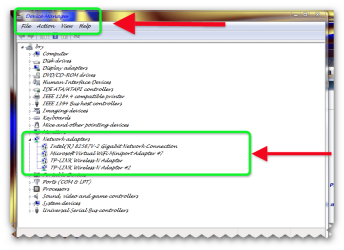
opening device manager

Here's How:1

Click on the Start button and then choose Control Panel.

Click on the System and Security link.

Note: If you're viewing the Large icons or Small icons view of Control Panel, you won't see this link. Simply click on Device Manager and then proceed to Step 4.

In the System and Security window, click on the Device Manager link located under the System heading.

You can now use Device Manager to update device drivers, view the system resources that a hardware device is using, etc.

IN YOUR CASE FIND THE WIRELESS CARD RIGHT CLICK TO GET PROPERTIES, CLICK, LOOK FOR DRIVER TAB AT TOP CLICK THIS.TO UNINSTALL DRIVER CLICK ON UNINSTALL. THEN REBOOT


Here's How:2

Click on the Windows 7 Start button.

Type the following command in the search box and then hit the Enter key:

devmgmt.msc

Note: Technically, opening Device Manager from the Command Prompt would require that you actually open the Command Prompt program. However, running an executable program like this from the search box accomplishes the same thing.

The Windows 7 Device Manager will display immediately.


Here's How:3

Click on the Start button and then choose Control Panel.

Click on the System and Security link.

Note: If you're viewing the Large icons or Small icons view of Control Panel, you won't see this link. Simply click on the Administrative Tools icon and proceed to Step 4.

In the System and Security window, click on the Administrative Tools heading located near the bottom of the window.

In the Administrative Tools window, double-click on the Computer Management icon.

When Computer Management opens, click on Device Manager on the left side of the window, located toward the bottom of the list under System Tools.

Device Manager should now appear on the right side of the Computer Management window.

Note: If you don't see Device Manager listed, you may need to click on the |> icon next to the System Tools icon.
 

Attachments

  • Brys snap ?04 ?July ?2011 18h11m44s 03.png
    Brys snap ?04 ?July ?2011 18h11m44s 03.png
    42.4 KB · Views: 95
  • Brys snap ?04 ?July ?2011 18h17m26s 04.png
    Brys snap ?04 ?July ?2011 18h17m26s 04.png
    24.8 KB · Views: 57
Last edited:

My Computer My Computer

At a glance

Operating System : Windows 7 Home Premium Edi...Processor : Intel Core 2 Quad Q8300 @ 2500 MHzPhysical Memory :8GB Corsair4x 2GB 800MHz C5 ...Video Card : XFX 6700 AMD
Computer Manufacturer/Model Number
packard bell IXTREME M5722
OS
Operating System : Windows 7 Home Premium Edition 6.01.7600 SP1 (x64)
CPU
Processor : Intel Core 2 Quad Q8300 @ 2500 MHz
Motherboard
Mainboard : Packard Bell (Acer EG43M )
Memory
Physical Memory :8GB Corsair4x 2GB 800MHz C5 DDR2
Graphics Card(s)
Video Card : XFX 6700 AMD
Monitor(s) Displays
Maestro 234DL - BenQ V2220 - BenQ VW2420H
Screen Resolution
Current Display :1920x1080p pixels at 60 Hz in HD LED
Hard Drives
Hard Disks : WDC (1000 GB)
Drive C: (Hard Disk) : 428 GB available on 491 GB
Drive D: (Hard Disk) : 426 GB available on 492 GB
SAMSUNG spinpoint HD103SJ 1000.2 GB
(X 2) KINGSTON SSD NOW V 30GB
PSU
XFX ProSeries 550W PSU
Case
PACKARD BELL IXTREME
Cooling
System Blower Current: 150mA Air Flow16CFM ;Akasa 90mm rear
Keyboard
Gigabyte Aivia K8100
Mouse
TRUST-Wireless Laser Mouse - Carbon edition MI-7770C
Internet Speed
TP-LINK > TL-WN951N / AV500 Gigabit Powerline Adapters
Browser
chrome dev
Other Info
EXTRA COOLING>(FAN CONTROLLER) PC Bay Cooler 3 x 40mm fans; Akasa AK-HD-BL Blue hard drive cooler 2 x 40 mm fan 4500 rpm 29.7 dBA
Bios> American Megatrends Inc.
Version : P01-A1
Date : 08/31/2009
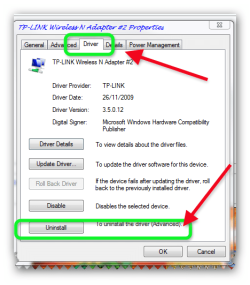
Okay, I've gotten to where I'm supposed to press uninstall, but I just want to make sure it's the right one first.
The one I right clicked on was called...
Atherosclerosis AR9285 Wireless Network Adaptor
Is that the right one? Cause there are 6 other ones listed under Network adaptors. None of the others say wireless in them though.

Edit: Okay I'm on my computer now. I didn't uninstall that, it just all of a sudden started working. So weird, cause I checked earlier this morning, and it still wasn't working. :s
Anyway I REALLY really appreciate all the help, and have bookmarked this page in case needed in the future. HOPEFULLY this never happens again though.
Thanks again! :)
 

My Computer My Computer

At a glance

Windows 7 64 bit
OS
Windows 7 64 bit
oh okey dokey glad to be of help and you have learnt a few bits and bobs :) so we can mark this thread solved
 

My Computer My Computer

At a glance

Operating System : Windows 7 Home Premium Edi...Processor : Intel Core 2 Quad Q8300 @ 2500 MHzPhysical Memory :8GB Corsair4x 2GB 800MHz C5 ...Video Card : XFX 6700 AMD
Computer Manufacturer/Model Number
packard bell IXTREME M5722
OS
Operating System : Windows 7 Home Premium Edition 6.01.7600 SP1 (x64)
CPU
Processor : Intel Core 2 Quad Q8300 @ 2500 MHz
Motherboard
Mainboard : Packard Bell (Acer EG43M )
Memory
Physical Memory :8GB Corsair4x 2GB 800MHz C5 DDR2
Graphics Card(s)
Video Card : XFX 6700 AMD
Monitor(s) Displays
Maestro 234DL - BenQ V2220 - BenQ VW2420H
Screen Resolution
Current Display :1920x1080p pixels at 60 Hz in HD LED
Hard Drives
Hard Disks : WDC (1000 GB)
Drive C: (Hard Disk) : 428 GB available on 491 GB
Drive D: (Hard Disk) : 426 GB available on 492 GB
SAMSUNG spinpoint HD103SJ 1000.2 GB
(X 2) KINGSTON SSD NOW V 30GB
PSU
XFX ProSeries 550W PSU
Case
PACKARD BELL IXTREME
Cooling
System Blower Current: 150mA Air Flow16CFM ;Akasa 90mm rear
Keyboard
Gigabyte Aivia K8100
Mouse
TRUST-Wireless Laser Mouse - Carbon edition MI-7770C
Internet Speed
TP-LINK > TL-WN951N / AV500 Gigabit Powerline Adapters
Browser
chrome dev
Other Info
EXTRA COOLING>(FAN CONTROLLER) PC Bay Cooler 3 x 40mm fans; Akasa AK-HD-BL Blue hard drive cooler 2 x 40 mm fan 4500 rpm 29.7 dBA
Bios> American Megatrends Inc.
Version : P01-A1
Date : 08/31/2009
I am delighted that you found the solution to your problem :)
 

My Computer My Computer

At a glance

Windows 7 Professional x64 SP1 ; Windows Serv...Intel Core i5 2400 @ 3.10GHz8.0GB DDR3 @ 665MHz (2GBx4)AMD Radeon HD 6870
Computer type
PC/Desktop
Computer Manufacturer/Model Number
Custom Built
OS
Windows 7 Professional x64 SP1 ; Windows Server 2012 R2 Standard
CPU
Intel Core i5 2400 @ 3.10GHz
Motherboard
Foxconn H67MP-S/-V/H67MP
Memory
8.0GB DDR3 @ 665MHz (2GBx4)
Graphics Card(s)
AMD Radeon HD 6870
Sound Card
Realtek High Definition Audio
Monitor(s) Displays
AOC 2243W & SMB1930NW
Screen Resolution
1440x900 & 1920x1080
Hard Drives
977GB Seagate ST31000524AS ATA Drive (SATA)
250GB WD iSCSI attached Drive
PSU
750W Gaming PSU
Case
Novatech Night
Cooling
Fan
Keyboard
Dell Standard PS/2 Keyboard
Mouse
R.A.T 07 Gaming Mouse
Internet Speed
Download: 10 Mbps Ping: 30ms Upload: 0.81 Mbps
Browser
Google Chrome
Other Info
Optiarc DVD RW AD-5260S ATA Device
DNS server not responding

I tried flushing the cache and that did not solve the issue.
In ipconfig it says:
connection-specific DNS suffix: gateway.2wire.net
Media disconnected
Proxie server box unchecked.
Please help!
 

My Computer My Computer

At a glance

Windows 7
Computer type
Laptop
Computer Manufacturer/Model Number
HP
OS
Windows 7
I tried all of the above and nothing worked.
It says my media is disconnected. How do I fix that?
 

My Computer My Computer

At a glance

Windows 7
Computer type
Laptop
Computer Manufacturer/Model Number
HP
OS
Windows 7
hi try this in administration mode

Open Start menu,click on Run, type (or copy and paste) CMD to open a command prompt:

Reset TCP/IP stack to installation defaults.type (or copy and paste) netsh int ip reset reset.log

Reset WINSOCK entries to installation defaults:type (or copy and paste) netsh winsock reset catalog

Reboot the machine.


On the computer that your using do you have both wireless and wired adapters ? How do you connect to the internet ? If you have both wired and wireless then is the one that's not connected have the media disconnected ? Are you connected to the internet ? If you have both wired and wireless then the one that your not using will say media disconnected.
 

My Computer My Computer

At a glance

Operating System : Windows 7 Home Premium Edi...Processor : Intel Core 2 Quad Q8300 @ 2500 MHzPhysical Memory :8GB Corsair4x 2GB 800MHz C5 ...Video Card : XFX 6700 AMD
Computer Manufacturer/Model Number
packard bell IXTREME M5722
OS
Operating System : Windows 7 Home Premium Edition 6.01.7600 SP1 (x64)
CPU
Processor : Intel Core 2 Quad Q8300 @ 2500 MHz
Motherboard
Mainboard : Packard Bell (Acer EG43M )
Memory
Physical Memory :8GB Corsair4x 2GB 800MHz C5 DDR2
Graphics Card(s)
Video Card : XFX 6700 AMD
Monitor(s) Displays
Maestro 234DL - BenQ V2220 - BenQ VW2420H
Screen Resolution
Current Display :1920x1080p pixels at 60 Hz in HD LED
Hard Drives
Hard Disks : WDC (1000 GB)
Drive C: (Hard Disk) : 428 GB available on 491 GB
Drive D: (Hard Disk) : 426 GB available on 492 GB
SAMSUNG spinpoint HD103SJ 1000.2 GB
(X 2) KINGSTON SSD NOW V 30GB
PSU
XFX ProSeries 550W PSU
Case
PACKARD BELL IXTREME
Cooling
System Blower Current: 150mA Air Flow16CFM ;Akasa 90mm rear
Keyboard
Gigabyte Aivia K8100
Mouse
TRUST-Wireless Laser Mouse - Carbon edition MI-7770C
Internet Speed
TP-LINK > TL-WN951N / AV500 Gigabit Powerline Adapters
Browser
chrome dev
Other Info
EXTRA COOLING>(FAN CONTROLLER) PC Bay Cooler 3 x 40mm fans; Akasa AK-HD-BL Blue hard drive cooler 2 x 40 mm fan 4500 rpm 29.7 dBA
Bios> American Megatrends Inc.
Version : P01-A1
Date : 08/31/2009
Back
Top