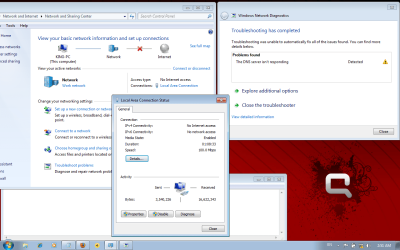
DNS server not responding... No Internet access...
Dear Friends,
I have compaq presario notebook laptop of V3500 series (Model: V3611AU). It has AMD 2 64X processor, 2.5 GB RAM, 1.86 clock speed.
Recently I upgraded Windows Vista ultimate to Windows 7 ultimate. For Vista I was using 400 KB wired telephone cable internet connection. I also upgraded the internet to optical internet connection with 8-10 MBPS download speed.
After installation of Windows 7 ultimate, the internet worked for 4 days nicely. Since, it was good internet speed, i was doing windows update daily. Meanwhile I stuck with windows sound problem (conexant high definition). I resolved this problem somehow.
I tried to figure out what could be the problem for my internet. To know this, i did what has been discussed on net like ipconfig /flushdns; ipconfig /release; ipconfig /all; ipconfig /renew etc etc....kind of things. But none of them worked for me.
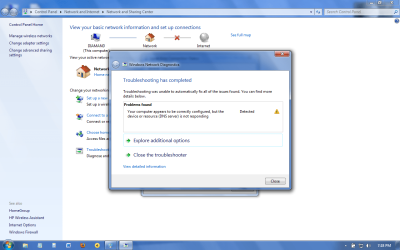
Then I checked whether there is some problem with my hardware. So i used previous telephone wired cable. Internet works fine with that cable. But when I connect optical cable, it shows "Your computer appears to be correctly configured, but the device or resource (DNS server) is not responding" after troubleshooting diagnosis.
I also checked whether the optical cable internet is working or not. For that I used my friend's laptop (running windows XP) to connect to internet using optical cable. It works fine with another laptop. I got fade up with the new problems of Windows 7.
Windows 7 is good OS as compared to Vista but with internet problems it is going to be very troublesome. Could anybody help me get my internet back on track. Any help would be greatly appreciated...Thanking you in advance...
Dear Friends,
I have compaq presario notebook laptop of V3500 series (Model: V3611AU). It has AMD 2 64X processor, 2.5 GB RAM, 1.86 clock speed.
Recently I upgraded Windows Vista ultimate to Windows 7 ultimate. For Vista I was using 400 KB wired telephone cable internet connection. I also upgraded the internet to optical internet connection with 8-10 MBPS download speed.
After installation of Windows 7 ultimate, the internet worked for 4 days nicely. Since, it was good internet speed, i was doing windows update daily. Meanwhile I stuck with windows sound problem (conexant high definition). I resolved this problem somehow.
I tried to figure out what could be the problem for my internet. To know this, i did what has been discussed on net like ipconfig /flushdns; ipconfig /release; ipconfig /all; ipconfig /renew etc etc....kind of things. But none of them worked for me.
Then I checked whether there is some problem with my hardware. So i used previous telephone wired cable. Internet works fine with that cable. But when I connect optical cable, it shows "Your computer appears to be correctly configured, but the device or resource (DNS server) is not responding" after troubleshooting diagnosis.
I also checked whether the optical cable internet is working or not. For that I used my friend's laptop (running windows XP) to connect to internet using optical cable. It works fine with another laptop. I got fade up with the new problems of Windows 7.
Windows 7 is good OS as compared to Vista but with internet problems it is going to be very troublesome. Could anybody help me get my internet back on track. Any help would be greatly appreciated...Thanking you in advance...
Attachments
My Computer
- Computer Manufacturer/Model Number
- Compaq Presario V35000 /
- OS
- Windows 7 32 bit
- Memory
- 2.5 GB

 rb:
rb: