Do I need ADOBE..?

pizzamandan67

New member
Local time
10:46 PM
Messages
4
Hi everyone

I'm on the verge of buying a new pc after spending what feels like a lifetime reading up on what I'd need. But there's one question that I can't find an answer to, does the new Windows 7 come with any picture/video editing capabilities or do I need to splash out on some £160 ADOBE elements studio software??? (buidling my pc on dell if you were wondering how I got the price...)

I don't do a lot of picture/video editing but always nice to know you can, especially when you're laying out 700quid on the thing!!!

Thanks in advance for any help you can give, much appreciated :D
 

My Computer

OS
Windows xp home edition
I use GIMP for all my editing needs... and its free .... get it -=>here

PS... It will not edit video... its similar to photoshop...
 

My Computer

Computer type
PC/Desktop
Computer Manufacturer/Model Number
LENOVO K450 @3.0GHZ
OS
64-bit Windows 8.1 Pro
CPU
Core(TM) i5 CPU 4330 Haswell @ 3.20GHz
Motherboard
LENOVO
Memory
12.00 GB
Graphics Card(s)
Intel(R) HD Graphics
Sound Card
Intel HD integtrated
Monitor(s) Displays
HP 25' ISP Monitor
Screen Resolution
1900/1020
Hard Drives
(1) ST1000DM003-1CH162 (2) Generic STORAGE DEVICE USB Device (3) Generic STORAGE DEVICE USB Device
Internet Speed
100mb down/10mb up
You could download GIMP2 for free.
 

My Computer

Computer Manufacturer/Model Number
Desktop
OS
Windows 7 Professional x64
CPU
Intel i5-2500k @ 3.3Ghz
Motherboard
Gigabyte GA-Z77X-UD5H
Memory
4GB DDR3
Graphics Card(s)
Nvidia GTS250 1GB
Monitor(s) Displays
Sony SDM S95A
Screen Resolution
1280x1024
Hard Drives
1x 1TB, 2x 250GB HDDs
PSU
Corsair HX850W
Case
Cooler Master 690 II
Cooling
Thermalright True Spirit 140mm & 3x 120mm & 3x 140mm Fans
Keyboard
Logitech Media Keyboard
Mouse
Microsoft Intellimouse
Internet Speed
8MB
cheers for the advice guys, hadn't heard of 'gimp' before but will give it a try!

but out of interest, what exactly can you do on windows 7 alone..? I remember the 'I'm a PC' adverts with some 5yr old boy merging his photos to make one large picture, do I need additional software (like GIMP) to do something as basic as this or is it standard?

Thanks again! :D
 

My Computer

OS
Windows xp home edition
The ad you mentioned shows how to make a panoramic picture using Windows Live Photo Gallery, which is a part of Windows Live suite of programs. Windows Live is free, you can download it or individual parts here.

So as you have been told earlier here, there's a bunch of free image editors available. For my basic needs I use Windows Paint and Live Photo Gallery, for some more advanced stuff Paint.net (also free) or Adobe Photoshop which you can test 30 days for free.

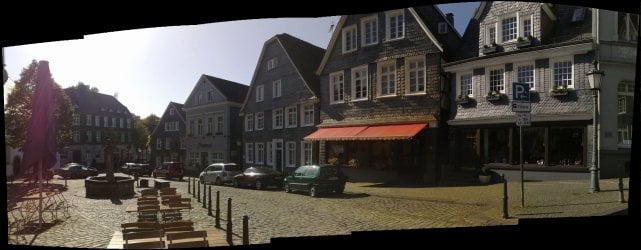
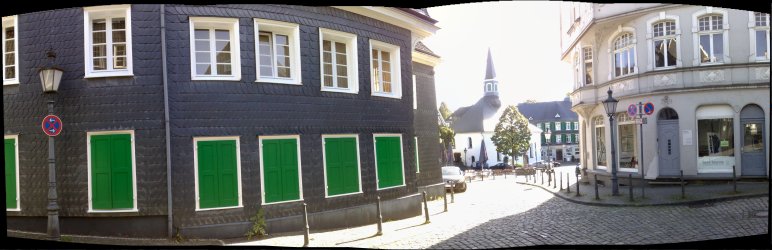
Even Live Photo Gallery is not an editing tool, you can do some nice things with it. Here's a couple of examples what Live Photo Gallery can do, unedited panoramas of our village a few days ago. Each is made from 4 to 6 photos. If I would like to edit them, I could do it also with Windows Paint. It is a free application which comes with Windows:

09102009067 Stitch.jpg
09102009076 Stitch 2.jpg
09102009095 Stitch 5.jpg

Kari
 

My Computer

Computer type
Laptop
Computer Manufacturer/Model Number
HP ENVY 17-1150eg
OS
Windows 10 Pro x64 EN-GB
CPU
1.6 GHz Intel Core i7-720QM Processor
Memory
6 GB
Graphics Card(s)
ATI Mobility Radeon HD 5850 Graphics
Sound Card
Beats sound system with integrated subwoofer
Monitor(s) Displays
17" laptop display, 22" LED and 32" Full HD TV through HDMI
Screen Resolution
1600*900 (1), 1920*1080 (2&3)
Hard Drives
Internal: 2 x 500 GB SATA Hard Disk Drive 7200 rpm
External: 2TB for backups, 3TB USB3 network drive for media
Cooling
As Envy runs a bit warm, I have it on a Cooler Master pad
Keyboard
Logitech diNovo Media Desktop Laser (bluetooth)
Mouse
Logitech Performance Mouse MX
Internet Speed
50/10 Mbps VDSL
Antivirus
Windows Defender 4.3.9431.0
Browser
Maxthon 3.5.2., IE11
Much appreciated! you guys just saved me 160quid! Which would make anyone happy :D

Thanks again
 

My Computer

OS
Windows xp home edition
Much appreciated! you guys just saved me 160quid! Which would make anyone happy :D

Thanks again
I PM you the address where you can send my part of the saved money;)
Cash only.

Kari
 

My Computer

Computer type
Laptop
Computer Manufacturer/Model Number
HP ENVY 17-1150eg
OS
Windows 10 Pro x64 EN-GB
CPU
1.6 GHz Intel Core i7-720QM Processor
Memory
6 GB
Graphics Card(s)
ATI Mobility Radeon HD 5850 Graphics
Sound Card
Beats sound system with integrated subwoofer
Monitor(s) Displays
17" laptop display, 22" LED and 32" Full HD TV through HDMI
Screen Resolution
1600*900 (1), 1920*1080 (2&3)
Hard Drives
Internal: 2 x 500 GB SATA Hard Disk Drive 7200 rpm
External: 2TB for backups, 3TB USB3 network drive for media
Cooling
As Envy runs a bit warm, I have it on a Cooler Master pad
Keyboard
Logitech diNovo Media Desktop Laser (bluetooth)
Mouse
Logitech Performance Mouse MX
Internet Speed
50/10 Mbps VDSL
Antivirus
Windows Defender 4.3.9431.0
Browser
Maxthon 3.5.2., IE11
I PM you the address where you can send my part of the saved money;)
Cash only.

Kari

:roflmao:.....good luck!
 

My Computer

Computer Manufacturer/Model Number
HP Touchsmart IQ771.uk
OS
Windows 7 Ultimate x64
CPU
AMD Turion(tm) 64 X2 Mobile Technology TL-56
Motherboard
ASUS Pheonix
Memory
3GB Nanya PC2-6400 DDR2-SDRAM SO-DIM (400MHz)
Graphics Card(s)
NVIDIA GeForce Go 7600 256MB GDDR3 SDRAM
Sound Card
High Definition Intergrated NVIDIA MCP51
Monitor(s) Displays
46" Sony Bravia HDTV
Screen Resolution
1600x1200
Hard Drives
1.5TB Samsug
320GB Seagate ST3320820AS - SATA 3Gb/s 8MB
500GB Maxtor Basics STM305003EHD301-RK
Internet Speed
↓6.32 Mb/s ↑0.35 Mb/s ↔26ms
Other Info
BIOS - American Megatrends Inc. 5.07
Ethernet Port - NVIDIA nForce 10/100/1000 Mbps
DVD Drive - TSSTcorp DVDR/RW TS-T632L
windows 7 also has windows DVD maker if your making videos for DVD. I do a lot of photo/art and video myself and have learned about a lot of free software here. Someone might be able to link the free software thread here (I would but currently heavily medicated) Depending on the type of editing you do or might do could help me suggesting software, like the type of video stuff you would like to do.

Also is this a desktop or laptop? I am using a laptop with Photoshop and I convert peoples home movies to DVD and use the Windows DVD maker, its a little slower then I would like but its free and does some really cool effects for menus etc. oh and the reason I ask about laptop or desktop is you would want to be careful about the laptop getting hot when doing movies.
 

My Computer

Computer Manufacturer/Model Number
Alienware M17x R3
OS
Windows 7 Ultimate x64
CPU
Intel Core i7 2670QM 2.2GHz 3.3GHz Turbo Mode
Memory
12GB Dual Channel DDR3 at 1333MHz
Graphics Card(s)
2GB GDDR5 AMD Radeon 6990M
Sound Card
Audio Powered by Klipsch
Monitor(s) Displays
17.3-inch WideFHD 1920 x 1080 60Hz WLED
Screen Resolution
1920x1080
Hard Drives
120GB SSD slot 1
1TB HDD slot 2
Case
alienware laptop case
Cooling
Dual heatsink and fans
Keyboard
Alienware multi color keyboard
Mouse
logitech G300 gaming mouse
Other Info
Intel® Centrino Advanced-N 6230 2x2 agn+ Bluetooth

finally got it!!!
ill be sure to send your cash through in the post Kari..! :P

And I plan on getting a desktop, I don't require a laptop so I don't see any point in paying more for smaller technology when there's a huge space under my desk waiting to be filled!

I'm not exactly looking for it to be doing anything too technical in particular, just the standards really...I suppose an example would be editing a dvd of mine. A few years back I did a skydive and paid a hefty sum to get it filmed! Trouble is came with a horrific interviews before and after (with me in a bright red jumpsuit!) so naturally I don't want to show anyone, but would be great to bypass the and get straight to the fall. Will windows 7 come with this as standard? (or do I need to download one of the other programs recommended)
 

My Computer

OS
Windows xp home edition
In some cases Photoshop doesn't have a replacement.
I found it eg. when I was working on layers (I tried Paint.NET, Gimp, even Paint Shop Pro X) - only PS was able to do this correctly.
 

My Computer

Computer type
PC/Desktop
Computer Manufacturer/Model Number
Self Built
OS
Windows 7 Home Premium x32 SP1
CPU
x2 2.6 GHz
Motherboard
Asus
Memory
A-Data 2GB DDR2-800
Graphics Card(s)
ATI X1250
Sound Card
SB 5.1 Live!
Hard Drives
WD and Seagate FAP
PSU
Tagan TG-480-U01
Keyboard
BTC 6300
Mouse
Logitech VX Nano
Antivirus
None
I've installed Irfanview as my basic Image Viewer and Editor ...
To replace the Junk provided my M$

Photoshop is too slow loading and a little complicated for the simple stuff ...
and I only use it when I need "More Power".

The new Photoshop Elements and Premiere looks like a good lower cost option for editing Pictures and Videos.

The new windows Movie Maker that you can get for W7 looks very crippled to me ...
as compared to what came with Vista or XP
 

My Computer

Computer Manufacturer/Model Number
HP d4996t (upgraded)
OS
XP MCE .... XP Pro 64 .... W7 U x64
CPU
E6750, 2.67GHz C2D
Memory
4GB, PC2 6400
Graphics Card(s)
GeForce 9400GT
Monitor(s) Displays
Twin Samsung 2443BWT
Screen Resolution
1920x1200
Hard Drives
Many .. 3 Installed
PSU
460W
Internet Speed
Cable
As far as Panoramas .. I haven't tried this Freeware in W7 yet ..
But it beats anything else I've tried.

I have a friend that was trying to scan a document that was bigger than his scanner ..
So he scanned it in pieces .. Then fed the pieces to Autostitch ..
and it re-assembled the document .. automatically.
I though that was clever
 

My Computer

Computer Manufacturer/Model Number
HP d4996t (upgraded)
OS
XP MCE .... XP Pro 64 .... W7 U x64
CPU
E6750, 2.67GHz C2D
Memory
4GB, PC2 6400
Graphics Card(s)
GeForce 9400GT
Monitor(s) Displays
Twin Samsung 2443BWT
Screen Resolution
1920x1200
Hard Drives
Many .. 3 Installed
PSU
460W
Internet Speed
Cable
Hi there
another GOOD cheapish program is PHOTOSHOP ELEMENTS. You can get the PREVIOUS version to the current one for around 25 GBP and unless you are a consummate Pro photographer this can do most things a typical use would do in the full blown Photoshop. (I think some sort of layers and filters might be missing but you need to be quite serious photo editor to have a huge need for these.

Cheers
jimbo
 

My Computer

Computer type
PC/Desktop
Computer Manufacturer/Model Number
Custom built, several laptops HP/ASUS
OS
Linux CENTOS 7 / various Windows OS'es and servers
CPU
Intel i7 Intel i5
Memory
8GB, 16GB
Graphics Card(s)
On Motherboard
Sound Card
Realtek HD audio
Monitor(s) Displays
Apple Cinema display, Samsung LCD
Screen Resolution
1920 X 1080
Hard Drives
4 X 1TB SATA
Mouse
Toshiba wireless laser
Internet Speed
> 20MB up

My Computer

Computer Manufacturer/Model Number
HP, Dell, Gateway, Toshiba - 4 laptops and 2 desktops
OS
Vista, Windows7, Mint Mate, Zorin, Windows 8
CPU
from 1.6GHz Duo to i7
Monitor(s) Displays
2x HP w2207
Hard Drives
5x HDD, 7x SSD, 12x Externals
Keyboard
with trackball - no mices
Mouse
Trackball mice
Internet Speed
DSL 6000

My Computers

System One System Two

  • Computer type
    PC/Desktop
    Computer Manufacturer/Model Number
    ChillBlast - Custom to my design
    OS
    Windows 11 Pro x64 [Latest Release and Release Preview]
    CPU
    Ryzen 9 5950X, 3.8 - 5.2 MHz
    Motherboard
    Asus Prime X570-Pro
    Memory
    64GB [2 x 32GB] DDR4 3200MHz
    Graphics Card(s)
    4GB NVIDIA GEFORCE GTX 1650 Ti
    Sound Card
    On-board SPDIF to 5.1 System + HDMI [5.1 system]
    Monitor(s) Displays
    32" UHD 32 Bit HDR Monitor + 43" UHD 4K 32Bit HDR TV
    Screen Resolution
    2 x 3840 x 2160 @60Hz
    Hard Drives
    1TB M2 SSD OS, 500GB Fast Access SSD, 2 x 8TB Data + Various Externals from 1TB to 4TB, 10TB NAS
    PSU
    NZXT C750 80 PLUS Gold 750W Modular PSU
    Case
    Workstation Case [Matt Black]
    Cooling
    NZXT Kraken X63 280mm CPU Cooler +2x Quiet Case fans
    Keyboard
    Logitech Wireless MX Keys & K400 + others
    Mouse
    Logitech Wireless MX Master 3S
    Internet Speed
    920 MB Down 50 MB Up
    Antivirus
    BitDefender Total Security Pro
    Browser
    Chrome (always run latest Non-Beta)
    Other Info
    Also run ...
    Laptop - Quad 8GB - Windows 10 Pro x64
    Nexus 7 Android tablet x2
    Samsung 10.2" tablet
    Blackview TAB 8 4G Android Tablet c/w Keyboard
    Wacom Intuos Pro Medium Pen Pad
    Wacom Intuos Pro Small Pen Pad
    Wacom Expresskeys Remote
    Loopdeck+ Graphics Controller
    Shuttle Pro v2 Control
  • Computer type
    Laptop
    System Manufacturer/Model Number
    Dell XPS 17 10750H
    OS
    Windows 11 Pro x64 Latest RP
    CPU
    Intel I7 10750H 5.0GHz
    Motherboard
    Dell XPS
    Memory
    32GB [2x16GB] DDR4 2933 MHz
    Graphics Card(s)
    nVidia GTX1650Ti 4 GB GDDR6
    Sound Card
    Stock [Realtek] 4 Speaker
    Monitor(s) Displays
    17" IPS UHD+ Infinity Edge Touchscreen
    Screen Resolution
    3840 x 2400
    Hard Drives
    2TB M2 NVMe, 4TB External + various 500GB & 1TB External NVMe (also have access to spinner HDD from
    PSU
    Stock
    Case
    Stock XPS Aluminium & Carbon Fibre
    Cooling
    Stock - Active Fan Control
    Keyboard
    Backlit + Various Logitech
    Mouse
    Stock Track Pad + Logitech MX Trackball
    Internet Speed
    72 MB Down 18MB Up
    Browser
    Chrome
    Other Info
    Also run ...
    Laptop - Quad 8GB - Windows 10 Pro x64
    Nexus 7 Android tablet x2
    10.2" tablet
    Sony Z3 Android Smartphone
    Wacom Intuos Pro Medium Pen Pad
    Wacom Intuos Pro Small Pen Pad
    Wacom Expresskeys Remote
    Loopdeck+ Graphics Controller
    Shuttle Pro v2 Control Pad
    10TB NAS
Hi there
another GOOD cheapish program is PHOTOSHOP ELEMENTS. You can get the PREVIOUS version to the current one for around 25 GBP and unless you are a consummate Pro photographer this can do most things a typical use would do in the full blown Photoshop. (I think some sort of layers and filters might be missing but you need to be quite serious photo editor to have a huge need for these.

Cheers
jimbo

Yes, I forgot to mention in my case I also tried PSE but it doesn't support multi-layered files :(
 

My Computer

Computer type
PC/Desktop
Computer Manufacturer/Model Number
Self Built
OS
Windows 7 Home Premium x32 SP1
CPU
x2 2.6 GHz
Motherboard
Asus
Memory
A-Data 2GB DDR2-800
Graphics Card(s)
ATI X1250
Sound Card
SB 5.1 Live!
Hard Drives
WD and Seagate FAP
PSU
Tagan TG-480-U01
Keyboard
BTC 6300
Mouse
Logitech VX Nano
Antivirus
None
Yes, I forgot to mention in my case I also tried PSE but it doesn't support multi-layered files :(

????? PSE supports Layers ?????????
About the only things missing from PSE are a few special layer effects ..
The ability to make animations .. and some web design stuff.

For about 10% of the price of the Professional Photoshop ...
It has about 99% of the tools any photographer will need.

And for a little more .. You can get it with the video editor Adobe Premiere
 

My Computer

Computer Manufacturer/Model Number
HP d4996t (upgraded)
OS
XP MCE .... XP Pro 64 .... W7 U x64
CPU
E6750, 2.67GHz C2D
Memory
4GB, PC2 6400
Graphics Card(s)
GeForce 9400GT
Monitor(s) Displays
Twin Samsung 2443BWT
Screen Resolution
1920x1200
Hard Drives
Many .. 3 Installed
PSU
460W
Internet Speed
Cable
Yes, I forgot to mention in my case I also tried PSE but it doesn't support multi-layered files :(

????? PSE supports Layers ?????????

I mean Photoshop Elements doesn’t support layer groups and displays them in their collapsed state. You must simplify them to create an editable image.
 

My Computer

Computer type
PC/Desktop
Computer Manufacturer/Model Number
Self Built
OS
Windows 7 Home Premium x32 SP1
CPU
x2 2.6 GHz
Motherboard
Asus
Memory
A-Data 2GB DDR2-800
Graphics Card(s)
ATI X1250
Sound Card
SB 5.1 Live!
Hard Drives
WD and Seagate FAP
PSU
Tagan TG-480-U01
Keyboard
BTC 6300
Mouse
Logitech VX Nano
Antivirus
None
In some cases Photoshop doesn't have a replacement.
I found it eg. when I was working on layers (I tried Paint.NET, Gimp, even Paint Shop Pro X) - only PS was able to do this correctly.
+1. That's true.
 

My Computer

Computer type
Laptop
Computer Manufacturer/Model Number
HP ENVY 17-1150eg
OS
Windows 10 Pro x64 EN-GB
CPU
1.6 GHz Intel Core i7-720QM Processor
Memory
6 GB
Graphics Card(s)
ATI Mobility Radeon HD 5850 Graphics
Sound Card
Beats sound system with integrated subwoofer
Monitor(s) Displays
17" laptop display, 22" LED and 32" Full HD TV through HDMI
Screen Resolution
1600*900 (1), 1920*1080 (2&3)
Hard Drives
Internal: 2 x 500 GB SATA Hard Disk Drive 7200 rpm
External: 2TB for backups, 3TB USB3 network drive for media
Cooling
As Envy runs a bit warm, I have it on a Cooler Master pad
Keyboard
Logitech diNovo Media Desktop Laser (bluetooth)
Mouse
Logitech Performance Mouse MX
Internet Speed
50/10 Mbps VDSL
Antivirus
Windows Defender 4.3.9431.0
Browser
Maxthon 3.5.2., IE11
Back
Top