
Solved Do I need FAT32 partition?

jayemich

New member
Local time
5:15 AM
Messages
4
Hi everyone,
I'll start with a current image of my disk allocation and then give some background on what's been done and what I need to do from here.
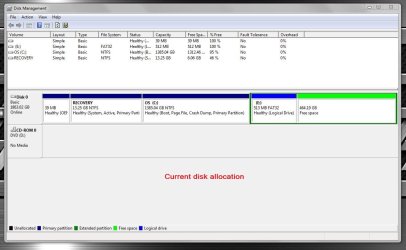
current disk allocation with linux gone.jpg

I installed Windows 10 on my desktop and decided I hated it after the 30 day grace period. I used a system image to revert to Windows 7. I then installed Linux Mint 20.3 as a dual boot with Windows 7. Linux crashed in a spectacular way so I deleted it from its partition and changed boot settings using EasyBCD. Windows 7 works as it should and I won't be reinstalling Linux.

My question is regarding the FAT32 Logical partition next to the free space I gained when I deleted Linux. Does Windows 7 use that FAT32 partition for anything? The computer does have an optical drive and several USB ports if that's the reason it's there. If I need to keep that partition can I extend it into the free space but then shrink it back down so that I can extend the Recovery and OS partitions.

Thanks in advance for any help - I haven't messed around with disk allocation for 100 years and realize I can really brick this computer if I do something too stupid.

Jaye
 

My Computers

System One System Two

  • Computer type
    PC/Desktop
    Computer Manufacturer/Model Number
    Dell
    OS
    windows 7
    CPU
    Intel i7-960 3.20GHz
    Motherboard
    Dell XPS 9100
    Memory
    12GB RAM
    Graphics Card(s)
    NVidia (?)
    Hard Drives
    2TB 7200RPM SATA 3Gb/s, 64MB cache
    Antivirus
    Norton 360
    Browser
    chrome
  • Computer type
    PC/Desktop
No, your "E" volume is not used by Win 7 and serves no purpose. Get rid of it.

Currently, you have an Extended partition (the dark green border) encompassing the logical volume "E" and free space that is not assigned to any other partition or logical volume. (Note the distinction between "free space" and "unallocated space" -- they're not the same thing. In this case, the free space is technically not unallocated because it *is* allocated to the Extended partition.)

In front of the OS partition you have a tiny DellUtility partition (an artifact leftover from the XP era, and of virtually no use today) and a 13GB Recovery partition containing the Dell factory OS restore image. That Recovery partition is "System, Active", which means the OS is booting through that partition. (It's also not meant to be user-accessible, so there's no reason to try and expand it to a larger size.)

Technically, you don't need the first two partitions, either, because you have backup images you're using instead -- which is a much better plan than going all the way back to a factory restore, anyway. But if you alter either of the first two partitions you'll need to do a boot repair to the OS partition to get it booting again. That's not hard, but it depends on how much you want to tackle and how confident you are. If you want to discuss that we can go into further detail, but for the simplest resolution leave the first two partitions as is.

Delete the "E" logical volume, then delete the Extended partition. Once you have turned it back into "Unallocated" space, you can expand the OS partition to add that space to your "C" partition.
 

My Computer

Computer type
PC/Desktop
Computer Manufacturer/Model Number
Dell Optiplex 7050
OS
Windows 7/8.1/10 multiboot
CPU
Intel Core i7-7700
Motherboard
Dell, Intel Q270 chipset
Memory
48GB (2x16GB Crucial DDR4-3200 + 2x8GB Hynix DDR4-2400)
Graphics Card(s)
Intel HD630 + AMD Radeon R7 450 PCIe
Monitor(s) Displays
Asus VC279 (27")
Screen Resolution
1920x1080
Hard Drives
Toshiba M.2 NVMe (256GB),
Samsung 960 Evo (500GB),
WD Red Plus 80EFBX (8TB)
You should be able to explore the logical drive E under the My Computer icon. If there's nothing in it, then I'm going to hazard a guess it's not of any use. Especially if you just have Windows installed.

The software DiskGenius makes stuff like this easy, but for this, Windows can do it as well.

For future reference, I wouldn't use multiple partitions for anything. Especially dual OS installs. They're way too problematic, data failure can rear its ugly Predator-like head, and partitions can suddenly go *poof* and disappear like magician's flash paper. I'd use more than one hard drive for more than one OS and a 5.25 hard drive switch drive bay. I can't remember the manufacturer, but I know one to have a reportedly decent HDD switch 5.25 bay. If interested I can look it back up in my Amazon list.

Having said this, it's likely Linux crashed in a spectacular way because of this dual partition crap. If you're willing to give Linux a go again and this time using two hard drives instead of partitions, check out ZorinOS.

You could always try an OS like Linux or what ever on your main computer (host) in a virtual machine (guest) (it's like a software-based computer). Many use VirtualBox, I like VMware's Workstation Player. Though, in Windows 7, VMware Workstation Player version 15 will only work. Newer versions require Windows 10 and up if I'm not mistaken.

- - - Updated - - -

Do note that sometimes when you install Windows and there are two hard drives active (running) at the same time, Windows has an uncanny ability to install its boot loader on the second running drive. That's why you use a HDD selector 5.25 bay or unplug the drive not being used for OS install at the time of install.

- - - Updated - - -

Addendum:

= NERD MODE. For other readers of interest. =


For the really down and nerdy as it pertains to virtual machines. For anyone reading this and is interested in a "virtual LAMP stack", check out XAMPP. There's WampServer as well and I'm sure others. With XAMPP I have Linux, Apache, MySQL, PHP all right there on my computer running on Windows for testing. You could literally host your own internal (intranet) Wikipedia with the free and open source Wiki software or a locally run WordPress website. I wouldn't host external unless you configure XAMPP in a very special way, and even then I'd refrain from doing it. And opening a port means you need to at least use the pfSense firewall. Domain name resolution can be achieved with a DDNS service like NO-IP. Or go really ultra secure and use Zerotier... In addition to other "virtual" software there's Docker. Stuff is just fantastic! Don't forget some Apache Guacamole!

= sudo apt-get turn|the|damn| NERD MODE|off =

*Arriba!*
 

My Computer

Computer type
PC/Desktop
OS
Windows 7 Ultimate x64
Welcome to the Forum

Windows can be installed in two ways: Legacy-MBR or UEFI-GPT

DON'T DELETE ANYTHING.

The Fat32 partition is used on a GPT drive to have the boot manager.
It seems that your drive is Legacy-MBR and not EFI-GPT as you have the recovery partition set as active.


What do you have on E: (the Fat32 partition)?

Please post another Disk Manager image with the column Status expanded so we can read it.
 

My Computers

System One System Two

  • Computer type
    PC/Desktop
    Computer Manufacturer/Model Number
    custom build
    OS
    Windows 7 HP 64
    CPU
    i5 6600K - 800MHz to 4200MHz
    Motherboard
    GA-Z170-HD3P
    Memory
    4+4G GSkill DDR4 3000
    Graphics Card(s)
    IG - Intel 530
    Monitor(s) Displays
    Samsung 226BW
    Screen Resolution
    1680x1050
    Hard Drives
    (1) -1 SM951 – 128GB M.2 AHCI PCIe SSD drive for Windows 7 and Lubuntu
    (2) -1 WD SATA 3 - 1T for Data
    (3) -1 WD SATA 3 - 1T for backup
    PSU
    Thermaltake 450W TR2 gold
    Keyboard
    Old and good Chicony mechanical keyboard
    Mouse
    Logitech mX performance - 9 buttons (had to disable some)
    Internet Speed
    500Mb/s
    Browser
    Firefox 64
    Other Info
    TinyWall firewall
  • Computer type
    Laptop
    System Manufacturer/Model Number
    Asus Q550LF
    OS
    Windows 7 Pro
    CPU
    i7-4500U 800MHz to 3.0GHz
    Motherboard
    Asus Q550LF
    Memory
    (4+4)G DDR3 1600
    Graphics Card(s)
    IG intel 4400 + NVIDIA GeForce GT 745M
    Sound Card
    Realtek
    Monitor(s) Displays
    LG Display LP156WF4-SPH1
    Screen Resolution
    1920 x 1080
    Hard Drives
    BX500 120G SSD for Windows and programs +
    1T HDD for data
    Internet Speed
    500 Mb/s
    Browser
    Firefox
    Other Info
    TinyWall firewall
Hi Megahertz07 - Thanks for the welcome! Lots of good threads and info here.

Unfortunately I already deleted the E:FAT32 partition and extended the OS partition. All that's left now is the OEM partition, the Recovery partition and the OS (C:) partition. I do have a system image that I did yesterday before I deleted the FAT32 partition if I run into trouble. As far as I know there was nothing on that partition, but I was basing that on the fact that the % Free was 100%. I just assumed it was something that Linux had used on installation, or something that EasyBCD used to get rid of the Linux boot grub.
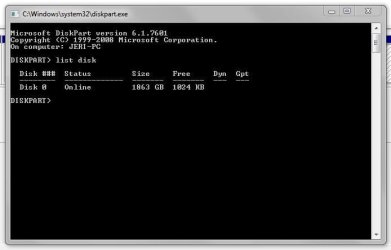
It seems that I do have Legacy MBR :
MBR drive.JPG

So far the PC is running like a champ and booted up this morning. What kind of issues could I be expecting if I really needed that FAT32 partition?
 

My Computers

System One System Two

  • Computer type
    PC/Desktop
    Computer Manufacturer/Model Number
    Dell
    OS
    windows 7
    CPU
    Intel i7-960 3.20GHz
    Motherboard
    Dell XPS 9100
    Memory
    12GB RAM
    Graphics Card(s)
    NVidia (?)
    Hard Drives
    2TB 7200RPM SATA 3Gb/s, 64MB cache
    Antivirus
    Norton 360
    Browser
    chrome
  • Computer type
    PC/Desktop
Yes, your drive is Legacy-MBR so the Fat32 isn't needed.
Only strange thing I noticed is that the Recovery partition is set as active. Normally is the first one. that is why I asked to post another Disk Manager image with the column Status expanded so we can read it.
 

My Computers

System One System Two

  • Computer type
    PC/Desktop
    Computer Manufacturer/Model Number
    custom build
    OS
    Windows 7 HP 64
    CPU
    i5 6600K - 800MHz to 4200MHz
    Motherboard
    GA-Z170-HD3P
    Memory
    4+4G GSkill DDR4 3000
    Graphics Card(s)
    IG - Intel 530
    Monitor(s) Displays
    Samsung 226BW
    Screen Resolution
    1680x1050
    Hard Drives
    (1) -1 SM951 – 128GB M.2 AHCI PCIe SSD drive for Windows 7 and Lubuntu
    (2) -1 WD SATA 3 - 1T for Data
    (3) -1 WD SATA 3 - 1T for backup
    PSU
    Thermaltake 450W TR2 gold
    Keyboard
    Old and good Chicony mechanical keyboard
    Mouse
    Logitech mX performance - 9 buttons (had to disable some)
    Internet Speed
    500Mb/s
    Browser
    Firefox 64
    Other Info
    TinyWall firewall
  • Computer type
    Laptop
    System Manufacturer/Model Number
    Asus Q550LF
    OS
    Windows 7 Pro
    CPU
    i7-4500U 800MHz to 3.0GHz
    Motherboard
    Asus Q550LF
    Memory
    (4+4)G DDR3 1600
    Graphics Card(s)
    IG intel 4400 + NVIDIA GeForce GT 745M
    Sound Card
    Realtek
    Monitor(s) Displays
    LG Display LP156WF4-SPH1
    Screen Resolution
    1920 x 1080
    Hard Drives
    BX500 120G SSD for Windows and programs +
    1T HDD for data
    Internet Speed
    500 Mb/s
    Browser
    Firefox
    Other Info
    TinyWall firewall
Yes, your drive is Legacy-MBR so the Fat32 isn't needed.
Only strange thing I noticed is that the Recovery partition is set as active. Normally is the first one. that is why I asked to post another Disk Manager image with the column Status expanded so we can read it.

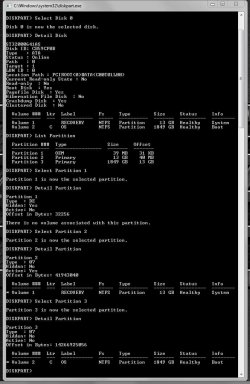
I hate to be a pain in your patootie, but I don't know how to show the column status expanded. I did a complete Diskpart with each partition (hope this helps):
disk partition details 2-27-22.JPG

The first partition was factory installed and I don't have any kind of access to it.
The second partition is Recovery and I think it's supposed to be active. I could be wrong.
The OS partition is not active, which doesn't sound right but the computer is operating normally.

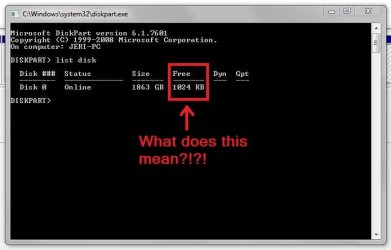
One more favor - could you look at this next image and tell me what's going on with "Free" in regards to the 0 disk?
MBR drive.JPG
Thanks!
 

My Computers

System One System Two

  • Computer type
    PC/Desktop
    Computer Manufacturer/Model Number
    Dell
    OS
    windows 7
    CPU
    Intel i7-960 3.20GHz
    Motherboard
    Dell XPS 9100
    Memory
    12GB RAM
    Graphics Card(s)
    NVidia (?)
    Hard Drives
    2TB 7200RPM SATA 3Gb/s, 64MB cache
    Antivirus
    Norton 360
    Browser
    chrome
  • Computer type
    PC/Desktop
Only strange thing I noticed is that the Recovery partition is set as active. Normally is the first one.
That was a very common Dell configuration as shipped from the factory.

A little history, for anyone who might be interested:

  • Dell added the "DellUtility" partition* (usually 39-60 MB) around the late-98 or ME era. It was always first on the disk because it ran DOS and DOS cannot boot beyond the first 2GB on the disk. It was shipped as "Active" but after first boot (termed "BTS" or "Break The Seal" by Dell) the OS partition thereafter became the Active partition.

  • Late in the XP-era Dell added a "DellRestore" factory restore partition* at the very end of the disk. The OS partition was still Active (post-BTS). DellRestore was never Active and was only booted by the proprietary Dell MBR when the magic factory restore keys (Ctrl-F11) were pressed.

  • In the Vista-era Dell used the newly-Microsoft standard Recovery partition, moved to between DellUtility and OS. However, OS was still Active post-BTS which meant Recovery booted through the OS partition when needed -- not a good plan because a hosed OS could prevent one from booting Recovery.

  • That shortcoming was remedied in the 7-era, in which Dell still used Vista's DellUtility/Recovery/OS layout but made Recovery the Active partition instead.

  • Late in the 7-era Dell finally dropped the DellUtility partition altogether. A DOS-bootable partition would be incompatible with GPT partition layouts, soon to be the coming standard in Win 8.

Also, FWIW, Microsoft MBRs could never boot logical volumes in the Extended partition. My understanding is linux could boot from the Extended partition (I'm not a linux expert), but that was something no Microsoft MBR was ever capable of doing. Noting that was the location of OP's FAT32 partition, it was clear to me it was not part of the Win 7 system.


* (full disclosure: I am the author of those webpages)
 

My Computer

Computer type
PC/Desktop
Computer Manufacturer/Model Number
Dell Optiplex 7050
OS
Windows 7/8.1/10 multiboot
CPU
Intel Core i7-7700
Motherboard
Dell, Intel Q270 chipset
Memory
48GB (2x16GB Crucial DDR4-3200 + 2x8GB Hynix DDR4-2400)
Graphics Card(s)
Intel HD630 + AMD Radeon R7 450 PCIe
Monitor(s) Displays
Asus VC279 (27")
Screen Resolution
1920x1080
Hard Drives
Toshiba M.2 NVMe (256GB),
Samsung 960 Evo (500GB),
WD Red Plus 80EFBX (8TB)

My Computers

System One System Two

  • Computer type
    PC/Desktop
    Computer Manufacturer/Model Number
    custom build
    OS
    Windows 7 HP 64
    CPU
    i5 6600K - 800MHz to 4200MHz
    Motherboard
    GA-Z170-HD3P
    Memory
    4+4G GSkill DDR4 3000
    Graphics Card(s)
    IG - Intel 530
    Monitor(s) Displays
    Samsung 226BW
    Screen Resolution
    1680x1050
    Hard Drives
    (1) -1 SM951 – 128GB M.2 AHCI PCIe SSD drive for Windows 7 and Lubuntu
    (2) -1 WD SATA 3 - 1T for Data
    (3) -1 WD SATA 3 - 1T for backup
    PSU
    Thermaltake 450W TR2 gold
    Keyboard
    Old and good Chicony mechanical keyboard
    Mouse
    Logitech mX performance - 9 buttons (had to disable some)
    Internet Speed
    500Mb/s
    Browser
    Firefox 64
    Other Info
    TinyWall firewall
  • Computer type
    Laptop
    System Manufacturer/Model Number
    Asus Q550LF
    OS
    Windows 7 Pro
    CPU
    i7-4500U 800MHz to 3.0GHz
    Motherboard
    Asus Q550LF
    Memory
    (4+4)G DDR3 1600
    Graphics Card(s)
    IG intel 4400 + NVIDIA GeForce GT 745M
    Sound Card
    Realtek
    Monitor(s) Displays
    LG Display LP156WF4-SPH1
    Screen Resolution
    1920 x 1080
    Hard Drives
    BX500 120G SSD for Windows and programs +
    1T HDD for data
    Internet Speed
    500 Mb/s
    Browser
    Firefox
    Other Info
    TinyWall firewall
Thanks everyone for taking the time to give detailed information and set my mind at ease. :thumbsup:
Megahertz07 - I had stumbled across other references to Simplix, probably here in one thread or another, and will definitely check into that. I hadn't been letting Windows do any updates once they started pushing Win 10. Worse, the system image I used to reinstall Win 7 was from 2015. That said, when I first booted up after the installation, Windows did download and install some updates even though WU was turned off. Anyway, thanks again!
 

My Computers

System One System Two

  • Computer type
    PC/Desktop
    Computer Manufacturer/Model Number
    Dell
    OS
    windows 7
    CPU
    Intel i7-960 3.20GHz
    Motherboard
    Dell XPS 9100
    Memory
    12GB RAM
    Graphics Card(s)
    NVidia (?)
    Hard Drives
    2TB 7200RPM SATA 3Gb/s, 64MB cache
    Antivirus
    Norton 360
    Browser
    chrome
  • Computer type
    PC/Desktop
Back
Top