Do I need to delete all partitions when doing Clean Reinstall ?

Lovus

Banned
Local time
9:24 AM
Messages
78
Location
At my HOUSE .
I am reading posts here but when you tell them to do a Clean Reinstall why do we need to delete all partitions ?
Is it okay to only delete the partition where windows will be reinstalled ?
 

My Computer My Computer

At a glance

Ultimate 32bit
OS
Ultimate 32bit
Cooling
Electric Fan
Internet Speed
Slow as a TURTLE
I am reading posts here but when you tell them to do a Clean Reinstall why do we need to delete all partitions ?
Is it okay to only delete the partition where windows will be reinstalled ?

If your Hard Drive has a C: and a D: partition on it, you just install your Win 7 in the C: partition and leave D: alone. When you do a clean install in C:, it will delete all files in C: but will not touch anything in D:.
 

My Computer My Computer

At a glance

Windows 7 Home Premium 32-Bit - Build 7600 SP1Intel Core i3-2120 3.30GhzKingston 4 GB DDR3 1333 mhzAMD Radeon HD6670
Computer type
PC/Desktop
Computer Manufacturer/Model Number
Custom Build
OS
Windows 7 Home Premium 32-Bit - Build 7600 SP1
CPU
Intel Core i3-2120 3.30Ghz
Motherboard
Asus P8Z68-V LX Intel Z68 Socket H2 ATX
Memory
Kingston 4 GB DDR3 1333 mhz
Graphics Card(s)
AMD Radeon HD6670
Sound Card
Sound Blaster Audigy SE 24-Bit
Monitor(s) Displays
Asus VE228
Screen Resolution
1440 X 900
Hard Drives
OCZ Vertex 3 120 GB Sata 3 SSD ==
Kingston SH103/S3 120 G Hyper X 120 GB SSD ==
Western Digital 500 GB Caviar Green 7200 RPM ==
PSU
Corsair CX600M == 600 Watt
Case
NZXT Apollo - Silver with Clear Side Panel
Cooling
Three 120 mm Fans
Keyboard
Microsoft Natural 4000
Mouse
Microsoft Custom Optical 3000
Internet Speed
AT&T Fiber Optic Wireless Network
Antivirus
Microsoft Security Essentials
Browser
Chrome
Other Info
120 mm Blue LED Fan -- Three Blue LED Lazer Light Sticks
Deleting the partitions is not required at all when reinstalling, Windows will install itself in any already created partition you can have or you may chose to delete and recreate, but it's your choice really.
It's neither mandatory to format them. Not even the one you're installed on if it's already created, all the data there will be still there after the install.
 

My Computer My Computer

At a glance

Windows 7 Ultimate x64Intel Core i7-740QM8 GB DDR3NVIDIA GeForce 330GT
Computer type
Laptop
Computer Manufacturer/Model Number
Toshiba Sattelite A665-S6092
OS
Windows 7 Ultimate x64
CPU
Intel Core i7-740QM
Memory
8 GB DDR3
Graphics Card(s)
NVIDIA GeForce 330GT
Screen Resolution
1366x768
Hard Drives
Samsung 840 SSD 500GB
1TB USB3 external HD
Cooling
Coolermaster Notepal U3 notebook cooling pad
Internet Speed
3mbps ASDL
Antivirus
ClamWin 0.98.7
Browser
Opera 12.17 x86 (main), Firefox 38 (sec), IE11 (last resort)
I am reading posts here but when you tell them to do a Clean Reinstall why do we need to delete all partitions ?
Is it okay to only delete the partition where windows will be reinstalled ?

Yes, it is OK to delete just the OS partition, but not necessary. However, when it comes to computers, I always go with the possibility that something may go wrong; therefore, I backup the data on the partition I am preserving as a safety net. Worst case scenario, I won't need it.

There is a good article on the process at the following link;

http://pcsupport.about.com/od/operatingsystems/ss/windows-7-clean-install-part-1.htm

HTH
 

My Computer My Computer

At a glance

Windows 7 Professional x64Intel i5 quad processor16 GBRadeon HD 5770
Computer type
PC/Desktop
Computer Manufacturer/Model Number
Custom Built
OS
Windows 7 Professional x64
CPU
Intel i5 quad processor
Motherboard
DP67BG
Memory
16 GB
Graphics Card(s)
Radeon HD 5770
Sound Card
Realtek High Definition Audio
Monitor(s) Displays
Samsung SyncMaster
Screen Resolution
1920X1080
Hard Drives
WD 2TB (SATA Internal)
WD 1TB (USB External)
PSU
Corsair GS800
Case
Tower (Generic)
Cooling
3 Internal Fans
Keyboard
MS Wireless
Mouse
MS Optical Wired
Internet Speed
54 mbps
Antivirus
Emsisoft
Browser
IE-Version 9, Palemoon-Version 24.2.0
Thanks for opinions. Now I have an idea what to do when doing Clean Reinstall
 

My Computer My Computer

At a glance

Ultimate 32bit
OS
Ultimate 32bit
Cooling
Electric Fan
Internet Speed
Slow as a TURTLE
To do a CLEAN REINSTALL is Just that. A CLEAN REINSTALL. Without Deleting all partitions you really are not doing a Real Clean Reinstall.

Now it is up to you what you want to do.
 

My Computer My Computer

At a glance

7 x64
OS
7 x64
To do a CLEAN REINSTALL is Just that. A CLEAN REINSTALL. Without Deleting all partitions you really are not doing a Real Clean Reinstall.

Now it is up to you what you want to do.

I think you are confused as to what he is asking. If he has three partitions on his hard drive, he can leave two of them and do a clean install on the C: drive. Deleting data drives is not part of a clean install.
 

My Computer My Computer

At a glance

Windows 7 Home Premium 32-Bit - Build 7600 SP1Intel Core i3-2120 3.30GhzKingston 4 GB DDR3 1333 mhzAMD Radeon HD6670
Computer type
PC/Desktop
Computer Manufacturer/Model Number
Custom Build
OS
Windows 7 Home Premium 32-Bit - Build 7600 SP1
CPU
Intel Core i3-2120 3.30Ghz
Motherboard
Asus P8Z68-V LX Intel Z68 Socket H2 ATX
Memory
Kingston 4 GB DDR3 1333 mhz
Graphics Card(s)
AMD Radeon HD6670
Sound Card
Sound Blaster Audigy SE 24-Bit
Monitor(s) Displays
Asus VE228
Screen Resolution
1440 X 900
Hard Drives
OCZ Vertex 3 120 GB Sata 3 SSD ==
Kingston SH103/S3 120 G Hyper X 120 GB SSD ==
Western Digital 500 GB Caviar Green 7200 RPM ==
PSU
Corsair CX600M == 600 Watt
Case
NZXT Apollo - Silver with Clear Side Panel
Cooling
Three 120 mm Fans
Keyboard
Microsoft Natural 4000
Mouse
Microsoft Custom Optical 3000
Internet Speed
AT&T Fiber Optic Wireless Network
Antivirus
Microsoft Security Essentials
Browser
Chrome
Other Info
120 mm Blue LED Fan -- Three Blue LED Lazer Light Sticks
If you have the typical Win7 HD setup it will have a 100-200mb System Reserved partition which boots Win7, followed by the C partition housing the OS. Then it may also have a data, Recovery and tools partition.

If you reinstall only to C and ignore the other partitions, it will place the System boot files on C abandoning the System Reserved partition for booting Win7 and making it wasted space. The only way to avoid this is to delete both System Reserved and C during install so that the installer handles this correctly.

Now as to any other partitions like Data, Recovery or OEM Tools which comes on many factory preinstalled Win7 machines. Data is up to you although saving your data there during reinstall is not a responsible backup method. Recovery and OEM Tools (bootable diagnostics) may or may not run afterwards so we recommend making your Recovery disks before reinstall.

This is further explained with more details on the various OEM partitions viability after reinstall in Clean Reinstall - Factory OEM Windows 7. Many users don't even want Factory Recovery which contains the preinstalled crap that throttles and corrupts Win7, so deleting those partitions is fine with them after perhaps making their Recovery disks as a backup in case a new owner might want them in the future.
 
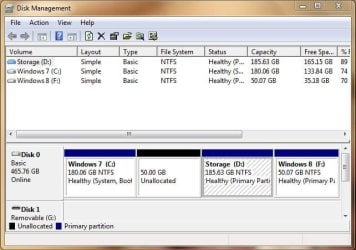
OK . This is what I did, I just deleted all partitions including system reserved , recovery and my os partition except for my data partition. And then reinstalled win 7. After reinstalling I deleted my system reserved using the easier way. After that I tried dual booting with Windows 8 because my friend gave me a fresh copy of it and told me to activate it through kms servers (sorry for using pirated software). And this is what I got disk management.JPG
Is this the right thing to do ? (except for using pirated software)
I'm using Acer Aspire X1440 which is low mid end pc and full of OEM craps
 
Last edited:

My Computer My Computer

At a glance

Ultimate 32bit
OS
Ultimate 32bit
Cooling
Electric Fan
Internet Speed
Slow as a TURTLE
Looks fine, get rid of the pirated windows 8 garbage.

Pirating is not tolerated here.
 

My Computer My Computer

At a glance

Windows 10 Pro x64Intel Core i7 6700KGSkill TridentZ RGB 16GB 3600 16-16-16-36EVGA GTX 980 Ti SC x2
Computer type
PC/Desktop
Computer Manufacturer/Model Number
Skylake Special #666
OS
Windows 10 Pro x64
CPU
Intel Core i7 6700K
Motherboard
Asus Sabertooth Z170 Mark 1
Memory
GSkill TridentZ RGB 16GB 3600 16-16-16-36
Graphics Card(s)
EVGA GTX 980 Ti SC x2
Sound Card
Realtek High Definition
Monitor(s) Displays
AOC G2460PG
Screen Resolution
1920 x 1080 144Hz
Hard Drives
Samsung 860 Pro 256GB, Seagate Barracuda 4TB x2
PSU
EVGA 1000 P2, EVGA White Custom Braided Cables
Case
Corsair Vengeance C70 Gunmetal Black
Cooling
Corsair H100i v2, Corsair ML120 x2, Thermal Grizzly Kryonaut
Keyboard
Logitech G910 Orion Spectrum
Mouse
Logitech G700s
Internet Speed
Verizon Fios Quantum Gateway 75/75
Antivirus
Windows Defender, Malwarebytes Free 3.8.3
Browser
Chrome
Other Info
Corsair SP120 x4, LG Blu-ray Drive, Durabrand HT-395 100 Watt Dolby Digital Amp, Corsair H2100 Wireless 7.1 Headset
I'm so sorry AddRAM . I just tried it Don't be mad :(
Ok I'll delete it because it's premature, just testing it .
 

My Computer My Computer

At a glance

Ultimate 32bit
OS
Ultimate 32bit
Cooling
Electric Fan
Internet Speed
Slow as a TURTLE
If your friend gave you a copy of Win8 which he said would activate through KMS servers then it was Enterprise which must have had a key available or it wouldn't activate through KMS servers.

But unless he assures you this is his business offering you a key to activate from his account, then it's best you should delete Win8 now. This gives you space to Extend both C and D if you want: Partition or Volume - Extend

or let us know if you'd like to distribute the unallocated space otherwise and we will give you the steps using Partition Wizard Resize Partition Video Help.
 
Back
Top