
You are using an out of date browser. It may not display this or other websites correctly.
You should upgrade or use an alternative browser.
You should upgrade or use an alternative browser.
Do not see HDD after clean all using diskpart
- Thread starter atran
- Start date

Did you have two HD Drive or two partitions?
Can you post a screen shot of Disk management?
http://www.sevenforums.com/tutorials/9733-how-post-screenshot-seven-forums.html
Screenshot tools.
http://www.sevenforums.com/general-...ed-method-uploading-posting-screen-shots.html
How to Use the Snipping Tool in Vista - Vista Forums
Snipping Tool - Windows 7 features - Microsoft Windows
Use Snipping Tool to capture screen shots
http://www.sevenforums.com/tutorials/9717-screenshot-paint.html
http://www.sevenforums.com/tutorials/51160-screenshot-upload-using-mwsnap.html
fscapture free download
Use Snipping Tool to capture screen shots
Can you post a screen shot of Disk management?
http://www.sevenforums.com/tutorials/9733-how-post-screenshot-seven-forums.html
Screenshot tools.
http://www.sevenforums.com/general-...ed-method-uploading-posting-screen-shots.html
How to Use the Snipping Tool in Vista - Vista Forums
Snipping Tool - Windows 7 features - Microsoft Windows
Use Snipping Tool to capture screen shots
http://www.sevenforums.com/tutorials/9717-screenshot-paint.html
http://www.sevenforums.com/tutorials/51160-screenshot-upload-using-mwsnap.html
fscapture free download
Use Snipping Tool to capture screen shots
My Computer
- OS
- ME/XP/Vista/Win7
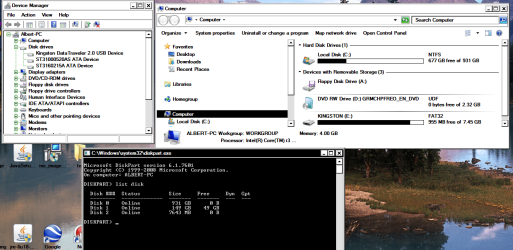

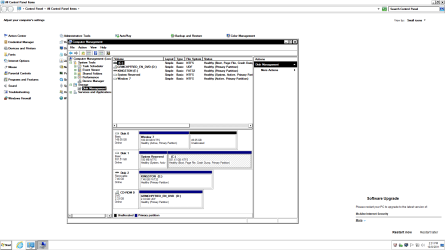

The problem is that your other HD - actually disk 0 in the screenshot you posted - has no drive letter assigned to it. This is easily fixed by rightclicking on that partition and adding a drive letter.
You do seem to have a different issue though - the partition that's missing a drive letter contains another installed Windows 7 system. Were you meaning to delete that installation and clean-install 7 from scratch?
You do seem to have a different issue though - the partition that's missing a drive letter contains another installed Windows 7 system. Were you meaning to delete that installation and clean-install 7 from scratch?
My Computer
- Computer type
- PC/Desktop
- Computer Manufacturer/Model Number
- Custom-built
- OS
- Windows 7 Professional SP1 32-bit
- CPU
- Intel Core 2 Duo E6600 2.4GHz
- Motherboard
- Asus PL5D2
- Memory
- 4GB DDR2-667 (4x1GB in dual-channel config)
- Graphics Card(s)
- nVidia GeForce 9800 GT
- Sound Card
- Creative X-Fi XtremeMusic
- Monitor(s) Displays
- Acer P236H
- Screen Resolution
- 1920x1200 (DVI)
- Hard Drives
- OCZ SSD Vertex Plus 60GB SATA (Firmware 3.55), 64MB cache
Hitachi HD321KJ SATA, 320GB, 7200rpm, 16MB cache
- PSU
- Antec TruePower 2.0
- Case
- Cooler Master Centurion
- Cooling
- Too many fans
- Keyboard
- Standard
- Mouse
- Microsoft wireless optical mouse
- Internet Speed
- AT&T U-verse (18mbit/sec)
- Antivirus
- Microsoft Security Essentials
- Browser
- Firefox
- Other Info
- Other devices:
Compaq CQ-60 laptop
Google Nexus 7 (2012) tablet
Nvidia SHIELD tablet (US/LTE)
Hardkernel ODROID-XU single-board computer (Samsung Exynos 5420)
You are booting from the 1tb now.
Which drive would like to boot from?
Which drive would like to boot from?
My Computer
- OS
- ME/XP/Vista/Win7
I would like to booth from disk1 and use disk 0 as clean hard dive.
(like to format it).
Thank you very much for your helps

1) Physically disconnect 1tb the HD.
Make the Windows 7 HD, disk0 & first HD boot in BIOS, also connect 1tb the HD to the first Sata port on the MOBO.
Leave the 150gb HD Drive disconnect
You may need to
Do a Strartup Repair:
http://www.sevenforums.com/tutorials/681-startup-repair.html?ltr=S
Note: You may need to do startup repair 3 to 4 times.
http://www.sevenforums.com/tutorials/105541-startup-repair-run-3-separate-times.html
When Windows is booting OK.
2)Reconnect the 150gb HD Drive, delete & create new.
http://www.sevenforums.com/tutorials/2668-partition-volume-delete.html?ltr=P
http://www.sevenforums.com/tutorials/2674-partition-volume-create-new.html?ltr=P
My Computer
- OS
- ME/XP/Vista/Win7

Similar threads
- Replies
- 1
- Views
- 14K

- Replies
- 59
- Views
- 26K

- Replies
- 51
- Views
- 10K
- Replies
- 2
- Views
- 4K
- Replies
- 5
- Views
- 4K