
Do you have enabled System Protection?

Do you have enabled System Protection?

  • Yes, I have enabled System Protection

    Votes: 22 62.9%
  • No (please specify why)

    Votes: 13 37.1%

  • Total voters
    35

Creer

IT SecurityEnthusiast
Guru
Local time
12:33 PM
Messages
340
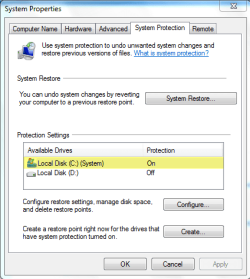
Do you have enabled System Protection in Windows 7?

A little tip, where you will find that:
sysprot.png
 

My Computer

Computer type
PC/Desktop
Computer Manufacturer/Model Number
Self Built
OS
Windows 7 Home Premium x32 SP1
CPU
x2 2.6 GHz
Motherboard
Asus
Memory
A-Data 2GB DDR2-800
Graphics Card(s)
ATI X1250
Sound Card
SB 5.1 Live!
Hard Drives
WD and Seagate FAP
PSU
Tagan TG-480-U01
Keyboard
BTC 6300
Mouse
Logitech VX Nano
Antivirus
None
yes i checked and it is on but why would you not want it on?
 

My Computer

Computer Manufacturer/Model Number
HP Pavilion p6795a
OS
windows 7 64 bit
CPU
intel core i5 3.30GHz Quad Core
Motherboard
HP
Memory
6gb
Graphics Card(s)
AMD RADEON HD 6450 1GB Dedicated
Sound Card
ATI HIGH DEFINITION SOUND
Monitor(s) Displays
LG
Screen Resolution
16:9 Hd
Hard Drives
1TB
Cooling
Fan
Keyboard
Wireless
Mouse
HP wireless keyboard and mouse
Internet Speed
fast enough
Other Info
Beast Of A Machine!
Sure, I'm the mad downloader so I create a restore point before installing play around with the software.

If I don't want it I use System restore The typical Uninstaller leaves leftover files and registry entries.
 

My Computer

Computer Manufacturer/Model Number
Cheap $399.00 E-Machine
OS
Windows 7 Pro & Vista Home Premium
CPU
Athlon 64 3800+ (Orleans) 2.40GHz
Motherboard
Winfast
Memory
2GB DDR2 RAM DIMM
Graphics Card(s)
NVIDIA GeForce 8500 GT 512 MB memory HDMI out
Sound Card
creative X-Fi Exteme 7..1 channel
Monitor(s) Displays
Acer V223W 22" widescreen DVI
Screen Resolution
1680x1050
Hard Drives
WDC WD5 500GB
WDC WD25 250GB
PSU
OCZ 550 watt
Case
Gateway
Cooling
2 fans
Keyboard
Dell
Mouse
Sony Vaio
Internet Speed
18MB/s down - .72MB /s up
Sure, I'm the mad downloader so I create a restore point before installing play around with the software.

+ 1

Restore points can save more headaches than you can imagine ;)
 

My Computer

Computer type
PC/Desktop
Computer Manufacturer/Model Number
Systems by SmartEyeball
OS
8 Pro x64
CPU
i7 3770K 4.6GHz
Motherboard
ASUS P8Z77 WS
Memory
16GB G.Skill Trident X 2666mhz
Graphics Card(s)
x2 EVGA 780 Ti Superclocked SLI
Sound Card
SB X-FI Surround 5.1 PRO USB / ATH-AD900 Headphones
Monitor(s) Displays
x3 Dell U2410 / 58" Samsung
Screen Resolution
5760*1200/ 1920*1200
Hard Drives
2x Intel 520 240GB (RAID 0) * 2x WD Caviar Blacks 2TB (RAID 0) * 2TB WD Caviar Black * Sony Optirac DVD
PSU
Silverstone Strider Evolution 1200W
Case
Thermaltake Level 10 GT Snow Edition
Cooling
Noctua NH-D14
Keyboard
Topre Realforce // Ducky Shine MX Black // Filco Ninja TKL
Mouse
Thermaltake Theron (Highly Recommended) + Razer Imperator
Antivirus
MSE
Browser
IE, FF, WaterFox
Other Info
GT Extreme V2 Sim Racing Cockpit + 40" LCD and K/B Mouse stand ▼
Fanatec CSR Elite Wheel + Clubsport V1 Pedals + CSR shifter/7G-H ▼Saitek X52 Pro ▼ TrackIR 5 Pro
Buttkicker v2 Seat Rumbler with Dedicated 5.1 and Sub Woofer attached to frame ▼
=
Bloody Big Grin
No,,i can usually fix whatever goes wrong,,if not just do re install,,its a learning experience..lol
 

My Computer

OS
Win 7
CPU
Athlon 64 5600+
Motherboard
Nforce 750a sli
Memory
ddr2 4gb
No,
in the first time only c:
now all off
don't ask why?
I just liked it that way (more thinking: install or not?)
 

My Computer

Computer type
PC/Desktop
Computer Manufacturer/Model Number
696
OS
7 Ultimate x64 sp1
CPU
Intel i5-4690K
Motherboard
GA Z97X Gaming 5
Memory
16Gb HyperX fury
Graphics Card(s)
R9-270x 2Gb
Sound Card
On Board
Monitor(s) Displays
2443NW
Screen Resolution
1920x1200
Hard Drives
WD5000 -
WD5001 -
WD1002
PSU
Cft-650-14cs
Case
Very Big Case
Cooling
stock
Keyboard
G11
Mouse
Logitech
Internet Speed
Adsl
Browser
FF
Other Info
RWD
Never liked System Restore and the first thing I do is turn it off.

I use various imaging programs, but for Win7 I use it's built in Backup and Restore for the initial image. I am also using ShadowProtect to make full image backups.
 

My Computers

System One System Two

  • Computer type
    Laptop
    Computer Manufacturer/Model Number
    Dell Precision 7510
    OS
    W7PRO
    CPU
    Intel i7-6820HQ @ 2.7GHz
    Memory
    16GB
  • Computer type
    Laptop
    OS
    W7Pro
Mines on and I also create system restore points before I install new software. If I don't like it or don't want to keep it I just use cCleaner to remove it and then system restore.
 

My Computer

Computer Manufacturer/Model Number
Self Built
OS
Windows 7 ultimate 64 bit / XP Home sp3
CPU
intel Core 2 Duo E8400 3.0ghz
Motherboard
Asus P5ND bios 1401
Memory
8 gigs 1066 OCZ Fata1ty
Graphics Card(s)
EVGA GTX 580 Call of Duty Black Ops Edition
Sound Card
Creative Soundblaster Audigy 2zs
Monitor(s) Displays
Asus 24in LCD's 2MS X2
Screen Resolution
1920x1080p @60Hz
Hard Drives
WD Caviar 500 Black/ WD Caviar 200 Blue
PSU
OCZ 700W GameXtreme
Case
NZXT Apollo
Cooling
Corsair H50 CPU/120mm x3 /60mm x2 /Corsair Dominator Ram
Keyboard
Logitech Bluetooth Wireless MX5000
Mouse
Logitech Bluetooth Wireless MX1000
Internet Speed
Download 19.83 Upload 0.97
Other Info
Logitech Z2300 Speakers/ Bose Noise Cancelling Headphones/Avermedia PCI-e Hybrid TV Bravo/Epson NX415 all in one/ 4 Port Powered USB Hub/ LG 10x Bluray Burner /TSST Corp DVDRW External
OFF, its thrashes HDD's and that's a PIA even on quieter newer VRaptors (Raid 0), possibly not so much a big deal on SSD's.

I have a Auto Backup of all my Media etc to an external HDD if it all went wrong but as this install is 1 year old I would clean install.

System Restore is for when you mess up your PC not for uninstalling a normal bit of software you don't like, thats extreme.

I seriously doubt it removes all traces as neither did XP's or the failure in ME.

Better using a 3rd party uninstall program and then running Cleaner.

I leave System Restore on for customers PC's as they are n00bs and will someday need it, but its not there to uninstall a game when there done IMO.
 
Last edited:

My Computer

OS
Vista (Hate Win 7)
Yes I have the Protection on why wouldn't I, at my age why would I want to live dangerously I'm all for the quiet life now ;)
 

My Computer

Computer type
PC/Desktop
Computer Manufacturer/Model Number
Acer Aspire XC-704 x64 bit/ Asus K55A Notebook PC/HP Envy x360 Convertible 15-bq0xx
OS
Windows 10 64bit/Windows 10 64bit/Windows 10 64bit
CPU
Intel Pentium J3710 @ 60GHz/Intel B820,1.7GHz/AMD A9 Radeon
Motherboard
Acer Aspire XC-704 (SOCKET 0)/Asus/HP 8312 (Socket FP4)
Memory
8.00GB DDR3 @ 1599MHz/8GB 2 x 4GB DDR3/8.00GB Dual-Channel
Graphics Card(s)
Intel HD Graphics/Intel/512MB ATI AMD Radeon R5 Graphics (HP
Sound Card
Realtek High Definition Audio/Onboard/AMD High Definition Au
Monitor(s) Displays
Acer LCD K222HQL /Asus 15.6/Generic PnP Monitor (1920x1080@6
Screen Resolution
1920x1080@59Hz/1366 x 768/1920x1080@60Hz
Hard Drives
1863GBWesternn Digital WDC/Asus/119GB SanDisk SD8SN8U-128G-1006 (SSD)
931GB Hitachi HGST HTS721010A9E630 (SATA)
Keyboard
Microsoft Natural Ergonomic Keyboard 4000 (UK)/Inbuilt/Inbui
Mouse
Microsoft Optical Wheel Mouse/Same plus Touchpad/Same + Pad
Internet Speed
Infinity 2 up to 76 Mbps
Antivirus
MSE/MSE/MSE and all 3 have MalwareBytes Premium
Browser
Edge, Firefox/Edge, Firefox/Edge, Firefox, Chrome
Other Info
Seagate Expansion 500GB External Desktop Drive
Seagate Expansion Portable Drives 500GB and 1TB
Epson XP-332 Wireless Printer
I've always left the System Protection feature in place and don't see a great reason to have it disabled. I've never experienced it thrashing the harddrive...at least nothing where I noticed a performance drop.

As far as uninstalling something and learning from the experience...that isn't always easy to do. For example, if you use a spyware cleaner or reg cleaner and it wreaks havoc...not easy to just reverse it's changes.

The only change that I make is reduce the % of the harddrive that system protection can consume. On my box at home, it's set at 2%

It is something that I RARELY use...but when I have needed it, it has worked out very well for no effort on my part.
 

My Computer

Computer Manufacturer/Model Number
Self-Built in July 2009
OS
Windows 7 Ultimate x64
CPU
Intel Q9550 2.83Ghz OC'd to 3.40Ghz
Motherboard
Gigabyte GA-EP45-UD3R rev. 1.1, F12 BIOS
Memory
8GB G.Skill PI DDR2-800, 4-4-4-12 timings
Graphics Card(s)
EVGA 1280MB Nvidia GeForce GTX570
Sound Card
Realtek ALC899A 8 channel onboard audio
Monitor(s) Displays
23" Acer x233H
Screen Resolution
1920x1080
Hard Drives
Intel X25-M 80GB Gen 2 SSD
Western Digital 1TB Caviar Black, 32MB cache. WD1001FALS
PSU
Corsair 620HX modular
Case
Antec P182
Cooling
stock
Keyboard
ABS M1 Mechanical
Mouse
Logitech G9 Laser Mouse
Internet Speed
15/2 cable modem
Other Info
Windows and Linux enthusiast. Logitech G35 Headset.
Turned mine off as iv never needed to used it. System Restore is like putting a band aid over a shotgun blast IMO.

If you've damaged your pc that much then you should probably just do a clean install of windows.
 
Yes, mine is on.
 

My Computer

Computer type
PC/Desktop
Computer Manufacturer/Model Number
Bruce ... somewhere in his 40's
OS
Windows 7 Ultimate 32bit SP1
CPU
Intel(R) Core(TM)2 Quad CPU @ 2.40GHz, 2400 MHz
Motherboard
INTEL/D975XBX2
Memory
4 GB
Graphics Card(s)
ATI Radeon HD 2600 Pro
Monitor(s) Displays
Samsung SyncMaster 914v
Screen Resolution
1280 x 1024
Hard Drives
2/500GB each ... ST3500630AS ATA Device.
One is not connected
PSU
Rocketfish 700 W
Case
G.Skill Gigabyte Chassis
Keyboard
Standard PS/2 Keyboard
Mouse
Microsoft PS/2 Mouse
Internet Speed
DSL
Antivirus
Avira Internet Security
Browser
IE 11
Other Info
ATI HDMI Audio
Mine is on all the time.

I just delete all points(except the latest one) after time to time when they become obsolete...
 

My Computer

Computer type
PC/Desktop
Computer Manufacturer/Model Number
Custom
OS
Windows 7 SP1 x64
CPU
Intel E8400 3.0 GHz
Motherboard
Gigabyte EP45-DS3R
Memory
4x1 Trascend DDR2 800 Mhz
Graphics Card(s)
Gainward 8800GT 512 Mb
Sound Card
Realtek HD Audio 889A
Monitor(s) Displays
LG L204WS
Screen Resolution
1680x1050
Hard Drives
Intel 520 Series 120Gb SSD (System)
Western Digital 6400AAKS 640Gb (Data)
PSU
Cooler Master 650W
Case
Cooler Master Centurion 532
Cooling
2x 12 cm fans
Keyboard
Logitech Wave
Mouse
Logitech G5
Internet Speed
10 Mbit Cable Flat
Antivirus
NOD32 Smart Security
Browser
Google Chrome
Turned mine off as iv never needed to used it. System Restore is like putting a band aid over a shotgun blast IMO.

If you've damaged your pc that much then you should probably just do a clean install of windows.

Talk about a band aid over a shotgun blast.

So, a while back at work I installed some CD burning application to make some type of specialized disc. However, once installed, my usual burning apps such as Roxio or IMGBurn no longer saw my DVD burner. So, i uninstalled the newer cd burning app, but low and behold Roxio and ImgBurn still couldn't see my DVD Burner. I rebooted the machine, still no good. I reinstalled both Roxio and imgburn and still they couldn't see see my DVD burner.

So, I used system restore and went back right before I installed the cd burning application. And everything was back to working fine. Having to reinstall Windows onto my work PC would have been a serious loss of productive worktime. System Restore fixed it in a flash.

I've probably only needed it about 3 times in the past 5 years....but when I did need it...it was there.
 

My Computer

Computer Manufacturer/Model Number
Self-Built in July 2009
OS
Windows 7 Ultimate x64
CPU
Intel Q9550 2.83Ghz OC'd to 3.40Ghz
Motherboard
Gigabyte GA-EP45-UD3R rev. 1.1, F12 BIOS
Memory
8GB G.Skill PI DDR2-800, 4-4-4-12 timings
Graphics Card(s)
EVGA 1280MB Nvidia GeForce GTX570
Sound Card
Realtek ALC899A 8 channel onboard audio
Monitor(s) Displays
23" Acer x233H
Screen Resolution
1920x1080
Hard Drives
Intel X25-M 80GB Gen 2 SSD
Western Digital 1TB Caviar Black, 32MB cache. WD1001FALS
PSU
Corsair 620HX modular
Case
Antec P182
Cooling
stock
Keyboard
ABS M1 Mechanical
Mouse
Logitech G9 Laser Mouse
Internet Speed
15/2 cable modem
Other Info
Windows and Linux enthusiast. Logitech G35 Headset.
That's fine because you used System Restore to do what its meant to do, IE > fix a fault caused by whatever !

Some seem to be using it to uninstall normal programs you would use Add/Remove for.
 
Last edited:

My Computer

OS
Vista (Hate Win 7)
Exactly...I just don't understand the argument..."I turn it off as I have never needed it before". It never proves it's purpose until that very first time that you actually do make use of it. It's like saying, "I never wear a seatbelt as I've never been in an accident before, therefore I don't need to wear this seatbelt".

I could see the benefit of disabling it, if
1). hard drive was EXPENSIVE and very limited
2). Hard drive performance was terribly slow so using it bogged the system down to a crawl

But since neither of those are really an issue...I just don't see the obvious advantage in "immediately turning it off". Saying it like that seems like a nerd badge of honor...but I don't really see the point.
 

My Computer

Computer Manufacturer/Model Number
Self-Built in July 2009
OS
Windows 7 Ultimate x64
CPU
Intel Q9550 2.83Ghz OC'd to 3.40Ghz
Motherboard
Gigabyte GA-EP45-UD3R rev. 1.1, F12 BIOS
Memory
8GB G.Skill PI DDR2-800, 4-4-4-12 timings
Graphics Card(s)
EVGA 1280MB Nvidia GeForce GTX570
Sound Card
Realtek ALC899A 8 channel onboard audio
Monitor(s) Displays
23" Acer x233H
Screen Resolution
1920x1080
Hard Drives
Intel X25-M 80GB Gen 2 SSD
Western Digital 1TB Caviar Black, 32MB cache. WD1001FALS
PSU
Corsair 620HX modular
Case
Antec P182
Cooling
stock
Keyboard
ABS M1 Mechanical
Mouse
Logitech G9 Laser Mouse
Internet Speed
15/2 cable modem
Other Info
Windows and Linux enthusiast. Logitech G35 Headset.
I already stated why for my scenario !

I do not want to listen to my VRaptors seeking randomly so I kill System Restore and Indexing (which I do not use anyhow).

The new VRaptors are not that loud over older ones but I have a Side Window Panel in my PC case and its not as sound proof as a Metal Side Panel.

Also System Restore has never been anywhere near perfect so I would rather simply run my Backup if I messed up my PC that much but in 1 year (this install) I have never bricked it as Vista (and Win 7) is hard to brick, XP ain't.

Peeps have got to respect others if they want it ON or OFF.

I do not want it on but will not flame someone for having it on unlike some will but I expect the same courtesy in return.

CCleaner and Tuneup Utils can remove 99% of left behind crap if something goes wrong.
 
Last edited:

My Computer

OS
Vista (Hate Win 7)
I just don't understand the argument.

You dont need to understand how i use my pc. You probably use apps like ccleaner, itunes, anything by google etc that i would not let near my pc. Each to their own.

If you have a need for system restore then continue to use it. Its your pc lol
 
Not trying to be judgemental and certainly not flaming guys...I just think some don't think of the full ramifications of some of these actions. If you have read my examples and still feel like you have made the best choice...then that is fine. Some may read through an example that I have posted and think...hey I never thought of it in that situation.

You probably use apps like ccleaner, itunes, anything by google etc that i would not let near my pc
Actually...no I am very selective about what gets on my PC. I'm a systems engineer and have been for the last 12 years. The apps that get installed on my machine are all legal, mostly open-source, and generally cause very few problems. ( I generally use Notepad++, MediaMonkey, VMWare, Firefox, OpenOffice, TrueCrypt, vlc, paint.net, handbrake, Fox It PDF reader, imgburn, putty, winscp and 7zip).
 

My Computer

Computer Manufacturer/Model Number
Self-Built in July 2009
OS
Windows 7 Ultimate x64
CPU
Intel Q9550 2.83Ghz OC'd to 3.40Ghz
Motherboard
Gigabyte GA-EP45-UD3R rev. 1.1, F12 BIOS
Memory
8GB G.Skill PI DDR2-800, 4-4-4-12 timings
Graphics Card(s)
EVGA 1280MB Nvidia GeForce GTX570
Sound Card
Realtek ALC899A 8 channel onboard audio
Monitor(s) Displays
23" Acer x233H
Screen Resolution
1920x1080
Hard Drives
Intel X25-M 80GB Gen 2 SSD
Western Digital 1TB Caviar Black, 32MB cache. WD1001FALS
PSU
Corsair 620HX modular
Case
Antec P182
Cooling
stock
Keyboard
ABS M1 Mechanical
Mouse
Logitech G9 Laser Mouse
Internet Speed
15/2 cable modem
Other Info
Windows and Linux enthusiast. Logitech G35 Headset.
Back
Top