
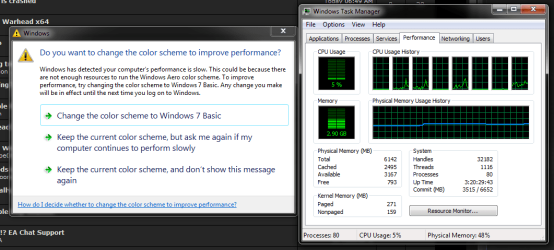
"Do you want to change the color scheme to improve performance?"
Hello,
This error has been bugging me for months now.
In certain games, in full screen mode the game will minimise and I will get the following error (See Pic). As you can see from the attached screen shot there is nothing wrong with the performance of the computer.
I have attempted to google this issue many many times but there doesn't seem to be a away to disable the notification. Even if you say "Don't Notify Me Again" it still does.
The most annoying thing about it is that the game isn't having any performance issues, and normally having the error pop up crashing the game! Kinda defeating the whole point of the notification.
There must be a way to stop this?!
SPECS:
OS: Windows 7 Ulti 64Bits
CPU: Intel Core i7 930 @ 2.80 Ghz
RAM: 6GB Tri Chan PC3-10700H (667Mhz)
PF: 2GB
Mobo: Gigabyte X58A-UD7
GPU: Nvidia GTX 460
With a system like this I cant be running out of resources for Aero-Glass....
(Nothing is over-clocked)
Hello,
This error has been bugging me for months now.
In certain games, in full screen mode the game will minimise and I will get the following error (See Pic). As you can see from the attached screen shot there is nothing wrong with the performance of the computer.
I have attempted to google this issue many many times but there doesn't seem to be a away to disable the notification. Even if you say "Don't Notify Me Again" it still does.
The most annoying thing about it is that the game isn't having any performance issues, and normally having the error pop up crashing the game! Kinda defeating the whole point of the notification.
There must be a way to stop this?!
SPECS:
OS: Windows 7 Ulti 64Bits
CPU: Intel Core i7 930 @ 2.80 Ghz
RAM: 6GB Tri Chan PC3-10700H (667Mhz)
PF: 2GB
Mobo: Gigabyte X58A-UD7
GPU: Nvidia GTX 460
With a system like this I cant be running out of resources for Aero-Glass....
(Nothing is over-clocked)
Attachments
My Computer
At a glance
Win 7Core 2 Duo L73003GBIntel GMA
- Computer Manufacturer/Model Number
- Lenovo X61T
- OS
- Win 7
- CPU
- Core 2 Duo L7300
- Motherboard
- Lenovo X61t
- Memory
- 3GB
- Graphics Card(s)
- Intel GMA
- Sound Card
- SoundMax


