Solved Does my system image to a new hard drive make it bootable?

drezzle

New member
Local time
5:07 PM
Messages
15
I used Macrium to make a system image of my existing drive onto a new hard drive and I made the system rescue boot disk too. (HP all-in-one desktop)

I'm not certain about the next step. Do I just replace the old drive with the new one and boot up? It is a system image, so why not? What is boot disk for?
 

My Computer My Computer

At a glance

windows 7 home premium 64 bit
OS
windows 7 home premium 64 bit
I used Macrium to make a system image of my existing drive onto a new hard drive and I made the system rescue boot disk too. (HP all-in-one desktop)

I'm not certain about the next step. Do I just replace the old drive with the new one and boot up? It is a system image, so why not? What is boot disk for?

That should work fine.
 

My Computer My Computer

At a glance

Windows 7 Home Premium 32-Bit - Build 7600 SP1Intel Core i3-2120 3.30GhzKingston 4 GB DDR3 1333 mhzAMD Radeon HD6670
Computer type
PC/Desktop
Computer Manufacturer/Model Number
Custom Build
OS
Windows 7 Home Premium 32-Bit - Build 7600 SP1
CPU
Intel Core i3-2120 3.30Ghz
Motherboard
Asus P8Z68-V LX Intel Z68 Socket H2 ATX
Memory
Kingston 4 GB DDR3 1333 mhz
Graphics Card(s)
AMD Radeon HD6670
Sound Card
Sound Blaster Audigy SE 24-Bit
Monitor(s) Displays
Asus VE228
Screen Resolution
1440 X 900
Hard Drives
OCZ Vertex 3 120 GB Sata 3 SSD ==
Kingston SH103/S3 120 G Hyper X 120 GB SSD ==
Western Digital 500 GB Caviar Green 7200 RPM ==
PSU
Corsair CX600M == 600 Watt
Case
NZXT Apollo - Silver with Clear Side Panel
Cooling
Three 120 mm Fans
Keyboard
Microsoft Natural 4000
Mouse
Microsoft Custom Optical 3000
Internet Speed
AT&T Fiber Optic Wireless Network
Antivirus
Microsoft Security Essentials
Browser
Chrome
Other Info
120 mm Blue LED Fan -- Three Blue LED Lazer Light Sticks
Thank you for your response. I hope you're right. I just checked it on dskmgmt and it's not an exact image since it isn't partitioned into the system, OS and recovery parts. It is also inactive.

I guess I should mark it as active before replacing the currently old active drive?
 

My Computer My Computer

At a glance

windows 7 home premium 64 bit
OS
windows 7 home premium 64 bit
If you put the image on the new drive it won't work. You would have to restore the image to a drive and it should all be fine. The Boot disk would be for booting into Advance Startup Options.
 

My Computer My Computer

At a glance

Windows 7 Ultimate X64 SP1Intel i5-2550K, Differing ~4.4-4.8GHz No buil...16GB G.Skill Sniper 1866MHz @ 2133MHz 2x8GBASUS GTX650TIB-DC2OC-2GD5, (650TI Boost)
Computer type
PC/Desktop
Computer Manufacturer/Model Number
Home Built Desktop By DataTech
OS
Windows 7 Ultimate X64 SP1
CPU
Intel i5-2550K, Differing ~4.4-4.8GHz No built in GPU
Motherboard
ASUS P8Z68-V PRO/GEN3
Memory
16GB G.Skill Sniper 1866MHz @ 2133MHz 2x8GB
Graphics Card(s)
ASUS GTX650TIB-DC2OC-2GD5, (650TI Boost)
Sound Card
Onboard Realtek 5-1
Monitor(s) Displays
Samsung P2570HD
Screen Resolution
1920x1080
Hard Drives
Samsung 840 Pro 256GB SSD for OS, 500GB Seagate Constellation (Enterprise drive) for Data
PSU
Corsair HX650W
Case
Inwin Dragon Rider
Cooling
Hyper 212 EVO w/two Noctua fans, push-pull, @1300 RPM
Keyboard
E-Z Eyes, bright yellow keys with large characters
Mouse
steelseries SENSEI Laser Pro Gaming
Internet Speed
48-51Mbs Mbs down, 11 Mbs up Xfinity Cable
Antivirus
Norton Internet Security 2013
Browser
IE 10, Opera, Pale Moon if needed
Other Info
4 case fans, LG BluRay-RE, ASUS DVD-RW, Mr. Fusion power supply, 1.21 gigawatts.
To restore the image I put onto the new drive would then involve buying another drive? Did I understand that correctly? My old hard drive is dying (slowly I hope), so I bought a new drive and made a system image on it. How do I restore that without buying another new drive? I think I'm missing something basic and have been reading the forum but I'm still a little confused.

The image is over 80GB.
 

My Computer My Computer

At a glance

windows 7 home premium 64 bit
OS
windows 7 home premium 64 bit
To restore the image I put onto the new drive would then involve buying another drive? Did I understand that correctly? My old hard drive is dying (slowly I hope), so I bought a new drive and made a system image on it. How do I restore that without buying another new drive? I think I'm missing something basic and have been reading the forum but I'm still a little confused.

The image is over 80GB.

Sorry I told you wrong. I did not realize you were going to boot from the actual image. The image is compressed and would not boot on its own. You would have to restore it to another HDD. If there is room on the old HDD, make another partition that is big enough and make the image on it. You can then restore from there to the new HDD.
 

My Computer My Computer

At a glance

Windows 7 Home Premium 32-Bit - Build 7600 SP1Intel Core i3-2120 3.30GhzKingston 4 GB DDR3 1333 mhzAMD Radeon HD6670
Computer type
PC/Desktop
Computer Manufacturer/Model Number
Custom Build
OS
Windows 7 Home Premium 32-Bit - Build 7600 SP1
CPU
Intel Core i3-2120 3.30Ghz
Motherboard
Asus P8Z68-V LX Intel Z68 Socket H2 ATX
Memory
Kingston 4 GB DDR3 1333 mhz
Graphics Card(s)
AMD Radeon HD6670
Sound Card
Sound Blaster Audigy SE 24-Bit
Monitor(s) Displays
Asus VE228
Screen Resolution
1440 X 900
Hard Drives
OCZ Vertex 3 120 GB Sata 3 SSD ==
Kingston SH103/S3 120 G Hyper X 120 GB SSD ==
Western Digital 500 GB Caviar Green 7200 RPM ==
PSU
Corsair CX600M == 600 Watt
Case
NZXT Apollo - Silver with Clear Side Panel
Cooling
Three 120 mm Fans
Keyboard
Microsoft Natural 4000
Mouse
Microsoft Custom Optical 3000
Internet Speed
AT&T Fiber Optic Wireless Network
Antivirus
Microsoft Security Essentials
Browser
Chrome
Other Info
120 mm Blue LED Fan -- Three Blue LED Lazer Light Sticks
Thanks Bigmck! There's some nice simple explanations on this forum which is better than most -- or maybe I'm slower than I should be when it comes to computers.

So now I know I'll have to do a clean install -- just finished making the disc and printing the instructions -- or partition and make another system image somewhere.

I already made the system image onto my old, old hard drive, but I didn't partition to do it -- just put it in with the XP windows system, and someone told me they'd kill each other. This failing hard drive I'm on -- I got this HP computer 1 year and 1 month ago -- so right after the warranty expires, I get hard drive failure notices following on the heels of their continued notices to purchase their extended warranty. I thought they must be joking. But then I started to hear those gentle clicking noises.

Since it's a 750 SATA hard drive and I only use about 1/10 of that, I unallocated over half of it thinking that would improve the chances of the bad sectors being put out to pasture. At least the click noises went away.

Can someone give me a hint about what is the easiest and fastest way to partition a disc? It's not in the disc management section on windows. I'm sure there are 1000s of threads here about how to partition your hard drive.............aaahhhh

___________________________________________________

So I found what to do in disc management which is right click on the unallocated space -- good enough! Then there's a warning not to make it dynamic. What's dynamic mean?

 
Last edited:

My Computer My Computer

At a glance

windows 7 home premium 64 bit
OS
windows 7 home premium 64 bit
Another question of a different sort -- I'm trying to remove the cables from my enclosed external (soon to be new internal drive) and I can't make them budge -- it's like they are set in concrete. Is it suppose to be that difficult. I'm worried I might break something if I use my handy pliers.
 

My Computer My Computer

At a glance

windows 7 home premium 64 bit
OS
windows 7 home premium 64 bit
The boot disc is what is used to do the reimage operation.

Don`t mess with your external, you will break it.
 

My Computer My Computer

At a glance

Windows 10 Pro x64Intel Core i7 6700KGSkill TridentZ RGB 16GB 3600 16-16-16-36EVGA GTX 980 Ti SC x2
Computer type
PC/Desktop
Computer Manufacturer/Model Number
Skylake Special #666
OS
Windows 10 Pro x64
CPU
Intel Core i7 6700K
Motherboard
Asus Sabertooth Z170 Mark 1
Memory
GSkill TridentZ RGB 16GB 3600 16-16-16-36
Graphics Card(s)
EVGA GTX 980 Ti SC x2
Sound Card
Realtek High Definition
Monitor(s) Displays
AOC G2460PG
Screen Resolution
1920 x 1080 144Hz
Hard Drives
Samsung 860 Pro 256GB, Seagate Barracuda 4TB x2
PSU
EVGA 1000 P2, EVGA White Custom Braided Cables
Case
Corsair Vengeance C70 Gunmetal Black
Cooling
Corsair H100i v2, Corsair ML120 x2, Thermal Grizzly Kryonaut
Keyboard
Logitech G910 Orion Spectrum
Mouse
Logitech G700s
Internet Speed
Verizon Fios Quantum Gateway 75/75
Antivirus
Windows Defender, Malwarebytes Free 3.8.3
Browser
Chrome
Other Info
Corsair SP120 x4, LG Blu-ray Drive, Durabrand HT-395 100 Watt Dolby Digital Amp, Corsair H2100 Wireless 7.1 Headset
Can someone give me a hint about what is the easiest and fastest way to partition a disc? It's not in the disc management section on windows. I'm sure there are 1000s of threads here about how to partition your hard drive.............aaahhhh

___________________________________________________

So I found what to do in disc management which is right click on the unallocated space -- good enough! Then there's a warning not to make it dynamic. What's dynamic mean?

Go to this site Free download Magic Partition Manager Software, partition magic alternative, free partition magic, partition magic Windows 7 and server partition software - Partition Wizard Online and drop down to the bottom of the page and you will see
Free Download Bootable CD Now!

Download that and burn on to a DVD at 4x. You can make partitions without any trouble. == As far as Dynamic Disks, just remember that means TROUBLE. You never want those. If you make more than four Primary Partitions on one HDD you will get Dynamic Disks and your PC won't boot.
 

My Computer My Computer

At a glance

Windows 7 Home Premium 32-Bit - Build 7600 SP1Intel Core i3-2120 3.30GhzKingston 4 GB DDR3 1333 mhzAMD Radeon HD6670
Computer type
PC/Desktop
Computer Manufacturer/Model Number
Custom Build
OS
Windows 7 Home Premium 32-Bit - Build 7600 SP1
CPU
Intel Core i3-2120 3.30Ghz
Motherboard
Asus P8Z68-V LX Intel Z68 Socket H2 ATX
Memory
Kingston 4 GB DDR3 1333 mhz
Graphics Card(s)
AMD Radeon HD6670
Sound Card
Sound Blaster Audigy SE 24-Bit
Monitor(s) Displays
Asus VE228
Screen Resolution
1440 X 900
Hard Drives
OCZ Vertex 3 120 GB Sata 3 SSD ==
Kingston SH103/S3 120 G Hyper X 120 GB SSD ==
Western Digital 500 GB Caviar Green 7200 RPM ==
PSU
Corsair CX600M == 600 Watt
Case
NZXT Apollo - Silver with Clear Side Panel
Cooling
Three 120 mm Fans
Keyboard
Microsoft Natural 4000
Mouse
Microsoft Custom Optical 3000
Internet Speed
AT&T Fiber Optic Wireless Network
Antivirus
Microsoft Security Essentials
Browser
Chrome
Other Info
120 mm Blue LED Fan -- Three Blue LED Lazer Light Sticks
If you put the image on the new drive it won't work. You would have to restore the image to a drive and it should all be fine. The Boot disk would be for booting into Advance Startup Options.

Thanks Bigmck! There's some nice simple explanations on this forum which is better than most -- or maybe I'm slower than I should be when it comes to computers.
Which part didn't you understand here?
 

My Computer My Computer

At a glance

Windows 7 Ultimate X64 SP1Intel i5-2550K, Differing ~4.4-4.8GHz No buil...16GB G.Skill Sniper 1866MHz @ 2133MHz 2x8GBASUS GTX650TIB-DC2OC-2GD5, (650TI Boost)
Computer type
PC/Desktop
Computer Manufacturer/Model Number
Home Built Desktop By DataTech
OS
Windows 7 Ultimate X64 SP1
CPU
Intel i5-2550K, Differing ~4.4-4.8GHz No built in GPU
Motherboard
ASUS P8Z68-V PRO/GEN3
Memory
16GB G.Skill Sniper 1866MHz @ 2133MHz 2x8GB
Graphics Card(s)
ASUS GTX650TIB-DC2OC-2GD5, (650TI Boost)
Sound Card
Onboard Realtek 5-1
Monitor(s) Displays
Samsung P2570HD
Screen Resolution
1920x1080
Hard Drives
Samsung 840 Pro 256GB SSD for OS, 500GB Seagate Constellation (Enterprise drive) for Data
PSU
Corsair HX650W
Case
Inwin Dragon Rider
Cooling
Hyper 212 EVO w/two Noctua fans, push-pull, @1300 RPM
Keyboard
E-Z Eyes, bright yellow keys with large characters
Mouse
steelseries SENSEI Laser Pro Gaming
Internet Speed
48-51Mbs Mbs down, 11 Mbs up Xfinity Cable
Antivirus
Norton Internet Security 2013
Browser
IE 10, Opera, Pale Moon if needed
Other Info
4 case fans, LG BluRay-RE, ASUS DVD-RW, Mr. Fusion power supply, 1.21 gigawatts.
If you make more than four Primary Partitions on one HDD you will get Dynamic Disks and your PC won't boot.
Sorry Jim, but this is not quite correct. It should read:

If you have more than 3 primary partitions on your disk and try to create an additional partition, you will end up with dynamics. Regardless whether the additional partition is primary or extended (logical) - it is all the same.
 

My Computer My Computer

At a glance

Vista, Windows7, Mint Mate, Zorin, Windows 8from 1.6GHz Duo to i7
Computer Manufacturer/Model Number
HP, Dell, Gateway, Toshiba - 4 laptops and 2 desktops
OS
Vista, Windows7, Mint Mate, Zorin, Windows 8
CPU
from 1.6GHz Duo to i7
Monitor(s) Displays
2x HP w2207
Hard Drives
5x HDD, 7x SSD, 12x Externals
Keyboard
with trackball - no mices
Mouse
Trackball mice
Internet Speed
DSL 6000
what is on the new drive now? Only the backup image? You can restore backup image to the same physical disk, so to new harddrive! But not in the same partition where the image is.

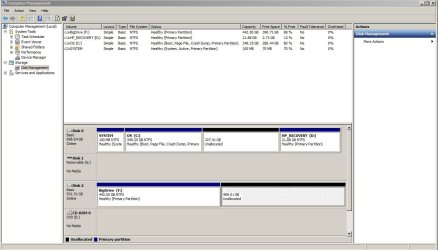
Post a screenshot of disk management. I want to see partition layout of new disk

How many partions has new disk now?
How many partitions did you backup?
 

My Computer My Computer

At a glance

Microsoft Windows 7 Home Premium 64-bits 7601...Intel(R) Core(TM) i3 CPU M 370 @ 2.40GHz4,00 GBATI Mobility Radeon HD 5400 Series
Computer type
Laptop
Computer Manufacturer/Model Number
ACER ASPIRE 5742G
OS
Microsoft Windows 7 Home Premium 64-bits 7601 Multiprocessor Free Service Pack 1
CPU
Intel(R) Core(TM) i3 CPU M 370 @ 2.40GHz
Motherboard
Acer Aspire 5742G
Memory
4,00 GB
Graphics Card(s)
ATI Mobility Radeon HD 5400 Series
Sound Card
(1) AMD High Definition Audio Device (2) Realtek High Defi
Screen Resolution
1366 x 768 x 32 bits (4294967296 colors) @ 60 Hz
Hard Drives
WDC WD5000BEVT-22ZAT0
If you put the image on the new drive it won't work. You would have to restore the image to a drive and it should all be fine. The Boot disk would be for booting into Advance Startup Options.

Thanks Bigmck! There's some nice simple explanations on this forum which is better than most -- or maybe I'm slower than I should be when it comes to computers.
Which part didn't you understand here?

I'm sorry Britton30 -- I included you in my statement about "this forum" but I could have been more specific. You made it quite clear I couldn't boot from my system image so I changed gears. Thank you so much for making that clear :)
 

My Computer My Computer

At a glance

windows 7 home premium 64 bit
OS
windows 7 home premium 64 bit
what is on the new drive now? Only the backup image? You can restore backup image to the same physical disk, so to new harddrive! But not in the same partition where the image is.

Post a screenshot of disk management. I want to see partition layout of new disk

How many partions has new disk now?
How many partitions did you backup?

Thank you for asking! Here is is:
 

Attachments

  • partitions.JPG
    partitions.JPG
    93.2 KB · Views: 20

My Computer My Computer

At a glance

windows 7 home premium 64 bit
OS
windows 7 home premium 64 bit
what is on the new drive now? Only the backup image? You can restore backup image to the same physical disk, so to new harddrive! But not in the same partition where the image is.

Post a screenshot of disk management. I want to see partition layout of new disk

How many partions has new disk now?
How many partitions did you backup?

Thank you for asking! Here is is:
The backup image is an BigDrive (F) isn't it? Did you make an macrium image of C, system reserved and recovery? Partition recovery isn't necessary anymore.

  • remove old disk.
  • connect new disk to same connector as old disk. (no really necessary I think)
  • Boot from macriurm recovery CD. Be sure it is the WINPE version!! Only winpe version can resize on restore. And can put it on antorher place. v5: How to restore a backup image (Restore, v5)
  • Click "browse for image" to load the image
  • As you can read in that tutorial you can drag and drop. Drag "system reserved" first. Put in in the unallocated space. A 100MB partition appears
  • Now drag the old C drive image to the unallocated space.
  • start the restore process
Be sure "system reserved" is marked" ACTIVE (it will ne the same as in amge so should be fine already)
If win7 doesn't boot... do:

http://www.sevenforums.com/tutorials/681-startup-repair.html (do it 3 times, with boots in between)

or do

v4 How to fix common boot problems using the Windows PE (Windows PE)
 

My Computer My Computer

At a glance

Microsoft Windows 7 Home Premium 64-bits 7601...Intel(R) Core(TM) i3 CPU M 370 @ 2.40GHz4,00 GBATI Mobility Radeon HD 5400 Series
Computer type
Laptop
Computer Manufacturer/Model Number
ACER ASPIRE 5742G
OS
Microsoft Windows 7 Home Premium 64-bits 7601 Multiprocessor Free Service Pack 1
CPU
Intel(R) Core(TM) i3 CPU M 370 @ 2.40GHz
Motherboard
Acer Aspire 5742G
Memory
4,00 GB
Graphics Card(s)
ATI Mobility Radeon HD 5400 Series
Sound Card
(1) AMD High Definition Audio Device (2) Realtek High Defi
Screen Resolution
1366 x 768 x 32 bits (4294967296 colors) @ 60 Hz
Hard Drives
WDC WD5000BEVT-22ZAT0
There is one alternate route you can go:

If you move the bootmgr to C before you take an image of C, then you need not worry about the System Partition any more - it is no more required. You only have to image/restore the C partition which will then be the active partition that will boot.
 

My Computer My Computer

At a glance

Vista, Windows7, Mint Mate, Zorin, Windows 8from 1.6GHz Duo to i7
Computer Manufacturer/Model Number
HP, Dell, Gateway, Toshiba - 4 laptops and 2 desktops
OS
Vista, Windows7, Mint Mate, Zorin, Windows 8
CPU
from 1.6GHz Duo to i7
Monitor(s) Displays
2x HP w2207
Hard Drives
5x HDD, 7x SSD, 12x Externals
Keyboard
with trackball - no mices
Mouse
Trackball mice
Internet Speed
DSL 6000
The backup image is an BigDrive (F) isn't it? YES

Did you make an macrium image of C, system reserved and recovery?


I believe I did.

Partition recovery isn't necessary anymore.

Does this mean I don't have to make a partition in the new disc to put the restored image?


  • connect new disk to same connector as old disk. (not really necessary I think)
I can do that but why would it not be necessary? You mean just do it when it's connected to the usb enclosure?


  • Boot from macriurm recovery CD. Be sure it is the WINPE version!! Only winpe version can resize on restore. And can put it on another place.
  • reserved" first. Put in in the unallocated space. A 100MB partition appears
I can do all that -- good explanation and thank you.


I'm starting to think though that I want to do a clean install as described elsewhere on this forum. I am just so upset with HP that my 1-year-old computer has a failing hard drive and I don't want any of their software near my computer anymore.


When I called them they said they'd be happy to put in a new hard drive for me if I'd ship my computer to them and pay $350 plus $60 for the hard drive. That's no help at all since with shipping costs I can almost buy a new computer at that price.


As a single working mother I don't have the time or money for yearly computer fixes or a new purchase. This is the first and last HP computer I'll ever purchase.
 

My Computer My Computer

At a glance

windows 7 home premium 64 bit
OS
windows 7 home premium 64 bit
There is one alternate route you can go:

If you move the bootmgr to C before you take an image of C, then you need not worry about the System Partition any more - it is no more required. You only have to image/restore the C partition which will then be the active partition that will boot.

Would you know what the advantage is of having the bootmgr system on a separate partition?
 

My Computer My Computer

At a glance

windows 7 home premium 64 bit
OS
windows 7 home premium 64 bit
There is one alternate route you can go:

If you move the bootmgr to C before you take an image of C, then you need not worry about the System Partition any more - it is no more required. You only have to image/restore the C partition which will then be the active partition that will boot.

Would you know what the advantage is of having the bootmgr system on a separate partition?
If you move the bootmgr to C, you lose the capability to boot into the recovery partition. But since you make images, you do not need that anyhow. Then there are some advantages of a seperate system partition when you double boot with another operating system.
 

My Computer My Computer

At a glance

Vista, Windows7, Mint Mate, Zorin, Windows 8from 1.6GHz Duo to i7
Computer Manufacturer/Model Number
HP, Dell, Gateway, Toshiba - 4 laptops and 2 desktops
OS
Vista, Windows7, Mint Mate, Zorin, Windows 8
CPU
from 1.6GHz Duo to i7
Monitor(s) Displays
2x HP w2207
Hard Drives
5x HDD, 7x SSD, 12x Externals
Keyboard
with trackball - no mices
Mouse
Trackball mice
Internet Speed
DSL 6000
Back
Top