Does sfc /scannow really help?

PoPPeR

New member
Local time
5:11 PM
Messages
70
I've been desktop support for over 10 years in large corporations 10k+ employees. never once did I had a good experience sfc /scannow fixing anything.

anybody out there find it help resolved your problem? if so, please list your problem and if sfc /scannow really fixed it.

thanks
 

My Computer

OS
XP Vista 7
Yes, it can work or show what files that are bad.
 

My Computer

OS
ME/XP/Vista/Win7
i've not seen it show anything. all i see is a progress bar, once it complete, it just close the progress bar screen. does it create a log file somewhere?
 

My Computer

OS
XP Vista 7
Yes it does create a log. Can't remember where. If you run it from a command prompt window (not the run command) it should tell you where it saves the log.

Also I had a situation just last week where the theme.dll files in Win 7 got corrupted and sfc /scannow found it and replaced them fixing my problems.
 

My Computer

Computer Manufacturer/Model Number
Custom
OS
Windows 7 Ultimate x64
CPU
QX6700 @ 3.2Ghz (temporarily till I get the drive to tweak)
Motherboard
Asus Maximus Formula
Memory
8gb (4x2gb) OCZ PC2-8500
Graphics Card(s)
GTX280
Sound Card
Auzentech Prelude
Monitor(s) Displays
Samsung 244T & 940BF
Screen Resolution
1920x1200 & 1280x1024
Hard Drives
2 x Hitatchi 7K500 500GB in raid 0
PSU
Seasonic M-12 700w
Case
Lian Li PC-6077B
Cooling
Liquid (D-tek Fuzion 2/DDC+/240GTX)
Keyboard
Saitech Eclipse II
Mouse
Logitech G9
Internet Speed
22Mbit burst - 15 Mbit typical down / 500Kbit up
Other Info
http://pics.livejournal.com/bun_bun/pic/001c64ww

My Computers

System One System Two

  • Computer type
    PC/Desktop
    Computer Manufacturer/Model Number
    ChillBlast - Custom to my design
    OS
    Windows 11 Pro x64 [Latest Release and Release Preview]
    CPU
    Ryzen 9 5950X, 3.8 - 5.2 MHz
    Motherboard
    Asus Prime X570-Pro
    Memory
    64GB [2 x 32GB] DDR4 3200MHz
    Graphics Card(s)
    4GB NVIDIA GEFORCE GTX 1650 Ti
    Sound Card
    On-board SPDIF to 5.1 System + HDMI [5.1 system]
    Monitor(s) Displays
    32" UHD 32 Bit HDR Monitor + 43" UHD 4K 32Bit HDR TV
    Screen Resolution
    2 x 3840 x 2160 @60Hz
    Hard Drives
    1TB M2 SSD OS, 500GB Fast Access SSD, 2 x 8TB Data + Various Externals from 1TB to 4TB, 10TB NAS
    PSU
    NZXT C750 80 PLUS Gold 750W Modular PSU
    Case
    Workstation Case [Matt Black]
    Cooling
    NZXT Kraken X63 280mm CPU Cooler +2x Quiet Case fans
    Keyboard
    Logitech Wireless MX Keys & K400 + others
    Mouse
    Logitech Wireless MX Master 3S
    Internet Speed
    920 MB Down 50 MB Up
    Antivirus
    BitDefender Total Security Pro
    Browser
    Chrome (always run latest Non-Beta)
    Other Info
    Also run ...
    Laptop - Quad 8GB - Windows 10 Pro x64
    Nexus 7 Android tablet x2
    Samsung 10.2" tablet
    Blackview TAB 8 4G Android Tablet c/w Keyboard
    Wacom Intuos Pro Medium Pen Pad
    Wacom Intuos Pro Small Pen Pad
    Wacom Expresskeys Remote
    Loopdeck+ Graphics Controller
    Shuttle Pro v2 Control
  • Computer type
    Laptop
    System Manufacturer/Model Number
    Dell XPS 17 10750H
    OS
    Windows 11 Pro x64 Latest RP
    CPU
    Intel I7 10750H 5.0GHz
    Motherboard
    Dell XPS
    Memory
    32GB [2x16GB] DDR4 2933 MHz
    Graphics Card(s)
    nVidia GTX1650Ti 4 GB GDDR6
    Sound Card
    Stock [Realtek] 4 Speaker
    Monitor(s) Displays
    17" IPS UHD+ Infinity Edge Touchscreen
    Screen Resolution
    3840 x 2400
    Hard Drives
    2TB M2 NVMe, 4TB External + various 500GB & 1TB External NVMe (also have access to spinner HDD from
    PSU
    Stock
    Case
    Stock XPS Aluminium & Carbon Fibre
    Cooling
    Stock - Active Fan Control
    Keyboard
    Backlit + Various Logitech
    Mouse
    Stock Track Pad + Logitech MX Trackball
    Internet Speed
    72 MB Down 18MB Up
    Browser
    Chrome
    Other Info
    Also run ...
    Laptop - Quad 8GB - Windows 10 Pro x64
    Nexus 7 Android tablet x2
    10.2" tablet
    Sony Z3 Android Smartphone
    Wacom Intuos Pro Medium Pen Pad
    Wacom Intuos Pro Small Pen Pad
    Wacom Expresskeys Remote
    Loopdeck+ Graphics Controller
    Shuttle Pro v2 Control Pad
    10TB NAS
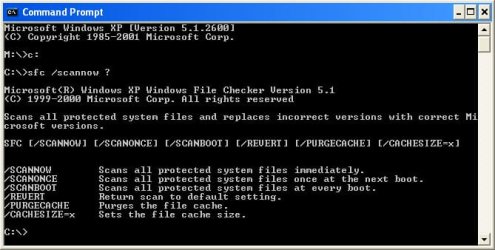
i don't see an option to save to log file

C:\>sfc /scannow ?
Microsoft(R) Windows XP Windows File Checker Version 5.1
(C) 1999-2000 Microsoft Corp. All rights reserved
Scans all protected system files and replaces incorrect versions with correct Mi
crosoft versions.
SFC [/SCANNOW] [/SCANONCE] [/SCANBOOT] [/REVERT] [/PURGECACHE] [/CACHESIZE=x]

/SCANNOW Scans all protected system files immediately.
/SCANONCE Scans all protected system files once at the next boot.
/SCANBOOT Scans all protected system files at every boot.
/REVERT Return scan to default setting.
/PURGECACHE Purges the file cache.
/CACHESIZE=x Sets the file cache size.
C:\>
 

Attachments

  • sfc.jpg
    sfc.jpg
    56.9 KB · Views: 159

My Computer

OS
XP Vista 7
May be this will help.
 

Attachments

  • Capture10.JPG
    Capture10.JPG
    55.6 KB · Views: 359

My Computer

OS
ME/XP/Vista/Win7
i've seen adviced on this forum to run sfc /scannow, and that's it. no other detail and to look at the log file nor next action. so the user assume that sfc /scannow is suppose to resolve things...but if you're telling me to llook at the log file to for clues of what could be the problem, then that's another step for the trained eyes.
 

My Computer

OS
XP Vista 7
The SFC / SCANNOW does actually perform some repairs automatically the point of the log file is to inform you of what was repaired so as to possibly prevent a future recurrence of the same issue and also to allow you to take further action on those files which for some reason could not be automatically repaired. If SFC has files that it cannot repair then this will be clearly noted in the exit message.
 

My Computers

System One System Two

  • Computer type
    PC/Desktop
    Computer Manufacturer/Model Number
    ChillBlast - Custom to my design
    OS
    Windows 11 Pro x64 [Latest Release and Release Preview]
    CPU
    Ryzen 9 5950X, 3.8 - 5.2 MHz
    Motherboard
    Asus Prime X570-Pro
    Memory
    64GB [2 x 32GB] DDR4 3200MHz
    Graphics Card(s)
    4GB NVIDIA GEFORCE GTX 1650 Ti
    Sound Card
    On-board SPDIF to 5.1 System + HDMI [5.1 system]
    Monitor(s) Displays
    32" UHD 32 Bit HDR Monitor + 43" UHD 4K 32Bit HDR TV
    Screen Resolution
    2 x 3840 x 2160 @60Hz
    Hard Drives
    1TB M2 SSD OS, 500GB Fast Access SSD, 2 x 8TB Data + Various Externals from 1TB to 4TB, 10TB NAS
    PSU
    NZXT C750 80 PLUS Gold 750W Modular PSU
    Case
    Workstation Case [Matt Black]
    Cooling
    NZXT Kraken X63 280mm CPU Cooler +2x Quiet Case fans
    Keyboard
    Logitech Wireless MX Keys & K400 + others
    Mouse
    Logitech Wireless MX Master 3S
    Internet Speed
    920 MB Down 50 MB Up
    Antivirus
    BitDefender Total Security Pro
    Browser
    Chrome (always run latest Non-Beta)
    Other Info
    Also run ...
    Laptop - Quad 8GB - Windows 10 Pro x64
    Nexus 7 Android tablet x2
    Samsung 10.2" tablet
    Blackview TAB 8 4G Android Tablet c/w Keyboard
    Wacom Intuos Pro Medium Pen Pad
    Wacom Intuos Pro Small Pen Pad
    Wacom Expresskeys Remote
    Loopdeck+ Graphics Controller
    Shuttle Pro v2 Control
  • Computer type
    Laptop
    System Manufacturer/Model Number
    Dell XPS 17 10750H
    OS
    Windows 11 Pro x64 Latest RP
    CPU
    Intel I7 10750H 5.0GHz
    Motherboard
    Dell XPS
    Memory
    32GB [2x16GB] DDR4 2933 MHz
    Graphics Card(s)
    nVidia GTX1650Ti 4 GB GDDR6
    Sound Card
    Stock [Realtek] 4 Speaker
    Monitor(s) Displays
    17" IPS UHD+ Infinity Edge Touchscreen
    Screen Resolution
    3840 x 2400
    Hard Drives
    2TB M2 NVMe, 4TB External + various 500GB & 1TB External NVMe (also have access to spinner HDD from
    PSU
    Stock
    Case
    Stock XPS Aluminium & Carbon Fibre
    Cooling
    Stock - Active Fan Control
    Keyboard
    Backlit + Various Logitech
    Mouse
    Stock Track Pad + Logitech MX Trackball
    Internet Speed
    72 MB Down 18MB Up
    Browser
    Chrome
    Other Info
    Also run ...
    Laptop - Quad 8GB - Windows 10 Pro x64
    Nexus 7 Android tablet x2
    10.2" tablet
    Sony Z3 Android Smartphone
    Wacom Intuos Pro Medium Pen Pad
    Wacom Intuos Pro Small Pen Pad
    Wacom Expresskeys Remote
    Loopdeck+ Graphics Controller
    Shuttle Pro v2 Control Pad
    10TB NAS
Also keep in mind that you should not run sfc /scannow just for the heck of it.
Only run it if you are actually having problems.

Yeah,, log searching can be a strain for the uninitiated.

Try this

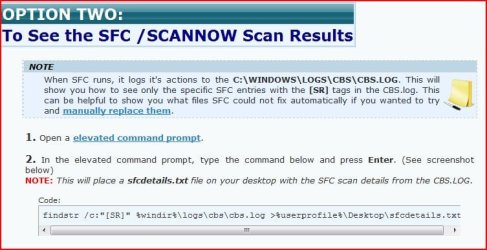
Copy the code and paste to notepad and save as whatever.cmd then run it

Code:
sfc /scannow

echo **************************************
echo ****Please Wait for Scan to finish****
echo ****..............................****
echo *****Then hit any key to continue*****
echo ****..............................****
echo **************************************
pause

findstr /c:"[SR]" %windir%\logs\cbs\cbs.log > "c:\CBS Results.txt"
"c:\CBS Results.txt"
This the location of the log file...

%windir%\logs\cbs\cbs.log
 

My Computer

Computer Manufacturer/Model Number
Self Built
OS
Win 7 Ultimate 32bit
CPU
C2D E6600 2.4Ghz
Motherboard
Intel D965WH
Memory
4G Kingston KHX5400D2
Graphics Card(s)
EVGA GTX 570 HD SC (012-P3-1573-KR)
Sound Card
On-Board
Monitor(s) Displays
Samsung 226BW
Screen Resolution
1680 x 1050
Hard Drives
2 x 250 Seagate Barracuda
2 x 500 Seagate Barracuda (Raid1)
PSU
Corsair TX750W
Case
In-Win C589
Cooling
Stock Intel Cooling
Also keep in mind that you should not run sfc /scannow just for the heck of it.
Only run it if you are actually having problems.

Yeah,, log searching can be a strain for the uninitiated.

Try this

Copy the code and paste to notepad and save as whatever.cmd then run it

Code:
sfc /scannow
 
echo **************************************
echo ****Please Wait for Scan to finish****
echo ****..............................****
echo *****Then hit any key to continue*****
echo ****..............................****
echo **************************************
pause
 
findstr /c:"[SR]" %windir%\logs\cbs\cbs.log > "c:\CBS Results.txt"
"c:\CBS Results.txt"
This the location of the log file...

%windir%\logs\cbs\cbs.log

I agree with the warning and with that in mind, I would change the sfc command to verifyonly instead of scannow, then read the log file to see what's corrupt or what couldn't be replaced and go from there.
 

My Computer

Computer Manufacturer/Model Number
Averatec 6130HS-20
OS
Windows 7 Professional 32-bit (6.1, Build 7600)
CPU
Intel(R) Pentium(R) 4 3.00 GHz HT
Memory
2.0 GB
Graphics Card(s)
ATI Mobility Radeon 9600 64MB
Sound Card
Realtek AC'97 Audio
Screen Resolution
1280 x 800
Hard Drives
Seagate 96023A 60GB 7200RPM -
Seagate FreeAgentDesktop 250GB
Cooling
20 Inch Box Fan
Mouse
Targus PAWM10 Wireless Optical Laptop Mouse
well, i just had explorer.exe error and it won't go away. i'll go end it in task manager, restart, error reappear. i ran sfc /scannow, ran the command to search for log, but unable to find log.

so i went ahead log on in safe mode, use different account, and no error. so i created another account, restart normal mode, and was able to log in without error

another fail attempt from sfc /scannow ...that's 100% of the time that it has not helped me. I'm a tech for 10-12 years, not once has sfc /scannow did anything for me. too bad
 

My Computer

OS
XP Vista 7
That is correct.

sfc /scannow does not always work.

I have had it work for me in the past. It all depends on what is wrong, how badly files are messed up, and probably which files are messed up.
 

My Computer

Computer Manufacturer/Model Number
Self Built
OS
Win 7 Ultimate 32bit
CPU
C2D E6600 2.4Ghz
Motherboard
Intel D965WH
Memory
4G Kingston KHX5400D2
Graphics Card(s)
EVGA GTX 570 HD SC (012-P3-1573-KR)
Sound Card
On-Board
Monitor(s) Displays
Samsung 226BW
Screen Resolution
1680 x 1050
Hard Drives
2 x 250 Seagate Barracuda
2 x 500 Seagate Barracuda (Raid1)
PSU
Corsair TX750W
Case
In-Win C589
Cooling
Stock Intel Cooling
My latest Start up and Install Files dated 7-3-2012 are sent, Karl in Md.
 

Attachments

My Computer

Computer Manufacturer/Model Number
HP Q8200
OS
windows 7
CPU
Intel Q8200
Motherboard
Plegarion
Memory
8GB
Graphics Card(s)
NVDA 9400GT
Sound Card
built in
Monitor(s) Displays
HP 17"
Screen Resolution
max
Hard Drives
3HD, i internal, 2 external
Keyboard
MS Wireless
Mouse
MS wireless
Internet Speed
22MB up, 4GB down Comcast
Back
Top