
Does this look right to you?

idonteven

New member
Local time
9:34 AM
Messages
2
Hi, everyone.

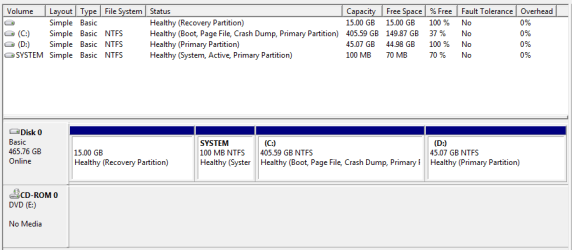
I've been using Windows 7 for a few days now and everything's been great. No problems at all. Today I started looking around the Computer Management Console in an attempt to familiarise myself with things a bit more, and came across this.

Can someone please explain methodically what's going on in the attached picture?

What is the empty, untitled 15GB recovery partition volume all about?
What is the 100MB 'SYSTEM' volume exactly? (of which 70MB is free - I really don't understand that at all)
Why isn't the 'C' partition listed as the active one? Should it be?

Like I said, I've no problems with functionality at all, but when I noticed how things looked in this section, it seemed a bit odd.

Is this an irregular looking layout, or am I worrying about nothing? Thanks in advance.
 

Attachments
  • 8809.png
    8809.png
    9.6 KB · Views: 56

My Computer

OS
Windows 7
Hello idonteven,

Welcome to Seven Froums.

Looks ok to me. Did you buy this computer from a manufacturer. They usually put a 15 gig partition that contains all the files needed to return the computer to the factory setup. The 100 MB partition contains some boot files and possibly the app to facilitate this recovery. As you can see, it is active.

Hope this helps.

Gary
 

My Computer

Computer Manufacturer/Model Number
Dell XPS420
OS
Vista Ult 64 bit Seven Ult RTM x64
CPU
Intel Core2 Quad Q6600 2.40 gigahertz
Memory
Crucial Ballistix 4x2GB PC2 6400
Graphics Card(s)
NVIDIA GeForce 8600 GTS 256 MB
Sound Card
Creative SB X-Fi audio
Monitor(s) Displays
HP w2207 + HPvs15
Screen Resolution
1680x1050 + 1024x768
Hard Drives
2-WD5000AAKS-500 GB
WD5000AAV-500 GB external
Keyboard
Microsoft Comfort Curve
Mouse
MX Revolution
Other Info
Wacom Intuos 2 Graphics Tablet
Experience Index=5.5
You must have done an upgrade rather than a "clean" install for that partition to be left over.

The 100MB partition?

I've heard of a 10MB boot partition ,. but never 100GB

The factory partition would contain the previous operating system which is of no use at all.
 

My Computer

Computer Manufacturer/Model Number
Cheap $399.00 E-Machine
OS
Windows 7 Pro & Vista Home Premium
CPU
Athlon 64 3800+ (Orleans) 2.40GHz
Motherboard
Winfast
Memory
2GB DDR2 RAM DIMM
Graphics Card(s)
NVIDIA GeForce 8500 GT 512 MB memory HDMI out
Sound Card
creative X-Fi Exteme 7..1 channel
Monitor(s) Displays
Acer V223W 22" widescreen DVI
Screen Resolution
1680x1050
Hard Drives
WDC WD5 500GB
WDC WD25 250GB
PSU
OCZ 550 watt
Case
Gateway
Cooling
2 fans
Keyboard
Dell
Mouse
Sony Vaio
Internet Speed
18MB/s down - .72MB /s up
Thanks for the responses, chaps.

Just to clarify, the laptop in question was purchased brand new with Windows 7 pre-installed, from Amazon a few days ago.

As far as taking any action is concerned, is it worth tidying up the apparent free space, or should I just leave everything as it is?
 

My Computer

OS
Windows 7
Well I';ll have to correct my post. If it came pre-installed with Windows 7,. then the factory partition should be left alone.
 

My Computer

Computer Manufacturer/Model Number
Cheap $399.00 E-Machine
OS
Windows 7 Pro & Vista Home Premium
CPU
Athlon 64 3800+ (Orleans) 2.40GHz
Motherboard
Winfast
Memory
2GB DDR2 RAM DIMM
Graphics Card(s)
NVIDIA GeForce 8500 GT 512 MB memory HDMI out
Sound Card
creative X-Fi Exteme 7..1 channel
Monitor(s) Displays
Acer V223W 22" widescreen DVI
Screen Resolution
1680x1050
Hard Drives
WDC WD5 500GB
WDC WD25 250GB
PSU
OCZ 550 watt
Case
Gateway
Cooling
2 fans
Keyboard
Dell
Mouse
Sony Vaio
Internet Speed
18MB/s down - .72MB /s up
Looks OK to me.

I assume D is a separate partition put there for you to keep data on.

Worth keeping the Recovery partition - in case you need to restore the pc to factory state.
 

My Computers

System One System Two

  • Computer type
    PC/Desktop
    OS
    7 X64
    CPU
    i5 8400
    Motherboard
    gigabyte b365m ds3h
    Memory
    2x8gb 3200mhz
    Hard Drives
    various
    PSU
    pure power 11 400w cm
    Case
    Coolermaster
    Cooling
    cryorig m9i
  • Computer type
    PC/Desktop
    OS
    7x64
    CPU
    g5400
    Motherboard
    ga b365m ds3h
    Memory
    8gb ddr4 2400
    PSU
    xfx pro 450w
Hello, your system is fine. Manufacturers normally have a recovery partition which contain an image of the system as you bought it. If something goes wrong, the image in that 15GB partition will be able to put you back at factory condition. If you delete that partition, you might think about using a third party imaging application like Acronis' and store an image of the system on an external drive. Doing that will give you back 15GB of space that you can absorb into the Data drive.

The 100MB partition is created when Windows 7 is installed, it contains the boot files that are used to repair the boot sector incase Windows can't boot. It can be deleted if you're using thirdparty boot managers and ISR software, but highly NOT recommended.

I have to ask what's on the D partition? It is probably data files. I think you would benefit more from this setup by shrinking the C drive to its appropriate size, may be around 60~70GB, and absorbing the extra space into the D drive. This will allow you to map all your user data and system images onto the D drive, making the system more crashproof.
 

My Computer

Computer Manufacturer/Model Number
SevenForums
OS
7 Prof
CPU
Q9550
Motherboard
Maximus II Formula
Memory
2x2 Mushkin Ascent 8500
Graphics Card(s)
4870X2
Sound Card
X-Fi Xtreme Gamer
Monitor(s) Displays
LN32A550
Screen Resolution
1920x1080
Hard Drives
Intel G2 80GB
5x1TB
PSU
Corsair 1000
Case
Cosmos
Cooling
Yates^13
Keyboard
G15v1
Mouse
MX518
Internet Speed
6Mbps
I have to ask what's on the D partition? It is probably data files. I think you would benefit more from this setup by shrinking the C drive to its appropriate size, may be around 60~70GB, and absorbing the extra space into the D drive. This will allow you to map all your user data and system images onto the D drive, making the system more crashproof.

I agree except to say that how large the C drive should be is dependent on how many programs you plan to install. I have used nearly 70 gigs of my C drive and so consider 100-120 GB to be minimum for C: If you need to reinstall the OS for some reason, your personal files are safe on another partition. Still should have good backups, but a lot less chance you'll need them.
 

My Computer

Computer Manufacturer/Model Number
Dell XPS420
OS
Vista Ult 64 bit Seven Ult RTM x64
CPU
Intel Core2 Quad Q6600 2.40 gigahertz
Memory
Crucial Ballistix 4x2GB PC2 6400
Graphics Card(s)
NVIDIA GeForce 8600 GTS 256 MB
Sound Card
Creative SB X-Fi audio
Monitor(s) Displays
HP w2207 + HPvs15
Screen Resolution
1680x1050 + 1024x768
Hard Drives
2-WD5000AAKS-500 GB
WD5000AAV-500 GB external
Keyboard
Microsoft Comfort Curve
Mouse
MX Revolution
Other Info
Wacom Intuos 2 Graphics Tablet
Experience Index=5.5
Back
Top