does W7 hate UEFI - cannot install - help please

MuppetandChums

New member
Local time
12:38 AM
Messages
16
Life was so so easy in the days of Bios.

Brand new build trying to install Windows 7 x64 on a new Samsung EVO SSD on a ASRock z97 Extreme 6 board with P2.30 firmware (latest) and 16Gb Ram.

Media

1 x Full Retail W7 x64 DVD
1 x OEM W7 x64 DVD

1 x Full Retail W7 x64 .iso
1 x OEM W7 x64 .iso

I have checked both CoAs with pidgen.exe V1.1.3.590 and they are kosher (OEM & Retail) and not blacklisted by MS.

USB stick bootable using Rufus 2.2 with .iso above installed and modified files in W7 'sources' folder as below.

1. Tried the firmware with CSM switched off and switched on. Makes no difference (I think).
2. Configured install from USB stick to be GPT not MBR.
3. Configured install from USB stick to be USB FAT32
4. Configured install from USB stick to be UEFI NTFS

Everything stops at install routine both DVD and USB stick ' accept Licence Terms and Conditions'. Mouse and Keyboard become unresponsive cannot progress install. Keyboard wired, mouse wireless. Not even 'Alt + a ' works.

I have inserted a PID.txt for with the CoA into the install 'sources' folder to smooth the path. Doesn't seen to work.

I have inserted a ei.cfg file 'reporting' the licence type into the install 'sources' folder to smooth the path. Doesn't seen to work.

I'm missing something here.
( no the answer is not W8 or 8.1)

Am I trying a mixed Bios and UEFI install in a UEFI world ?

Thanks for reading.
 

My Computer

Computer Manufacturer/Model Number
shuttle SX38P
OS
7 Ultimate
CPU
Intel E8400 2 x 3000
Motherboard
Shuttle
Memory
4GB Corsair
Graphics Card(s)
Radeon HD2400 Pro
Sound Card
mobo
Monitor(s) Displays
Dell G24210
Hard Drives
Disk 1 - WD Raptor 150GB - OS (26gb of 53gb) + Apps(10gb of 20gb) + uTorrent partition (6gb of 50gb+)
Disk 2 - Seagate 7200 1TB. pagesys + data store + users profile/data - 300gb used
Disk 3 - Seagtate 7200 1.5TB pagesys + data store - 400gb used
PSU
450W
Case
Shuttle
Cooling
air + fans
Most probably it is not windows 7 itself but the MBR partition table that is used by windows 7 by default. If the discs are formatted as GPT, UEFI is not a problem with windows 7.

You can do two alternative things.

First, boot into the BIOS, set it to Legacy BIOS. Search throughout the BIOS, wherever it is UEFI, set it to Legacy. Then try installing windows 7. It should work.

Second, convert your discs to GPT discs.
You can do in in two ways, destructive and non-destructive.

When the disc is converted to GPT, it is ready for UEFI. Make a UEFI bootable pendrive using Rufus and install windows flawlessly.
 

My Computer

Computer type
PC/Desktop
Computer Manufacturer/Model Number
Self Assembled
OS
Microsoft Windows 10 Pro Insider Preview 64-bit
CPU
Intel(R) Core(TM) i3-4130 CPU @ 3.40GHz
Motherboard
Gigabyte Technology Co., Ltd. B85M-D3H
Memory
Corsair Vengence 4GB x2 (8.00GB Dual-Channel DDR3 @ 798MHz)
Graphics Card(s)
2047MB GeForce GTS 450 (ZOTAC International)
Sound Card
Onboard (Realtek High Definition Audio)
Monitor(s) Displays
LG Flatron E2040T
Screen Resolution
1600x900
Hard Drives
Western Digital 1 TB
Seagate 500 GB
PSU
Corsair VS550
Case
Cooler Master K380
Cooling
Cooler Master Seidon 120V Plus
Keyboard
Logitech MK260r
Mouse
Logitech MK260r
Internet Speed
PMPL Broadband
Antivirus
Windows Defender + MBAM
Browser
Firefox
Other Info
Dell Studio 15" Laptop
Thanks but....

My SSD has never been used or formatted.
I have no Bios its a UEFI.
I cannot convert the new SSD for the OS to GPT unless I run something from a bootable USB drive. But why would I want to do this surely an install process addresses this ?
I tried making a FAT32 partition for a MBR on Partion 1 on the USB drive for a UEFI install. No Go.

I do not have a Legacy Bios option. I have a Compatibility Support Mode but I think that's just for W8.

All of a sudden Ubuntu looks so so attractive.
 

My Computer

Computer Manufacturer/Model Number
shuttle SX38P
OS
7 Ultimate
CPU
Intel E8400 2 x 3000
Motherboard
Shuttle
Memory
4GB Corsair
Graphics Card(s)
Radeon HD2400 Pro
Sound Card
mobo
Monitor(s) Displays
Dell G24210
Hard Drives
Disk 1 - WD Raptor 150GB - OS (26gb of 53gb) + Apps(10gb of 20gb) + uTorrent partition (6gb of 50gb+)
Disk 2 - Seagate 7200 1TB. pagesys + data store + users profile/data - 300gb used
Disk 3 - Seagtate 7200 1.5TB pagesys + data store - 400gb used
PSU
450W
Case
Shuttle
Cooling
air + fans

My Computer

Computer type
PC/Desktop
Computer Manufacturer/Model Number
Self Assembled
OS
Microsoft Windows 10 Pro Insider Preview 64-bit
CPU
Intel(R) Core(TM) i3-4130 CPU @ 3.40GHz
Motherboard
Gigabyte Technology Co., Ltd. B85M-D3H
Memory
Corsair Vengence 4GB x2 (8.00GB Dual-Channel DDR3 @ 798MHz)
Graphics Card(s)
2047MB GeForce GTS 450 (ZOTAC International)
Sound Card
Onboard (Realtek High Definition Audio)
Monitor(s) Displays
LG Flatron E2040T
Screen Resolution
1600x900
Hard Drives
Western Digital 1 TB
Seagate 500 GB
PSU
Corsair VS550
Case
Cooler Master K380
Cooling
Cooler Master Seidon 120V Plus
Keyboard
Logitech MK260r
Mouse
Logitech MK260r
Internet Speed
PMPL Broadband
Antivirus
Windows Defender + MBAM
Browser
Firefox
Other Info
Dell Studio 15" Laptop
Then once you format the stick using only Option One in tutorial provided in post above, comparing the picture after loading the ISO to make sure settings did not jump around, you must boot the stick as a UEFI device only.

If this fails report back any settings in BIOS setup checking all tabs for UEFI, EFI, CSM, Legacy BIOS, Secure Boot and BIOS Boot priority order.
 
How depressing. Ubuntu 14.04 ..an OS not renowned for drivers and interoperability. Downloaded, installed & configured in under 15 minutes on the same HW. If it was not for Adobe products I'd be away from Windows forever.
 

My Computer

Computer Manufacturer/Model Number
shuttle SX38P
OS
7 Ultimate
CPU
Intel E8400 2 x 3000
Motherboard
Shuttle
Memory
4GB Corsair
Graphics Card(s)
Radeon HD2400 Pro
Sound Card
mobo
Monitor(s) Displays
Dell G24210
Hard Drives
Disk 1 - WD Raptor 150GB - OS (26gb of 53gb) + Apps(10gb of 20gb) + uTorrent partition (6gb of 50gb+)
Disk 2 - Seagate 7200 1TB. pagesys + data store + users profile/data - 300gb used
Disk 3 - Seagtate 7200 1.5TB pagesys + data store - 400gb used
PSU
450W
Case
Shuttle
Cooling
air + fans
When you're ready to continue troubleshooting let us know. These issues are always solved here when there is close cooperation.
 
I had no problems installing Win 7 in UEFI on a MBR formatted SSD directly from the CD. You don't absolutely need GPT unless a HDD is larger than 2.2TB. See here.
 

My Computer

Computer type
PC/Desktop
Computer Manufacturer/Model Number
Custom Build
OS
Win 7 Ultimate 64 bit
CPU
Intel i7-3930K
Motherboard
ASUS P9X79 WS
Memory
Kingston HyperX Genesis 32GB Kit (8x4GB Modules) 1600MHz DDR
Graphics Card(s)
MSI R7850 Twin Frozr 2GD5/OC Radeon HD 7850 2GB 256-bit GDDR
Sound Card
Asus Xonar Essence STX
Monitor(s) Displays
3x Asus VG248QE 24", Vizio 32" TV
Screen Resolution
1920 x 1080, ?
Hard Drives
Samsung 128GB 840 Pro SSD (1),
Samsung 4TB 850 EVO SSDs (4)
Samsung 4TB 850 EVO SSDs (16) external backup drives used in 2.5" hot swap bays in the computer.
PSU
Corsair HX750w
Case
Antec Two Hundred v2 (modified)
Cooling
Cooler Master GeminII S524 120mm (fan replaced with a 140mm)
Keyboard
Logitech G510s
Mouse
Logitech M525 (two in use)
Internet Speed
=< 32Mbps down, 8Mbps up
Antivirus
AVAST!, MBAM, SAS, Spybot S&D (all but MBAM free) Glary Util
Browser
IE11
Other Info
LSI 9211-8i HBA card (8 SATA III ports), 2.5" & 3.5" Hot Swap Bays, HooToo HT-CR001 PCI-E to USB 3.0 Internal Hub + 6 Slot Card Reader, and LG Model CH12LS28 BD-ROM Optical Drive. Also, ScanSnap S1500 ADF duplexing scanner, Canon 9000F flat bed scanner, Corsair SP2500 2.1 speakers, Samsung CLP 415nw laser color printer, Cyberpower PP2200SW UPS
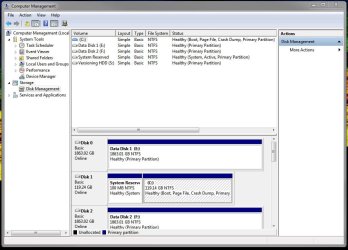
Here 'tis::

Disk Management.JPG
 

My Computer

Computer type
PC/Desktop
Computer Manufacturer/Model Number
Custom Build
OS
Win 7 Ultimate 64 bit
CPU
Intel i7-3930K
Motherboard
ASUS P9X79 WS
Memory
Kingston HyperX Genesis 32GB Kit (8x4GB Modules) 1600MHz DDR
Graphics Card(s)
MSI R7850 Twin Frozr 2GD5/OC Radeon HD 7850 2GB 256-bit GDDR
Sound Card
Asus Xonar Essence STX
Monitor(s) Displays
3x Asus VG248QE 24", Vizio 32" TV
Screen Resolution
1920 x 1080, ?
Hard Drives
Samsung 128GB 840 Pro SSD (1),
Samsung 4TB 850 EVO SSDs (4)
Samsung 4TB 850 EVO SSDs (16) external backup drives used in 2.5" hot swap bays in the computer.
PSU
Corsair HX750w
Case
Antec Two Hundred v2 (modified)
Cooling
Cooler Master GeminII S524 120mm (fan replaced with a 140mm)
Keyboard
Logitech G510s
Mouse
Logitech M525 (two in use)
Internet Speed
=< 32Mbps down, 8Mbps up
Antivirus
AVAST!, MBAM, SAS, Spybot S&D (all but MBAM free) Glary Util
Browser
IE11
Other Info
LSI 9211-8i HBA card (8 SATA III ports), 2.5" & 3.5" Hot Swap Bays, HooToo HT-CR001 PCI-E to USB 3.0 Internal Hub + 6 Slot Card Reader, and LG Model CH12LS28 BD-ROM Optical Drive. Also, ScanSnap S1500 ADF duplexing scanner, Canon 9000F flat bed scanner, Corsair SP2500 2.1 speakers, Samsung CLP 415nw laser color printer, Cyberpower PP2200SW UPS
Hi Jeannie

Disk management shows no evidence of a UEFI install or system. So if yours is EFI then it must be set to CSM or Legacy BIOS. In some minimal BIOS this will only be determined by whether the installation media is booted as a UEFI or Legacy Device.

When UEFI was in its infancy we often needed to encourage users to install to legacy if there was no firmware update that enables a UEFI install of Windows 7. However gradually the manufacturers caught up and now this has not been necessary in about a years time. So I recommend in most cases doing a UEFI install to experience the full features of the new generation of BIOS.
 
I pretty sure my MOBO (ASUS P9X79 WS) doesn't have a legacy BIOS option. I do not recall one and, when digging through my manual (yeah, I kept it and actually read it), it says nothing about a legacy BIOS option.
 

My Computer

Computer type
PC/Desktop
Computer Manufacturer/Model Number
Custom Build
OS
Win 7 Ultimate 64 bit
CPU
Intel i7-3930K
Motherboard
ASUS P9X79 WS
Memory
Kingston HyperX Genesis 32GB Kit (8x4GB Modules) 1600MHz DDR
Graphics Card(s)
MSI R7850 Twin Frozr 2GD5/OC Radeon HD 7850 2GB 256-bit GDDR
Sound Card
Asus Xonar Essence STX
Monitor(s) Displays
3x Asus VG248QE 24", Vizio 32" TV
Screen Resolution
1920 x 1080, ?
Hard Drives
Samsung 128GB 840 Pro SSD (1),
Samsung 4TB 850 EVO SSDs (4)
Samsung 4TB 850 EVO SSDs (16) external backup drives used in 2.5" hot swap bays in the computer.
PSU
Corsair HX750w
Case
Antec Two Hundred v2 (modified)
Cooling
Cooler Master GeminII S524 120mm (fan replaced with a 140mm)
Keyboard
Logitech G510s
Mouse
Logitech M525 (two in use)
Internet Speed
=< 32Mbps down, 8Mbps up
Antivirus
AVAST!, MBAM, SAS, Spybot S&D (all but MBAM free) Glary Util
Browser
IE11
Other Info
LSI 9211-8i HBA card (8 SATA III ports), 2.5" & 3.5" Hot Swap Bays, HooToo HT-CR001 PCI-E to USB 3.0 Internal Hub + 6 Slot Card Reader, and LG Model CH12LS28 BD-ROM Optical Drive. Also, ScanSnap S1500 ADF duplexing scanner, Canon 9000F flat bed scanner, Corsair SP2500 2.1 speakers, Samsung CLP 415nw laser color printer, Cyberpower PP2200SW UPS
If you have an old Asus motherboard, then there are no CSM and Secure Boot settings and then you won't be able to install Windows 7/8/10 in UEFI boot mode.

Asus UEFI BIOS Utility 1.png

The Asus motherboard CSM and Secure Boot settings. -> link

Here is info about UEFI Boot Mode (installing using the GPT partition style) and Legacy BIOS Boot Mode (installing using the MBR partition style): link
 

My Computer

Computer type
Laptop
Computer Manufacturer/Model Number
Lenovo IdeaPad G580
OS
Windows 8.1/10 x64
CPU
Intel Core i5-3230M
Memory
8 GB
Graphics Card(s)
Intel HD Graphics 4000
Antivirus
Windows Defender, EMET, standard user account
Browser
Internet Explorer
Then how on earth was I able to install Win 7 on a MOBO that doesn't have a legacy BIOS, just UEFI BIOS?
 

My Computer

Computer type
PC/Desktop
Computer Manufacturer/Model Number
Custom Build
OS
Win 7 Ultimate 64 bit
CPU
Intel i7-3930K
Motherboard
ASUS P9X79 WS
Memory
Kingston HyperX Genesis 32GB Kit (8x4GB Modules) 1600MHz DDR
Graphics Card(s)
MSI R7850 Twin Frozr 2GD5/OC Radeon HD 7850 2GB 256-bit GDDR
Sound Card
Asus Xonar Essence STX
Monitor(s) Displays
3x Asus VG248QE 24", Vizio 32" TV
Screen Resolution
1920 x 1080, ?
Hard Drives
Samsung 128GB 840 Pro SSD (1),
Samsung 4TB 850 EVO SSDs (4)
Samsung 4TB 850 EVO SSDs (16) external backup drives used in 2.5" hot swap bays in the computer.
PSU
Corsair HX750w
Case
Antec Two Hundred v2 (modified)
Cooling
Cooler Master GeminII S524 120mm (fan replaced with a 140mm)
Keyboard
Logitech G510s
Mouse
Logitech M525 (two in use)
Internet Speed
=< 32Mbps down, 8Mbps up
Antivirus
AVAST!, MBAM, SAS, Spybot S&D (all but MBAM free) Glary Util
Browser
IE11
Other Info
LSI 9211-8i HBA card (8 SATA III ports), 2.5" & 3.5" Hot Swap Bays, HooToo HT-CR001 PCI-E to USB 3.0 Internal Hub + 6 Slot Card Reader, and LG Model CH12LS28 BD-ROM Optical Drive. Also, ScanSnap S1500 ADF duplexing scanner, Canon 9000F flat bed scanner, Corsair SP2500 2.1 speakers, Samsung CLP 415nw laser color printer, Cyberpower PP2200SW UPS
Then how on earth was I able to install Win 7 on a MOBO that doesn't have a legacy BIOS, just UEFI BIOS?
That is possible only when there is legacy boot option for ODD/USB; and windows is installed using that legacy option.

If it is UEFI only, then the partition table should have three hidden partitions of total 528 MB as displayed by genet.

Some UEFI boards (may be all, I am not that much aware of it) offer this option, which installs an earlier OS keeping UEFI aside. If the installer is booted normally, it results the situation that you explained in your post #10, the installer formats the HDD/SSD as MBR. Here UEFI is useless.

If you want to use UEFI, you have to boot the installer as UEFI, using the boot menu key. Then the installer formats the HDD/SSD as GPT.

I should not tell you, you definitely know it, that the Legacy BIOS is not a single option to opt for, but a combination of various options in the advanced settings in the UEFI/BIOS.
 

My Computer

Computer type
PC/Desktop
Computer Manufacturer/Model Number
Self Assembled
OS
Microsoft Windows 10 Pro Insider Preview 64-bit
CPU
Intel(R) Core(TM) i3-4130 CPU @ 3.40GHz
Motherboard
Gigabyte Technology Co., Ltd. B85M-D3H
Memory
Corsair Vengence 4GB x2 (8.00GB Dual-Channel DDR3 @ 798MHz)
Graphics Card(s)
2047MB GeForce GTS 450 (ZOTAC International)
Sound Card
Onboard (Realtek High Definition Audio)
Monitor(s) Displays
LG Flatron E2040T
Screen Resolution
1600x900
Hard Drives
Western Digital 1 TB
Seagate 500 GB
PSU
Corsair VS550
Case
Cooler Master K380
Cooling
Cooler Master Seidon 120V Plus
Keyboard
Logitech MK260r
Mouse
Logitech MK260r
Internet Speed
PMPL Broadband
Antivirus
Windows Defender + MBAM
Browser
Firefox
Other Info
Dell Studio 15" Laptop
I'm still confused; there is absolutely no mention of "legacy" of any kind in my manual or in the UEFI BIOS. My installation works and I'm a "if it ain't broke, don't fix it" kind of girl.
 

My Computer

Computer type
PC/Desktop
Computer Manufacturer/Model Number
Custom Build
OS
Win 7 Ultimate 64 bit
CPU
Intel i7-3930K
Motherboard
ASUS P9X79 WS
Memory
Kingston HyperX Genesis 32GB Kit (8x4GB Modules) 1600MHz DDR
Graphics Card(s)
MSI R7850 Twin Frozr 2GD5/OC Radeon HD 7850 2GB 256-bit GDDR
Sound Card
Asus Xonar Essence STX
Monitor(s) Displays
3x Asus VG248QE 24", Vizio 32" TV
Screen Resolution
1920 x 1080, ?
Hard Drives
Samsung 128GB 840 Pro SSD (1),
Samsung 4TB 850 EVO SSDs (4)
Samsung 4TB 850 EVO SSDs (16) external backup drives used in 2.5" hot swap bays in the computer.
PSU
Corsair HX750w
Case
Antec Two Hundred v2 (modified)
Cooling
Cooler Master GeminII S524 120mm (fan replaced with a 140mm)
Keyboard
Logitech G510s
Mouse
Logitech M525 (two in use)
Internet Speed
=< 32Mbps down, 8Mbps up
Antivirus
AVAST!, MBAM, SAS, Spybot S&D (all but MBAM free) Glary Util
Browser
IE11
Other Info
LSI 9211-8i HBA card (8 SATA III ports), 2.5" & 3.5" Hot Swap Bays, HooToo HT-CR001 PCI-E to USB 3.0 Internal Hub + 6 Slot Card Reader, and LG Model CH12LS28 BD-ROM Optical Drive. Also, ScanSnap S1500 ADF duplexing scanner, Canon 9000F flat bed scanner, Corsair SP2500 2.1 speakers, Samsung CLP 415nw laser color printer, Cyberpower PP2200SW UPS
Your installation is fine, no fixing is needed.

But if you want to give UEFI a go, then that would be a good try. Though it will not cause a big difference with windows 7.
 

My Computer

Computer type
PC/Desktop
Computer Manufacturer/Model Number
Self Assembled
OS
Microsoft Windows 10 Pro Insider Preview 64-bit
CPU
Intel(R) Core(TM) i3-4130 CPU @ 3.40GHz
Motherboard
Gigabyte Technology Co., Ltd. B85M-D3H
Memory
Corsair Vengence 4GB x2 (8.00GB Dual-Channel DDR3 @ 798MHz)
Graphics Card(s)
2047MB GeForce GTS 450 (ZOTAC International)
Sound Card
Onboard (Realtek High Definition Audio)
Monitor(s) Displays
LG Flatron E2040T
Screen Resolution
1600x900
Hard Drives
Western Digital 1 TB
Seagate 500 GB
PSU
Corsair VS550
Case
Cooler Master K380
Cooling
Cooler Master Seidon 120V Plus
Keyboard
Logitech MK260r
Mouse
Logitech MK260r
Internet Speed
PMPL Broadband
Antivirus
Windows Defender + MBAM
Browser
Firefox
Other Info
Dell Studio 15" Laptop
Can we see pics all of your BIOS' tabs? This often settles it since some UEFI related settings are masked or unclear.
 
Can we see pics all of your BIOS' tabs? This often settles it since some UEFI related settings are masked or unclear.

I would rather not. My computer is recording movies right now. I don't really have time today, anyway, because I have to prepare for a 10-12 hour power outage tomorrow and the temperature is going to be at least 110°F. You would think, in a megalopolis like the Phoenix area, dry ice would be easy to find. I can remember when every grocery store had it.

You can download the manual here.
 

My Computer

Computer type
PC/Desktop
Computer Manufacturer/Model Number
Custom Build
OS
Win 7 Ultimate 64 bit
CPU
Intel i7-3930K
Motherboard
ASUS P9X79 WS
Memory
Kingston HyperX Genesis 32GB Kit (8x4GB Modules) 1600MHz DDR
Graphics Card(s)
MSI R7850 Twin Frozr 2GD5/OC Radeon HD 7850 2GB 256-bit GDDR
Sound Card
Asus Xonar Essence STX
Monitor(s) Displays
3x Asus VG248QE 24", Vizio 32" TV
Screen Resolution
1920 x 1080, ?
Hard Drives
Samsung 128GB 840 Pro SSD (1),
Samsung 4TB 850 EVO SSDs (4)
Samsung 4TB 850 EVO SSDs (16) external backup drives used in 2.5" hot swap bays in the computer.
PSU
Corsair HX750w
Case
Antec Two Hundred v2 (modified)
Cooling
Cooler Master GeminII S524 120mm (fan replaced with a 140mm)
Keyboard
Logitech G510s
Mouse
Logitech M525 (two in use)
Internet Speed
=< 32Mbps down, 8Mbps up
Antivirus
AVAST!, MBAM, SAS, Spybot S&D (all but MBAM free) Glary Util
Browser
IE11
Other Info
LSI 9211-8i HBA card (8 SATA III ports), 2.5" & 3.5" Hot Swap Bays, HooToo HT-CR001 PCI-E to USB 3.0 Internal Hub + 6 Slot Card Reader, and LG Model CH12LS28 BD-ROM Optical Drive. Also, ScanSnap S1500 ADF duplexing scanner, Canon 9000F flat bed scanner, Corsair SP2500 2.1 speakers, Samsung CLP 415nw laser color printer, Cyberpower PP2200SW UPS
Back
Top