Does Win 7 create a temp folder when installing software?

piikea

New member
Member
Local time
10:20 PM
Messages
53
Location
San Diego
I moved the temp folder (& paths) off my W7 OS C: (SSD) as suggested but later I installed a couple programs from their install disks (Logitech & HP printer) only to find a temp folder on the C: with various files (types) related to them in it. The temp folder was created at the time I did the installs & I didn't create them so Windows must have...?
 

My Computers

System One System Two

  • Computer type
    PC/Desktop
    OS
    Windows 7 Home Premium 64bit with SP1, OEM
    CPU
    Intel Core i7-3770
    Motherboard
    Gigabyte GA-Z77X-UD3H LGA1155
    Memory
    G Skill 8GB (2x4GB) Ripkaws PC3-12800 DDR3 1600MHz
    Graphics Card(s)
    EVGA, GeForce GTX 560 Ti FPB (AR) 1GB GDDR5 4104MHz
    Sound Card
    Creative Sound Blaster Audigy SE, 7.1 channels, 24 bit
    Monitor(s) Displays
    HP ZR24w
    Screen Resolution
    1920x1200 - 60Hz
    Hard Drives
    Intel 60GB 520 Series SSD, MLC SandForce SF-2281, 550/475 MB/s

    WD 1TB Caviar Blue, SATA 6 Gb/s, 7200 RPM
    PSU
    Seasonic X-560, 80 PLUS Gold
    Case
    Cooler Master Elite 430
    Cooling
    2 stock fans
  • Antivirus
    MS Security Essentials
Hello piikea!

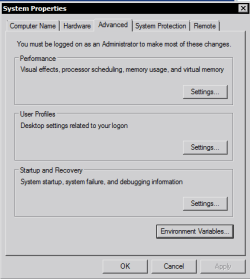
Windows 7 itself uses the temp PATH variables you've set in the Environment Variables box of the Advanced tab in System Properties when you install programs that use Windows Installer as the engine..

Capture1.PNG Capture.PNG

Programs that use their own Installer engine like InstallShield and the like may set their own temp folders on C: during installation. The remnant files created or left after installation in their created temp folders are usually safe to delete after 24 hours or less...

Hope that helps!
 

My Computer

Computer Manufacturer/Model Number
DELL SXPS 1640
OS
Windows 7 x64 Professional SP1
CPU
Intel C2D T9550 2.66 GHz @ 2.793 GHz (Thanks ThrottleStop!!)
Motherboard
Intel PM45
Memory
8 GB DDR3
Graphics Card(s)
ATI MOBILITY RADEON 4670
Sound Card
CREATIVE XFI AUDIO NOTEBOOK
Monitor(s) Displays
16.1 WLED
Screen Resolution
1920x1080
Hard Drives
Seagate ST9500420AS 500GB (465GiBi) 7200 RPM Drive

External Drives:-
2 TB WD Essentials x 3
1 TB WD Mybook Gen 1
1 TB WD Mybook Gen 2
1 TB Seagate
1 TB Seagate
320 GB WD Scorpio Black (enclosed)
PSU
90W Dell Power Brick
Case
Dell Chassis
Cooling
Coolermaster Cooling Pad
Keyboard
Built-in backlighted Keyboard
Mouse
Logitech Wireless Mini Mouse
Internet Speed
4/0.5
  • Like
Reactions: Arc
I have never had a problem removing any temporary folder.
 

My Computer

Computer type
PC/Desktop
Computer Manufacturer/Model Number
Home made Desktop
OS
Windows 10 Pro. 64/ version 1709 Windows 7 Pro/64
CPU
Intel i7-6800K @ 4.3
Motherboard
ASUS X-99 Deluxe II
Memory
Corsair Platinum 16 gig @2400
Graphics Card(s)
EVGA GTX 1070 OC
Monitor(s) Displays
Asus 27" LED LCD/VE278Q
Screen Resolution
1920-1080 or 1280-720 HDMI
Hard Drives
INTEL SSD 730-240 Gb Sata 3.0/
PSU
EVGA Platium 1200W
Case
Phanteks Luxe Tempered Glass 8 fans/ one radiator
Cooling
XSPC/ Water Cooled CPU
Keyboard
Das 4 Professional
Mouse
Logitech M705/MX Anywhere 2-S
Internet Speed
100 mbits
Antivirus
Microsoft Security Essentials/ Malwarebytes Premium 3.0/ SAS
Browser
I.E. 11 default/Firefox/ ISP Time Warner Cable/Spectrum
Other Info
LG BluRay Burner/
Sound system-KLipsch-THX/
Icy Dock ssd Hot Swap bays.
I deleted the temp folders & the printer still works except for the Fax & Scan functions. Scan gets: "Scanner could not be initiated, Scanner not found." I can print a document & printer shows up in Device manager as "working properly". Perhaps the drivers just for those 2 functions were in that folder?

However, if I go Devices & Printers, right click the printer & hit "start scan" from there it will do a scan. It also shows a separate Fax icon from the printer - Microsoft Shared Fax Driver - so maybe W7 is overriding the printer in "controlling" those functions? Kinda weird

Logitech isn't offering drivers or support for this webcam so that couldn't be installed regardless of the temp folder situation.
 

My Computers

System One System Two

  • Computer type
    PC/Desktop
    OS
    Windows 7 Home Premium 64bit with SP1, OEM
    CPU
    Intel Core i7-3770
    Motherboard
    Gigabyte GA-Z77X-UD3H LGA1155
    Memory
    G Skill 8GB (2x4GB) Ripkaws PC3-12800 DDR3 1600MHz
    Graphics Card(s)
    EVGA, GeForce GTX 560 Ti FPB (AR) 1GB GDDR5 4104MHz
    Sound Card
    Creative Sound Blaster Audigy SE, 7.1 channels, 24 bit
    Monitor(s) Displays
    HP ZR24w
    Screen Resolution
    1920x1200 - 60Hz
    Hard Drives
    Intel 60GB 520 Series SSD, MLC SandForce SF-2281, 550/475 MB/s

    WD 1TB Caviar Blue, SATA 6 Gb/s, 7200 RPM
    PSU
    Seasonic X-560, 80 PLUS Gold
    Case
    Cooler Master Elite 430
    Cooling
    2 stock fans
  • Antivirus
    MS Security Essentials
Back
Top