
You are using an out of date browser. It may not display this or other websites correctly.
You should upgrade or use an alternative browser.
You should upgrade or use an alternative browser.
Does windows 7 automatically install drivers for you?
- Thread starter Bluehippo
- Start date
I heard that windows 7 automatically installs drivers. Does that mean I shouldn't put the hardware installation disc in?
It usually does, if it doesn't it's better to get them from the manufacturer's website.
What are you installing?
My Computer
- Computer type
- PC/Desktop
- Computer Manufacturer/Model Number
- Self Built
- OS
- Win 10 Pro x64
- CPU
- Intel I5-2500K @3.3GHz
- Motherboard
- Asrock P67 Extreme4
- Memory
- 16GB G.Skill Ripjaws X (4x4GB)
- Graphics Card(s)
- EVGA GeForce 750 Ti SC 2GB
- Sound Card
- ASUS Xonar DG 5.1 Channels 24-bit 96KHz PCI Interface Sound
- Monitor(s) Displays
- auria eq2367
- Screen Resolution
- 1920 x 1080
- Hard Drives
- 250GB Samsung 850 EVO SSD
1TB WD Blue
1TB Hitachi
- PSU
- SeaSonic X 650W 80 Plus Gold
- Case
- Corsair Obsidian 750D
- Cooling
- Corsair H60, Three 140mm case fans
- Keyboard
- Logitech Wireless Keyboard K520
- Mouse
- Logitech Wireless Mouse M310
- Internet Speed
- Wave Broadband ~ 100 dn 5 up
- Antivirus
- Windows Defender, Malwarebytes Premium
- Browser
- Edge, IE11, Chrome
- Other Info
- Laptop specs: HP g7-1365dx /
CPU: AMD A6-3420M APU with Radeon(tm) HD Graphics /
RAM: Crucial 8Gb (2x4Gb) /
SSD: Crucial M4-CT128M4SSD2 ATA Device/ FW 000F /
GFX: AMD Radeon HD 6520G /
OS: Windows 10 Pro x64

Yes it will but it doesn't mean to say they will be the most recent ones.
As derekimo says, depending on what you are installing will depend on how up to date the updates will be. If it's for graphics, sound etc etc, then you will be better off going direct to the source of the update, ie nvidia, realtek.
As derekimo says, depending on what you are installing will depend on how up to date the updates will be. If it's for graphics, sound etc etc, then you will be better off going direct to the source of the update, ie nvidia, realtek.
My Computer
- Computer Manufacturer/Model Number
- Custom Build.
- OS
- Windows 7 Ultimate x64.
- CPU
- i5 760 @ 4.2Ghz. 1.18v
- Motherboard
- Gigabyte - H55M-USB3
- Memory
- 4g Corsair xms3 ddr3, 1600Mhz.
- Graphics Card(s)
- Gigabyte GTX-560Ti soc edition
- Sound Card
- Asus Xonar Dx - Logitech Z5500.
- Monitor(s) Displays
- Acer 22" LCD Wide screen 1680-1050 -Samsung 42" Plasma....
- Screen Resolution
- 1680/1050 -----1920/1080p.
- Hard Drives
- 2x 2TB Seagate Go Flex,
1x 1TB Seagate,
1x 640WD Black,
x16 Gig sandisc flash drive,
1x8Gig sandisc flash drive.
- PSU
- XigmaTek 80plus NRP-PC702 - 700w dual 30a.
- Case
- Venus Gamers Midi Tower Case with LED Display
- Cooling
- Arctic Freezer 7 Pro Rev 2... x2 Arctic F8 case fans........
- Keyboard
- Logitech G15-v2 Gaming.
- Mouse
- Microsoft Sidewinder X8.
- Internet Speed
- Virgin Media - 50mb down- 8mb up.
- Other Info
- x2 Xbox 360 wireless controllers...
Dual layer optical disc drive...
Chrome 79million
A.V = MSE
I heard that windows 7 automatically installs drivers. Does that mean I shouldn't put the hardware installation disc in?
Yes, it usually auto-installs appropriate drivers for your computer, thus reduce the fuss to install drivers.
But some drivers may not be up-to-date. You may need to download the latest driver for your computer, depending on the condition.
My Computer
- Computer Manufacturer/Model Number
- Acer Aspire 4935
- OS
- Windows 7 Ultimate RTM x86 build 7600
- CPU
- Intel Core 2 Duo T6400 2.00 GHz
- Motherboard
- Acer Empowering Technology
- Memory
- 3 GB DDR2 RAM
- Graphics Card(s)
- Intel Graphics Media Accelerator 4500MHD
- Sound Card
- Realtek High Definition Audio
- Monitor(s) Displays
- Acer CineCrystal HD 14.0" 1366x768
- Hard Drives
- Hitachi HTS543225L9A300 ATA 250GB
Transcend External HDD 160GB
Hello AdrianK,
As a new Windows 7 installer I have several comments. I can not explain the reason, but it appeared as though W7 was attempting to access the net for drivers. I installed Zonealarm. Both my USB and SATA drive showed errors. Went to driver detail and all the options update, rollback and uninstall were grayed out and unavailabe. Only Details of driver could be used. I googled ZA problems Window 7 64bit and got hits that ZA blocked ports required by the OS to function. Removed ZA and the drive and the USB hub came up on reboot and connection with no errors.
Secondly, I have been sternly advised by a friend + Certified to never install factory drivers. Windows 7 has access to the driver's you need. Well I had problems with my video, checking W7 driver's, it was over a year old. Went to manufacturer's site and found one dated IIRC March, 2010. Updated with it and the problem disappeared. It ran with the driver W7 installed but now I don't recall I think I was getting Administrative Event Errors.
Good luck with your installs, seems to be varied opinions on this, some say Windows had everything you need and don't use Factory, others as above advise you to go Factory and get latest.
glennc
As a new Windows 7 installer I have several comments. I can not explain the reason, but it appeared as though W7 was attempting to access the net for drivers. I installed Zonealarm. Both my USB and SATA drive showed errors. Went to driver detail and all the options update, rollback and uninstall were grayed out and unavailabe. Only Details of driver could be used. I googled ZA problems Window 7 64bit and got hits that ZA blocked ports required by the OS to function. Removed ZA and the drive and the USB hub came up on reboot and connection with no errors.
Secondly, I have been sternly advised by a friend + Certified to never install factory drivers. Windows 7 has access to the driver's you need. Well I had problems with my video, checking W7 driver's, it was over a year old. Went to manufacturer's site and found one dated IIRC March, 2010. Updated with it and the problem disappeared. It ran with the driver W7 installed but now I don't recall I think I was getting Administrative Event Errors.
Good luck with your installs, seems to be varied opinions on this, some say Windows had everything you need and don't use Factory, others as above advise you to go Factory and get latest.
glennc
My Computer
- Computer type
- PC/Desktop
- Computer Manufacturer/Model Number
- Self-Built
- OS
- Windows 7 Ultimate
- CPU
- AMD Phenom-II X4 965
- Motherboard
- Gigabyte GA-MA785GM-US2H
- Memory
- 8192 MB DDR2-SDRAM
- Graphics Card(s)
- ATI Radeon HD 4200
- Sound Card
- ATI Radeon HD 4200 High Definition Audo
- Monitor(s) Displays
- LG Electronics W1943
- Screen Resolution
- 1360 X 768
- Hard Drives
- C: 500 GB Caviar Black SATA
E: 500 GB Caviar Black SATA
- PSU
- Ultra LSP 750
- Case
- Ultra XBlaster
- Cooling
- 2 Fans, CPU Fan, PS Fan
- Keyboard
- Acer
- Mouse
- Logitech
- Internet Speed
- 6 MB

I have been sternly advised by a friend + Certified to never install factory drivers. Windows 7 has access to the driver's you need.
Sounds like your friend doesn't know what he is talking about as the rest of your posts shows,
Well I had problems with my video, checking W7 driver's, it was over a year old. Went to manufacturer's site and found one dated IIRC March, 2010. Updated with it and the problem disappeared.
Despite all the improvements made in getting drivers through Windows Update, it still is not a good idea to install them for major components (chipset, video, etc) and always better to get them from the manufacturer.
My Computer
- Computer type
- PC/Desktop
- Computer Manufacturer/Model Number
- Me
- OS
- Win 7 Ultimate x64
- CPU
- FX-8350 @ 4.6 GHz so far
- Motherboard
- Asus M5A97 EVO
- Memory
- ADATA XPG V1 Series Black 8GB DDR3 1600
- Graphics Card(s)
- Sapphire R9 270x Dual-X
- Sound Card
- Xonar DGX w/ Corsair Vengence 1300
- Monitor(s) Displays
- Acer S232HL Abid
- Screen Resolution
- 1920x1080
- Hard Drives
- 120 GB OCZ Vertex 3
500 GB Seagate 7200.12
- PSU
- Antec Earthwatts 650W Green
- Case
- Antec Three Hundred
- Cooling
- Cooler Master 212 EVO
- Keyboard
- Logitech G510
- Mouse
- Logitech G500s
- Internet Speed
- 35000/3000

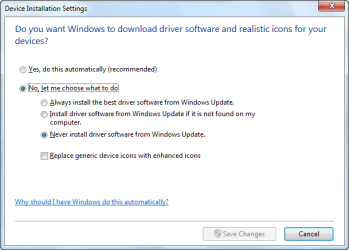
In answer to your question you have the option to let windows install the drivers or not see my graphic.
To get to this click on start, type in INSTALL DRIVERS and then open the Icon at the top see graphic.
As you can see I manually choose to install my drivers, that is your choice.
Steve
To get to this click on start, type in INSTALL DRIVERS and then open the Icon at the top see graphic.
As you can see I manually choose to install my drivers, that is your choice.
Steve
Attachments

My Computer
- Computer Manufacturer/Model Number
- Over Clockers Ultima Viper 2.80Ghz
- OS
- Windows 7 Ultimate 64 - OEM Service Pack 1
- CPU
- Intel Core i7 930 2.80Ghz Bloomfield Socket LGA 1366
- Motherboard
- Gigabyte GA-X58A-UD3R Intel X58 Socket 1366 DDR3
- Memory
- Patriot Viper 6GB 3x2GB DDR3 PC3-1200C9 1600Mhz Tri Channel
- Graphics Card(s)
- Asus ATI Radeon HD 5770 CuCore 1024MB GDDR5 PCI Express
- Sound Card
- Realtek ALC889 @ Intel 82801JB ICH10 - High Definition Audio
- Monitor(s) Displays
- Samsung SyncMaster 920N 19"
- Screen Resolution
- 1280*1024
- Hard Drives
- 1 x OCZ Vertex2 Series 120GB 2.5" SATA-II SSD
1 x Seagate Barracuda 7200.12 1TB SATA-II 32MB Cache
1 x Western Digital Caviar Green 2TB SATA-II 64 MB Cache
- PSU
- Corsair TX 650W ATX SLi
- Case
- Antec 902 Ultimate Gaming Case Black
- Cooling
- Prolimatech Megahalems Rev B CPU Cooler Socket 775/1156/1366
- Keyboard
- Microsoft Comfort Curve Keyboard
- Mouse
- Microsoft Optical USB
- Internet Speed
- ADSL24 FTTC 34.2 Mbps Down 7.1Mbps Up
- Other Info
- OcUK 22x DVDSATA ReWriter Black
Akasa AK-FN058 Apache Black Super Silent 120mm Fan
Printer Epson Stylus Photo R300
Scanner Canon Canoscan 8000F
Hello again steve-pressman,
Sounds like some good advice so far in my limited experience. So, Gentlemen I concur, thus my personal experience.
glennc
Sounds like some good advice so far in my limited experience. So, Gentlemen I concur, thus my personal experience.
glennc
My Computer
- Computer type
- PC/Desktop
- Computer Manufacturer/Model Number
- Self-Built
- OS
- Windows 7 Ultimate
- CPU
- AMD Phenom-II X4 965
- Motherboard
- Gigabyte GA-MA785GM-US2H
- Memory
- 8192 MB DDR2-SDRAM
- Graphics Card(s)
- ATI Radeon HD 4200
- Sound Card
- ATI Radeon HD 4200 High Definition Audo
- Monitor(s) Displays
- LG Electronics W1943
- Screen Resolution
- 1360 X 768
- Hard Drives
- C: 500 GB Caviar Black SATA
E: 500 GB Caviar Black SATA
- PSU
- Ultra LSP 750
- Case
- Ultra XBlaster
- Cooling
- 2 Fans, CPU Fan, PS Fan
- Keyboard
- Acer
- Mouse
- Logitech
- Internet Speed
- 6 MB
Ok I'll get them from the manufacturer's website. Thanks.
Good Idea!

My Computer
- Computer type
- PC/Desktop
- Computer Manufacturer/Model Number
- Self Built
- OS
- Win 10 Pro x64
- CPU
- Intel I5-2500K @3.3GHz
- Motherboard
- Asrock P67 Extreme4
- Memory
- 16GB G.Skill Ripjaws X (4x4GB)
- Graphics Card(s)
- EVGA GeForce 750 Ti SC 2GB
- Sound Card
- ASUS Xonar DG 5.1 Channels 24-bit 96KHz PCI Interface Sound
- Monitor(s) Displays
- auria eq2367
- Screen Resolution
- 1920 x 1080
- Hard Drives
- 250GB Samsung 850 EVO SSD
1TB WD Blue
1TB Hitachi
- PSU
- SeaSonic X 650W 80 Plus Gold
- Case
- Corsair Obsidian 750D
- Cooling
- Corsair H60, Three 140mm case fans
- Keyboard
- Logitech Wireless Keyboard K520
- Mouse
- Logitech Wireless Mouse M310
- Internet Speed
- Wave Broadband ~ 100 dn 5 up
- Antivirus
- Windows Defender, Malwarebytes Premium
- Browser
- Edge, IE11, Chrome
- Other Info
- Laptop specs: HP g7-1365dx /
CPU: AMD A6-3420M APU with Radeon(tm) HD Graphics /
RAM: Crucial 8Gb (2x4Gb) /
SSD: Crucial M4-CT128M4SSD2 ATA Device/ FW 000F /
GFX: AMD Radeon HD 6520G /
OS: Windows 10 Pro x64

- Local time
- 7:57 AM
- Messages
- 7,877
Generally speaking, Windows 7 includes most of the necessary drivers for the computer to function. I find that I often do not "Have" to update to the drivers from the vendor specifically. For me, if it's working properly and doesn't show up in Device Manager as having an issue I just leave it alone. The only exception to that rule for me is with my video card. I usually get that driver right from the vendor.
My Computer
- Computer Manufacturer/Model Number
- Self-Built in July 2009
- OS
- Windows 7 Ultimate x64
- CPU
- Intel Q9550 2.83Ghz OC'd to 3.40Ghz
- Motherboard
- Gigabyte GA-EP45-UD3R rev. 1.1, F12 BIOS
- Memory
- 8GB G.Skill PI DDR2-800, 4-4-4-12 timings
- Graphics Card(s)
- EVGA 1280MB Nvidia GeForce GTX570
- Sound Card
- Realtek ALC899A 8 channel onboard audio
- Monitor(s) Displays
- 23" Acer x233H
- Screen Resolution
- 1920x1080
- Hard Drives
- Intel X25-M 80GB Gen 2 SSD
Western Digital 1TB Caviar Black, 32MB cache. WD1001FALS
- PSU
- Corsair 620HX modular
- Case
- Antec P182
- Cooling
- stock
- Keyboard
- ABS M1 Mechanical
- Mouse
- Logitech G9 Laser Mouse
- Internet Speed
- 15/2 cable modem
- Other Info
- Windows and Linux enthusiast. Logitech G35 Headset.

I agree with pparks1 the only other thing I might do is check on my chipset driver version especialy if it's Nvidia and update it. Fabe
My Computer
- Computer Manufacturer/Model Number
- Self Built
- OS
- Windows 7 ultimate 64 bit / XP Home sp3
- CPU
- intel Core 2 Duo E8400 3.0ghz
- Motherboard
- Asus P5ND bios 1401
- Memory
- 8 gigs 1066 OCZ Fata1ty
- Graphics Card(s)
- EVGA GTX 580 Call of Duty Black Ops Edition
- Sound Card
- Creative Soundblaster Audigy 2zs
- Monitor(s) Displays
- Asus 24in LCD's 2MS X2
- Screen Resolution
- 1920x1080p @60Hz
- Hard Drives
- WD Caviar 500 Black/ WD Caviar 200 Blue
- PSU
- OCZ 700W GameXtreme
- Case
- NZXT Apollo
- Cooling
- Corsair H50 CPU/120mm x3 /60mm x2 /Corsair Dominator Ram
- Keyboard
- Logitech Bluetooth Wireless MX5000
- Mouse
- Logitech Bluetooth Wireless MX1000
- Internet Speed
- Download 19.83 Upload 0.97
- Other Info
- Logitech Z2300 Speakers/ Bose Noise Cancelling Headphones/Avermedia PCI-e Hybrid TV Bravo/Epson NX415 all in one/ 4 Port Powered USB Hub/ LG 10x Bluray Burner /TSST Corp DVDRW External
Similar threads
- Replies
- 1
- Views
- 2K

- Replies
- 3
- Views
- 3K
- Replies
- 0
- Views
- 1K

