Does Windows Defrag defrag system files?

TBolt

New member
Member
Local time
8:17 AM
Messages
40
Hi all. Stupid question here...

A friend of mine was speaking highly about this PerfectDisk prog because "it defrags system files." I was kind of surprised because I thought (assumed) that the defrag utility built into Windows 7 already defragged system files. Is this not true?

I do not see an option to force system file defragmentation; maybe that's why I assumed it was already taken care of.

Thank you.
 

My Computer

Computer type
PC/Desktop
Computer Manufacturer/Model Number
Toshiba Qosmio X505-Q894
OS
Win 8.1 Pro
CPU
Intel® Core™ i7-740QM processor
Memory
8 GB
Graphics Card(s)
NVIDIA® GeForce® GTX 460M
Monitor(s) Displays
2
Screen Resolution
1680x945 & 1920x1080
Internet Speed
Cable
Other Info
Excellent desktop replacement for work & gaming.

My Computer

Computer type
PC/Desktop
Computer Manufacturer/Model Number
Dell XPS 420
OS
Windows 10, Home Clean Install
CPU
Intel Core2 processsor Q8200(2.33Ghz 1333FSB) Quad Core Tech
Motherboard
Dell
Memory
6 gb
Graphics Card(s)
ATI Radeon 256MB HD3650
Sound Card
Intergrated 7.1 Channel Audio
Monitor(s) Displays
Dell SP2009W 20"
Hard Drives
640 GB Serial ATA Hard drive
Cooling
Fan
Keyboard
Dell USB Keyboard
Mouse
Dell Premium Optical USB
Internet Speed
DSL 2.85
Microsoft made most of the system files moveable starting with Vista. So yes, the built in defrag can move all the others can. Defragging the page files requires one to do it before Windows boots.
 

My Computer

Computer type
PC/Desktop
Computer Manufacturer/Model Number
Alienware Aurora ALX R4
OS
Windows 10 Pro (x64)
CPU
Intel Core i7-3930K (3.2GHz - 4.5GHz)
Motherboard
Alienware Aurora-R4 x79
Memory
4x Samsung 4GB PC3-12800 DDR3 (16GB 1600MHz)
Graphics Card(s)
Nvidia Geforce GTX 690
Sound Card
SteelSeries Siberia Elite
Monitor(s) Displays
Dell UltraSharp U3011
Screen Resolution
2560x1600
Hard Drives
Samsung 850 Pro 256 GB, Seagate 1TB Desktop Hybrid HDD, 2x Western Digital 4TB Green HDD
PSU
875W Some Dell PSU <.<
Case
Alienware Aurora ALX
Cooling
Custom Liquid Cooling (EK CPU & GPU blocks) dual EK 480RAD
Keyboard
Logitech G710+ Mechanical
Mouse
Logitech G700s
Internet Speed
Verizon Fios (50 mbps average)
Other Info
Server: Intel NUC D54250WYK: i5-4250U, 16GB, 256 GB mSATA, Windows Server 2012 R2
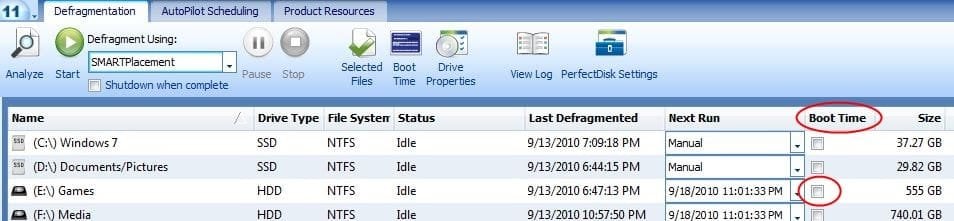
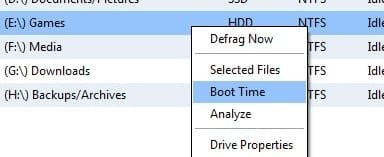
You have 2 options for the funtion you are looking for in PD.

1) Check the Boot Time Box, and reboot.

2) Right Click the Drive you wish to Defragment system Files on, and youll get a menu.

As mentioned, most system files it can Defragment without rebooting. But the PF will need a reboot.

As far as Im aware, Win7s does the system Files only.
 

Attachments

  • Capture.JPG
    Capture.JPG
    39.3 KB · Views: 302
  • Untitled.jpg
    Untitled.jpg
    10.5 KB · Views: 98

My Computer

Computer Manufacturer/Model Number
Custom (Self Build)
OS
Windows 7 Home Premium 64bit
CPU
Intel Core i7 2700k
Motherboard
eVGA P67 SLI
Memory
8GB Mushkin Redline Ridgebacks @1866
Graphics Card(s)
EVGA GTX570 SC
Sound Card
XiFi Titanium HD
Monitor(s) Displays
LG W2453V
Screen Resolution
1920x1080
Hard Drives
Intel 320 80GB -- Intel X25-V 40GB --WD Black 1TB x2 -- WD Blue 640GB
PSU
Seasonic x750
Case
Corsair 600T SE White
Cooling
eVGA Superclocked CPU Cooler
Keyboard
Saitek Cyborg
Antivirus
Kaspersky
Browser
IE
Other Info
LG BD/DVD
Okay, thank you guys. Didn't know about the page files; sounds like the defrag utility is effective enough, though. :)
 

My Computer

Computer type
PC/Desktop
Computer Manufacturer/Model Number
Toshiba Qosmio X505-Q894
OS
Win 8.1 Pro
CPU
Intel® Core™ i7-740QM processor
Memory
8 GB
Graphics Card(s)
NVIDIA® GeForce® GTX 460M
Monitor(s) Displays
2
Screen Resolution
1680x945 & 1920x1080
Internet Speed
Cable
Other Info
Excellent desktop replacement for work & gaming.
Back
Top