How can I bypass Windows 11 system requirement?

howie369

New member
Local time
6:03 PM
Messages
5
Have you ever encountered a situation where the Windows 11 system requirements are not met? I recently wanted to upgrade to Windows 11, but it prompted me that my computer did not meet the minimum system requirements, especially TPM 2.0 and Secure Boot, which my device does not support at all. This is a bit of a headache for me, because I don't want to wait any longer and want to experience Windows 11 as soon as possible. Is there any way to bypass Windows 11 system requirements and force the installation of Windows 11? I hope everyone can share their successful experience or solution!
 

My Computer My Computer

At a glance

Windows 10
Computer type
PC/Desktop
OS
Windows 10
yes, plenty of ways to do it.

the installation media needs to be on something writeable e.g. usb stick. Cant be done if it is inside an iso

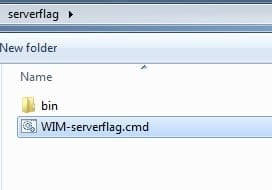
simplest way :ar: View attachment serverflagv2.zip

run the .cmd file and it will ask you to browse to the install.wim ( or install.esd)

serverflag0.jpg

then you can select to process just one image ( edition) or all images.

type * and press enter

thats it
 
Last edited:

My Computers My Computers

  • At a glance

    7 X64i5 84002x8gb 3200mhz
    Computer type
    PC/Desktop
    OS
    7 X64
    CPU
    i5 8400
    Motherboard
    gigabyte b365m ds3h
    Memory
    2x8gb 3200mhz
    Hard Drives
    various
    PSU
    pure power 11 400w cm
    Case
    Coolermaster
    Cooling
    cryorig m9i
  • At a glance

    7x64g54008gb ddr4 2400
    Computer type
    PC/Desktop
    OS
    7x64
    CPU
    g5400
    Motherboard
    ga b365m ds3h
    Memory
    8gb ddr4 2400
    PSU
    xfx pro 450w

My Computer My Computer

At a glance

64-bit Windows 11 Pro for WorkstationsIntel i7-8700K OC'd to 5 GHz64 GB (4x16GB) G.SKILL TridentZ RGB DDR4 3600...ASUS ROG-STRIX-GTX1080TI-O11G-GAMING
Computer type
PC/Desktop
Computer Manufacturer/Model Number
Self built custom
OS
64-bit Windows 11 Pro for Workstations
CPU
Intel i7-8700K OC'd to 5 GHz
Motherboard
ASUS ROG Maximus XI Formula Z390
Memory
64 GB (4x16GB) G.SKILL TridentZ RGB DDR4 3600 MHz
Graphics Card(s)
ASUS ROG-STRIX-GTX1080TI-O11G-GAMING
Sound Card
Integrated
Monitor(s) Displays
2 x Samsung Odyssey G7 27"
Screen Resolution
2560x1440
Hard Drives
1TB Samsung 990 PRO M.2,
4TB Samsung 990 PRO PRO M.2,
TerraMaster F8 SSD Plus NAS
PSU
Seasonic Prime Titanium 850W
Case
Thermaltake Core P3
Cooling
Corsair Hydro H115i
Keyboard
Logitech wireless K800
Mouse
Logitech MX Master 4
Internet Speed
2 Gb/s Download and 100 Mb/s Upload
Antivirus
Malwarebyte Anti-Malware Premium
Browser
Google Chrome
Other Info
Logitech Z625 speaker system,
Logitech BRIO 4K Pro webcam,
HP Color LaserJet Pro MFP M477fdn,
APC SMART-UPS RT 1000 XL - SURT1000XLI,
Galaxy S23 Plus phone

My Computer My Computer

At a glance

Windows 7 x64 SP1AMD Athlon 64 X2 6000+ / 3.0 GHz6 GB
Computer type
PC/Desktop
Computer Manufacturer/Model Number
Gateway GT5656
OS
Windows 7 x64 SP1
CPU
AMD Athlon 64 X2 6000+ / 3.0 GHz
Motherboard
NVIDIA GeForce 6150 SE
Memory
6 GB
Monitor(s) Displays
Lenovo LED
Screen Resolution
1920 X 1080
Hard Drives
Windows on 500 GB spinner; Ubuntu 16 on Sandisk 250GB SSD; Bodhi5 on Samsung 250GB SSD; another old spinner for fooling around.
PSU
Original that came with computer
Keyboard
Logitech wireless
Mouse
Logitech wireless
Antivirus
Microsoft Sec Essentials
Browser
Vivaldi
According to the users on elevenforums, unsupported pc have been getting regular updates. However they aren't offered upgrade to new build through window update. e.g going from 23h2 to 24h2.
 

My Computers My Computers

  • At a glance

    7 X64i5 84002x8gb 3200mhz
    Computer type
    PC/Desktop
    OS
    7 X64
    CPU
    i5 8400
    Motherboard
    gigabyte b365m ds3h
    Memory
    2x8gb 3200mhz
    Hard Drives
    various
    PSU
    pure power 11 400w cm
    Case
    Coolermaster
    Cooling
    cryorig m9i
  • At a glance

    7x64g54008gb ddr4 2400
    Computer type
    PC/Desktop
    OS
    7x64
    CPU
    g5400
    Motherboard
    ga b365m ds3h
    Memory
    8gb ddr4 2400
    PSU
    xfx pro 450w
Microsoft is now saying it will allow W11 to be installed on "unsupported" computers. However, it notes that updates will not work, and in general it will be an inferior experience with no support from them, etc. etc. etc..
That article is a poor piece of journalism that has jumped to an erroneous conclusion, MS has always allowed unsupported installs.

Bree said:
Nothing new here. The PC World article says: "Microsoft doesn’t explain the actual “upgrading to Windows 11” steps in the document, but we assume it’s done via the Windows Update app and the PC Health Check app". It seems that the author has only just picked up on the MS disclaimer and jumped to the conclusion that MS has recently had a change of heart. That is not the case, that disclaimer has been around since the launch of Windows 11 in October 2021.

....The only recent change is that, having used a workaround to bypass the hardware checks, the 24H2 install media now displays that disclaimer. Setup for 23H2 or earlier never did.
Microsoft now allows upgrade to incompatible systems. | Windows 11 Forum - post #5

According to the users on elevenforums, unsupported pc have been getting regular updates. However they aren't offered upgrade to new build through window update. e.g going from 23h2 to 24h2.
Yes, I'm one of those Eleven Forum members. I have had Windows 11 running on an unsupported 1st gen i5 since October 2021. Windows Update got all the same updates as any supported device. The only things it didn't get offered by Windows Update were any of the feature updates to the next version. For that a manual upgrade with an ISO and a workaround had to be used. It's now on 24H2.
 

My Computers My Computers

  • At a glance

    Windows 7 Home Premium x64AMD V1204GB
    Computer type
    Laptop
    Computer Manufacturer/Model Number
    Toshiba satellite C650D
    OS
    Windows 7 Home Premium x64
    CPU
    AMD V120
    Memory
    4GB
    Internet Speed
    150 Mbps
    Antivirus
    MSE
    Browser
    IE11, Edge, Firefox
    Other Info
    I also have W7 Pro on my System Two, and several W7 Hyper-V VMs. My other machines run Windows 10/11. Their specs are in my Ten Forums & Eleven Forum profiles.
  • At a glance

    Windows 7 Pro x64Intel i5-3320M8 GB
    Computer type
    Laptop
    System Manufacturer/Model Number
    Lenovo Thinkpad T430
    OS
    Windows 7 Pro x64
    CPU
    Intel i5-3320M
    Memory
    8 GB
    Hard Drives
    250GB Samsung SSD 860 EVO
    Antivirus
    MSE
Thanks for everyone's help, I've used winbootmate to bypass my windows 11 system requirement, it worked as expected!
404 Not Found

https://techcommunity.microsoft.com...s-during-installation-on-an-old-lapto/4060758
There are many ways to skin a cat, I've not come across that one before. Your link is broken, this is a better one: SYSCute WinBootMate - Install Windows 11 without TPM and Secure Boot

Many use Rufus to do the same thing....
How to Use Rufus to Bypass TPM and Secure Boot Requirements in Windows 11

.... but I prefer to make the registry mods myself, allowing me to use an unmodified install usb as made by Microsoft's MCT.
 

My Computers My Computers

  • At a glance

    Windows 7 Home Premium x64AMD V1204GB
    Computer type
    Laptop
    Computer Manufacturer/Model Number
    Toshiba satellite C650D
    OS
    Windows 7 Home Premium x64
    CPU
    AMD V120
    Memory
    4GB
    Internet Speed
    150 Mbps
    Antivirus
    MSE
    Browser
    IE11, Edge, Firefox
    Other Info
    I also have W7 Pro on my System Two, and several W7 Hyper-V VMs. My other machines run Windows 10/11. Their specs are in my Ten Forums & Eleven Forum profiles.
  • At a glance

    Windows 7 Pro x64Intel i5-3320M8 GB
    Computer type
    Laptop
    System Manufacturer/Model Number
    Lenovo Thinkpad T430
    OS
    Windows 7 Pro x64
    CPU
    Intel i5-3320M
    Memory
    8 GB
    Hard Drives
    250GB Samsung SSD 860 EVO
    Antivirus
    MSE
Back
Top