Solved dom.storage

botchie

New member
Local time
11:01 PM
Messages
3
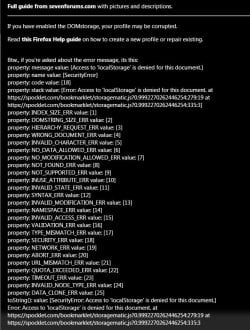
keep getting Dom.storage full . Have set d.s in Firefox and IE to true: but getting msg. in Chrome and Coowon browsers and Google wont allow me into see their settings for Dom. Have done the whole gambit with the browsers to clean out all Caches, history etc. and also used Panda and CCleaner. The only thing I havent done is to check the settings in the Register which was clean out with both programs. TY in advance with any help :).
 

Attachments

  • DOM.jpg
    DOM.jpg
    11 KB · Views: 12
  • DOM1.jpg
    DOM1.jpg
    102 KB · Views: 1
Last edited:

My Computer

Computer type
PC/Desktop
Computer Manufacturer/Model Number
hp a6750y
OS
win 7 both 32 and 64

My Computer

Computer type
Laptop
Computer Manufacturer/Model Number
Employer provided Dell Latitude
OS
W7 Pro SP1 64bit
CPU
i7
Memory
8GB
Graphics Card(s)
Intel HD Graphics
Hard Drives
crappy SSD
Antivirus
Employer mandated Symantec Endpoint Protection
Browser
Pale Moon 64bit, IE11 64bit & Chrome 64bit
DOM. storage

Just pops up when playing Mafia Wars and try to do a job or fight and says Spocklet error DOM.STORAGE full use a Spocklet app to delete Junk. In Firefox type in "about:config" and go thru screens to see if "DOM.STORAGE" is TRUE , also another fix for IE . Have done both but it does not give a fix for Google type browsers. I also noticed the allot space was 1520 for both browers. Will not let me copy or get pic.
 

My Computer

Computer type
PC/Desktop
Computer Manufacturer/Model Number
hp a6750y
OS
win 7 both 32 and 64
I don't think that you can set a dom storage limit in Chrome...
...but you can check to see that the storage is enabled:

chrome://settings/
show advanced settings...
Under the heading of Privacy
click on the button named "Content settings..."
under the heading of Cookies
select "Allow local data to be set (recommended)"

Some extensions might continue to block dom storage.
 

My Computer

Computer type
Laptop
Computer Manufacturer/Model Number
Employer provided Dell Latitude
OS
W7 Pro SP1 64bit
CPU
i7
Memory
8GB
Graphics Card(s)
Intel HD Graphics
Hard Drives
crappy SSD
Antivirus
Employer mandated Symantec Endpoint Protection
Browser
Pale Moon 64bit, IE11 64bit & Chrome 64bit
DOM.Storage, Chrome

Thank you for the info but already had checked that setting. Reran Ccleaner, Advance Cleaner Sys and Panda, so everything seems ok. tyvm again
 

My Computer

Computer type
PC/Desktop
Computer Manufacturer/Model Number
hp a6750y
OS
win 7 both 32 and 64
Back
Top