Done with Firefox...

JonM33

New member
Local time
11:47 PM
Messages
565
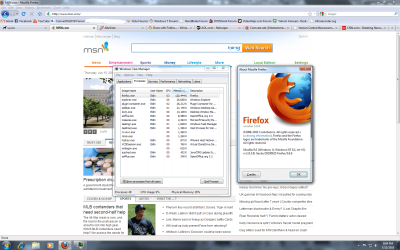
I had this happen with Firefox 3.6.3 on June 15. I only had about 6-7 tabs open on it but it was acting very sluggish in performance just scrolling through web pages.

firefoxmemory.jpg


Then yesterday, twice the Firefox process was maxing out one of my cores at 100% with only 6-7 tabs open. I rebooted and eventually it came back again. Given, I have a quad core so the rest of my system was fine but Firefox had slowed to a crawl.

So since yesterday evening I have switched to Opera 10.60. I gotta say that I am quite impressed with it.
 

My Computer

OS
Windows 7 Home Premium x64
CPU
Intel Core 2 Quad Q9450 @ 3.2GHz
Motherboard
Asus P5Q PRO Turbo
Memory
4GB DDR2-800
Graphics Card(s)
MSI Radeon HD 5850
Sound Card
Creative Labs Audigy2 ZS
Monitor(s) Displays
Samsung 225BW
Hard Drives
(2) 1TB Samsung F1, (2) 1.5TB Samsung F2, 1TB Samsung F2, 2TB Samsung F3
PSU
Corsair HX650
Case
Antec Nine Hundred
i hate firefox it now work good for win 7 on xp i work fine it always lag on win7
 

My Computer

OS
windows 7
CPU
AMD II X 2 pheonem 965 black
Motherboard
gb 785 ud3h
Memory
2 gb
Graphics Card(s)
ati HD 4200
Monitor(s) Displays
view sonic 15
Hard Drives
1 tera
Case
cooler master 400 wat
Huh...I rarely have issues with Firefox.
 

My Computer

Computer Manufacturer/Model Number
Self-Built in July 2009
OS
Windows 7 Ultimate x64
CPU
Intel Q9550 2.83Ghz OC'd to 3.40Ghz
Motherboard
Gigabyte GA-EP45-UD3R rev. 1.1, F12 BIOS
Memory
8GB G.Skill PI DDR2-800, 4-4-4-12 timings
Graphics Card(s)
EVGA 1280MB Nvidia GeForce GTX570
Sound Card
Realtek ALC899A 8 channel onboard audio
Monitor(s) Displays
23" Acer x233H
Screen Resolution
1920x1080
Hard Drives
Intel X25-M 80GB Gen 2 SSD
Western Digital 1TB Caviar Black, 32MB cache. WD1001FALS
PSU
Corsair 620HX modular
Case
Antec P182
Cooling
stock
Keyboard
ABS M1 Mechanical
Mouse
Logitech G9 Laser Mouse
Internet Speed
15/2 cable modem
Other Info
Windows and Linux enthusiast. Logitech G35 Headset.
No problems here.
 

Attachments

  • Untitled.png
    Untitled.png
    169.6 KB · Views: 86

My Computers

System One System Two

  • Computer type
    PC/Desktop
    Computer Manufacturer/Model Number
    PowerSpec G164
    OS
    WIN10
    CPU
    AMD Ryzen 5 3600 6-Core Processor 3.59 GHz
    Memory
    16.0 GB
    Internet Speed
    VERY FAST>>>!!!
  • Antivirus
    ESET Security Premium
Huh...I rarely have issues with Firefox.

I tend to open and close a lot of tabs and leave my browser running 24/7 as I leave my PC running 24/7. As you can see with the screenshot, 1.3GB of physical memory used. The only extension I ran was Adblock Plus.

Regarding the high CPU usage for the process, I don't know what was causing it. But it was just another step in the wrong direction for Firefox. Apparently it's a known problem: http://support.mozilla.com/en-US/kb/Firefox+consumes+a+lot+of+CPU+resources
 

My Computer

OS
Windows 7 Home Premium x64
CPU
Intel Core 2 Quad Q9450 @ 3.2GHz
Motherboard
Asus P5Q PRO Turbo
Memory
4GB DDR2-800
Graphics Card(s)
MSI Radeon HD 5850
Sound Card
Creative Labs Audigy2 ZS
Monitor(s) Displays
Samsung 225BW
Hard Drives
(2) 1TB Samsung F1, (2) 1.5TB Samsung F2, 1TB Samsung F2, 2TB Samsung F3
PSU
Corsair HX650
Case
Antec Nine Hundred
Huh...I rarely have issues with Firefox.

I tend to open and close a lot of tabs and leave my browser running 24/7 as I leave my PC running 24/7. As you can see with the screenshot, 1.3GB of physical memory used. The only extension I ran was Adblock Plus.

Regarding the high CPU usage for the process, I don't know what was causing it. But it was just another step in the wrong direction for Firefox.

I often go multiple days, sometimes weeks at work without a reboot and I use Firefox exclusively with tabs and I have never seen a runaway like that.
 

My Computer

Computer Manufacturer/Model Number
Self-Built in July 2009
OS
Windows 7 Ultimate x64
CPU
Intel Q9550 2.83Ghz OC'd to 3.40Ghz
Motherboard
Gigabyte GA-EP45-UD3R rev. 1.1, F12 BIOS
Memory
8GB G.Skill PI DDR2-800, 4-4-4-12 timings
Graphics Card(s)
EVGA 1280MB Nvidia GeForce GTX570
Sound Card
Realtek ALC899A 8 channel onboard audio
Monitor(s) Displays
23" Acer x233H
Screen Resolution
1920x1080
Hard Drives
Intel X25-M 80GB Gen 2 SSD
Western Digital 1TB Caviar Black, 32MB cache. WD1001FALS
PSU
Corsair 620HX modular
Case
Antec P182
Cooling
stock
Keyboard
ABS M1 Mechanical
Mouse
Logitech G9 Laser Mouse
Internet Speed
15/2 cable modem
Other Info
Windows and Linux enthusiast. Logitech G35 Headset.
i think chrome is much better then firefox
 

My Computer

OS
windows 7
CPU
AMD II X 2 pheonem 965 black
Motherboard
gb 785 ud3h
Memory
2 gb
Graphics Card(s)
ati HD 4200
Monitor(s) Displays
view sonic 15
Hard Drives
1 tera
Case
cooler master 400 wat
Huh...I rarely have issues with Firefox.
I often go multiple days, sometimes weeks at work without a reboot and I use Firefox exclusively with tabs and I have never seen a runaway like that.

Likewise with my home computer which runs 24/7 with multiple tab open.
 

My Computer

Computer Manufacturer/Model Number
Home built
OS
Windows 7 Ultimate 32 bit
CPU
Intel(R) Pentium(R) 4 CPU 3.00GHz
Motherboard
ASUS P4P800-VM Motherboard Chipset: Intel 865G + ICH5
Memory
2.50 GB RAM
Graphics Card(s)
NVIDIA GeForce 7600 GS
Sound Card
SoundMax Integrated Digital Audio (Chip)
Monitor(s) Displays
ViewSonic VX 1962 wm
Screen Resolution
1680 X 1050
Hard Drives
Seagate Barracuda 7200.10 80 GB
ST380215A ATA Device 18.6 GB
Western Digital "My Book" external hard drive 750 GB
Cooling
Fan based
Keyboard
Microsoft Comfort Curve Keyboard 2000 v10 USB
Mouse
Logitec optic USB
Internet Speed
3.01 Mb/s download 0.64 Mb/s upload
I often go multiple days, sometimes weeks at work without a reboot and I use Firefox exclusively with tabs and I have never seen a runaway like that.

Likewise with my home computer which runs 24/7 with multiple tab open.

Glad to hear that. I searched Google and found that I wasn't the only one with the problem though. Which means it is a common issue (see the link I added to my post). Mozilla's fix seems to be don't browse websites with plug-ins or scripts. Sure, let's go back to 1994 and basic HTML websites. :sarc:
 

My Computer

OS
Windows 7 Home Premium x64
CPU
Intel Core 2 Quad Q9450 @ 3.2GHz
Motherboard
Asus P5Q PRO Turbo
Memory
4GB DDR2-800
Graphics Card(s)
MSI Radeon HD 5850
Sound Card
Creative Labs Audigy2 ZS
Monitor(s) Displays
Samsung 225BW
Hard Drives
(2) 1TB Samsung F1, (2) 1.5TB Samsung F2, 1TB Samsung F2, 2TB Samsung F3
PSU
Corsair HX650
Case
Antec Nine Hundred
Glad to hear that. I searched Google and found that I wasn't the only one with the problem though. Which means it is a common issue (see the link I added to my post). Mozilla's fix seems to be don't browse websites with plug-ins or scripts. Sure, let's go back to 1994 and basic HTML websites. :sarc:
Even a handful of people complaining about something on the Internet does not make something a common issue. Remember, those with problems are always the most vocal.

While I don't doubt that you are experiencing issues here....it could be something on your box, your setup, or some particular sites that you go to exposing this issue.

Great news is that there are choices when it comes to browsers. We don't all have to use, like, endorse, or support the same one.
 

My Computer

Computer Manufacturer/Model Number
Self-Built in July 2009
OS
Windows 7 Ultimate x64
CPU
Intel Q9550 2.83Ghz OC'd to 3.40Ghz
Motherboard
Gigabyte GA-EP45-UD3R rev. 1.1, F12 BIOS
Memory
8GB G.Skill PI DDR2-800, 4-4-4-12 timings
Graphics Card(s)
EVGA 1280MB Nvidia GeForce GTX570
Sound Card
Realtek ALC899A 8 channel onboard audio
Monitor(s) Displays
23" Acer x233H
Screen Resolution
1920x1080
Hard Drives
Intel X25-M 80GB Gen 2 SSD
Western Digital 1TB Caviar Black, 32MB cache. WD1001FALS
PSU
Corsair 620HX modular
Case
Antec P182
Cooling
stock
Keyboard
ABS M1 Mechanical
Mouse
Logitech G9 Laser Mouse
Internet Speed
15/2 cable modem
Other Info
Windows and Linux enthusiast. Logitech G35 Headset.
Even a handful of people complaining about something on the Internet does not make something a common issue. Remember, those with problems are always the most vocal.

Of course they are. Why would anyone not having problems be vocal to complain about something? :p

While I don't doubt that you are experiencing issues here....it could be something on your box, your setup, or some particular sites that you go to exposing this issue.

Please understand that I am not a noob with computers. I am well aware of variables that can cause problems. It's not my "box" or my "setup". Even Mozilla's KB doesn't point in that direction. My Firefox is pretty much a vanilla install. The only extension I use is Adblock Plus.

I use my browser for a LOT of things. If Firefox cannot handle that without bad memory leaks or high CPU usage then it's not a viable solution for me to use. :(

This isn't some browser competition nor does telling me, "I don't have any problem," or, "Works fine for me," help in any way, shape or form. That is the worst statement that anyone can make. Maybe when FF4.0 comes out I will give it another round and see if it can hold up without taxing resources. ;)
 
Last edited:

My Computer

OS
Windows 7 Home Premium x64
CPU
Intel Core 2 Quad Q9450 @ 3.2GHz
Motherboard
Asus P5Q PRO Turbo
Memory
4GB DDR2-800
Graphics Card(s)
MSI Radeon HD 5850
Sound Card
Creative Labs Audigy2 ZS
Monitor(s) Displays
Samsung 225BW
Hard Drives
(2) 1TB Samsung F1, (2) 1.5TB Samsung F2, 1TB Samsung F2, 2TB Samsung F3
PSU
Corsair HX650
Case
Antec Nine Hundred
I was done with Firefox when 2.0 came out. For some reason after installing it, I could no longer login to any website. This coupled with the fact that it always bugged me while doing school work anything else I considered important about updates for it having to install. I could look at useless crap for days with no issue. First time I actually needed to look something up, I'd get a pop-up. After that I switched between various browsers until Chrome came out. Never going back.
 

My Computer

Computer type
Laptop
Computer Manufacturer/Model Number
Toshiba P775-S7100
OS
Windows 7 Professional SP1 64-bit
CPU
Intel Core i5-2450M @2.5 GHz
Memory
6 GB DDR3 1333MHz
Graphics Card(s)
Intel HD 3000
Monitor(s) Displays
Built-in 17.3" LED; 22" Insignia NS-L22Q-10A
Screen Resolution
1600x900; 1360x768
Hard Drives
750 GB Hitachi
1TB Seagate FreeAgent External
Internet Speed
Verizon DSL Speed(Down/Up): 3360 Kbps / 800 Kbps
Antivirus
MSE and MBAM Pro
Browser
IE10
I had a look at Chrome but found it too basic, does not seem to be able to do much. Maybe I just did not play with it long enough
 

My Computer

Computer Manufacturer/Model Number
Proline
OS
Windows 7 Pro 64 bit
CPU
Intel(R) Core(TM) i7 CPU 870 @ 2.93GHz
Motherboard
H55-G43(MS-7638)
Memory
4GB
Graphics Card(s)
NVIDIA GeForce GTX 470
Sound Card
Onboard
Monitor(s) Displays
Proline LCD 19 inch
Screen Resolution
1280 x 1024
Hard Drives
2 x SATA 250 Gig 1 x External 2TB
PSU
RX 730 SS
Case
Proline
Cooling
Standard
Keyboard
PS2
Mouse
PS2
Internet Speed
To embarrassed to tell lol
Glad to hear that. I searched Google and found that I wasn't the only one with the problem though. Which means it is a common issue (see the link I added to my post). Mozilla's fix seems to be don't browse websites with plug-ins or scripts. Sure, let's go back to 1994 and basic HTML websites. :sarc:
Even a handful of people complaining about something on the Internet does not make something a common issue. Remember, those with problems are always the most vocal.

While I don't doubt that you are experiencing issues here....it could be something on your box, your setup, or some particular sites that you go to exposing this issue.

Great news is that there are choices when it comes to browsers. We don't all have to use, like, endorse, or support the same one.
+1 ;)
 

My Computer

Computer Manufacturer/Model Number
Home Grown
OS
Windows 7 Ultimate (64)
CPU
i7-2600K
Motherboard
Asus P8P67-M Pro
Memory
G.SKILL Ripjaws X Series 8GB (2 x 4GB)
Graphics Card(s)
ATI 5750
Sound Card
On-Board
Monitor(s) Displays
LG W2486L
Screen Resolution
1920X1080
Hard Drives
Intel X-25M 80 Gig SSD | Intel X-25M 160 Gig SSD | WD Black 500MB - External eSata
PSU
Zalman ZM770-XT 770 Watts
Case
Antec 180 mini
Cooling
Cooler Master V8
Internet Speed
15MB - Cable
Other Info
Sissy OC - 4.6 @ 1.3175 24/7 | 18' Idle - 55' Load

My Computer

Computer Manufacturer/Model Number
Self Built
OS
Win 7 Ultimate 32bit
CPU
C2D E6600 2.4Ghz
Motherboard
Intel D965WH
Memory
4G Kingston KHX5400D2
Graphics Card(s)
EVGA GTX 570 HD SC (012-P3-1573-KR)
Sound Card
On-Board
Monitor(s) Displays
Samsung 226BW
Screen Resolution
1680 x 1050
Hard Drives
2 x 250 Seagate Barracuda
2 x 500 Seagate Barracuda (Raid1)
PSU
Corsair TX750W
Case
In-Win C589
Cooling
Stock Intel Cooling
I had a look at Chrome but found it too basic, does not seem to be able to do much. Maybe I just did not play with it long enough

Yes, I don't like it's download manager interface at all. :geek:
 

My Computer

OS
Windows 7 Home Premium x64
CPU
Intel Core 2 Quad Q9450 @ 3.2GHz
Motherboard
Asus P5Q PRO Turbo
Memory
4GB DDR2-800
Graphics Card(s)
MSI Radeon HD 5850
Sound Card
Creative Labs Audigy2 ZS
Monitor(s) Displays
Samsung 225BW
Hard Drives
(2) 1TB Samsung F1, (2) 1.5TB Samsung F2, 1TB Samsung F2, 2TB Samsung F3
PSU
Corsair HX650
Case
Antec Nine Hundred
When chrome first came it out was rather basic. Now its in par with firefox in terms of features, and it uses a different process for every little thing. So if a plug-in crashes, I can usually keep doing what i'm doing as if nothing happened. Chrome eventual restarts the plug-in on its own. or I can just hit refresh and it restarts the plug-in when the page refreshes. Makes for a pretty smooth experience.
 

My Computer

Computer type
Laptop
Computer Manufacturer/Model Number
Toshiba P775-S7100
OS
Windows 7 Professional SP1 64-bit
CPU
Intel Core i5-2450M @2.5 GHz
Memory
6 GB DDR3 1333MHz
Graphics Card(s)
Intel HD 3000
Monitor(s) Displays
Built-in 17.3" LED; 22" Insignia NS-L22Q-10A
Screen Resolution
1600x900; 1360x768
Hard Drives
750 GB Hitachi
1TB Seagate FreeAgent External
Internet Speed
Verizon DSL Speed(Down/Up): 3360 Kbps / 800 Kbps
Antivirus
MSE and MBAM Pro
Browser
IE10
Just out of idle curiosity, why do people leave their browsers open for days? :huh:

PC's on 24/7 I understand (and do) but not browsers.

I open and close browsers like it's going out of fashion... admittedly it's a habit that harks back to the days of using low resource rigs, but still - is it really necessary to leave a browser open for days?

It's not like they take forever to start. It also avoids these major memory leak issues with some browsers.
 

My Computer

Computer type
PC/Desktop
Computer Manufacturer/Model Number
Systems by SmartEyeball
OS
8 Pro x64
CPU
i7 3770K 4.6GHz
Motherboard
ASUS P8Z77 WS
Memory
16GB G.Skill Trident X 2666mhz
Graphics Card(s)
x2 EVGA 780 Ti Superclocked SLI
Sound Card
SB X-FI Surround 5.1 PRO USB / ATH-AD900 Headphones
Monitor(s) Displays
x3 Dell U2410 / 58" Samsung
Screen Resolution
5760*1200/ 1920*1200
Hard Drives
2x Intel 520 240GB (RAID 0) * 2x WD Caviar Blacks 2TB (RAID 0) * 2TB WD Caviar Black * Sony Optirac DVD
PSU
Silverstone Strider Evolution 1200W
Case
Thermaltake Level 10 GT Snow Edition
Cooling
Noctua NH-D14
Keyboard
Topre Realforce // Ducky Shine MX Black // Filco Ninja TKL
Mouse
Thermaltake Theron (Highly Recommended) + Razer Imperator
Antivirus
MSE
Browser
IE, FF, WaterFox
Other Info
GT Extreme V2 Sim Racing Cockpit + 40" LCD and K/B Mouse stand ▼
Fanatec CSR Elite Wheel + Clubsport V1 Pedals + CSR shifter/7G-H ▼Saitek X52 Pro ▼ TrackIR 5 Pro
Buttkicker v2 Seat Rumbler with Dedicated 5.1 and Sub Woofer attached to frame ▼
=
Bloody Big Grin
Just out of idle curiosity, why do people leave their browsers open for days? :huh:

PC's on 24/7 I understand (and do) but not browsers.

I open and close browsers like it's going out of fashion... admittedly it's a habit that harks back to the days of using low resource rigs, but still - is it really necessary to leave a browser open for days?

It's not like they take forever to start. It also avoids these major memory leak issues with some browsers.

If you have 8-10 tabs open and want to visit them later, why close the browser? I know that Firefox has a setting to save tabs upon close so they can all re-open when you launch the browser again but why do that if they are already there?

Browsers shouldn't have memory leaks. That's an application and security flaw.
 

My Computer

OS
Windows 7 Home Premium x64
CPU
Intel Core 2 Quad Q9450 @ 3.2GHz
Motherboard
Asus P5Q PRO Turbo
Memory
4GB DDR2-800
Graphics Card(s)
MSI Radeon HD 5850
Sound Card
Creative Labs Audigy2 ZS
Monitor(s) Displays
Samsung 225BW
Hard Drives
(2) 1TB Samsung F1, (2) 1.5TB Samsung F2, 1TB Samsung F2, 2TB Samsung F3
PSU
Corsair HX650
Case
Antec Nine Hundred
I've heard about runaway memory usage with firefox...
Personally, I've never experienced it. For the record I use adblockplus noscript and cslite.
If its a scripting thing, that could be why I've never been hit with runaway memory usage. I globally whack all scripts allowing only what I want.

Ya...browsers have their problems.
Yet..on the whole? I'll stick with FF. IE is still the junk it has always been. Opera...nice browser, but lacks the plugins I enjoy.
 

My Computer

Computer Manufacturer/Model Number
HomeBrew
OS
Win7/XP
CPU
INTEL E8600 @ 4.2GHz
Motherboard
Asus P5E w/Formula Rampage BIOS
Memory
8GB PC8500 Corsiar Dominator
Graphics Card(s)
nVidia GTX 280
Sound Card
Asus FXII (SoundMax controlled)
Monitor(s) Displays
2 x I-INC 28'
Screen Resolution
1920x1200
Hard Drives
2 x Seagate 1.5TB
PSU
Ultra 700W
Case
Something..with alot of air
Cooling
Tuniq 120 CPU - Several 80mm and one 120MM fan
Keyboard
IBM MODEL M - YA BABY!!! NEVER SAY DIE!
Mouse
MS Intellimouse
Internet Speed
50/5
Back
Top