Done with Firefox...

Jon, try adding the NoScript addon and see if that solves the problem.
 

My Computer

Computer Manufacturer/Model Number
Home built
OS
Windows 7 Ultimate 32 bit
CPU
Intel(R) Pentium(R) 4 CPU 3.00GHz
Motherboard
ASUS P4P800-VM Motherboard Chipset: Intel 865G + ICH5
Memory
2.50 GB RAM
Graphics Card(s)
NVIDIA GeForce 7600 GS
Sound Card
SoundMax Integrated Digital Audio (Chip)
Monitor(s) Displays
ViewSonic VX 1962 wm
Screen Resolution
1680 X 1050
Hard Drives
Seagate Barracuda 7200.10 80 GB
ST380215A ATA Device 18.6 GB
Western Digital "My Book" external hard drive 750 GB
Cooling
Fan based
Keyboard
Microsoft Comfort Curve Keyboard 2000 v10 USB
Mouse
Logitec optic USB
Internet Speed
3.01 Mb/s download 0.64 Mb/s upload
The high memory usage was probably caused by an addon
 

My Computer

Computer type
PC/Desktop
Computer Manufacturer/Model Number
Custom Build
OS
Windows 10 Pro x64, Arch Linux
CPU
Intel Core 2 Quad Q8200 OC'd 3.08GHz
Motherboard
Asus Rampage formula LGA775
Memory
8GB DDR2 900Mhz
Graphics Card(s)
MSI GT730 2GB GDDR5 (Kepler)
Sound Card
Supreme FX2
Monitor(s) Displays
Samsung LS22F350 LED
Screen Resolution
1080P
Hard Drives
Kingston SSDNow UV400 120GB, 500GB Hitachi, 2TB Samsung, 500GB Seagate FreeAgent, 640GB Samsung, 160GB Toshiba (Arch)
PSU
AeroCool 500W Bronze
Cooling
Cooler Master V6 + 3X fans
Keyboard
Prolink keyboard
Mouse
Logitech M705
Internet Speed
1MiB/s
Browser
Chrome Beta
Have you tried reinstalling it? Or atleast remove all the addons , they can eat quite some resources.
 

My Computer

Computer Manufacturer/Model Number
MSI
OS
Windows 7 64 Bit
CPU
Intel(R) Core(TM) i5 2500k @ 3.30GHz OC@ 4.4GHz
Motherboard
GA-Z68X-UD3H-B3
Memory
Corsair 8GB DDR3 RAM LP @ 1600Mhz
Graphics Card(s)
Nvidia GTS450 1GB
Monitor(s) Displays
22" 16:10
Screen Resolution
1680x1050
PSU
Corsair 750Watt
Keyboard
Steelseries G7
Mouse
Steelseries Xai
Internet Speed
10Mbit
Just out of idle curiosity, why do people leave their browsers open for days? :huh:

PC's on 24/7 I understand (and do) but not browsers.

I open and close browsers like it's going out of fashion... admittedly it's a habit that harks back to the days of using low resource rigs, but still - is it really necessary to leave a browser open for days?

It's not like they take forever to start. It also avoids these major memory leak issues with some browsers.
This makes a lot of sense. I put my computer to sleep when I go to sleep, but when I do that, I close the browser. Then when I wake up, I see the RAM gadget has dropped back to its normal idle spot. Just seems like common sense to me.:geek:
 

My Computer

Computer type
PC/Desktop
Computer Manufacturer/Model Number
Gigabyte Technology Co., Ltd.
OS
Win 7 Ultimate 64-bit SP1 (desktop)
CPU
Intel Core 2 Duo E8400
Motherboard
Gigabyte GA-EP35-DS3R
Memory
2x 2GB OCZ DDR II SDRAM PC2-6400
Graphics Card(s)
NVIDIA GeForce 9400GT
Monitor(s) Displays
HP 2009m(primary), Acer P191W
Screen Resolution
1600x900, 1440x900
Hard Drives
Internal:WD Caviar Black 640GB 32MB cache 7200RPM
External:Samsung Story Station 1TB HDD desktop drive
500GB Toshiba portable drive
PSU
Antec Earthwatts EA500D
Case
Antec Sonata III
Cooling
4 fans
Keyboard
Logitech Wave
Mouse
Logitech M-SBF90
Internet Speed
Slow due to home Wireless-G router
Antivirus
MSE, Hitman Pro, Malwarebytes
Browser
Chrome and Palemoon
Other Info
Laptop....Acer 5750Z-4835
15.6" HD Widescreen CineCrystal™ LED-backlit LCD Display: (1366x768 resolution, 16:9 aspect ratio)
Intel® Pentium® Processor B940 (2.0GHz, 2MB L3 cache)
Windows® 7 Home Premium,500GB Hard Drive,4GB DDR3 RAM, Intel® HD Graphics,8X DVD-Super Multi Double-Layer Drive
Multi-in-1 Digital Media Card Reader,802.11b/g/n Wi-Fi
Chrome and Palemoon, MSE, Hitman Pro
Jon, try adding the NoScript addon and see if that solves the problem.
That drives some people absolutely batty, having to constantly enable certain sites. I use it, but my sister refuses to.:geek:
 

My Computer

Computer type
PC/Desktop
Computer Manufacturer/Model Number
Gigabyte Technology Co., Ltd.
OS
Win 7 Ultimate 64-bit SP1 (desktop)
CPU
Intel Core 2 Duo E8400
Motherboard
Gigabyte GA-EP35-DS3R
Memory
2x 2GB OCZ DDR II SDRAM PC2-6400
Graphics Card(s)
NVIDIA GeForce 9400GT
Monitor(s) Displays
HP 2009m(primary), Acer P191W
Screen Resolution
1600x900, 1440x900
Hard Drives
Internal:WD Caviar Black 640GB 32MB cache 7200RPM
External:Samsung Story Station 1TB HDD desktop drive
500GB Toshiba portable drive
PSU
Antec Earthwatts EA500D
Case
Antec Sonata III
Cooling
4 fans
Keyboard
Logitech Wave
Mouse
Logitech M-SBF90
Internet Speed
Slow due to home Wireless-G router
Antivirus
MSE, Hitman Pro, Malwarebytes
Browser
Chrome and Palemoon
Other Info
Laptop....Acer 5750Z-4835
15.6" HD Widescreen CineCrystal™ LED-backlit LCD Display: (1366x768 resolution, 16:9 aspect ratio)
Intel® Pentium® Processor B940 (2.0GHz, 2MB L3 cache)
Windows® 7 Home Premium,500GB Hard Drive,4GB DDR3 RAM, Intel® HD Graphics,8X DVD-Super Multi Double-Layer Drive
Multi-in-1 Digital Media Card Reader,802.11b/g/n Wi-Fi
Chrome and Palemoon, MSE, Hitman Pro
well i never used firefox everyone tells me it is so fast i always used msn i thought it had been always decent

on the other hand i recently started using google chrome no issues what so ever so i can't give you any idea of what it can be besides a internet connection lag
or plainly the driver going bad on the browser did you ever try uninstalling it and then reinstalling it after removal of folders and delete old files first ?

with all that being done should be no way it would lag again especially if you make it like a fresh first time install just throwing it out there that is something i would do
 

My Computer

Computer type
PC/Desktop
Computer Manufacturer/Model Number
CoreI7-6700K MrFingerIII Special Builds
OS
Windows 10 Home Premium 64bit sp1
CPU
Intel I7-6700K @ 4.6 Ghz 1.344 volts everyday OC
Motherboard
Asrock Fatality K6 Z170 Socket 1151
Memory
32GB G-Skill TridentZ 3200mhz 16-18-18-38 DDR4
Graphics Card(s)
Sli Gigabyte Windforce GTX 980 G1
Sound Card
AC97 Creative Rage Tactic 3D Headphones Bluetooth
Monitor(s) Displays
27" Asus ROG Swift PG278Q G-Sync 48" Vizio Smart HD TV
Screen Resolution
2560x1440p 27"- 48" Currently Gaming at 2560x1440p Res 2K
Hard Drives
250GB Samsung Evo840SSD Seagate baracuda 500 GB WD Mybook 500Gb 1TB Seagate Barracuda
PSU
HX1050w Corsair Silver 80plus certified crosfire/sli
Case
Enthod Pro Full Tower
Cooling
Corsair H110i GT 280 mm High Performance WaterBlock
Keyboard
Logitech wireless keyboard
Mouse
Logitech wireless mouse
Internet Speed
Cox Cable 100+ mb
Antivirus
WebRoot Spysweeper with Antivirus
Browser
IE-10, Chrome, Opera
Other Info
My Other Rig is a AMD FX8320E @4.6Ghz 16GB Ballistic Sport Ram
Mobo Asrock Fatality 990FX 120GB OCZ SSD 1TB Seagate Barracuda Corsair H75 Cooling PSU Corsair CX750
GPU GTX Gigabyte 970G1
That's crazy!

I have about 8 tabs open and my Mem Usage is 176,272 K

Edit: I upgraded to Firefox 4.0 Beta 1 this morning on my work laptop.
 

My Computer

Computer Manufacturer/Model Number
Custom
OS
Windows 7 Professional x64
CPU
AMD Phenom™ II X4
Motherboard
Biostar TA790GXE 128M
Memory
4GB Corsair Dominator Series DDR2 1066 (8500)
Graphics Card(s)
2GB MSi Radeon HD 6950 PE/OC
Monitor(s) Displays
24" Samsung T240 Monitor 1920x1600
Screen Resolution
1920x1200
Hard Drives
250GB Western Digital SATA
PSU
OCZ 700W Modular
Case
Antec Nine Hundred
Keyboard
Basic Dell
Mouse
Logitech MX518
Internet Speed
Cable
One of the tabs when the memory spiked like wouldn't happened to have been Failbook would it?

That is one site I know of that can cause that kind of memory usage regardless of which browser you use depending on which part of the site you are on. I have seen it in both Firefox and IE8 where memory usage will go over 500 MB with some of the games on Failbook (and no I don't use it, but my wife does).
 

My Computer

Computer type
PC/Desktop
Computer Manufacturer/Model Number
Me
OS
Win 7 Ultimate x64
CPU
FX-8350 @ 4.6 GHz so far
Motherboard
Asus M5A97 EVO
Memory
ADATA XPG V1 Series Black 8GB DDR3 1600
Graphics Card(s)
Sapphire R9 270x Dual-X
Sound Card
Xonar DGX w/ Corsair Vengence 1300
Monitor(s) Displays
Acer S232HL Abid
Screen Resolution
1920x1080
Hard Drives
120 GB OCZ Vertex 3
500 GB Seagate 7200.12
PSU
Antec Earthwatts 650W Green
Case
Antec Three Hundred
Cooling
Cooler Master 212 EVO
Keyboard
Logitech G510
Mouse
Logitech G500s
Internet Speed
35000/3000
Jon, try adding the NoScript addon and see if that solves the problem.

Negative. I have used it before and it's a pain because you need to enable every website you use that has any sort of script.

The high memory usage was probably caused by an addon

Only one installed was Adblock Plus. That should improve memory use because Flash ads do not load.

Have you tried reinstalling it? Or atleast remove all the addons , they can eat quite some resources.

I went from Firefox 3.6.3 to 3.6.6 with problems (varying) on both. The 3.6.3 version gave me the memory issues. I know with 3.6.4 they isolated plugins to a separate process. The issue with 3.6.6 was maxed out CPU usage for the firefox.exe process.

This makes a lot of sense. I put my computer to sleep when I go to sleep, but when I do that, I close the browser. Then when I wake up, I see the RAM gadget has dropped back to its normal idle spot. Just seems like common sense to me.:geek:

My computer is on 24/7. I never put it to sleep. Why should I close out the browser when I will just open it again and load up 8-10 tabs again? Work smarter, not harder.

That drives some people absolutely batty, having to constantly enable certain sites. I use it, but my sister refuses to.:geek:

Exactly, I hated having to enable it on every website I went to. It's a useful extension but not practical.

One of the tabs when the memory spiked like wouldn't happened to have been Failbook would it?

That is one site I know of that can cause that kind of memory usage regardless of which browser you use depending on which part of the site you are on. I have seen it in both Firefox and IE8 where memory usage will go over 500 MB with some of the games on Failbook (and no I don't use it, but my wife does).

I do not play games on Facebook (Mafia Wars, Farm Land, etc). I post there and that's it. I generally close the tab too because people tend to IM you through Facebook even if you aren't there.
 

My Computer

OS
Windows 7 Home Premium x64
CPU
Intel Core 2 Quad Q9450 @ 3.2GHz
Motherboard
Asus P5Q PRO Turbo
Memory
4GB DDR2-800
Graphics Card(s)
MSI Radeon HD 5850
Sound Card
Creative Labs Audigy2 ZS
Monitor(s) Displays
Samsung 225BW
Hard Drives
(2) 1TB Samsung F1, (2) 1.5TB Samsung F2, 1TB Samsung F2, 2TB Samsung F3
PSU
Corsair HX650
Case
Antec Nine Hundred
some add on's act like spyware
 

My Computer

Computer type
PC/Desktop
Computer Manufacturer/Model Number
CoreI7-6700K MrFingerIII Special Builds
OS
Windows 10 Home Premium 64bit sp1
CPU
Intel I7-6700K @ 4.6 Ghz 1.344 volts everyday OC
Motherboard
Asrock Fatality K6 Z170 Socket 1151
Memory
32GB G-Skill TridentZ 3200mhz 16-18-18-38 DDR4
Graphics Card(s)
Sli Gigabyte Windforce GTX 980 G1
Sound Card
AC97 Creative Rage Tactic 3D Headphones Bluetooth
Monitor(s) Displays
27" Asus ROG Swift PG278Q G-Sync 48" Vizio Smart HD TV
Screen Resolution
2560x1440p 27"- 48" Currently Gaming at 2560x1440p Res 2K
Hard Drives
250GB Samsung Evo840SSD Seagate baracuda 500 GB WD Mybook 500Gb 1TB Seagate Barracuda
PSU
HX1050w Corsair Silver 80plus certified crosfire/sli
Case
Enthod Pro Full Tower
Cooling
Corsair H110i GT 280 mm High Performance WaterBlock
Keyboard
Logitech wireless keyboard
Mouse
Logitech wireless mouse
Internet Speed
Cox Cable 100+ mb
Antivirus
WebRoot Spysweeper with Antivirus
Browser
IE-10, Chrome, Opera
Other Info
My Other Rig is a AMD FX8320E @4.6Ghz 16GB Ballistic Sport Ram
Mobo Asrock Fatality 990FX 120GB OCZ SSD 1TB Seagate Barracuda Corsair H75 Cooling PSU Corsair CX750
GPU GTX Gigabyte 970G1
Update - I finally got my banking website working with Opera. The website only allows IE, Firefox or Safari. If I visited it with Opera it would redirect to another page and reference IE and Firefox. So I had to make some Site Preference changes through the Network tab. I forced it to recognize as Firefox and removed redirection. Now it works without a problem.

I have officially uninstalled Firefox. Opera suits all my needs. If none of you have tried the latest version you definitely should!

some add on's act like spyware

Good to know. I only had Adblock Plus installed. That's not spyware.
 

My Computer

OS
Windows 7 Home Premium x64
CPU
Intel Core 2 Quad Q9450 @ 3.2GHz
Motherboard
Asus P5Q PRO Turbo
Memory
4GB DDR2-800
Graphics Card(s)
MSI Radeon HD 5850
Sound Card
Creative Labs Audigy2 ZS
Monitor(s) Displays
Samsung 225BW
Hard Drives
(2) 1TB Samsung F1, (2) 1.5TB Samsung F2, 1TB Samsung F2, 2TB Samsung F3
PSU
Corsair HX650
Case
Antec Nine Hundred
Jon, try adding the NoScript addon and see if that solves the problem.
That drives some people absolutely batty, having to constantly enable certain sites. I use it, but my sister refuses to.:geek:

But you only have to enable a site one time - much like allowing a program through a firewall.
 

My Computer

Computer Manufacturer/Model Number
Home built
OS
Windows 7 Ultimate 32 bit
CPU
Intel(R) Pentium(R) 4 CPU 3.00GHz
Motherboard
ASUS P4P800-VM Motherboard Chipset: Intel 865G + ICH5
Memory
2.50 GB RAM
Graphics Card(s)
NVIDIA GeForce 7600 GS
Sound Card
SoundMax Integrated Digital Audio (Chip)
Monitor(s) Displays
ViewSonic VX 1962 wm
Screen Resolution
1680 X 1050
Hard Drives
Seagate Barracuda 7200.10 80 GB
ST380215A ATA Device 18.6 GB
Western Digital "My Book" external hard drive 750 GB
Cooling
Fan based
Keyboard
Microsoft Comfort Curve Keyboard 2000 v10 USB
Mouse
Logitec optic USB
Internet Speed
3.01 Mb/s download 0.64 Mb/s upload
But you only have to enable a site one time - much like allowing a program through a firewall.

And that's why I don't use ZoneAlarm or Comodo. I hate the annoying pop-ups every time something wants to access the internet.
 

My Computer

OS
Windows 7 Home Premium x64
CPU
Intel Core 2 Quad Q9450 @ 3.2GHz
Motherboard
Asus P5Q PRO Turbo
Memory
4GB DDR2-800
Graphics Card(s)
MSI Radeon HD 5850
Sound Card
Creative Labs Audigy2 ZS
Monitor(s) Displays
Samsung 225BW
Hard Drives
(2) 1TB Samsung F1, (2) 1.5TB Samsung F2, 1TB Samsung F2, 2TB Samsung F3
PSU
Corsair HX650
Case
Antec Nine Hundred
Such is the price of security. All those ridiculous annoyances of security just get in the way.
I'll just take my chances and complain about it later when I get hit by something. That's a much better plan.

Don't get me wrong,, ZA became garbage many many years ago, and for the most part a 3rd party Firewall is not needed as Windows Built-In firewall is quite robust and very configurable.

But honestly,, Opera is not that good of a browser over all. it's ok, gets the job done, but it has its issues.

But, FF with AdBlock and NoScript is one of the most secure browsers out there.

With that said, I use both IE8 (soon IE9) and FF. An extra moment to allow a site I trust such as this one, is not a hassle when I know I will be quite well protected by very malicious sites that do lurk out there.

When it comes to my PC, I will take that little bit of inconvenience for safety as I am better able to control it myself.

With all that said,, I can also vouch for some issues with FF eating CPU cycles and memory, depending on what sites you hit.

One issue I have with FF, is a Java site that when opened with another site, will start choking on the CPU cycles. Close either site and it starts working fine again. This is an FF issue in FF with Java.
 

My Computer

Computer Manufacturer/Model Number
Self Built
OS
Win 7 Ultimate 32bit
CPU
C2D E6600 2.4Ghz
Motherboard
Intel D965WH
Memory
4G Kingston KHX5400D2
Graphics Card(s)
EVGA GTX 570 HD SC (012-P3-1573-KR)
Sound Card
On-Board
Monitor(s) Displays
Samsung 226BW
Screen Resolution
1680 x 1050
Hard Drives
2 x 250 Seagate Barracuda
2 x 500 Seagate Barracuda (Raid1)
PSU
Corsair TX750W
Case
In-Win C589
Cooling
Stock Intel Cooling
Such is the price of security. All those ridiculous annoyances of security just get in the way.
I'll just take my chances and complain about it later when I get hit by something. That's a much better plan.

I don't do things that warrant the need to intrusive security. I do not install illegal software and I keep my websites legitimate.

But honestly,, Opera is not that good of a browser over all. it's ok, gets the job done, but it has its issues.

Statements like this, without some sort of support, are meaningless.

But, FF with AdBlock and NoScript is one of the most secure browsers out there.

My concern in this entire thread has never been about security.

With all that said,, I can also vouch for some issues with FF eating CPU cycles and memory, depending on what sites you hit.

One issue I have with FF, is a Java site that when opened with another site, will start choking on the CPU cycles. Close either site and it starts working fine again. This is an FF issue in FF with Java.

One site I did have open was MediaFire, which is HEAVY on Javascript. The problem is that after the uploads completed and the tab was closed the Firefox process was still maxed out.

I use MediaFire in Opera and there isn't a single problem with CPU usage.
 

My Computer

OS
Windows 7 Home Premium x64
CPU
Intel Core 2 Quad Q9450 @ 3.2GHz
Motherboard
Asus P5Q PRO Turbo
Memory
4GB DDR2-800
Graphics Card(s)
MSI Radeon HD 5850
Sound Card
Creative Labs Audigy2 ZS
Monitor(s) Displays
Samsung 225BW
Hard Drives
(2) 1TB Samsung F1, (2) 1.5TB Samsung F2, 1TB Samsung F2, 2TB Samsung F3
PSU
Corsair HX650
Case
Antec Nine Hundred
Google chrome, Speed and info.

I use Google chrome. I recommend it to everyone I talk to. It is super fast. and very stable. It has never crashed on me. I even used the most unstable version there is canary and that never even crashed on me. I love Chrome. It is really secure and fast. Plus if one tab crashes they say that only that tab will crash all the others will be fine. Same thing if you go to a bad site and it breaks into that tab. It can only get into that tab not the rest of your tabs. It is like every tab is in its on sandbox. But it is not really sandbox. Watch this video. It is really good I mean it. Seriously try it out. And it has a home button and bookmarks that can be right under your address bar. So do not say it does not have them you just have to turn them on. Also it will sync all your bookmarks and extensions through anywhere. if you go get a new computer all you do it get Chrome back and sign into your name and tell it to sync. It will automatically bring back all of your setting everything. I really recommend trying it seriously.

The story Behind Chrome

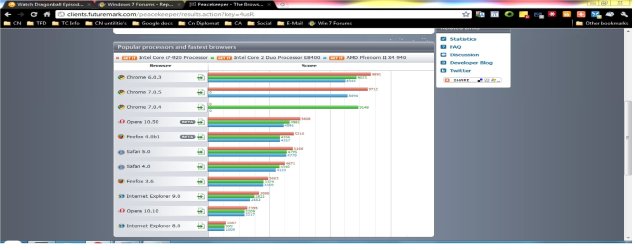
It tells you just about everything you would want to hear a browser has. and is going to be. I mean even go look at all the stats on how fast is your web browser on these forums. I had a bunch of windows open when I ran it this time. But Look at the total stats. Last time I did it right but with all my extensions running I got 10,000. but I have a cheap computer also.

Browser stats

internet benchmark (Chrome).jpg

Here is Google Chrome vs. Potato , Sound waves, and Lightning.

Watch these videos really. The versus one is funny.
 

My Computer

Computer Manufacturer/Model Number
HP Pavilion p6000 series/Model p6654y
OS
Windows 7 Ultimate x64
CPU
AMD Athlon(tm) II X4 630
Motherboard
Socket AM3 (938)
Memory
DDR3 2048 MB's/ PC3-10600 (1,333 MHz) (2 Cards)
Graphics Card(s)
ATI Radeon HD 4200
Sound Card
Realtek High definition Audio
Monitor(s) Displays
PnP-Monitor (Standard) (I am using my Emerson TV)
Screen Resolution
1024 x 768 pixels at 75 Hz in true colors (32-bit)
Hard Drives
750.05 Gigabytes Usable Hard Drive Capacity
692.61 Gigabytes Hard Drive Free Space

hp DVD-RAM GH60L SATA CdRom Device [Optical drive]
YMAX magicJack USB Device [Optical drive]

Generic- Compact Flash USB Device [Hard drive] -- drive 2
Generic
PSU
250 Watts
Case
HP
Cooling
Fan
Keyboard
Logitech wireless wave combo MK550 (Came with mouse)
Mouse
Logitech wireless wave combo MK550 (Came with keyboard)
Internet Speed
DSL Download speed 15.06-mb/s Upload .49-mb/s ping 45ms
Other Info
HP Wireless 802.11 b/g/n PCIe Card
That's an old comparison. FF 4.0b1...seriously?

As we all know, benchmarks are largely dependent on the computer hardware utilized during the benchmarking.

Use what you like. I like FF. Especially the 4.0b9pre x64 build. The differences in benchmark times amongst the various browsers on current hardware platforms is almost too miniscule to measure in everyday browsing experiences. They've all done a great job in the "speed" department and JavaScript implementations.
 

My Computer

Computer Manufacturer/Model Number
Toshiba L355D
OS
Windows 7 Ultimate x64 SP1
CPU
Core2 Duo
Motherboard
Intel
Memory
4 GB
Graphics Card(s)
GM965 on-board
Sound Card
RealTek on-board
Monitor(s) Displays
19"+17"(laptop)
Screen Resolution
1440x900 (x 2)
Hard Drives
500GB Ext. 200GB Internal
PSU
N/A
Case
N/A
Cooling
N/A
I will never use Chrome. No permanent statusbar, plus each extension having their own...whatever it's called, is a huge turnoff. Firefox for life.
 

My Computer

Computer Manufacturer/Model Number
HP p6270z
OS
Windows 7 Home Premium x64
CPU
AMD Athlon II X4 620
Motherboard
Foxconn ALOE (CPU 1)
Memory
4.00GB Dual Channel DDR3 @ 666Mhz (9-9-9-24)
Graphics Card(s)
HD Radeon 4200 (Integrated)
Sound Card
Realtek High Definition Audio
Monitor(s) Displays
HP 2311 (1920x1080) @ 60Hz
Screen Resolution
1920x1080
Hard Drives
488GB Seagate ST3500418AS SCSI Disk Device (RAID)
I use Google chrome. I recommend it to everyone I talk to. It is super fast. and very stable. It has never crashed on me. I even used the most unstable version there is canary and that never even crashed on me. I love Chrome. It is really secure and fast. Plus if one tab crashes they say that only that tab will crash all the others will be fine. Same thing if you go to a bad site and it breaks into that tab. It can only get into that tab not the rest of your tabs. It is like every tab is in its on sandbox. But it is not really sandbox. Watch this video. It is really good I mean it. Seriously try it out. And it has a home button and bookmarks that can be right under your address bar. So do not say it does not have them you just have to turn them on. Also it will sync all your bookmarks and extensions through anywhere. if you go get a new computer all you do it get Chrome back and sign into your name and tell it to sync. It will automatically bring back all of your setting everything. I really recommend trying it seriously.

The story Behind Chrome

It tells you just about everything you would want to hear a browser has. and is going to be. I mean even go look at all the stats on how fast is your web browser on these forums. I had a bunch of windows open when I ran it this time. But Look at the total stats. Last time I did it right but with all my extensions running I got 10,000. but I have a cheap computer also.

Browser stats

That picture of statistics is really lame.
The latest version of Opera it shows is 10.50 beta which came out in February 2010
They updated the chart a couple of months ago to include more recent results for Firefox
Safari & Chrome but not for Opera.
At the bottom of the statistics page they show the fastest System.

Opera (v11.00) 20302 Points
 

My Computer

Computer type
PC/Desktop
Computer Manufacturer/Model Number
self build
OS
Windows 7 Ultimate 64 bit
CPU
Intel Core i7 4770K overclocked to 4.7GHz Quad Core Haswell
Motherboard
Asus Z87 Pro (Socket 1150) ATX Motherboard
Memory
16GB Team Group Vulcan Gold 2133MHz
Graphics Card(s)
ATI Radeon HD 7880 Series Display adapter
Monitor(s) Displays
NEC LCD2690WUXi2
Screen Resolution
26" 1920 x 1200
Hard Drives
Samsung 500GB SSD 840 EVO SATA 6Gb/s
Samsung 250GB SSD 840 EVO SATA 6Gb/s
PSU
Corsair AX760 Platinum
Case
Cooler Master HAF X Gaming Tower
Cooling
XSPC RayStorm 750 RS360 Water cooling
Mouse
Razer Death Adder left handed
Internet Speed
126Mb download 11.5Mb up
Antivirus
Avast free
Browser
Opera
Other Info
Main Browser is Opera
Favorite software Adobe Lightroom & Photoshop
best plugins Nik software
Firewall : Private firewall 7
I am just stating what I know about chrome. I love it a lot is all. I highly recommend it. And what about Operas safety. Did you watch the story about chrome. About how they explain how it is safe. How it will not crash the whole browser at ounce. I have never had any crash at all. not even with the most unstable version canary. But What ever. I was just putting in my input. I think it is at least worth a try. From what I see and hear. I think that either Opera or chrome would be a best choice for anyone. I seem to be seeing that Opera is very good also as you stated. But if you look at Operas speed ratings in detail. The only thing that Opera beats chrome in is social text parsing and rendering. The rest of them Chrome blows Opera away. I will always stick with chrome. Especially I love the sync. The real reasoning behind it is because I first used it with my old 2300 dell desktop series from 2003. It was just as fast as my brand new computer with chrome. No joke. I could not believe it.
 

My Computer

Computer Manufacturer/Model Number
HP Pavilion p6000 series/Model p6654y
OS
Windows 7 Ultimate x64
CPU
AMD Athlon(tm) II X4 630
Motherboard
Socket AM3 (938)
Memory
DDR3 2048 MB's/ PC3-10600 (1,333 MHz) (2 Cards)
Graphics Card(s)
ATI Radeon HD 4200
Sound Card
Realtek High definition Audio
Monitor(s) Displays
PnP-Monitor (Standard) (I am using my Emerson TV)
Screen Resolution
1024 x 768 pixels at 75 Hz in true colors (32-bit)
Hard Drives
750.05 Gigabytes Usable Hard Drive Capacity
692.61 Gigabytes Hard Drive Free Space

hp DVD-RAM GH60L SATA CdRom Device [Optical drive]
YMAX magicJack USB Device [Optical drive]

Generic- Compact Flash USB Device [Hard drive] -- drive 2
Generic
PSU
250 Watts
Case
HP
Cooling
Fan
Keyboard
Logitech wireless wave combo MK550 (Came with mouse)
Mouse
Logitech wireless wave combo MK550 (Came with keyboard)
Internet Speed
DSL Download speed 15.06-mb/s Upload .49-mb/s ping 45ms
Other Info
HP Wireless 802.11 b/g/n PCIe Card
Back
Top