Don't laugh at me please!

hispandora

New member
Local time
6:05 PM
Messages
14
Okay I know this is probably a stupid question but I have one HD in my machine that came with three partitions on it.

The first partition is some little tiny space that doesn't show up when you boot up but shows up on when you do the OS install called Recovery-OEM

The second is aprox 40GB space partitioned off as D:

The third is the main partition about 555GB space partitioned off as C:

When I was having problems with the Windows 7 install the MS Tech had me try installing it on the D: Partition. Now that I have Windows 7 working on the C: Partition I want to know if I can format the D: Partition to get rid of those non working windows files off the drive.

If I right click on the D: Drive and go to Format I have an option to Format the D: Drive but it gives me a sort of scary and intimidating message about the ENTIRE drive being formatted and data lost. Formatting the D: Drive wont effect the C: Partition at all will it?
 

My Computer My Computer

At a glance

Windows 7 Home Premium 64bitIntel Core i5-750 2.66GHz 8M LGA1156Corsair XMS PC10600 RAM - 8GB, DDR3, Core i5,...VCO GeForce 9800GT 512MB PCIE
Computer Manufacturer/Model Number
Systemax P55
OS
Windows 7 Home Premium 64bit
CPU
Intel Core i5-750 2.66GHz 8M LGA1156
Motherboard
MSI P55-CD53 ATX Motherboard
Memory
Corsair XMS PC10600 RAM - 8GB, DDR3, Core i5, Dual Channel
Graphics Card(s)
VCO GeForce 9800GT 512MB PCIE
Sound Card
On Board
Monitor(s) Displays
Samsung SyncMaster P2350
Hard Drives
640GB 7200RPM 3G Sata Hard Drive
Case
Mid-Tower ATX Camging Chassis
No...as long as you make sure it is the D: partition that you are formatting, it won't effect the C: partition at all.
 

My Computer My Computer

At a glance

Windows 10 Tech Preview 9926 x64AMD FX-835016GB DDR3 1333Asus R9 290 DirectCU II OC, Gigabyte Windforc...
Computer type
PC/Desktop
Computer Manufacturer/Model Number
SuperBeast
OS
Windows 10 Tech Preview 9926 x64
CPU
AMD FX-8350
Motherboard
Gigabyte GA-990FXA-UD3
Memory
16GB DDR3 1333
Graphics Card(s)
Asus R9 290 DirectCU II OC, Gigabyte Windforce R9 290 OC
Sound Card
Integrated w/ Creative A250 2.1 speakers
Monitor(s) Displays
Main: Asus VN289H 28" Secondary: Acer G246HL 24"
Screen Resolution
1920x1080
Hard Drives
128 GB SanDisk Ultra Plus (Windows drive)

240 GB Crucial M500 SSD (Games drive)

1 TB WDC WD10EACS 7200RPM HDD (Data drive)

2 TB Seagate Expansion Desktop external HDD (Backup drive)
PSU
900w Antec HCG-900
Case
Raidmax Agusta Full ATX
Cooling
Corsair H80
Keyboard
Cooler Master Devastator MB24
Mouse
Cooler Master Devastator MS2K 1000/1600/2000 DPI
Internet Speed
100Mbps cable
Antivirus
Avast!
Browser
Chrome
@hispandora:

That tiny partition (100mb?) is the system recovery partition that Win7 automatically creates on install.

You can safely format D:. providing all the data that you require is on C:.

If you are running Windows off C:, formatting D: will not harm Windows. That scary message is just a warning, an opportunity to rethink your decision to format and to ensure that all the essential data on the drive has been moved elsewhere.
 

My Computers My Computers

  • At a glance

    Windows 10 Professional 64-BitIntel Core i7 8700KG.Skill TridentZ RGB DDR4 4000 F4-4000C18D-16...Zotac GeForce GTX-1660 Ti AMP 6GB
    Computer type
    Laptop
    Computer Manufacturer/Model Number
    Custom
    OS
    Windows 10 Professional 64-Bit
    CPU
    Intel Core i7 8700K
    Motherboard
    Asus Maximus X Code
    Memory
    G.Skill TridentZ RGB DDR4 4000 F4-4000C18D-16GTZR
    Graphics Card(s)
    Zotac GeForce GTX-1660 Ti AMP 6GB
    Sound Card
    ROG SupremeFX S1220 (Onboard)
    Monitor(s) Displays
    Dell UP2716D
    Screen Resolution
    2560x1440
    Hard Drives
    Samsung 980 Pro PCIe NVMe 500GB
    Samsung 970 Evo PCIe NVMe 250GB
    Samsung 860 Evo SATA III 2TB
    WD Black WD2003FZEX 2TB x 3
    ODD - GH24NSC0
    PSU
    Coolermaster V1000
    Case
    Corsair Obsidian 450D
    Cooling
    Corsair H115i - Corsair SP140 Red x 2
    Keyboard
    Logitech G213
    Mouse
    Logitech G102
    Internet Speed
    100 Mbps (Supposedly) - Asianet India FTTH
    Antivirus
    Avast Free!
    Browser
    Maxthon Cloud Browser 5.xx
    Other Info
    Asus FX-553VD (960 Evo, 860 Evo, 16GB)
    Samsung Galaxy C9 Pro
    Canon EOS 70D
  • At a glance

    Windows 10 Pro x64Intel Core i7 7700HQ2 x 8GB Samsung DDR4 2400GTX 1050
    Computer type
    Laptop
    System Manufacturer/Model Number
    Asus FX503VD
    OS
    Windows 10 Pro x64
    CPU
    Intel Core i7 7700HQ
    Memory
    2 x 8GB Samsung DDR4 2400
    Graphics Card(s)
    GTX 1050
    Screen Resolution
    1920 x 1080
    Hard Drives
    Samsung 960 Evo PCIe NVMe 250GB Boot
    Samsung 840 Pro Series 256 GB SSD (MZ-7PD256BW);
Okay I know this is probably a stupid question but I have one HD in my machine that came with three partitions on it.

The first partition is some little tiny space that doesn't show up when you boot up but shows up on when you do the OS install called Recovery-OEM

The second is aprox 40GB space partitioned off as D:

The third is the main partition about 555GB space partitioned off as C:

When I was having problems with the Windows 7 install the MS Tech had me try installing it on the D: Partition. Now that I have Windows 7 working on the C: Partition I want to know if I can format the D: Partition to get rid of those non working windows files off the drive.

If I right click on the D: Drive and go to Format I have an option to Format the D: Drive but it gives me a sort of scary and intimidating message about the ENTIRE drive being formatted and data lost. Formatting the D: Drive wont effect the C: Partition at all will it?


Can you give us a screen shot of your HD in disk Management ?
 

Attachments

  • Disk_Management_oct_2009.JPG
    Disk_Management_oct_2009.JPG
    88.7 KB · Views: 34

My Computer My Computer

At a glance

Win7 Enterprise, Win7 x86 (Ult 7600), Win7 x6...AMD fx8350 4ghz, AMD-32 2400mhz, AMD-64 3200m...2gb, 4gb on the Ult 7600, 4gb on Technet RTM,...Draw my own Graphics, several nVidia cards
Computer type
PC/Desktop
Computer Manufacturer/Model Number
Built them myself, Science Experiments !
OS
Win7 Enterprise, Win7 x86 (Ult 7600), Win7 x64 Ult 7600, TechNet RTM on AMD x64 (2.8Ghz)
CPU
AMD fx8350 4ghz, AMD-32 2400mhz, AMD-64 3200mhz, AMDx64 2.8G
Motherboard
SIS 755, ECS-K8M890M-M (Ult 7600), GigaByte & others
Memory
2gb, 4gb on the Ult 7600, 4gb on Technet RTM, 32gb on FX8350
Graphics Card(s)
Draw my own Graphics, several nVidia cards
Sound Card
on motherboard
Monitor(s) Displays
19" flat scr, 28" I-Inc widescr,22" Emprex Widescr, 23" Acer
Screen Resolution
1280 x 1024, 1440 x 900, 1920 x 1080
Hard Drives
6 pata Ide HD's & 2 Sata HD's
added 80gb external on Ult 7600 computer,
numerous extra 1tb, 2TB, 3Tb SATA HD's
A collection of ext HD Docks w/ HDs
PSU
430w, 550w, 600w, 700, 800, etc
Case
All Generic Full Towers
Cooling
Open Air & a few fans, some w/ colored LEDs
Keyboard
Compaq & Dell recycled from GoodWill
Mouse
Made in China Optical Wired Mouse
Internet Speed
Fast Cable InterNet
Antivirus
AVG Free on 24 different Desktops, NO Problems!
Browser
IE 8 is preferred, but use FireFox sometimes
Other Info
Linksys Routers, switches, & Hubs
Too Many USB Flash Drives to count, Biggest is 64GB !
Eight computers in my home network.
Sixteen computers at my business network.
Linked via TeamViewer !
Lots of old used spare computer parts everywhere!
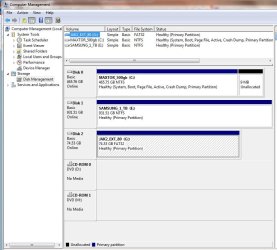
Sure! Here is a SS of my Disk Managment

C: Is my main drive of course
D: Is that partition I want to reformat
L: Is my Ready Boost Drive
J: Is my External HD that I save most my data on
 

Attachments

  • DiskManagement.png
    DiskManagement.png
    532.5 KB · Views: 85

My Computer My Computer

At a glance

Windows 7 Home Premium 64bitIntel Core i5-750 2.66GHz 8M LGA1156Corsair XMS PC10600 RAM - 8GB, DDR3, Core i5,...VCO GeForce 9800GT 512MB PCIE
Computer Manufacturer/Model Number
Systemax P55
OS
Windows 7 Home Premium 64bit
CPU
Intel Core i5-750 2.66GHz 8M LGA1156
Motherboard
MSI P55-CD53 ATX Motherboard
Memory
Corsair XMS PC10600 RAM - 8GB, DDR3, Core i5, Dual Channel
Graphics Card(s)
VCO GeForce 9800GT 512MB PCIE
Sound Card
On Board
Monitor(s) Displays
Samsung SyncMaster P2350
Hard Drives
640GB 7200RPM 3G Sata Hard Drive
Case
Mid-Tower ATX Camging Chassis
This may be offtopic, but do you see a difference using ready boost?
 

My Computer My Computer

At a glance

Windows 7
OS
Windows 7
Okay I know this is probably a stupid question but I have one HD in my machine that came with three partitions on it.

The first partition is some little tiny space that doesn't show up when you boot up but shows up on when you do the OS install called Recovery-OEM

The second is aprox 40GB space partitioned off as D:

The third is the main partition about 555GB space partitioned off as C:

When I was having problems with the Windows 7 install the MS Tech had me try installing it on the D: Partition. Now that I have Windows 7 working on the C: Partition I want to know if I can format the D: Partition to get rid of those non working windows files off the drive.

If I right click on the D: Drive and go to Format I have an option to Format the D: Drive but it gives me a sort of scary and intimidating message about the ENTIRE drive being formatted and data lost. Formatting the D: Drive wont effect the C: Partition at all will it?

Many computers today has the recover software on drive d., the small partion to do the restore.
 

My Computer My Computer

At a glance

win 7
OS
win 7
To be honest I couldn't tell you. My last system had a ready boost drive on it from the first time I started using it because the guy that built it put one on there, so I just moved it from that system to this one. So it's just sort of been something that is always there :)
 

My Computer My Computer

At a glance

Windows 7 Home Premium 64bitIntel Core i5-750 2.66GHz 8M LGA1156Corsair XMS PC10600 RAM - 8GB, DDR3, Core i5,...VCO GeForce 9800GT 512MB PCIE
Computer Manufacturer/Model Number
Systemax P55
OS
Windows 7 Home Premium 64bit
CPU
Intel Core i5-750 2.66GHz 8M LGA1156
Motherboard
MSI P55-CD53 ATX Motherboard
Memory
Corsair XMS PC10600 RAM - 8GB, DDR3, Core i5, Dual Channel
Graphics Card(s)
VCO GeForce 9800GT 512MB PCIE
Sound Card
On Board
Monitor(s) Displays
Samsung SyncMaster P2350
Hard Drives
640GB 7200RPM 3G Sata Hard Drive
Case
Mid-Tower ATX Camging Chassis
Okay I know this is probably a stupid question but I have one HD in my machine that came with three partitions on it.

The first partition is some little tiny space that doesn't show up when you boot up but shows up on when you do the OS install called Recovery-OEM

The second is aprox 40GB space partitioned off as D:

The third is the main partition about 555GB space partitioned off as C:

When I was having problems with the Windows 7 install the MS Tech had me try installing it on the D: Partition. Now that I have Windows 7 working on the C: Partition I want to know if I can format the D: Partition to get rid of those non working windows files off the drive.

If I right click on the D: Drive and go to Format I have an option to Format the D: Drive but it gives me a sort of scary and intimidating message about the ENTIRE drive being formatted and data lost. Formatting the D: Drive wont effect the C: Partition at all will it?

When the MS Tech had you install win7 on "D" * Could the new running win7 be seeing itself as "C" ? Have you looked at properties with win7 running to see the drive letters & their corresponding sizes. What OS was on before you installed win7 ?

" Doc "
 

My Computer My Computer

At a glance

Win7 Enterprise, Win7 x86 (Ult 7600), Win7 x6...AMD fx8350 4ghz, AMD-32 2400mhz, AMD-64 3200m...2gb, 4gb on the Ult 7600, 4gb on Technet RTM,...Draw my own Graphics, several nVidia cards
Computer type
PC/Desktop
Computer Manufacturer/Model Number
Built them myself, Science Experiments !
OS
Win7 Enterprise, Win7 x86 (Ult 7600), Win7 x64 Ult 7600, TechNet RTM on AMD x64 (2.8Ghz)
CPU
AMD fx8350 4ghz, AMD-32 2400mhz, AMD-64 3200mhz, AMDx64 2.8G
Motherboard
SIS 755, ECS-K8M890M-M (Ult 7600), GigaByte & others
Memory
2gb, 4gb on the Ult 7600, 4gb on Technet RTM, 32gb on FX8350
Graphics Card(s)
Draw my own Graphics, several nVidia cards
Sound Card
on motherboard
Monitor(s) Displays
19" flat scr, 28" I-Inc widescr,22" Emprex Widescr, 23" Acer
Screen Resolution
1280 x 1024, 1440 x 900, 1920 x 1080
Hard Drives
6 pata Ide HD's & 2 Sata HD's
added 80gb external on Ult 7600 computer,
numerous extra 1tb, 2TB, 3Tb SATA HD's
A collection of ext HD Docks w/ HDs
PSU
430w, 550w, 600w, 700, 800, etc
Case
All Generic Full Towers
Cooling
Open Air & a few fans, some w/ colored LEDs
Keyboard
Compaq & Dell recycled from GoodWill
Mouse
Made in China Optical Wired Mouse
Internet Speed
Fast Cable InterNet
Antivirus
AVG Free on 24 different Desktops, NO Problems!
Browser
IE 8 is preferred, but use FireFox sometimes
Other Info
Linksys Routers, switches, & Hubs
Too Many USB Flash Drives to count, Biggest is 64GB !
Eight computers in my home network.
Sixteen computers at my business network.
Linked via TeamViewer !
Lots of old used spare computer parts everywhere!
That's an odd looking disk management screen shot.

I would expect to see a display of C and D somewhere in the lower portion, not just the listing at the top.
 

My Computer My Computer

At a glance

Windows 7 Home Premium SP1, 64-bitIntel Skylake i5-6600K, not overclocked8 GB HyperX DDR4-2666 (2 x 4 GB)none; graphics are integrated on CPU
Computer type
PC/Desktop
Computer Manufacturer/Model Number
Ignatz Special; 4 speed manual gearbox; factory air conditioning; one of one
OS
Windows 7 Home Premium SP1, 64-bit
CPU
Intel Skylake i5-6600K, not overclocked
Motherboard
AsRock Z170M Extreme 4, micro ATX
Memory
8 GB HyperX DDR4-2666 (2 x 4 GB)
Graphics Card(s)
none; graphics are integrated on CPU
Sound Card
onboard: Realtek ALC1150; external: USB Behringer UF0-202
Monitor(s) Displays
Dell S2340M 23 inch IPS
Screen Resolution
1600 x 900
Hard Drives
System: Crucial MX100 series SSD, 128 GB;
Data: Samsung Spinpoint 103SJ, 1 TB;
Backup: WD Caviar Green WD30EZRX-00D8PB0, 3 TB
PSU
Rosewill SilentNight 500 watt fanless, semi-modular
Case
Antec Solo II
Cooling
Noctua NH-U12S; Noctua F12 intake, Noctua S12A exhaust
Keyboard
Microsoft 200 6JH-00001 USB
Mouse
Dell or Microsoft optical wired; USB
Antivirus
Microsoft Security Essentials and Malwarebytes Premium
Browser
Pale Moon
Other Info
All fans PWM; speeds at idle: CPU circa 500 rpm; intake circa 600 rpm; exhaust circa 600 rpm; CPU temps 27 idle and 47 C load in a warm room (27 C/81 F) when running Intel Extreme Tuning Utility stress test.
That's an odd looking disk management screen shot.

I would expect to see a display of C and D somewhere in the lower portion, not just the listing at the top.

C and D are probably present in the lower portion of the screen (the slider is down at the bottom).

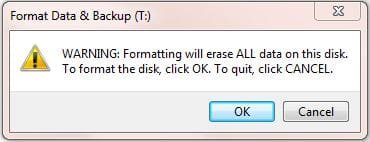
As for formatting...if you tell it to format the D: partition it will just format D: partition. You probably got this message:
Format warning.JPG

where "Disk" means the partition, not the whole "Drive."
 

My Computer My Computer

At a glance

W8 Pro, W7 Ultimate, XP Pro x64, Vista x64, U...Q6600, Q6700, T7500, T7500, N270, N2708GB, 8GB, 4GB, 4GB, 2GB, 2GBATI, nVidia, nVidia, nVidia, Intel, Intel
Computer type
PC/Desktop
Computer Manufacturer/Model Number
Dell: XPS 420 (2), XPS M1330 (several), XPS 14z, Mini 9, Mini 10v
OS
W8 Pro, W7 Ultimate, XP Pro x64, Vista x64, Ubuntu
CPU
Q6600, Q6700, T7500, T7500, N270, N270
Motherboard
Dell
Memory
8GB, 8GB, 4GB, 4GB, 2GB, 2GB
Graphics Card(s)
ATI, nVidia, nVidia, nVidia, Intel, Intel
Monitor(s) Displays
Dell 2408WFP
Hard Drives
A drawer full. OCZ Vertex's in RAID 0. Vertex 3's, Vertex 4, Samsung 830's, Samsung 840's, Intel 330. Don't use dino drives any more except for servers.
Keyboard
Logitech Wave
Internet Speed
29 Mbps DL / .95 Mbps UL
Other Info
New project(2013)...Another low power server. Zotac H67ITX, i3-2100T, Windows Server 2012 Essentials on Samsung SSD.
Previous project...Low power (38-40 watts using Kill-a-Watt) Windows Home Server. Zotac ION (Atom 330, GeForce9400), 4GB RAM, 2x2TB WD Green, IN WIM miniITX Case. Fits on a shelf in laundry closet, practically silent.
Back
Top