dot net 4 problem

iwasinnamuknow

New member
Local time
2:43 PM
Messages
9
Location
England
I know there are many people having problems with dot net 4 on windows 7, but nothing I have found in a couple of weeks of googling has managed to fix the problem.

I've tried installing the full package, client profile package and the version that comes with visual studio '10 but nothing works. I have tried cleaning with the tool, rebooting, reinstalling and every other piece of advice I have found but nothing has worked.

The symptom: After installing dot net 4, programs that require it still do not believe it is installed and refuse to run. Seeing as I've just spent a large sum of money on VS2010, I really need this to work somehow :P

I'm attaching my dot net verifier log which appears to show the same whatever I try.

Please can someone help?

Thanks in advance
 

Attachments

My Computer My Computer

OS
Windows 7 x64 Ulimate
CPU
AMD Phenom II X6 1100T Black Edition
Motherboard
Asus Crosshair IV Formula AMD 890FX
Memory
16GB Dual channel Corsair Vengeance DDR3 PC3-15000C9
Graphics Card(s)
Xfire'd dual AMD HD6950
Sound Card
Audio over HDMI from HD6950
Monitor(s) Displays
Philips 1080p 32" HDTV & LG 17" LCD
Screen Resolution
1920x1080 & 1440x900
Hard Drives
2x WD6402AAEX in RAID1
PSU
Corsair Professional Series™ Gold AX750
Case
Antec P183
No-one has any clue how to get dot net 4 framwork going?
 

My Computer My Computer

OS
Windows 7 x64 Ulimate
CPU
AMD Phenom II X6 1100T Black Edition
Motherboard
Asus Crosshair IV Formula AMD 890FX
Memory
16GB Dual channel Corsair Vengeance DDR3 PC3-15000C9
Graphics Card(s)
Xfire'd dual AMD HD6950
Sound Card
Audio over HDMI from HD6950
Monitor(s) Displays
Philips 1080p 32" HDTV & LG 17" LCD
Screen Resolution
1920x1080 & 1440x900
Hard Drives
2x WD6402AAEX in RAID1
PSU
Corsair Professional Series™ Gold AX750
Case
Antec P183
I'm trying to get you some assistance.

Mike
 

My Computer My Computer

Computer Manufacturer/Model Number
Hopalong/ Godzilla
OS
Windows7 Pro 64bit SP-1; Windows XP Pro 32bit
CPU
Intel Core i7-870 Lynnfield 2.93GHz LGA 1156 95W Quad-Core
Motherboard
ASUS P7P55D-E PRO
Memory
8GB@1400MHz Crucial Ballistix DDR3-1600 4x2GB
Graphics Card(s)
ASUS ENGTX460 DirectCU/2DI/1GD5 1GB 256-bit GDDR5
Sound Card
VIA Onboard
Monitor(s) Displays
Asus VS248H-P 24"; Samsung SyncMaster 941BW 19"ws
Screen Resolution
1920x1080; 1440x900
Hard Drives
Samsung 830 120GB SSD
Intel 320 120GB SSD
Western Digital Caviar Black WD7501AALS 750GB 7200 RPM SATA 3.0Gb/s
Western Digital Caviar Black WD6401AALS 640GB 7200 RPM SATA 3.0Gb/s
PSU
COOLER MASTER Silent Pro RS850-AMBAJ3-US 850W Modular
Case
COOLER MASTER HAF 932 RC-932-KKN5-GP Black
Cooling
Scythe "Mugen-2 Rev.B" (2 ScytheKaze-Jyuni PWM fans)
Keyboard
Logitech K-320
Mouse
Kensington
Antivirus
Avast Inernet Suite
Browser
IE 9 ; Chrome
Oh, excellent. Thank you very much :)
 

My Computer My Computer

OS
Windows 7 x64 Ulimate
CPU
AMD Phenom II X6 1100T Black Edition
Motherboard
Asus Crosshair IV Formula AMD 890FX
Memory
16GB Dual channel Corsair Vengeance DDR3 PC3-15000C9
Graphics Card(s)
Xfire'd dual AMD HD6950
Sound Card
Audio over HDMI from HD6950
Monitor(s) Displays
Philips 1080p 32" HDTV & LG 17" LCD
Screen Resolution
1920x1080 & 1440x900
Hard Drives
2x WD6402AAEX in RAID1
PSU
Corsair Professional Series™ Gold AX750
Case
Antec P183

My Computer My Computer

Computer type
PC/Desktop
Computer Manufacturer/Model Number
Packard Bell
OS
Windows 7 Home Premium 64bit
CPU
Intel(R) Core(TM) i3-2120 CPU @ 3.30GHz
Motherboard
Packard Bell IPISB-AG
Memory
3.00 GB
Graphics Card(s)
(1) Intel(R) HD Graphics (2) VNC Mirror Driver
Sound Card
Realtek High Definition Audio
Monitor(s) Displays
AIO LCD
Screen Resolution
1920 x 1080
Hard Drives
WDC WD10EADX-22TDHB0 ATA Device
Fixed hard disk media
4 partitions
931.51 GB
Keyboard
Wireless
Mouse
Wireless
Antivirus
Microsoft Security Essentials
Browser
IE; Firefox
Other Info
Also:
Samsung N220 Plus Netbook - Windows 7 Home
HP laptop
iPad 5
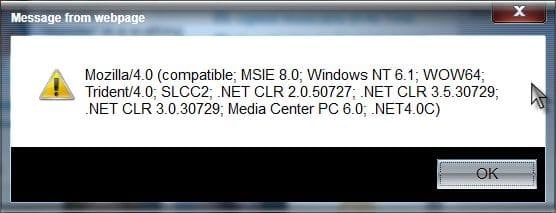
Some easy ways to confirm what version of .net you have installed:

Open IE, and paste this code into the address bar and press enter:

Code:
javascript:alert(navigator.userAgent)

You should get a popup like this:

.net.jpg

This small program will also confirm versions installed:

.net Version Detector

The more complicated method:

MS KB Article

A Guy
 

My Computer My Computer

Computer type
PC/Desktop
OS
Windows 10 Home x64
CPU
INTEL Core i5-750 Quad-Core 3.37GHz
Motherboard
ASUS P7P55D
Memory
HyperX Fury Black Series 8GB (2 x 4GB) 1866Mhz
Graphics Card(s)
EVGA GeForce GTX 750 Superclocked 1GB 128-Bit GDDR5
Monitor(s) Displays
LG 32MA68HY 32" IPS
Screen Resolution
1920 x 1080
Hard Drives
Samsung 840 Evo 120GB, SEAGATE 500GB Barracuda® 7200.12, SATA 3 Gb/s, 7200 RPM, 16MB cache
PSU
ANTEC TruePower New TP-550, 80 PLUS, 550W
Case
ANTEC Three Hundred Illusion
Cooling
COOLER MASTER Hyper 212 Plus, 4 x 120mm 1 x 140mm Noctua's
Internet Speed
85 + Mbps
Antivirus
Avast
Browser
Vivaldi
Hello!

The part of your log showing the error is here:

Code:
[03/07/11,16:15:54] Launching process 'Netfx40TestApplication.exe' now
[03/07/11,16:15:54] Process successfully launched. Waiting 300 seconds for it to complete.
[03/07/11,16:15:54] ****ERROR**** Process 'Netfx40TestApplication.exe' exited with return code -2146232576
[03/07/11,16:15:54] ****ERROR**** Verification failed for product .NET Framework 4 Full
Error lookup for that error code:

Code:
C:\Users\Richard>err -2146232576
# for hex 0x1 / decimal 1 :

   ERROR_INVALID_FUNCTION                                        winerror.h
# Incorrect function.
   S_FALSE                                                       winerror.h
# 60 matches found for "-2146232576"
This could mean a lot of things.

I wonder if you came across this thread in your research?
Install strategy for .net 4.0 windows forms application developed in VS2010

I must admit that it is beyond my understanding, but certainly looks the business.
smile.gif
Unfortunately, this applies to redistributing the .net Framework, and pros and cons of the different methods of doing that, but not quite this problem. That is for post programming.

Firstly, which version of Visual Studio 2010 are you trying to install? Professional, Premium, Ultimate etc.

Next, I need you to run this tool: Visual Studio and .NET Log Collection Utility - Heath Stewart's Blog - Site Home - MSDN Blogs

Upload your logs here. In the event that they are too big to upload here, any file sharing website, such as RapidShare, MediaFire, Skydive etc. Please make sure to set the permissions to public!

Thanks!

Richard
 

My Computer My Computer

Computer Manufacturer/Model Number
Dell XPS 420
OS
Vista Home Premium x86 SP2
CPU
Intel Core 2 Quad Q9300 2.50GHz
Motherboard
Stock Dell 0TP406
Memory
4 gb (DDR2 800) 400MHz
Graphics Card(s)
ATI Radeon HD 3870 (512 MBytes)
Monitor(s) Displays
1 x Dell 2007FP and 1 x (old) Sonic flat screen
Screen Resolution
1600 x 1200 and 1280 x 1204
Hard Drives
1 x 640Gb (SATA 300) Western Digital: WDC WD6400AAKS-75A7B0 1 x 1Tb (SATA 600) Western Digital: Caviar Black, SATA 6GB/S, 64Mb cache, 8ms Western Digital: WDC WD1002FAEX-00Z3A0 ATA Device
Case
Dell XPS 420
Cooling
Stock Fan
Keyboard
Dell Bluetooth
Mouse
Advent Optical ADE-WG01 (colour change light up)
Internet Speed
Varies from 10kb/s to 170kb/s. So unreliable it is not funny
Other Info
ASUS USB 3.0 5Gbps/SATA 6Gbps - PCI-Express Combo Controller Card (U3S6)
Dot Net 4 just does not want to work, anyone got a fix yet?

I tried all of the above, can't get this to work, no one seems to know how to fix it. Has anyone found a real solution? This is rare, only happens on select, random PCs running Windows 7 64-bit professional or ultimate. It works on other PCs just fine.

Has anyone found the issue when Dot-Net 4.x just is not seen as correct or installed, even though it is installed correctly?

Thanks,

SuperTAbrams
 

My Computer My Computer

OS
Windows 7 64-bit Professional
here's the installed:
<32Bit>
2.0.50727.5448
->C:\Windows\Microsoft.NET\Framework\v2.0.50727
<64Bit>
2.0.50727.5448
->C:\Windows\Microsoft.NET\Framework64\v2.0.50727
< Installed .NET Frameworks >
.NET FW 2.0 SP 2
.NET FW 3.0 SP 2
.NET FW 3.5 SP 1


on a tip from a friend who is one of the smartest it directors around I tried using the cleanup tool [the one you linked], then rebooted, turned off UAC, stopped the antimal filters, and tried again with same result, only it seemed a little quicker kill this time.


Some easy ways to confirm what version of .net you have installed:

Open IE, and paste this code into the address bar and press enter:

Code:
javascript:alert(navigator.userAgent)

You should get a popup like this:

View attachment 143077

This small program will also confirm versions installed:

.net Version Detector

The more complicated method:

MS KB Article

A Guy
 

My Computer My Computer

Computer Manufacturer/Model Number
HP DC7600, HP DC7600[2], HP DC7100, Samsung NC10
OS
Windows XP Pro SP3, Windows 7 Pro 32-bit, Windows 7 Ultimate 64bit, Windows XP Home SP3
CPU
Pentium 4 3.2GHz, Pentium 4 3.4GHz 64bit, Atom,
Motherboard
Dunno
Memory
4GB matched, 1GB, 2.5GB, 4.0 GB
Graphics Card(s)
Geforce 8400 GS and others
Sound Card
RealteK ALC260 and others
Monitor(s) Displays
Asus HD
Screen Resolution
1920x1080
Hard Drives
WD Caviar 640gb SATA
Cooling
We Be Cool
Back
Top