Downgrade Dell Win8 pro to Win7 Pro with Dell DVD

If you don't mind my thoughts on your last post, specifically this part,

Do I need System Repair Disc - Create in Windows 8 ? Considering I am downgrading from Win8 Pro to Win7 Pro (the topic of this thread) with a "Reinstallation DVD, Win7 Pro sp1" disc (provided by Dell) ?
I dont anticipate reinstating the factory Win8 -- unless I need to return the Dell to factory Win8 Pro state for warranty reasons.

It would be better to have it and not need it, than to need it and not have it. :)
 

My Computer My Computer

At a glance

Win 10 Pro x64Intel I5-2500K @3.3GHz16GB G.Skill Ripjaws X (4x4GB)EVGA GeForce 750 Ti SC 2GB
Computer type
PC/Desktop
Computer Manufacturer/Model Number
Self Built
OS
Win 10 Pro x64
CPU
Intel I5-2500K @3.3GHz
Motherboard
Asrock P67 Extreme4
Memory
16GB G.Skill Ripjaws X (4x4GB)
Graphics Card(s)
EVGA GeForce 750 Ti SC 2GB
Sound Card
ASUS Xonar DG 5.1 Channels 24-bit 96KHz PCI Interface Sound
Monitor(s) Displays
auria eq2367
Screen Resolution
1920 x 1080
Hard Drives
250GB Samsung 850 EVO SSD
1TB WD Blue
1TB Hitachi
PSU
SeaSonic X 650W 80 Plus Gold
Case
Corsair Obsidian 750D
Cooling
Corsair H60, Three 140mm case fans
Keyboard
Logitech Wireless Keyboard K520
Mouse
Logitech Wireless Mouse M310
Internet Speed
Wave Broadband ~ 100 dn 5 up
Antivirus
Windows Defender, Malwarebytes Premium
Browser
Edge, IE11, Chrome
Other Info
Laptop specs: HP g7-1365dx /
CPU: AMD A6-3420M APU with Radeon(tm) HD Graphics /
RAM: Crucial 8Gb (2x4Gb) /
SSD: Crucial M4-CT128M4SSD2 ATA Device/ FW 000F /
GFX: AMD Radeon HD 6520G /
OS: Windows 10 Pro x64
Thank you derekimo for your response :)

This learning to downgrade is like pulling teeth -- the anticipated is worse than the experience :roflmao:

I do appreciate your help :)
 

My Computer My Computer

At a glance

XP Pro (x86) | 7 HP (x86) & (x64) | 7 Pro (x64)
Computer type
PC/Desktop
Computer Manufacturer/Model Number
Toshiba, Lenovo (laptops) + 4 rigs
OS
XP Pro (x86) | 7 HP (x86) & (x64) | 7 Pro (x64)
You're welcome. :)

Kind of like pulling a bandage off? Just give it a rip, you'll be done before you know it. :D

I think you have all the info you need, experience it first hand now.
 

My Computer My Computer

At a glance

Win 10 Pro x64Intel I5-2500K @3.3GHz16GB G.Skill Ripjaws X (4x4GB)EVGA GeForce 750 Ti SC 2GB
Computer type
PC/Desktop
Computer Manufacturer/Model Number
Self Built
OS
Win 10 Pro x64
CPU
Intel I5-2500K @3.3GHz
Motherboard
Asrock P67 Extreme4
Memory
16GB G.Skill Ripjaws X (4x4GB)
Graphics Card(s)
EVGA GeForce 750 Ti SC 2GB
Sound Card
ASUS Xonar DG 5.1 Channels 24-bit 96KHz PCI Interface Sound
Monitor(s) Displays
auria eq2367
Screen Resolution
1920 x 1080
Hard Drives
250GB Samsung 850 EVO SSD
1TB WD Blue
1TB Hitachi
PSU
SeaSonic X 650W 80 Plus Gold
Case
Corsair Obsidian 750D
Cooling
Corsair H60, Three 140mm case fans
Keyboard
Logitech Wireless Keyboard K520
Mouse
Logitech Wireless Mouse M310
Internet Speed
Wave Broadband ~ 100 dn 5 up
Antivirus
Windows Defender, Malwarebytes Premium
Browser
Edge, IE11, Chrome
Other Info
Laptop specs: HP g7-1365dx /
CPU: AMD A6-3420M APU with Radeon(tm) HD Graphics /
RAM: Crucial 8Gb (2x4Gb) /
SSD: Crucial M4-CT128M4SSD2 ATA Device/ FW 000F /
GFX: AMD Radeon HD 6520G /
OS: Windows 10 Pro x64
Thanks SandeepP for your response and kind offer. :)
I will get back to you when time permits. Still working well past my use-by-date
It is nice being head hunted after 4 decades of experience (...and I enjoy what I do).
Regards :)

Hi GrayGhost2,

Sure please perform the downgrade at your convenience and let us know if get stuck somewhere. We would be more than happy to assist you for the same.

I understand technology is changing really fast and there is so much to learn everyday. If you have any further queries, please feel free to contact us.
 

My Computer My Computer

At a glance

Winndows 7 32 bit
Computer type
PC/Desktop
OS
Winndows 7 32 bit
If you don't mind my thoughts on your last post, specifically this part,

Do I need System Repair Disc - Create in Windows 8 ? Considering I am downgrading from Win8 Pro to Win7 Pro (the topic of this thread) with a "Reinstallation DVD, Win7 Pro sp1" disc (provided by Dell) ?
I dont anticipate reinstating the factory Win8 -- unless I need to return the Dell to factory Win8 Pro state for warranty reasons.

It would be better to have it and not need it, than to need it and not have it. :)

Also if or when you return to Windows 8 & upgrade to 8.1 free, the option to make a CD/DVD has been removed in 8.1.
 

My Computer My Computer

At a glance

ME/XP/Vista/Win7
OS
ME/XP/Vista/Win7
If you don't mind my thoughts on your last post, specifically this part,

Do I need System Repair Disc - Create in Windows 8 ? Considering I am downgrading from Win8 Pro to Win7 Pro (the topic of this thread) with a "Reinstallation DVD, Win7 Pro sp1" disc (provided by Dell) ?
I dont anticipate reinstating the factory Win8 -- unless I need to return the Dell to factory Win8 Pro state for warranty reasons.

It would be better to have it and not need it, than to need it and not have it. :)

Also if or when you return to Windows 8 & upgrade to 8.1 free, the option to make a CD/DVD has been removed in 8.1.

That is a good reason in itself.
 

My Computer My Computer

At a glance

Win 10 Pro x64Intel I5-2500K @3.3GHz16GB G.Skill Ripjaws X (4x4GB)EVGA GeForce 750 Ti SC 2GB
Computer type
PC/Desktop
Computer Manufacturer/Model Number
Self Built
OS
Win 10 Pro x64
CPU
Intel I5-2500K @3.3GHz
Motherboard
Asrock P67 Extreme4
Memory
16GB G.Skill Ripjaws X (4x4GB)
Graphics Card(s)
EVGA GeForce 750 Ti SC 2GB
Sound Card
ASUS Xonar DG 5.1 Channels 24-bit 96KHz PCI Interface Sound
Monitor(s) Displays
auria eq2367
Screen Resolution
1920 x 1080
Hard Drives
250GB Samsung 850 EVO SSD
1TB WD Blue
1TB Hitachi
PSU
SeaSonic X 650W 80 Plus Gold
Case
Corsair Obsidian 750D
Cooling
Corsair H60, Three 140mm case fans
Keyboard
Logitech Wireless Keyboard K520
Mouse
Logitech Wireless Mouse M310
Internet Speed
Wave Broadband ~ 100 dn 5 up
Antivirus
Windows Defender, Malwarebytes Premium
Browser
Edge, IE11, Chrome
Other Info
Laptop specs: HP g7-1365dx /
CPU: AMD A6-3420M APU with Radeon(tm) HD Graphics /
RAM: Crucial 8Gb (2x4Gb) /
SSD: Crucial M4-CT128M4SSD2 ATA Device/ FW 000F /
GFX: AMD Radeon HD 6520G /
OS: Windows 10 Pro x64
theog +1 :)
theog said:
Also if or when you return to Windows 8 & upgrade to 8.1 free, the option to make a CD/DVD has been removed in 8.1.
Thank you. ... I read your "Note" in Downgrade Windows 8 to Windows 7 tutorial.
Some of this stuff is starting to sink in !
Thank you for your support
-----

derekimo +! :)
Thank you for your support too.
 

My Computer My Computer

At a glance

XP Pro (x86) | 7 HP (x86) & (x64) | 7 Pro (x64)
Computer type
PC/Desktop
Computer Manufacturer/Model Number
Toshiba, Lenovo (laptops) + 4 rigs
OS
XP Pro (x86) | 7 HP (x86) & (x64) | 7 Pro (x64)
You're welcome. :)

Looking forward to your success story. :geek:
 

My Computer My Computer

At a glance

Win 10 Pro x64Intel I5-2500K @3.3GHz16GB G.Skill Ripjaws X (4x4GB)EVGA GeForce 750 Ti SC 2GB
Computer type
PC/Desktop
Computer Manufacturer/Model Number
Self Built
OS
Win 10 Pro x64
CPU
Intel I5-2500K @3.3GHz
Motherboard
Asrock P67 Extreme4
Memory
16GB G.Skill Ripjaws X (4x4GB)
Graphics Card(s)
EVGA GeForce 750 Ti SC 2GB
Sound Card
ASUS Xonar DG 5.1 Channels 24-bit 96KHz PCI Interface Sound
Monitor(s) Displays
auria eq2367
Screen Resolution
1920 x 1080
Hard Drives
250GB Samsung 850 EVO SSD
1TB WD Blue
1TB Hitachi
PSU
SeaSonic X 650W 80 Plus Gold
Case
Corsair Obsidian 750D
Cooling
Corsair H60, Three 140mm case fans
Keyboard
Logitech Wireless Keyboard K520
Mouse
Logitech Wireless Mouse M310
Internet Speed
Wave Broadband ~ 100 dn 5 up
Antivirus
Windows Defender, Malwarebytes Premium
Browser
Edge, IE11, Chrome
Other Info
Laptop specs: HP g7-1365dx /
CPU: AMD A6-3420M APU with Radeon(tm) HD Graphics /
RAM: Crucial 8Gb (2x4Gb) /
SSD: Crucial M4-CT128M4SSD2 ATA Device/ FW 000F /
GFX: AMD Radeon HD 6520G /
OS: Windows 10 Pro x64
Hi SandeepP :)
I would appreciate your help

As per your recommendations in one of your posts :- Dell:- How to Downgrade from Windows 8 Pro to Windows 7 Professional Dell Article 590895

"Step 3. Download Critical Drivers and Copy to a USB Key"
Prior to installing Windows 7 Professional, visit the Dell Drivers and Downloads website to download critical driver packages that will let you get online and return to the Dell website to install the rest of your hardware drivers. The following Windows 7 drivers are considered critical and must be downloaded:

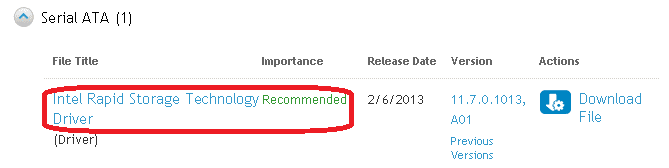
• Intel Rapid Storage Technology Driver
• Wireless or Local Area Network (LAN) driver
With filters set to "MS Windows 7 64-bit" ...
... found ...
Intel Rapid Storage Technology.PNG

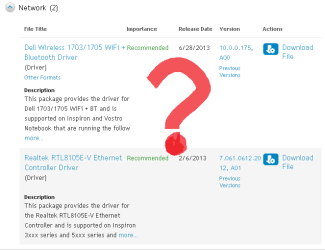
... but cannot locate "Wireless or Local Area Network (LAN) driver"

LAN etc.PNG

Where might I find the Wireless or Local Area Network (LAN) driver ?
For Windows 7 Pro 64-bit

Thank you :)
 
Last edited:

My Computer My Computer

At a glance

XP Pro (x86) | 7 HP (x86) & (x64) | 7 Pro (x64)
Computer type
PC/Desktop
Computer Manufacturer/Model Number
Toshiba, Lenovo (laptops) + 4 rigs
OS
XP Pro (x86) | 7 HP (x86) & (x64) | 7 Pro (x64)
Those are the Network drivers you likely need. Put them both in your backup as you prepare closely following the steps to get a perfect Clean Reinstall - Factory OEM Windows 7.

You can also keep plugged in by wire which is more likely to deliver its driver so you start up after install ready to connect. If not install the wireless driver and connect to your network.

Then immediately enable Automatically deliver drivers via Windows Update (Step 3) and run all rounds of IMportant and Optional Windows Updates with reboots, to completion. After each reboot go back to Check for Updates. When there are no more, post back any devices in Device Manager still missing their driver.
Do not import any other drivers than those missing after all Updates are done.

You should be following the forums' tutorial for getting a perfect reinstall, not Dell's. We are the top resource on the web for this specialty, not Dell or anyone else.

Be sure to also read and understand the Special Note for Dell Owners at the end of tutorial.
 
Hi SandeepP :)
I would appreciate your help

As per your recommendations in one of your posts :- Dell:- How to Downgrade from Windows 8 Pro to Windows 7 Professional Dell Article 590895

"Step 3. Download Critical Drivers and Copy to a USB Key"
Prior to installing Windows 7 Professional, visit the Dell Drivers and Downloads website to download critical driver packages that will let you get online and return to the Dell website to install the rest of your hardware drivers. The following Windows 7 drivers are considered critical and must be downloaded:

• Intel Rapid Storage Technology Driver
• Wireless or Local Area Network (LAN) driver
With filters set to "MS Windows 7 64-bit" ...
... found ...
View attachment 287348

... but cannot locate "Wireless or Local Area Network (LAN) driver"

View attachment 287349

Where might I find the Wireless or Local Area Network (LAN) driver ?
For Windows 7 Pro 64-bit

Thank you :)


Hi GrayGhost2,

The one that states Dell Wireless 1703/1705 is your wireless LAN driver that you would need to install on the system after windows installation.

So download all these drivers on different USB drive you would need them once the windows is installed successfully.

Lastly you would not need to download the .ISO file as you already have the disc to install Windows 7. Use that disc and follow the rest of the tutorial which should be able to install windows 7.

Keep us posted with the results so we can advise you further.
 

My Computer My Computer

At a glance

Winndows 7 32 bit
Computer type
PC/Desktop
OS
Winndows 7 32 bit
Greg
"www.heidoc.net" finally came good. It was the only link that was failing on 3 browsers for over 24 hours

Will I be using the existing Win8 Pro Product-ID and/or CD Key ?
I have both -- via VB Script with the compliments of Retrieve Product Key
 

My Computer My Computer

At a glance

XP Pro (x86) | 7 HP (x86) & (x64) | 7 Pro (x64)
Computer type
PC/Desktop
Computer Manufacturer/Model Number
Toshiba, Lenovo (laptops) + 4 rigs
OS
XP Pro (x86) | 7 HP (x86) & (x64) | 7 Pro (x64)
Good news. I was watching it earlier today and almost sure it would come back up. The site heavily relied upon for legal downloads of Win7 ISO's since MS finally came around to how their customers need them to assure the best install of Win7 - as opposed to the worst possible install which is preinstalled OEM Win7.
 
Greg,
The Dell has 2GB RAM (1918 MB).
Processor: Intel Pentium CPU 2117U @ 1.80GHz
System Type: 64-bit operating System, x64-based processor
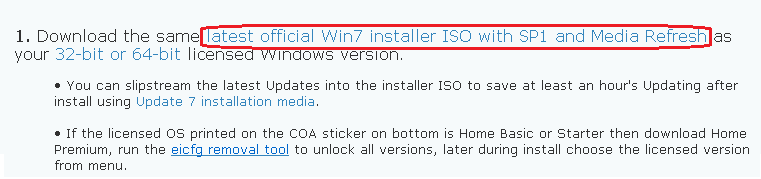
Reading through latest official Win7 installer ISO with SP1 and Media Refresh they recommend x64 for =>4GB.
This laptop is only for book-keeping with a 32bit program.

Can I downgrade to Win7 Pro x86 from the current Win8 Pro x64, and use the existing Win8 Pro Product-ID etc ?
Or am I restricted to x64 ?
 
Last edited:

My Computer My Computer

At a glance

XP Pro (x86) | 7 HP (x86) & (x64) | 7 Pro (x64)
Computer type
PC/Desktop
Computer Manufacturer/Model Number
Toshiba, Lenovo (laptops) + 4 rigs
OS
XP Pro (x86) | 7 HP (x86) & (x64) | 7 Pro (x64)
Does the Dell Win7 Reinstallation DVD say 64-bit on it? If so you'll need to see if SanDeep can help you get a 32 bit installer, since that Dell DVD may have SLP activation baked in.

Normally you can install either 32- or 64-bit with each license, but this is a little different since you are using your downgrade rights to change from WIndows 8 Pro to WIn7 Pro. We'll have to determine how that works when wanting to change bit-version.
 

My Computer My Computer

At a glance

XP Pro (x86) | 7 HP (x86) & (x64) | 7 Pro (x64)
Computer type
PC/Desktop
Computer Manufacturer/Model Number
Toshiba, Lenovo (laptops) + 4 rigs
OS
XP Pro (x86) | 7 HP (x86) & (x64) | 7 Pro (x64)
Activation is different with Windows 8 which does not use the Product Key on the OEM's COA sticker. Instead it auto-activates the version which it ships with. So I don't know yet how a retail Win7 installer will activate under the WIndows 8 Downgrade program. It may require the Dell disk with activation baked in.

I'd wait to hear from Sandeep and Theog to be sure, unless you want to go ahead and do a practice install with the Win7 retail installer which may or may not activate as a Pro Downgrade.
 
Greg,
Its worth a try!
I like the idea of an uncluttered Win7-Pro install -- using the ISO method.
... but the Dell "Reinstallation DVD, Win7 Pro sp1 x64-bit" DVD is sitting here on my desk ... a coaster so far.
And I assume from SandeepP's comments, the Dell disc will be a point and click .... ! But all the added bloat. :confused:
Dilema. I will experiment with ISO. If it fails ... back to the Dell disc.
 

My Computer My Computer

At a glance

XP Pro (x86) | 7 HP (x86) & (x64) | 7 Pro (x64)
Computer type
PC/Desktop
Computer Manufacturer/Model Number
Toshiba, Lenovo (laptops) + 4 rigs
OS
XP Pro (x86) | 7 HP (x86) & (x64) | 7 Pro (x64)
Greg,
Its worth a try!
I like the idea of an uncluttered Win7-Pro install -- using the ISO method.
... but the Dell "Reinstallation DVD, Win7 Pro sp1 x64-bit" DVD is sitting here on my desk ... a coaster so far.
And I assume from SandeepP's comments, the Dell disc will be a point and click .... ! But all the added bloat. :confused:
Dilema. I will experiment with ISO. If it fails ... back to the Dell disc.

Hi GrayGhost2,

It would be better if you use our disc first to install Windows 7. As using retail copy of windows might give you problems in activation. As it is a system where product key is coded to the motherboard best would be to use the disc provided by us.

And I can confirm again that OEM Win 7 install disc doesn't have any bloatware or softwares, it simple clean windows only.

Please check with the dell disc first and let me know if you come into any issues. If you have any further queries, please feel free to contact us.
 

My Computer My Computer

At a glance

Winndows 7 32 bit
Computer type
PC/Desktop
OS
Winndows 7 32 bit
Back
Top