Solved Downgraded to windows 7 and now wireless connection error

NightmareApple

New member
Local time
4:30 PM
Messages
6
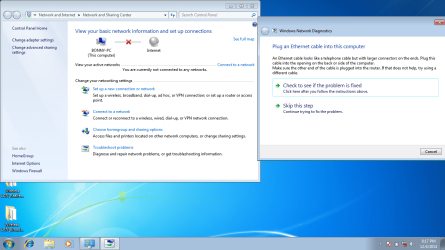
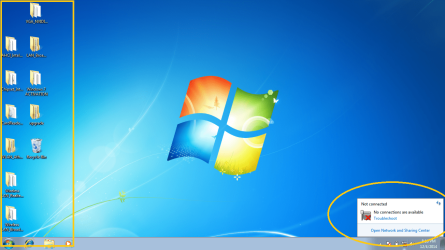
I have installed the latest LAN drivers for the pc and even though I have done that the Wireless coneection still wont work I have tried troubleshoot and it keeps saying that I need to plug in a ethernet cable but still no wireless connections. I have a Gateway NE56R41u and to get to the driver menu on the official gaetway website you have to click notebook but still the problem persists and no matter how many times I try I still cannot get the Wifi connections to show up at all.:mad::zip:
 

My Computer My Computer

At a glance

Windows 8.1 64 bit3.124 gb ram
Computer type
Laptop
Computer Manufacturer/Model Number
Samsung
OS
Windows 8.1 64 bit
CPU
3.12
Memory
4 gb ram
Antivirus
avira
Browser
firefox
Hi Welcome to Seven Forums ... Which Driver did you try to Install for the Wireless Card ? ... Did you Install the Launch Manager ? ...
 

My Computer My Computer

At a glance

windows 7 home 64bitINTEL-CORE I716GB
Computer Manufacturer/Model Number
W530-3630QM1
OS
windows 7 home 64bit
CPU
INTEL-CORE I7
Memory
16GB
Hard Drives
750GB
Browser
Chrome
Wireless LAN Atheros Wireless LAN Driver,

Wireless LAN Broadcom Driver

Wireless LAN Realtek Driver

I tried all 3 of them one at a time and none of them worked this point right now I am installing Every recent driver that is out on the Gatway page right now. Will be Kepp you updated on what happens when done installing I am on the last one right now then I will restart.
 

My Computer My Computer

At a glance

Windows 8.1 64 bit3.124 gb ram
Computer type
Laptop
Computer Manufacturer/Model Number
Samsung
OS
Windows 8.1 64 bit
CPU
3.12
Memory
4 gb ram
Antivirus
avira
Browser
firefox
You need to Install the Chipset Driver ...
 

My Computer My Computer

At a glance

windows 7 home 64bitINTEL-CORE I716GB
Computer Manufacturer/Model Number
W530-3630QM1
OS
windows 7 home 64bit
CPU
INTEL-CORE I7
Memory
16GB
Hard Drives
750GB
Browser
Chrome
I have installed the chipset driver and still no connections are showing
 

My Computer My Computer

At a glance

Windows 8.1 64 bit3.124 gb ram
Computer type
Laptop
Computer Manufacturer/Model Number
Samsung
OS
Windows 8.1 64 bit
CPU
3.12
Memory
4 gb ram
Antivirus
avira
Browser
firefox
attachment.php
 

Attachments

  • asfasf].png
    asfasf].png
    30.1 KB · Views: 17
  • sdgsdg.png
    sdgsdg.png
    127.9 KB · Views: 3
  • Untitled.png
    Untitled.png
    290.9 KB · Views: 1

My Computer My Computer

At a glance

Windows 8.1 64 bit3.124 gb ram
Computer type
Laptop
Computer Manufacturer/Model Number
Samsung
OS
Windows 8.1 64 bit
CPU
3.12
Memory
4 gb ram
Antivirus
avira
Browser
firefox
post the hardware id's
Open the Device Manager
Right Click on the Device in question
Properties
Details Tab on drop down choose hardware id then copy and paste it in next post VEN_ #### and DEV_####
 

My Computer My Computer

At a glance

win 10
Computer type
PC/Desktop
Computer Manufacturer/Model Number
dell xps 9000
OS
win 10
342208d1417748367-downgraded-windows-7-now-wireless-connection-error-detailes.png
 

Attachments

  • DETAILES.png
    DETAILES.png
    6.2 KB · Views: 16

My Computer My Computer

At a glance

Windows 8.1 64 bit3.124 gb ram
Computer type
Laptop
Computer Manufacturer/Model Number
Samsung
OS
Windows 8.1 64 bit
CPU
3.12
Memory
4 gb ram
Antivirus
avira
Browser
firefox
Thanks you guys for the help really ^.^. I tried using an Asus network driver and it decided to work like a charm :D
 

My Computer My Computer

At a glance

Windows 8.1 64 bit3.124 gb ram
Computer type
Laptop
Computer Manufacturer/Model Number
Samsung
OS
Windows 8.1 64 bit
CPU
3.12
Memory
4 gb ram
Antivirus
avira
Browser
firefox
ok are the other ones with yellow next to them have the drivers installed. glad you got it going
 

My Computer My Computer

At a glance

win 10
Computer type
PC/Desktop
Computer Manufacturer/Model Number
dell xps 9000
OS
win 10
Sorted nice work :thumbsup:
 

My Computer My Computer

At a glance

windows 7 home 64bitINTEL-CORE I716GB
Computer Manufacturer/Model Number
W530-3630QM1
OS
windows 7 home 64bit
CPU
INTEL-CORE I7
Memory
16GB
Hard Drives
750GB
Browser
Chrome
Back
Top