Downgrading from cable to ADSL2+

TanyaC

New member
Guru
Local time
3:39 AM
Messages
782
Location
Melbourne, Australia
I am moving house and I have a Scientific Atlanta cable modem which combines phone and internet. The new provider, Netspace (iinet), which uses Tel$tra infrastructure can't provide cable. Indeed, as the area is a new estate, Tel$tra have locked everyone else out such that only Tel$tra resellers can provide services.

According to heat maps in the area, I am going to drop from 18,000 mbps (2.4Mbps), to around 1.0mbps (125Kbps), for the same price...

They want me to use a thing called a BoB. What is that?

I would prefer to supply my own modem. Does that mean I have to get something that does ADSL2+ and phone in one box? The sales guy I spoke with was pretty clueless.

Any suggestions on a good modem?

Can I keep my existing DIR-655 router too?

Does anyone know if I have to install any software with Netspace on every computer that wants to access the internet?

Do I have to install a line filter? For something of good quality, would would I expect to pay?

If I have a wireless phone system will there be any issues with the internet as a result of using a 6 handset wireless phone system?

thanks
Tanya
 

My Computer

Computer type
PC/Desktop
Computer Manufacturer/Model Number
Home Made
OS
Linux Mint 17 Cinnamon | Win 7 Ult x64
CPU
Intel I7-3770K @ 4.2ghz
Motherboard
ASRock Extreme 4
Memory
32GB G-Skill C10Q
Graphics Card(s)
EVGA GTX 670 2GB SC
Sound Card
Creative Fatality ExtremeGamer
Monitor(s) Displays
LG E2742V x 2
Screen Resolution
1920x1080
Hard Drives
256GB Vertex 4 SSD
2TB Seagate ST2000DM001
1TB Seagate ST1000DM003
PSU
Corsair HX 650
Case
HAF 932 advanced
Cooling
Corsair H100i liquid cooler
Keyboard
Logitech Wireless
Mouse
Logitech Wireless
Internet Speed
OptusNet NBN 100/40
Antivirus
Malwarebytes
Browser
Firefox 30
Other Info
Router: Sagemcom F@st 3846 Crippled by Optus.
Tanya,
As a fellow Australian in the grips of Telstra & the resultant inefficiency you have my sympathy.

Re Netspace / Iinet & the questions you have asked here....
From personal experience Iinet support is excellent.
I would suggest you address these questions to them.
They will be better able to tell you exactly what is required.
 

My Computer

Computer Manufacturer/Model Number
LAPTOP. HP Pavilion dv7-4010TX .
OS
Win 7 Ultimate 64-bit. SP1.
CPU
Intel i7 -720QM.[1.6GHz Turbo Boost 2.8GHz. 6MB Cache.]
Memory
8 DDR 3 RAM. 1066MHZ
Graphics Card(s)
ATI 1024 MB. DDR3. Radeon HD5650
Monitor(s) Displays
17.3" High Definition Brightview LCD. LED Backlit.
Screen Resolution
1600 x 900.
Hard Drives
640GB
Case
Laptop / notebook.
Mouse
Logitech Anywhere mouse. MX.
Internet Speed
ADSL [ but too slow ]
You should check with your new ISP and see what modems they support or recommend. DSL is different from cable as the service is over a phone line. The phone line plugs into the modem and then you use a filter on another phone jack to plug in you phone. Your wireless phone system will work fine just plug the base station into the filter and the filter into a phone jack. You can then plug your router into the lan port of the modem and you should be ready to go. The only time additional software is need is when the modem has a usb port and you want to plug the modem into a usb port on you pc but not needed when using the lan port.

Jim :geek:
 

My Computer

Computer type
PC/Desktop
Computer Manufacturer/Model Number
Home Built
OS
Windows 8.1 Pro w/Media Center 64bit, Windows 7 HP 64bit
CPU
Phenom II X6 1100T
Motherboard
ASUS M5A99X EVO
Memory
Crucial Balistic 8gb DDR3-1866 CL9
Graphics Card(s)
MSI R6850 Cyclone IGD5 PE
Sound Card
On Board
Monitor(s) Displays
ASUS VE258Q 25" LED with DVI-HDMI-DisplayPort
Screen Resolution
1920 x 1080
Hard Drives
Two WD Cavier Black 2TB Sata III, WD My Book Essential 2TB USB 3.0
PSU
Seasonic X650 80 Plus GOLD Modular
Case
Corsair 400R
Cooling
Antec Kuhler H2O 620, Two 120mm and four 140mm
Keyboard
Logitech K120
Mouse
Logitech Marble Mouse USB, Logitech Precision Game Pad
Internet Speed
15MB
Antivirus
Norton IS 2013, Malwarebytes Pro Beta 2
Browser
IE-11, FF-27
Other Info
APC UPS ES 750, Netgear WNR3500L Gigabit & Wireless N Router with SamKnows Test Program, Motorola SB6120 Gigabit Cable Modem. Brother HL-2170W Laser Printer, Epson V300 Scanner
  • Like
Reactions: JMH
You should check with your new ISP and see what modems they support or recommend. DSL is different from cable as the service is over a phone line. The phone line plugs into the modem and then you use a filter on another phone jack to plug in you phone. Your wireless phone system will work fine just plug the base station into the filter and the filter into a phone jack. You can then plug your router into the lan port of the modem and you should be ready to go. The only time additional software is need is when the modem has a usb port and you want to plug the modem into a usb port on you pc but not needed when using the lan port.

Jim :geek:

Thanks for the info.

The phone line plugs into the modem and then you use a filter on another phone jack to plug in you phone

So I don't plug the filter into the wall socket and the modem and phone both into the filter?


ISPs seem to push specific brands. I have contacted so many ISPs in the last few days I forget who reccomended what, but I do remember reading reviews on iiNets reccommendation and it was a pretty poor modem.

Since I can connect the router to my modem, I dont need wireless, and any security (right???) Since my router will take care of that as it has done in the past :p

So, something that syncs well, has good reliability and performance, and a long warranty. I'll ask iiNet again, but anyone have any of their own reccommendations?

I gather that if I want to use my existing router I am going to need a modem that supports bridging?

Any good or bad experiences?

thanks
 

My Computer

Computer type
PC/Desktop
Computer Manufacturer/Model Number
Home Made
OS
Linux Mint 17 Cinnamon | Win 7 Ult x64
CPU
Intel I7-3770K @ 4.2ghz
Motherboard
ASRock Extreme 4
Memory
32GB G-Skill C10Q
Graphics Card(s)
EVGA GTX 670 2GB SC
Sound Card
Creative Fatality ExtremeGamer
Monitor(s) Displays
LG E2742V x 2
Screen Resolution
1920x1080
Hard Drives
256GB Vertex 4 SSD
2TB Seagate ST2000DM001
1TB Seagate ST1000DM003
PSU
Corsair HX 650
Case
HAF 932 advanced
Cooling
Corsair H100i liquid cooler
Keyboard
Logitech Wireless
Mouse
Logitech Wireless
Internet Speed
OptusNet NBN 100/40
Antivirus
Malwarebytes
Browser
Firefox 30
Other Info
Router: Sagemcom F@st 3846 Crippled by Optus.
I think you got it. The filter is to isolate the phone from the modem. One jack to the modem, another jack to filter and phone.
I have not used DSL for many years so don't have any info on good modems. You may check on what you ISP charges to lease the modem. My ISP charges $5 a month and the advantage to this is when I have a problem they can't tell me it's my problem. In the past when I owned the modem they always said the line was OK so it must be my problem with the modem. Now they have no excuse.
I think some of the modems have built in firewall which your router may have also.

Jim :geek:
 

My Computer

Computer type
PC/Desktop
Computer Manufacturer/Model Number
Home Built
OS
Windows 8.1 Pro w/Media Center 64bit, Windows 7 HP 64bit
CPU
Phenom II X6 1100T
Motherboard
ASUS M5A99X EVO
Memory
Crucial Balistic 8gb DDR3-1866 CL9
Graphics Card(s)
MSI R6850 Cyclone IGD5 PE
Sound Card
On Board
Monitor(s) Displays
ASUS VE258Q 25" LED with DVI-HDMI-DisplayPort
Screen Resolution
1920 x 1080
Hard Drives
Two WD Cavier Black 2TB Sata III, WD My Book Essential 2TB USB 3.0
PSU
Seasonic X650 80 Plus GOLD Modular
Case
Corsair 400R
Cooling
Antec Kuhler H2O 620, Two 120mm and four 140mm
Keyboard
Logitech K120
Mouse
Logitech Marble Mouse USB, Logitech Precision Game Pad
Internet Speed
15MB
Antivirus
Norton IS 2013, Malwarebytes Pro Beta 2
Browser
IE-11, FF-27
Other Info
APC UPS ES 750, Netgear WNR3500L Gigabit & Wireless N Router with SamKnows Test Program, Motorola SB6120 Gigabit Cable Modem. Brother HL-2170W Laser Printer, Epson V300 Scanner
WEll, it looks like, after several days of research, about 50 phone calls and alot of frustration that answer is going to be a DSL-526B ADSL modem, which will connect to my DIR-655 for the routing and security.

And going from 2.4MBps to 100KBps. Gosh Australia is the lucky country!!! Such advanced Internet services:sick:
 

My Computer

Computer type
PC/Desktop
Computer Manufacturer/Model Number
Home Made
OS
Linux Mint 17 Cinnamon | Win 7 Ult x64
CPU
Intel I7-3770K @ 4.2ghz
Motherboard
ASRock Extreme 4
Memory
32GB G-Skill C10Q
Graphics Card(s)
EVGA GTX 670 2GB SC
Sound Card
Creative Fatality ExtremeGamer
Monitor(s) Displays
LG E2742V x 2
Screen Resolution
1920x1080
Hard Drives
256GB Vertex 4 SSD
2TB Seagate ST2000DM001
1TB Seagate ST1000DM003
PSU
Corsair HX 650
Case
HAF 932 advanced
Cooling
Corsair H100i liquid cooler
Keyboard
Logitech Wireless
Mouse
Logitech Wireless
Internet Speed
OptusNet NBN 100/40
Antivirus
Malwarebytes
Browser
Firefox 30
Other Info
Router: Sagemcom F@st 3846 Crippled by Optus.
Have you checked for any wireless services in your area? A wireless provider I was formerly with was getting me 3Mbps. Still a big drop in speeds from what you were dealing with, but still bearable.
 

My Computer

Computer Manufacturer/Model Number
Toshiba P300
OS
Windows 8 Pro
CPU
Intel Centrino Dual Core P7450 2.13GHz
Memory
4gb
Graphics Card(s)
ATI Mobility Raedon HD3650
Hard Drives
Toshiba MK3252GSX ATA
Internet Speed
Wish it were faster
Have you checked for any wireless services in your area? A wireless provider I was formerly with was getting me 3Mbps. Still a big drop in speeds from what you were dealing with, but still bearable.

Hi, I'm finally back online.

No, I haven't checked wireless services. I'll look into that next week.

I have moved to a new estate. Tel$tra claim that the land developers only requested phone line technology be installed in the estate so the estate runs on a pair gain system.

This means I could only get ADSL 1. 1536/256. I feel like I'm back in the stone age.

Have gone from 19400 Mbps to 1500 Mbps. In reality, around 100 - 120KBps. Around 4% of the speed I used to have before, with half the download allowance for 20% more $$ than the previous location.

I think Australia must have the worst Internet services in the world :cry:

As usual, Tel$tra could not meet their own SLA's in terms of provisioniong of the new service.

Have a D-LINK DSL-526B, which I'm about to attempt to set up as a full bridge to my existing DIR-655. I pray it doesn't slow things down any more.

Optus were unable to provide any services in the new estate. They claim that Tel$tra have blocked them out of the estate.
 

My Computer

Computer type
PC/Desktop
Computer Manufacturer/Model Number
Home Made
OS
Linux Mint 17 Cinnamon | Win 7 Ult x64
CPU
Intel I7-3770K @ 4.2ghz
Motherboard
ASRock Extreme 4
Memory
32GB G-Skill C10Q
Graphics Card(s)
EVGA GTX 670 2GB SC
Sound Card
Creative Fatality ExtremeGamer
Monitor(s) Displays
LG E2742V x 2
Screen Resolution
1920x1080
Hard Drives
256GB Vertex 4 SSD
2TB Seagate ST2000DM001
1TB Seagate ST1000DM003
PSU
Corsair HX 650
Case
HAF 932 advanced
Cooling
Corsair H100i liquid cooler
Keyboard
Logitech Wireless
Mouse
Logitech Wireless
Internet Speed
OptusNet NBN 100/40
Antivirus
Malwarebytes
Browser
Firefox 30
Other Info
Router: Sagemcom F@st 3846 Crippled by Optus.
Join the club of "Deprived Ones."
Telstra & pair gain ugh!
I know all about it.
 

My Computer

Computer Manufacturer/Model Number
LAPTOP. HP Pavilion dv7-4010TX .
OS
Win 7 Ultimate 64-bit. SP1.
CPU
Intel i7 -720QM.[1.6GHz Turbo Boost 2.8GHz. 6MB Cache.]
Memory
8 DDR 3 RAM. 1066MHZ
Graphics Card(s)
ATI 1024 MB. DDR3. Radeon HD5650
Monitor(s) Displays
17.3" High Definition Brightview LCD. LED Backlit.
Screen Resolution
1600 x 900.
Hard Drives
640GB
Case
Laptop / notebook.
Mouse
Logitech Anywhere mouse. MX.
Internet Speed
ADSL [ but too slow ]
Man, I feel sorry for you guys. I run ADSL thru Telus Communications and I have a 15Mbps connection. Speed tests actually confirm me at around 11 Mbps download. (Megabits)

Upload is about 400 Kbps (Kilobits)

Translated into megabyte speeds thru uTorrent or similar, about 1.3 MB/sec download and 60 KB/sec upload

I am actually pretty happy with it. Hopefully they don't hit me with limits.
 

My Computer

Computer Manufacturer/Model Number
Acer Aspire 6930///Compaq Presario SR5152NX
OS
Windows 7 Professional 32-bit///Vista Home Premium 32-bit
Memory
3GB RAM///2GB RAM
Graphics Card(s)
Built-in, crap///NVIDIA GeForce 6150SE nForce 430
Sound Card
Built-in, alright///Realtek HD audio
Monitor(s) Displays
Built in and 26" LCD/40" LCD (VGA splitter)
Screen Resolution
Laptop: 1366X768 26"Mon: 1366X768 40"Mon:1920X1080
Hard Drives
Internal 350GB///250GB
2 Seagate 1TB HDD Ext.
1 Verbatim 500GB HDD Ext.
Cooling
Stock fans
Keyboard
Intelli-Type Wireless multimedia keyboard
Mouse
MS Wireless Notebook Optical Mouse 3000
Internet Speed
15Mbps Telus DSL
Other Info
2 PS3's, 1 XBOX360, and a Panasonic Blu-Ray player rendering media to various locations in house via PS3 Media Server*****
DIR-655 Xtreme N Gb router w/DAP-1522 bridge/access point******Using Input Director to share keyboard and mouse across all screens and PC's in my room.
Man, I feel sorry for you guys. I run ADSL thru Telus Communications and I have a 15Mbps connection. Speed tests actually confirm me at around 11 Mbps download. (Megabits)

Upload is about 400 Kbps (Kilobits)

Translated into megabyte speeds thru uTorrent or similar, about 1.3 MB/sec download and 60 KB/sec upload

I am actually pretty happy with it. Hopefully they don't hit me with limits.

I would have been happy with 1.3 MBps. I had 2.4MBps for 10 years...

I called my ISP for assistance. Call was to get configuration assistance with connecting my ADSL modem as a bridge through my router..

Tanya "I would like to run my ADSL modem as a bridge and connect it to my DLINK DIR-655 router. Can you tell me where I should put the settings for PPPoE and so on.."

ISP "Was the router and modem supplied by us?"

Tanya "No, they are mine"

ISP "Sorry we do not provide configuration assistance for equipment not supplied by us"

Tanya "I just need to know the PVC and PPoE details, and if I put them in them modem or the router"

ISP "I'm sorry. I am unable to advise you where to put these settings"

Tanya "Who can help me?"

ISP "I'm sorry, I'm not familiar with your equipment"

Tanya "How can I get my equipment up and running?"

ISP "My system shows your ADSL connection is operational. If it were not operational I could log a fault ticket"

Tanya "I can't connect to the internet. I have an ADSL connection but the authentication is failing".

ISP "My system shows you are connected"

Tanya :mad: <click>
 

My Computer

Computer type
PC/Desktop
Computer Manufacturer/Model Number
Home Made
OS
Linux Mint 17 Cinnamon | Win 7 Ult x64
CPU
Intel I7-3770K @ 4.2ghz
Motherboard
ASRock Extreme 4
Memory
32GB G-Skill C10Q
Graphics Card(s)
EVGA GTX 670 2GB SC
Sound Card
Creative Fatality ExtremeGamer
Monitor(s) Displays
LG E2742V x 2
Screen Resolution
1920x1080
Hard Drives
256GB Vertex 4 SSD
2TB Seagate ST2000DM001
1TB Seagate ST1000DM003
PSU
Corsair HX 650
Case
HAF 932 advanced
Cooling
Corsair H100i liquid cooler
Keyboard
Logitech Wireless
Mouse
Logitech Wireless
Internet Speed
OptusNet NBN 100/40
Antivirus
Malwarebytes
Browser
Firefox 30
Other Info
Router: Sagemcom F@st 3846 Crippled by Optus.
If you are not under contract ....... have you tried TPG?
 

My Computer

Computer Manufacturer/Model Number
LAPTOP. HP Pavilion dv7-4010TX .
OS
Win 7 Ultimate 64-bit. SP1.
CPU
Intel i7 -720QM.[1.6GHz Turbo Boost 2.8GHz. 6MB Cache.]
Memory
8 DDR 3 RAM. 1066MHZ
Graphics Card(s)
ATI 1024 MB. DDR3. Radeon HD5650
Monitor(s) Displays
17.3" High Definition Brightview LCD. LED Backlit.
Screen Resolution
1600 x 900.
Hard Drives
640GB
Case
Laptop / notebook.
Mouse
Logitech Anywhere mouse. MX.
Internet Speed
ADSL [ but too slow ]
I think Australia must have the worst Internet services in the world :cry:

Yep. We really are the lowest of the low.........infrastructure negelected for far too long. NBN won't make a blind bit of difference...."too much, too little, too late"
 

My Computer

Computer type
PC/Desktop
Computer Manufacturer/Model Number
Golden Mk. I.4
OS
Windows 10 Pro x64 ; Xubuntu x64
CPU
Intel i7 860 @ 2.80 GHz O/C'ed to 4.0GHz
Motherboard
Gigabyte P55A-UD3R Rev.1. Award BIOS F13
Memory
16GB Corsair Vengance DDR3 @ 661 MHz Dual Channel (9-9-9-24)
Graphics Card(s)
EVGA NVidia GTX 560 1024MB
Sound Card
Realtek Integrated
Monitor(s) Displays
Dual Samsung SyncMaster 2494HS
Screen Resolution
1920*1080 and 1920*1080
Hard Drives
1*Samsung 840 EVO 120GB SSD;
1*OCZ Vertex 2 60GB SSD;
2*Samsung F3 SpinPoint 1TB in RAID0;
1*Samsung F1 SpinPoint 1TB;
2*Western Digital 1TB External USB 3.0
1*Western Digital 500GB External USB 3.0
1*Seagate 500GB External USB 2.0
PSU
Thermaltake ToughPower QFan 750W
Case
Thermaltake Element S VK60001W2Z
Cooling
Corsair H60 Water Cooling, 2*230mm and 2*80mm case fans
Keyboard
Logitech G110
Mouse
Logitech MX518
I think Australia must have the worst Internet services in the world :cry:

Yep. We really are the lowest of the low.........infrastructure negelected for far too long. NBN won't make a blind bit of difference...."too much, too little, too late"

I'm told the NBN, which might not even eventuate for at leat 10 years, will come bundled with ISP-spying, additional controls and blocks such that even if we got high speed, we wouldn't be able to take advantage of it anyway :mad:

JMH suggested trying TPG.. I just spent an hour on the phone with them. Their technical knowledge is worse than mine. They couldn't give a straight answer.

From what I've read, to get the maximum download speed, your upload speed need to be 10% of your downstream bandwidth. SO on a theoretical bandwidth of 20Mpbs you'd need 2Mbps to get the maximum, cable distances, attenuation and other factors not withstanding.

TPG's maximum upstream is only 5% of the 20Mbps.

Besides that they state that on a 20Mbps service, 4.5% of that theoretical service is acceptable; that is 109KBps. If you achieve that out of a theoretical maximum of 2500KBps they will not do anything about it.

If I found that the service provided by TPG was the same or worse than iiNet I have to pay a $350 cancellation fee. At Least iiNet's cancel fee is only $69.

The iiNet guy said that the only difference between ADSL1 and ADSL2 is the DSLAM profile is changed. They stated that the same DSLAM will be capable of ADSL1 and ADSL2 and ADSL2+ configurations. Then he renegged and said that if I get poor speeds now, upgrading to ADSL2(+) will not change anything because the same DSLAM would be used .. Does anyone know what the truth really is?

My cable distance is 246 metres to a fibre optic trunk, then 2.7km to the local exchange.

Right now on ADSL 1 I'm averaging 60KBps. iiNet are blaming my new equipment and are refusing to do anything about it, even though we've been though som isolation tests and found my equipment to be fine.
 

My Computer

Computer type
PC/Desktop
Computer Manufacturer/Model Number
Home Made
OS
Linux Mint 17 Cinnamon | Win 7 Ult x64
CPU
Intel I7-3770K @ 4.2ghz
Motherboard
ASRock Extreme 4
Memory
32GB G-Skill C10Q
Graphics Card(s)
EVGA GTX 670 2GB SC
Sound Card
Creative Fatality ExtremeGamer
Monitor(s) Displays
LG E2742V x 2
Screen Resolution
1920x1080
Hard Drives
256GB Vertex 4 SSD
2TB Seagate ST2000DM001
1TB Seagate ST1000DM003
PSU
Corsair HX 650
Case
HAF 932 advanced
Cooling
Corsair H100i liquid cooler
Keyboard
Logitech Wireless
Mouse
Logitech Wireless
Internet Speed
OptusNet NBN 100/40
Antivirus
Malwarebytes
Browser
Firefox 30
Other Info
Router: Sagemcom F@st 3846 Crippled by Optus.
Tanya,

Have you tried Internode? I'm not sure if they are in your area.

Regards,
Golden
 

My Computer

Computer type
PC/Desktop
Computer Manufacturer/Model Number
Golden Mk. I.4
OS
Windows 10 Pro x64 ; Xubuntu x64
CPU
Intel i7 860 @ 2.80 GHz O/C'ed to 4.0GHz
Motherboard
Gigabyte P55A-UD3R Rev.1. Award BIOS F13
Memory
16GB Corsair Vengance DDR3 @ 661 MHz Dual Channel (9-9-9-24)
Graphics Card(s)
EVGA NVidia GTX 560 1024MB
Sound Card
Realtek Integrated
Monitor(s) Displays
Dual Samsung SyncMaster 2494HS
Screen Resolution
1920*1080 and 1920*1080
Hard Drives
1*Samsung 840 EVO 120GB SSD;
1*OCZ Vertex 2 60GB SSD;
2*Samsung F3 SpinPoint 1TB in RAID0;
1*Samsung F1 SpinPoint 1TB;
2*Western Digital 1TB External USB 3.0
1*Western Digital 500GB External USB 3.0
1*Seagate 500GB External USB 2.0
PSU
Thermaltake ToughPower QFan 750W
Case
Thermaltake Element S VK60001W2Z
Cooling
Corsair H60 Water Cooling, 2*230mm and 2*80mm case fans
Keyboard
Logitech G110
Mouse
Logitech MX518
Suffice to say " pair gain systems" suck.
To resolve this unacceptable download speed I would need to sell my home & relocate to where I don't want to live.

Re TPG - I can get up to 6 Mb/s at times where as with Iinet the best they achieved was 1.5 Mb/s.
 

My Computer

Computer Manufacturer/Model Number
LAPTOP. HP Pavilion dv7-4010TX .
OS
Win 7 Ultimate 64-bit. SP1.
CPU
Intel i7 -720QM.[1.6GHz Turbo Boost 2.8GHz. 6MB Cache.]
Memory
8 DDR 3 RAM. 1066MHZ
Graphics Card(s)
ATI 1024 MB. DDR3. Radeon HD5650
Monitor(s) Displays
17.3" High Definition Brightview LCD. LED Backlit.
Screen Resolution
1600 x 900.
Hard Drives
640GB
Case
Laptop / notebook.
Mouse
Logitech Anywhere mouse. MX.
Internet Speed
ADSL [ but too slow ]
Suffice to say " pair gain systems" suck.
To resolve this unacceptable download speed I would need to sell my home & relocate to where I don't want to live.

Re TPG - I can get up to 6 Mb/s at times where as with Iinet the best they achieved was 1.5 Mb/s.

Yeah, me too. I just moved in here three weeks ago. I was naive.. I thought a new estate with all the mod cons would at least have decent Internet.. How wrong I was!

The kids love the house, so they dont want to move, and we've moved 3 times in 3 years...

Interesting that two different ISPs can get such significantly different results. Do you know if they ran off the same DSLAM? Did they only change the profile?

At times is when? Overnight? They seem to have the same offpeak times - 2am - 8am..

I could cope with 6Mbps. 1.5 really, really sucks
 

My Computer

Computer type
PC/Desktop
Computer Manufacturer/Model Number
Home Made
OS
Linux Mint 17 Cinnamon | Win 7 Ult x64
CPU
Intel I7-3770K @ 4.2ghz
Motherboard
ASRock Extreme 4
Memory
32GB G-Skill C10Q
Graphics Card(s)
EVGA GTX 670 2GB SC
Sound Card
Creative Fatality ExtremeGamer
Monitor(s) Displays
LG E2742V x 2
Screen Resolution
1920x1080
Hard Drives
256GB Vertex 4 SSD
2TB Seagate ST2000DM001
1TB Seagate ST1000DM003
PSU
Corsair HX 650
Case
HAF 932 advanced
Cooling
Corsair H100i liquid cooler
Keyboard
Logitech Wireless
Mouse
Logitech Wireless
Internet Speed
OptusNet NBN 100/40
Antivirus
Malwarebytes
Browser
Firefox 30
Other Info
Router: Sagemcom F@st 3846 Crippled by Optus.
Tanya,

Have you tried Internode? I'm not sure if they are in your area.

Regards,
Golden

Internode cannot provide anything better than iiNet, and what they can provide is dearer than iiNet. But thanks for the suggestion.
 

My Computer

Computer type
PC/Desktop
Computer Manufacturer/Model Number
Home Made
OS
Linux Mint 17 Cinnamon | Win 7 Ult x64
CPU
Intel I7-3770K @ 4.2ghz
Motherboard
ASRock Extreme 4
Memory
32GB G-Skill C10Q
Graphics Card(s)
EVGA GTX 670 2GB SC
Sound Card
Creative Fatality ExtremeGamer
Monitor(s) Displays
LG E2742V x 2
Screen Resolution
1920x1080
Hard Drives
256GB Vertex 4 SSD
2TB Seagate ST2000DM001
1TB Seagate ST1000DM003
PSU
Corsair HX 650
Case
HAF 932 advanced
Cooling
Corsair H100i liquid cooler
Keyboard
Logitech Wireless
Mouse
Logitech Wireless
Internet Speed
OptusNet NBN 100/40
Antivirus
Malwarebytes
Browser
Firefox 30
Other Info
Router: Sagemcom F@st 3846 Crippled by Optus.
TPG have provided a consistent 6 to 8 Mb/s over the last 36 hours hours here.
Amazing! {on pair gain}
 

My Computer

Computer Manufacturer/Model Number
LAPTOP. HP Pavilion dv7-4010TX .
OS
Win 7 Ultimate 64-bit. SP1.
CPU
Intel i7 -720QM.[1.6GHz Turbo Boost 2.8GHz. 6MB Cache.]
Memory
8 DDR 3 RAM. 1066MHZ
Graphics Card(s)
ATI 1024 MB. DDR3. Radeon HD5650
Monitor(s) Displays
17.3" High Definition Brightview LCD. LED Backlit.
Screen Resolution
1600 x 900.
Hard Drives
640GB
Case
Laptop / notebook.
Mouse
Logitech Anywhere mouse. MX.
Internet Speed
ADSL [ but too slow ]
TPG have provided a consistent 6 to 8 Mb/s over the last 36 hours hours here.
Amazing! {on pair gain}

I think I have a positive outcome. It's early days yet, but things are definately looking up. I thought I'd share the details with y'all.

As we know, I went to netspace for my Internet, who are owned by iiNet. They said the best they could offer me was a 1536/256 service. Apart from blowing their SLA's for install time, the peak speed I achieved was at around 8:30am with a speed of 1.30Mbps (around 160KBps).

Typically, for most of the day, speeds averaged around 60KBps in the real world, regardless of the source of the data being transferred.

Netspace had me doing speedtests from their speedtest site (an utterly meaningless test), and we found that downloading a 100mb test file averaged 110KBps.

Netspace stated that any transfer speed from their speedtest site, at 60%+ of the theoretical maximum was an acceptable speed and they would not take a fault report.

In actuality, I was only getting 33% of the maximum in the real world so they refused to consider this a fault.

So I made a complaint to Tel$tra who then forced iiNet to make a complaint to Tel$tra wholesale, who supplies the infrastructure.

I also filed a complaint with the TIO and requested iiNet to change me to a different plan.

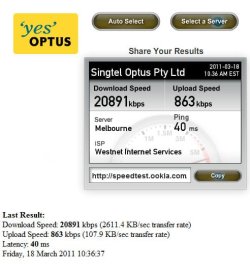
After a week of conflict with various organisations this morning I did some test downloads and achieved a peak speed of 25000Mbps/3126KBps (huh?), with an average of 19200 kbps/2400KBps. This test was done with 2 x 4.2GB files from two different sites.

Once they removed the capping codes from the DSLAM the speed increases were quite pleasing to say the least!

We also found that I am 2.8kn from the local exchange. However, it is fibre cable most of the way, with a copper length of only 246m for the pair gain infrastructure.

It is said to that to achieve a maximum download speed your upload speed needs to be 10% of your maximum possible download speed. So on a 20Mbps service, you would need 2Mbps upload speed. Of course, various factors influence speeds, so I'm just quoting a general rule of thumb.

We'll see if this lasts, but at this point in time, for a plain ADSL 1 connection this is looking really good.

And now that we have proof that good speeds are achievable here.. I can try and move to TPG whose pricing is much better than iiNet's.


Tanya
 

Attachments

  • sf1.jpg
    sf1.jpg
    55.9 KB · Views: 0
Last edited:

My Computer

Computer type
PC/Desktop
Computer Manufacturer/Model Number
Home Made
OS
Linux Mint 17 Cinnamon | Win 7 Ult x64
CPU
Intel I7-3770K @ 4.2ghz
Motherboard
ASRock Extreme 4
Memory
32GB G-Skill C10Q
Graphics Card(s)
EVGA GTX 670 2GB SC
Sound Card
Creative Fatality ExtremeGamer
Monitor(s) Displays
LG E2742V x 2
Screen Resolution
1920x1080
Hard Drives
256GB Vertex 4 SSD
2TB Seagate ST2000DM001
1TB Seagate ST1000DM003
PSU
Corsair HX 650
Case
HAF 932 advanced
Cooling
Corsair H100i liquid cooler
Keyboard
Logitech Wireless
Mouse
Logitech Wireless
Internet Speed
OptusNet NBN 100/40
Antivirus
Malwarebytes
Browser
Firefox 30
Other Info
Router: Sagemcom F@st 3846 Crippled by Optus.
  • Like
Reactions: JMH
Back
Top