Downgrading from windows 10 gone wrong (bootmgr is missing)
Hi all. So I was trying to deinstall windows 10 and install windows 7 of my Asus Vivobook S300C using this guide.
Everything worked fine until the "IMMEDIATELY Click Out On Top X, TERMINATE Installation Process and REBOOT." step. At this point I restarted the computer and continued through the installation process to the point where I was supposed be able to click "INSTALL NOW". Here I got the message
"A required CD/DVD drive device driver is missing. If you have a driver floppy disk, CD, DVD, or USB flash drive, please insert it now. Note: If the Windows installation media is in the CD/DVD drive, you can safely remove it for this step." <Browse> <OK> <Cancel>.
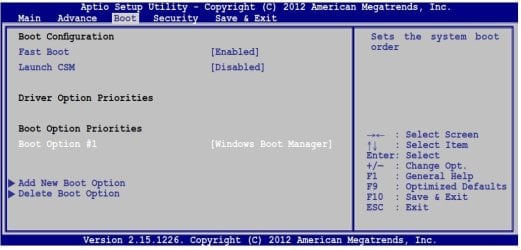
After a bit of googling I found this site which suggested the problem might be caused by the fact I was using a USB 3.0 port. I indeed was using a USB3.0 port so I turned off the computer and put the USB drive in a 2.0 port instead. However, now when I turn on the computer I get the message "BOOTMGR is missing. Press Ctrl+Alt+Delete to restart". When I go into Bios the USB stick isn't even there in the boot options anymore (just the hard drive of the laptop).
I tried making a new bootable USB stick but still get the same problem. Any ideas as to why this could be?
Thanks in advance!
Hi all. So I was trying to deinstall windows 10 and install windows 7 of my Asus Vivobook S300C using this guide.
Everything worked fine until the "IMMEDIATELY Click Out On Top X, TERMINATE Installation Process and REBOOT." step. At this point I restarted the computer and continued through the installation process to the point where I was supposed be able to click "INSTALL NOW". Here I got the message
"A required CD/DVD drive device driver is missing. If you have a driver floppy disk, CD, DVD, or USB flash drive, please insert it now. Note: If the Windows installation media is in the CD/DVD drive, you can safely remove it for this step." <Browse> <OK> <Cancel>.
After a bit of googling I found this site which suggested the problem might be caused by the fact I was using a USB 3.0 port. I indeed was using a USB3.0 port so I turned off the computer and put the USB drive in a 2.0 port instead. However, now when I turn on the computer I get the message "BOOTMGR is missing. Press Ctrl+Alt+Delete to restart". When I go into Bios the USB stick isn't even there in the boot options anymore (just the hard drive of the laptop).
I tried making a new bootable USB stick but still get the same problem. Any ideas as to why this could be?
Thanks in advance!
Last edited:
My Computer
At a glance
Windows 7 Professional x64i5-4210M4GBShared Intel
- Computer type
- Laptop
- Computer Manufacturer/Model Number
- Lenovo ThinkPad Edge E540
- OS
- Windows 7 Professional x64
- CPU
- i5-4210M
- Memory
- 4GB
- Graphics Card(s)
- Shared Intel
- Hard Drives
- 500GB HDD
- Antivirus
- Avast
- Browser
- Chrome